Introdución
This user manual provides essential information for the safe and effective operation of your Povanje 5.0 Cuft Fireproof Safe. Designed for home and office use, this safe offers robust security features to protect your valuable documents, jewelry, firearms, and other personal belongings from theft and environmental damage. Please read this manual thoroughly before initial use and retain it for future reference.

Image: The Povanje 5.0 Cuft Fireproof Safe, showcasing its spacious interior and organized compartments for various items.
Información de seguridade
- Do not store emergency keys inside the safe. Keep them in a secure, separate location.
- Ensure the safe is placed on a stable, level surface. For enhanced security, consider bolting the safe to a wall or floor.
- Keep the digital keypad dry and clean. Avoid using abrasive cleaners.
- Comprobe regularmente os niveis de batería para garantir o funcionamento continuo da fechadura electrónica.
- This safe is designed to deter theft and provide some protection against fire and water damage. For critical documents, utilize the included fireproof and waterproof bag.
Contido do paquete
Verifique que todos os elementos que se indican a continuación estean incluídos no seu paquete:
- 1 x Large Fireproof Safe for Home
- 1 x Fireproof Waterproof Document Bag
- 1 x Manual de usuario
- 2 chaves de reserva
- 4 x parafusos de montaxe
- 1 x Lock Protective Cover
- 1 x Mat

Image: A visual representation of all components included with your safe, including the safe itself, keys, mounting hardware, and the fireproof bag.
Configuración
1. Desembalaxe e colocación
Carefully remove the safe from its packaging. The safe is equipped with pre-drilled holes on the back and bottom for secure mounting. Bolts and anchors are included to facilitate mounting to a floor or wall, preventing unauthorized removal.
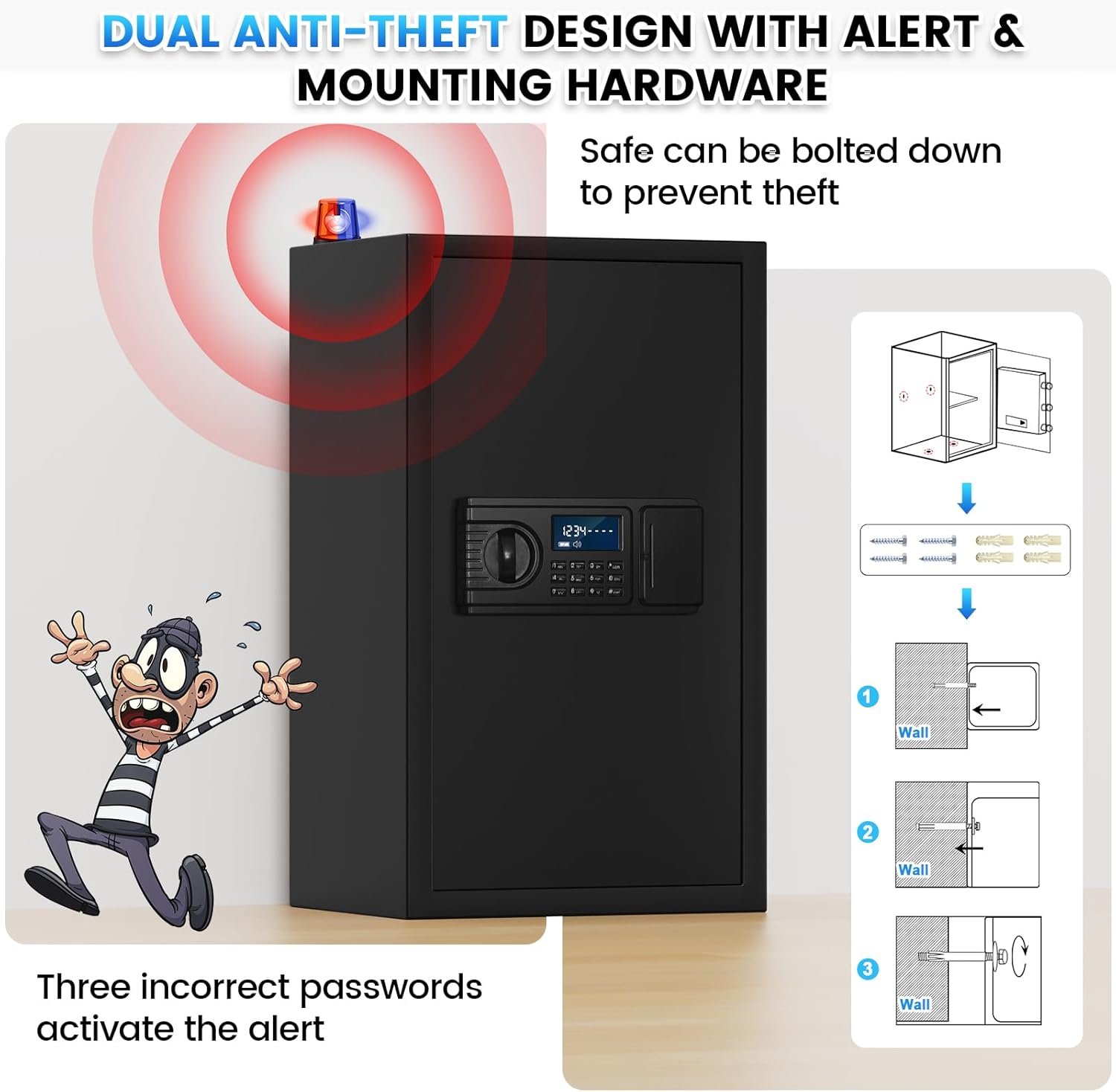
Image: Instructions for securing the safe to a wall or floor using the provided mounting hardware, enhancing its anti-theft capabilities.
2. Instalación da batería
The digital keypad requires four (4) AA batteries (not included). The external battery compartment is designed for easy access, ensuring you can power the safe even if internal batteries run out. Open the battery cover on the keypad unit and insert the batteries, observing correct polarity.

Imaxe: Unha detallada view of the digital keypad, highlighting the external battery compartment for convenient battery replacement.
3. Initial Access (Using Emergency Key)
For first-time use, or if you forget your password or the batteries run out, you can open the safe using one of the two provided emergency keys. Insert the key into the hidden keyhole (usually behind the keypad cover or a small panel) and turn it while simultaneously turning the knob to open the door.

Image: Visual guide demonstrating how to open the safe using the emergency key for initial access or in case of forgotten password/dead battery.
4. Setting Your Passcode
The factory initial code is 1234 #. It is highly recommended to change this immediately.
- Setting Personal Password:
- Press the setting button inside the door (usually a small red button).
- Introduza o contrasinal desexado de 1 a 8 díxitos no teclado numérico.
- Prema a tecla '#' para confirmar.
- Setting Master Password (if applicable):
- Enter "00" on the keypad.
- Press the setting button inside the door.
- Enter your desired 1-8 digit master password.
- Prema a tecla '#' para confirmar.
Always test your new password with the door open first to ensure it works correctly before closing and locking the safe.

Image: Step-by-step instructions for programming your personal and master passwords on the safe's digital keypad.
Instrucións de funcionamento
1. Abrir a caixa forte
To open the safe for daily use, enter your personal code on the LCD keypad. The LCD screen will display the numbers as you enter them. Once the correct code is entered, turn the knob to unlock and open the door.
Video: Demonstration of opening the safe using the digital keypad and turning the knob. This video also shows the internal features and the battery compartment.
2. Hidden Password Mode
To prevent others from seeing your entered password, press the '*' key before entering your code. This will hide your entry on the LCD screen, displaying '00000000' instead.

Image: Illustration of the hidden password feature, where pressing '*' before your code displays zeros on the screen for privacy.
3. Smart Anti-Theft Alert
For enhanced security, the safe is equipped with an anti-theft alarm system. If an incorrect password is entered three (3) consecutive times, the system will lock and activate an audible alarm for one minute. To stop the alarm, remove the batteries or enter the correct password.
Image: Visual representation of the anti-theft alarm system, which activates if incorrect passwords are entered multiple times.
4. Using Removable Shelves and LED Light
The safe includes three removable shelves, allowing you to customize the interior space to accommodate items of various sizes. Simply lift and slide the shelves out of their supports. The built-in LED light illuminates the interior, making it easy to access your belongings even in low-light conditions.

Image: Comparison showing the safe's interior with and without removable shelves, demonstrating its flexible storage capacity.
5. Fireproof and Waterproof Document Bag
While the safe provides robust protection, the included fireproof and waterproof document bag offers an additional layer of security for highly sensitive documents, cash, or small electronics against extreme fire or water damage. Always place critical items inside this bag before storing them in the safe.
Image: The fireproof and waterproof document bag, designed to provide extra protection for sensitive items within the safe.
Mantemento
1. Substitución da batería
The LCD screen will alert you when the batteries are low. Replace all four AA batteries promptly to ensure continuous functionality of the digital lock. The external battery compartment allows for easy replacement without needing to open the safe with a key.
2. Limpeza
Limpar o exterior da caixa forte cun pano suave eamp cloth. Avoid using harsh chemicals or abrasive materials that could damage the finish or the keypad. Ensure the keypad remains dry.
Resolución de problemas
| Problema | Causa posible | Solución |
|---|---|---|
| A caixa forte non abre co contrasinal. | Incorrect passcode entered; low batteries; forgotten passcode. | Ensure correct passcode is entered. Replace batteries. Use emergency key to open and reset passcode. |
| Alarm sounds repeatedly. | Three incorrect passcode attempts. | Enter the correct passcode or remove batteries to stop the alarm. |
| LCD screen is blank or dim. | Pilas baixas ou agotadas. | Substitúe as catro pilas AA. |
| A porta non pecha nin bloquea correctamente. | Obstruction in the door frame; bolts not fully extended/retracted. | Check for any obstructions. Ensure the knob is fully turned to engage/disengage bolts. |
Especificacións
| Característica | Detalle |
|---|---|
| Marca | Povanje |
| Número de modelo | safe fireproof waterproof 60EE |
| Dimensións do produto | 12.2" D x 14.96" W x 23.6" H |
| Capacidade | 3.8 Cubic Feet (Note: Actual usable internal volume may vary slightly) |
| Tipo de bloqueo | Fechadura de combinación electrónica, chave |
| Cor | Negro |
| Material | Aceiro de aliaxe |
| Características especiais | Sensor Light, Combination Lock, Anti-Theft, Scratch Resistant, Removable Shelf |
| Tipo de montaxe | Wall & Floor Mount |
| Peso do elemento | 38 libras |
| Alarma | Vibration & Audible |
| Nivel de resistencia á auga | Not Water Resistant (Use included fireproof/waterproof bag for critical items) |
Note: Product specifications are subject to change without prior notice.
Garantía e Soporte
Povanje offers a 5-year return or exchange warranty and lifetime technical support for this product. We are committed to providing excellent customer service.
- Quick Response: Customer service typically responds within 12 hours.
- Money-Back & Replacement: Enjoy a 30-day money-back guarantee and replacement policy.
- Warranty Period: A 365-day warranty is provided.
- Lifetime After-Sales Support: Comprehensive support is available for the lifetime of the product.
- In case of fire: You can provide your order number and picture to get a free new fire safe.
For any questions or support, please log in to your Amazon account, navigate to "Your orders," find the order ID for this product, and click "Contact seller."

Image: Povanje's commitment to customer satisfaction, highlighting quick response times, return policies, and lifetime support.


