1. Introdución
Thank you for choosing the Donner DDP-95 Digital Piano. This instrument is designed to provide an authentic piano playing experience with modern digital features, suitable for beginners and experienced players alike. This manual provides essential information for the safe and effective use of your digital piano.
1.1 Información de seguridade
- Fonte de alimentación: Empregue só o adaptador de corrente especificado. Asegúrese de que o volumetage coincide coa súa fonte de alimentación local.
- Colocación: Coloque o piano sobre unha superficie estable e nivelada. Evite a luz solar directa, fontes de calor e humidade excesiva.
- Limpeza: Usa un pano suave e seco para limpar. Non empregues produtos de limpeza líquidos nin disolventes.
- Auga e humidade: Keep the instrument away from water or any liquids. Do not operate with wet hands.
- Ventilación: Ensure proper ventilation around the instrument to prevent overheating.
- Servizo: Non intente reparar o instrumento vostede mesmo. Encargue calquera mantemento a persoal cualificado.
2. Produto rematadoview
The Donner DDP-95 features an 88-key weighted keyboard, a 4.3-inch LCD display, and a wide array of tones, rhythms, and teaching modes to enhance your musical journey.
2.1 Principais compoñentes
- Digital Piano Unit (Keyboard and Stand)
- 3-Pedal System (Soft, Sostenuto, Sustain)
- Descanso musical
- Adaptador de alimentación
- Manual de usuario

Figure 2.1: The Donner DDP-95 Digital Piano, showcasing its full size, integrated stand, and three-pedal unit.

Figura 2.2: De arriba abaixo view of the DDP-95 control panel, highlighting the LCD display and various function buttons for wireless connection, split, dual tones, MP3, transpose, chord, drum kit, and metronome.
3. Configuración
3.1 Asemblea
The DDP-95 typically comes with the keyboard and stand as separate components. Follow the included assembly guide for detailed instructions on attaching the keyboard to the stand and securing the pedal unit. Ensure all screws are tightened securely before use.
3.2 Conexión de enerxía
- Connect the DC power adapter to the DC 15V input jack on the rear of the piano.
- Conecta o adaptador a unha toma de corrente estándar.
3.3 Conexión de pedais
Connect the pedal unit cable to the 'PEDAL' jack on the rear of the piano. The DDP-95 features a 3-pedal system for Soft, Sostenuto, and Sustain functions.

Figure 3.1: The three-pedal system, including Soft, Sostenuto, and Sustain pedals, designed for an authentic playing experience.
3.4 Conexións de audio
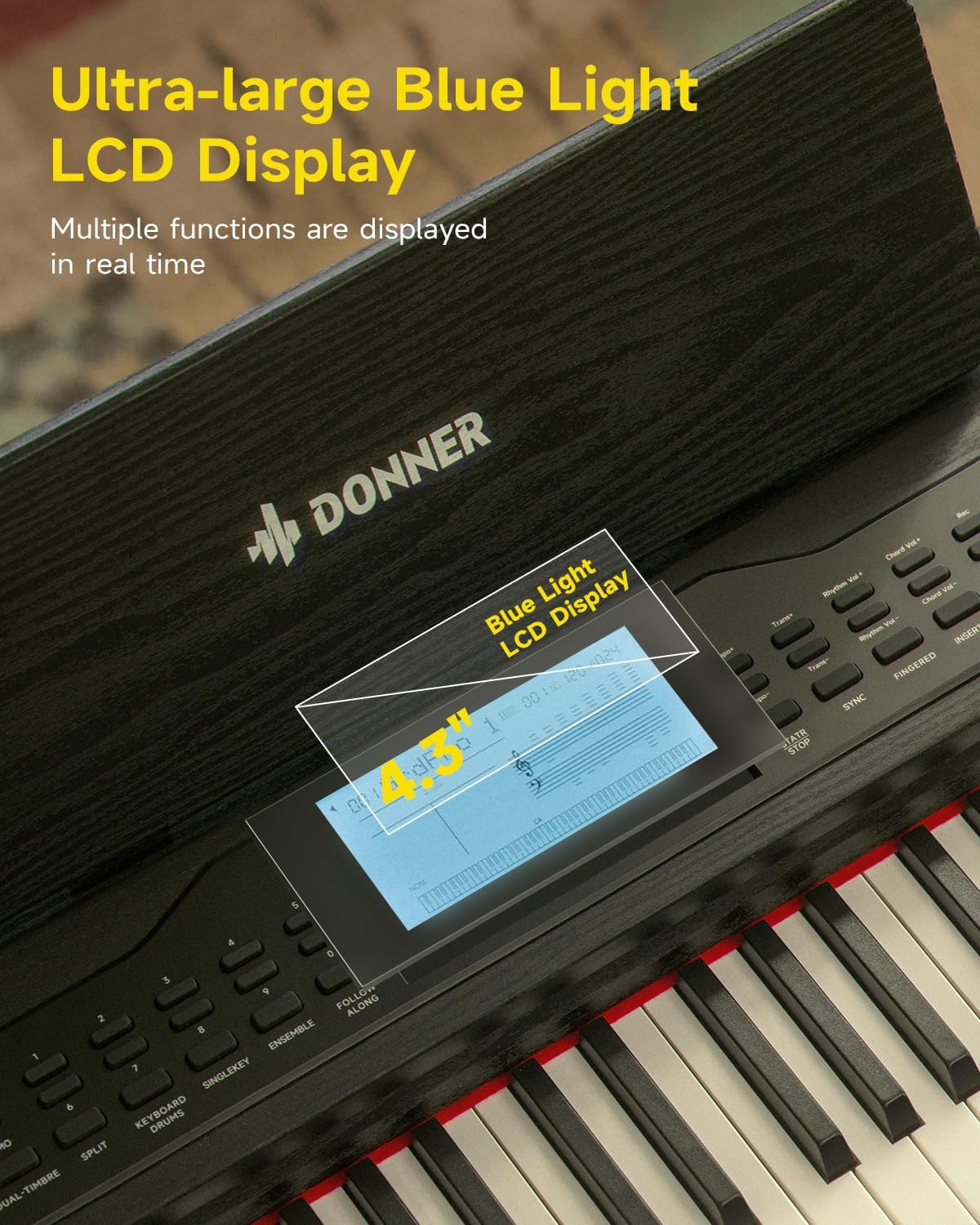
Figure 3.2: Rear panel connections, including (1) DC power jack, (2) Sustain Pedal Jack, (3) Headphone jack, (4) Audio input/output jacks, and (5) USB-MIDI port for connecting to computers, smartphones, and tablets.
- Auriculares: Connect standard 6.35mm stereo headphones to the 'HEADPHONE' jack for private practice.
- Entrada/Saída de audio: Use the 'AUDIO IN' and 'AUDIO OUT' 6.35mm jacks to connect to external audio devices like amplifiers, mixers, or other instruments.
3.5 USB-MIDI and Bluetooth Connectivity
- USB-MIDI: Connect the piano to a computer, smartphone, or tablet using a USB-MIDI cable for MIDI data transfer with compatible software.
- Bluetooth: The DDP-95 supports wireless Bluetooth connection for MIDI-compatible applications. Refer to your device's Bluetooth settings and the application's instructions for pairing.
4. Instrucións de funcionamento
4.1 Funcionamento básico
- Encendido/apagado: Press the 'POWER' button to turn the piano on or off.
- Control de volume: Use the 'VOLUME' knob or buttons to adjust the overall sound level.
- Selección de tons: The DDP-95 offers 610 tones. Use the 'TONE' buttons and the LCD display to browse and select different instrument sounds.
- Selección de ritmo: Choose from 600 rhythms (including 128 accompaniment styles) using the 'RHYTHM' buttons.
- Cancións de demostración: Reproduce 100 cancións de demostración incorporadas para inspirarte ou practicar.
- Metrónomo: Activate the metronome function to assist with timing and rhythm practice.

Figura 4.1: Máisview of the DDP-95's extensive sound library, including 610 tones, 600 rhythms, 110 demo songs, and 128-note polyphony.
4.2 Pantalla LCD
The 4.3-inch blue light LCD display provides visual feedback on various settings and functions. It can show notes in staff notation, indicate key positions, and offer intuitive prompts.

Figure 4.2: The 4.3-inch blue light LCD display, showing real-time information and musical notation.

Figure 4.3: Detailed breakdown of the LCD display elements: (1) Tone/Demo/Rhythm Name, (2) Number of Bars, (3) Tempo, (4) Rhythmic Volume, (5) Indication of Active Keys, (6) Currently Used Function Icon, (7) Piano Score.
4.3 Características do teclado
- 88-Key Fully Weighted Keyboard: Provides an authentic piano feel with hammer action.
- 16-Level Touch Sensitivity: Adjusts the volume and timbre based on how hard or soft you play the keys, allowing for expressive dynamics.

Figure 4.4: Visual representation of the 16-level touch sensitivity, demonstrating how key weight influences sound effects from light to heavy.
4.4 Modos de ensino
The DDP-95 includes three teaching modes to assist learners:
- Chave única: Practice individual notes.
- Follow Along: The piano waits for you to play the correct note before proceeding.
- Xuntos: Practice with an accompaniment, playing your part along with the built-in music.

Figure 4.5: Illustration of the three teaching modes: Single Key, Follow Along, and Ensemble, designed to guide learners progressively.
4.5 Gravación e reprodución
The piano allows you to record your performances, with a capacity of up to 5000 bytes. This feature is useful for reviewing your playing, identifying areas for improvement, and capturing musical ideas.
- Press the 'RECORD' button to start recording.
- Press 'PLAY' to listen to your recorded performance.
4.6 Funcións adicionais
- Teclado dividido: Divides the keyboard into two sections, allowing two different tones to be played simultaneously or for two people to play together.
- Dual Tones: Layers two different tones to create a richer, more complex sound.
- Transpoñer: Shifts the pitch of the entire keyboard up or down in semitone steps.
- Chord Function: Provides automatic chord accompaniment based on the keys played.
- Drum Kit: Access various drum sounds for rhythm creation.
5. Mantemento
5.1 Limpeza
To maintain the appearance and functionality of your DDP-95 Digital Piano:
- Limpar a superficie cun pano suave, seco e sen fiapos.
- Para a sucidade persistente, d lixeiramenteampEnxágüe o pano con auga e logo séqueo inmediatamente.
- Avoid abrasive cleaners, waxes, or solvents as they can damage the finish.
5.2 Almacenamento
When not in use for extended periods, store the piano in a cool, dry place, away from extreme temperatures and humidity. Cover the keyboard with a dust cover to protect the keys and internal components.
6 Solución de problemas
If you encounter issues with your Donner DDP-95, refer to the following common problems and solutions:
| Problema | Causa posible | Solución |
|---|---|---|
| Sen son | Volume demasiado baixo; auriculares conectados; problema de alimentación. | Increase volume; disconnect headphones; check power connection. |
| As chaves non responden | Function mode active (e.g., teaching mode); internal error. | Exit special modes; power cycle the instrument. |
| A conexión Bluetooth falla | Dispositivo non en modo de emparellamento; interferencia; distancia. | Ensure device is discoverable; reduce distance; restart both devices. |
| Son distorsionado | Volume too high; faulty cable; external speaker issue. | Lower volume; check/replace cables; test with different speakers/headphones. |
If the problem persists after trying these solutions, please contact Donner customer support.
7. Especificacións
| Característica | Detalle |
|---|---|
| Nome do modelo | DDP-95 |
| Número de chaves | 88 |
| Tipo de teclado | Fully Weighted, Hammer Action |
| Sensibilidade ao tacto | 16 niveis |
| Tons | 610 |
| Ritmos | 600 (128 Accompaniment Styles) |
| Cancións de demostración | 100 |
| Polifonía | 128 notas |
| Mostrar | 4.3" Blue Light LCD |
| Capacidade de gravación | Ata 5000 bytes |
| Conectividade | Bluetooth, USB-MIDI, 6.35mm Headphone Jack, 6.35mm Audio In/Out Jacks |
| Pedais | Soft, Sostenuto, Sustain (3-Pedal System) |
| Fonte de enerxía | Fuente de alimentación DC 15V |
| Peso do elemento | 65.9 libras (aprox. 29.9 kg) |
| Dimensións do paquete | 53.94 x 16.14 x 11.81 polgadas (aprox. 137 x 41 x 30 cm) |
8. Garantía e soporte
8.1 Información da garantía
Donner products are manufactured to high-quality standards. For specific warranty terms and conditions, please refer to the warranty card included with your product or visit the official Donner websitio. Garda o comprobante de compra para reclamacións de garantía.
8.2 Atención ao cliente
If you have any questions, require technical assistance, or need to report an issue, please contact Donner customer support through their official website or the contact information provided in your product packaging. Provide your model number (DDP-95) and purchase details when seeking support.


