Introdución
This manual provides essential information for the safe and efficient use of your NOHON 10000mAh Magnetic Wireless Power Bank, Model NX-YSP04. Please read this manual thoroughly before using the product and retain it for future reference.
The NOHON Magnetic Wireless Power Bank offers a convenient and portable charging solution with its 10000mAh capacity, magnetic wireless charging, and fast wired charging capabilities. Its compact design makes it ideal for travel and daily use.
Contido do paquete
Verifica que todos os elementos estean presentes no teu paquete:
- 1 x NOHON 10000mAh Magnetic Wireless Power Bank
- 1 x cable de carga USB-C
- 1 x Manual de usuario
Produto rematadoview
Familiarize yourself with the components of your power bank.
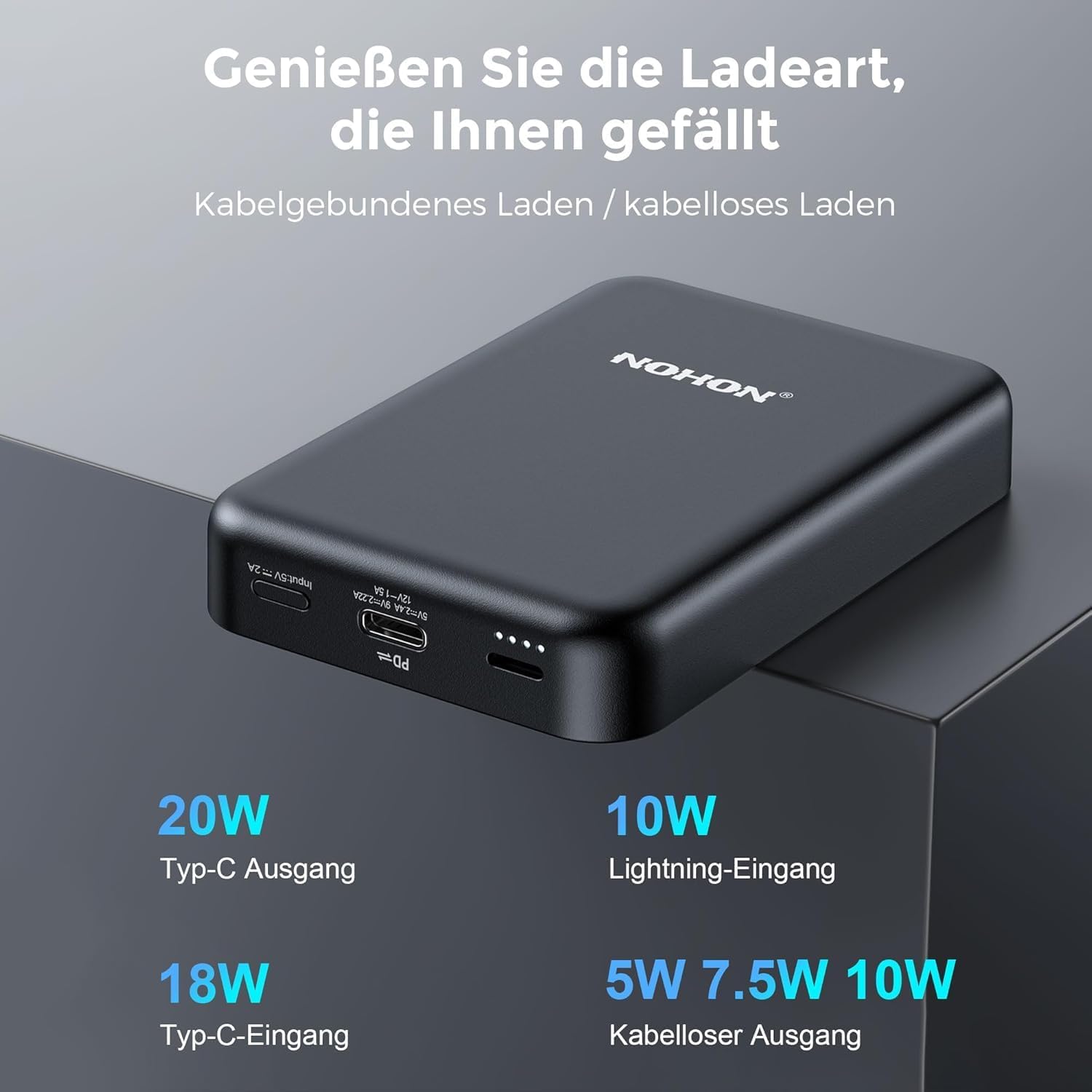
Image: NOHON Magnetic Wireless Power Bank showing its Type-C In/Out port, Lightning Input, and LED indicators.
- Almofada de carga sen fíos magnética: For wireless charging compatible devices.
- USB-C Port (In/Out): Supports 20W PD fast charging for both input and output.
- Lightning Input Port: For charging the power bank using a Lightning cable (10W).
- Indicadores LED: Display battery level and charging status.
- Botón de encendido: To activate/deactivate the power bank and check battery level.
Configuración
Carga inicial do banco de enerxía
Before first use, fully charge your NOHON Power Bank.
- Conecta o cable USB-C fornecido ao porto USB-C do cargador portátil.
- Conecta o outro extremo do cable USB-C a un adaptador de parede USB compatible (non incluído).
- Os indicadores LED acenderanse para mostrar o progreso da carga. Todos os LED estarán fixos cando estea completamente cargado.
- Alternatively, you can use a Lightning cable (not included) to charge the power bank via its Lightning input port.

Imaxe: Primeiro plano view of the USB-C and Lightning input ports on the power bank.
Instrucións de funcionamento
Comprobando o nivel da batería
Press the power button once to check the remaining battery level via the LED indicators.
Carga sen fíos
The power bank features magnetic wireless charging for compatible devices (e.g., iPhone 12/13/14 series).
- Ensure your device supports magnetic wireless charging. For other devices, a MagSafe-compatible case may be required.
- Align your device with the magnetic charging pad on the power bank. The magnets will securely attach the device.
- Wireless charging will begin automatically. The power bank supports 5W/7.5W/10W wireless output.

Image: An iPhone is shown magnetically attached to the NOHON power bank, indicating active wireless charging.

Image: A hand demonstrates the strong magnetic attachment of the power bank to a smartphone, ensuring stable charging.

Image: Illustration differentiating between MagSafe-compatible cases (green check) and non-MagSafe cases (red cross) for optimal magnetic charging.
Carga por cable
Use the USB-C port for wired charging of your devices.
- Connect one end of a USB-C cable to the USB-C port on the power bank.
- Conecta o outro extremo do cable ao porto de carga do teu dispositivo.
- The power bank will automatically begin charging your device with up to 20W PD fast charging.
Cargando varios dispositivos simultáneamente
The NOHON Power Bank supports charging two devices at the same time: one wirelessly and one via the USB-C port.

Image: The power bank is shown charging an iPhone wirelessly while simultaneously being recharged via a USB-C cable from a wall adapter.
Mantemento
- Manteña o banco de enerxía seco e lonxe da humidade.
- Non expoña a temperaturas extremas (quentes ou frías).
- Clean the surface with a soft, dry cloth. Avoid harsh chemicals or abrasive materials.
- Almacene nun lugar fresco e seco cando non se use durante períodos prolongados.
- Evite deixar caer ou someter o banco de enerxía a fortes impactos.
Resolución de problemas
- O banco de enerxía non carga:
- Asegúrate de que o cable de carga estea conectado correctamente tanto ao banco de enerxía como á fonte de alimentación.
- Proba cun cable de carga ou adaptador de parede diferente.
- Comprobe se a fonte de alimentación está activa.
- O dispositivo non se carga sen fíos:
- Ensure your device is wirelessly charging compatible and properly aligned with the power bank's magnetic pad.
- Remove any thick cases or metal objects between the device and the power bank.
- Asegúrate de que o banco de enerxía teña carga suficiente.
- Press the power button on the power bank to activate wireless charging if it doesn't start automatically.
- O dispositivo non se carga mediante cable:
- Asegúrate de que o cable estea conectado correctamente tanto á batería externa como ao dispositivo.
- Try a different cable or device to rule out cable or device issues.
- Asegúrate de que o banco de enerxía teña carga suficiente.
Especificacións
| Número de modelo | NX-YSP04 |
| Capacidade da batería | 10000 mAh |
| Entrada/Saída USB-C | 20 W PD (entrega de potencia) |
| Entrada Lightning | 10 W |
| Saída sen fíos | 5 W / 7.5 W / 10 W |
| Tipo de batería | Polímero de litio |
| Dimensións (L x W x H) | 9.6 x 6.4 x 1.8 cm |
| Peso | 250 g |
| Dispositivos compatibles | Smartphones (e.g., iPhone 12/13/14 series), Tablets, Wireless Earbuds |

Image: Visual representation of the power bank's broad compatibility with iOS devices (iPhone 12/13/14 series) and other smartphones (requiring a MagSafe case).
Información de seguridade
Para garantir un funcionamento seguro e evitar danos, observe as seguintes precaucións de seguridade:
- Non desmontes, modifiques nin repares o dispositivo ti mesmo.
- Do not expose to fire, water, or extreme temperatures.
- Evite caídas ou impactos fortes.
- Manter fóra do alcance dos nenos.
- Non o use se o banco de enerxía está danado ou inchado.
- Eliminar o produto de forma responsable segundo a normativa local.
- The product features Multi-Protect safety technology to prevent overcharge, over-discharge, over-current, and short-circuit.
Garantía e Soporte
NOHON is committed to product quality and customer satisfaction. If you encounter any issues or have questions regarding your NOHON Magnetic Wireless Power Bank, please contact our customer support.
Please refer to the contact information provided on the product packaging or the official NOHON websitio para obter detalles de asistencia.
The product includes a standard manufacturer's warranty. Please retain your proof of purchase for warranty claims.


