1. Produto rematadoview
The Cable Matters 20Gbps USB-C Switch (Model 201343) allows you to share a single USB-C or Thunderbolt 4 monitor or docking station between up to three computers. This device supports high-speed data transfer, video resolutions up to 8K@30Hz on Windows, and 4K@60Hz on macOS, along with 140W Power Delivery charging for the active device. It is designed to streamline your workspace by enabling seamless switching between multiple host devices.

Image: The Cable Matters 20Gbps USB-C Switch, a compact silver device with three input ports and a pigtail output cable, shown alongside its remote control.
Características principais:
- 20 Gbps Data Transfer: Supports high-speed data transfer for demanding applications.
- Resolución de vídeo 8K: Up to 8K@30Hz on Windows, 4K@60Hz on macOS.
- Potencia de entrega de 140 W: Provides fast charging to the active connected laptop.
- 3-in-1-Out Switching: Connects up to three computers to one USB-C peripheral.
- Control remoto RF: Conveniently switch between devices without additional software.
2. Configuración e instalación
Follow these steps to set up your Cable Matters 20Gbps USB-C Switch.
Contido do paquete:
- 1 x Cable Matters 20Gbps USB-C Switch (Model 201343) with 1.6ft Pigtail Cable
- 3 x USB4 20Gbps Cables (3.3ft)
- 1 x mando a distancia RF
- 2 x Hook-and-Loop Pads
- 1 x Contact Card
- 1 x Caixa

Image: A visual representation of all items included in the product package, including the switch, three USB4 cables, remote control, and documentation.
Instrucións de conexión:
- Connect the Switch to your Peripheral: Connect the pigtail cable from the USB-C Switch to your USB-C or Thunderbolt 4 monitor or docking station.
- Conectar ordenadores: Use the included USB4 20Gbps cables to connect each of your three computers to the input ports (labeled 1, 2, 3) on the USB-C Switch.
- Entrega de enerxía (opcional): If your monitor or docking station provides Power Delivery, the switch will pass up to 140W of power to the currently active computer. Ensure your peripheral is connected to a power source.
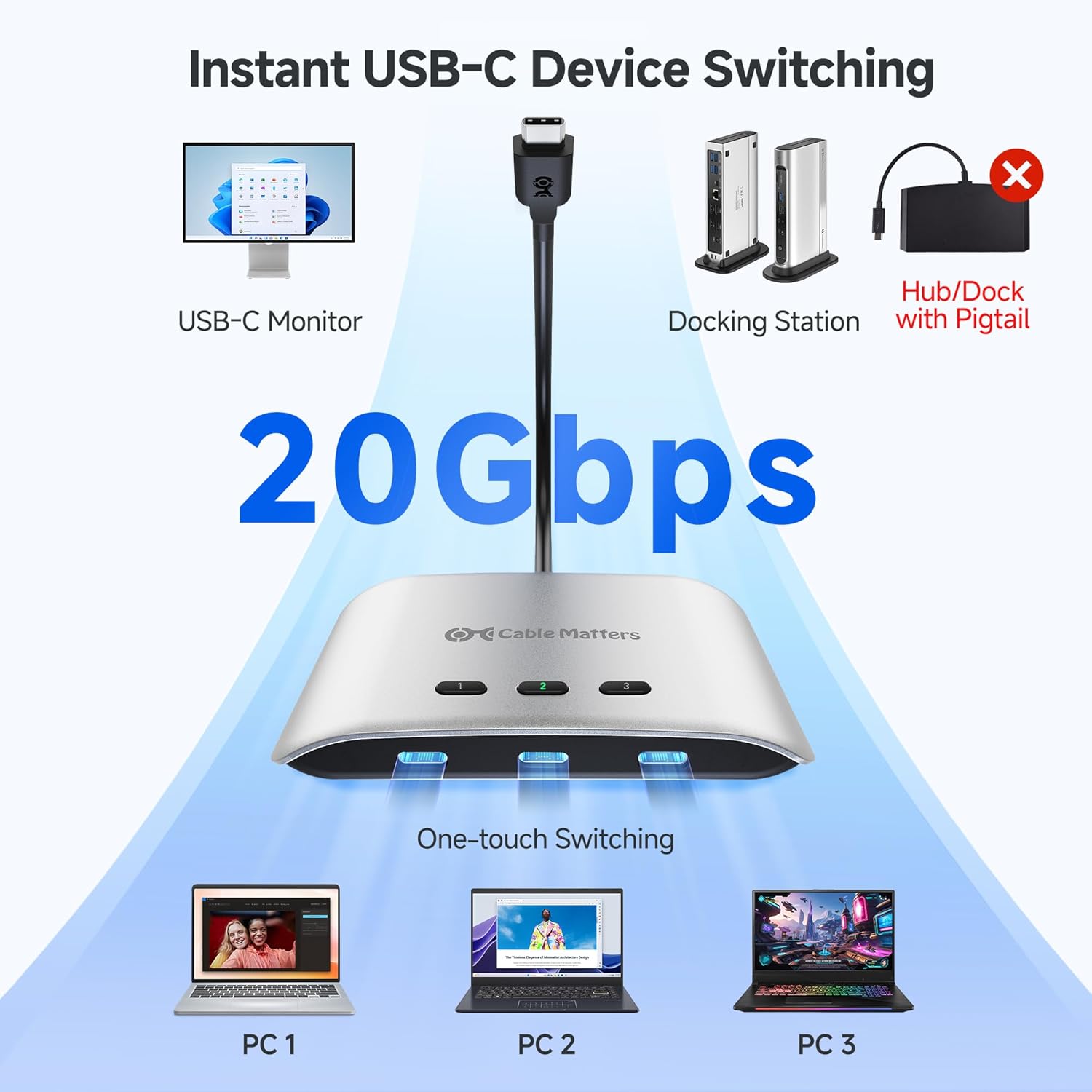
Image: A diagram illustrating the connection flow: three PCs connect to the USB-C switch, which then connects to a USB-C monitor or docking station, enabling one-touch switching.
Notas importantes de compatibilidade:
- Use only the included USB4 20 Gbps cables. Do not use Thunderbolt 3/4/5 cables as this may cause compatibility issues.
- The switch works with USB4 and Thunderbolt 4 docks. However, its 20 Gbps bandwidth (compared to 40 Gbps for most docks) may limit the number of displays or the maximum resolution/refresh rate.
- macOS only supports one external display through this switch.
- Avoid USB-C docks with built-in pigtail/captive cables to prevent compatibility issues.

Image: A comparison diagram showing that Windows/Linux (11th Gen CPU or higher) supports dual 4K@60Hz expansion via a docking station, while macOS supports only one monitor expansion (4K@60Hz).

Image: A diagram illustrating that when using a Thunderbolt 3 device (monitor, laptop, or dock) with the switch, only one external display is supported, and output is limited to 4K@60Hz with a Thunderbolt 3 dock.
3. Funcionamento do interruptor
The USB-C Switch offers both manual and remote control options for switching between connected computers.
Cambio manual:
Press the numbered buttons (1, 2, or 3) on the top of the switch to select the desired computer. The corresponding LED indicator will illuminate.
Control remoto RF:
Use the included RF remote control for convenient switching from a distance.
- Press buttons 1, 2, or 3 on the remote to select the corresponding computer.
- The 'Next' button cycles through the connected computers sequentially.
Pairing a New Remote:
To pair a new remote, connect the switch to a computer. Press and hold the 'Pair' button on the remote for 5 seconds until the LED on the switch stops flashing.

Imaxe: Primeiro plano view of the USB-C switch connected to a monitor, with the remote control shown in the foreground, indicating how to pair a new remote by pressing and holding the 'Pair' button.
Power Delivery Functionality:
The switch supports up to 140W Power Delivery. Note that only the currently selected (active) computer receives charging power. Other connected devices will not charge simultaneously.
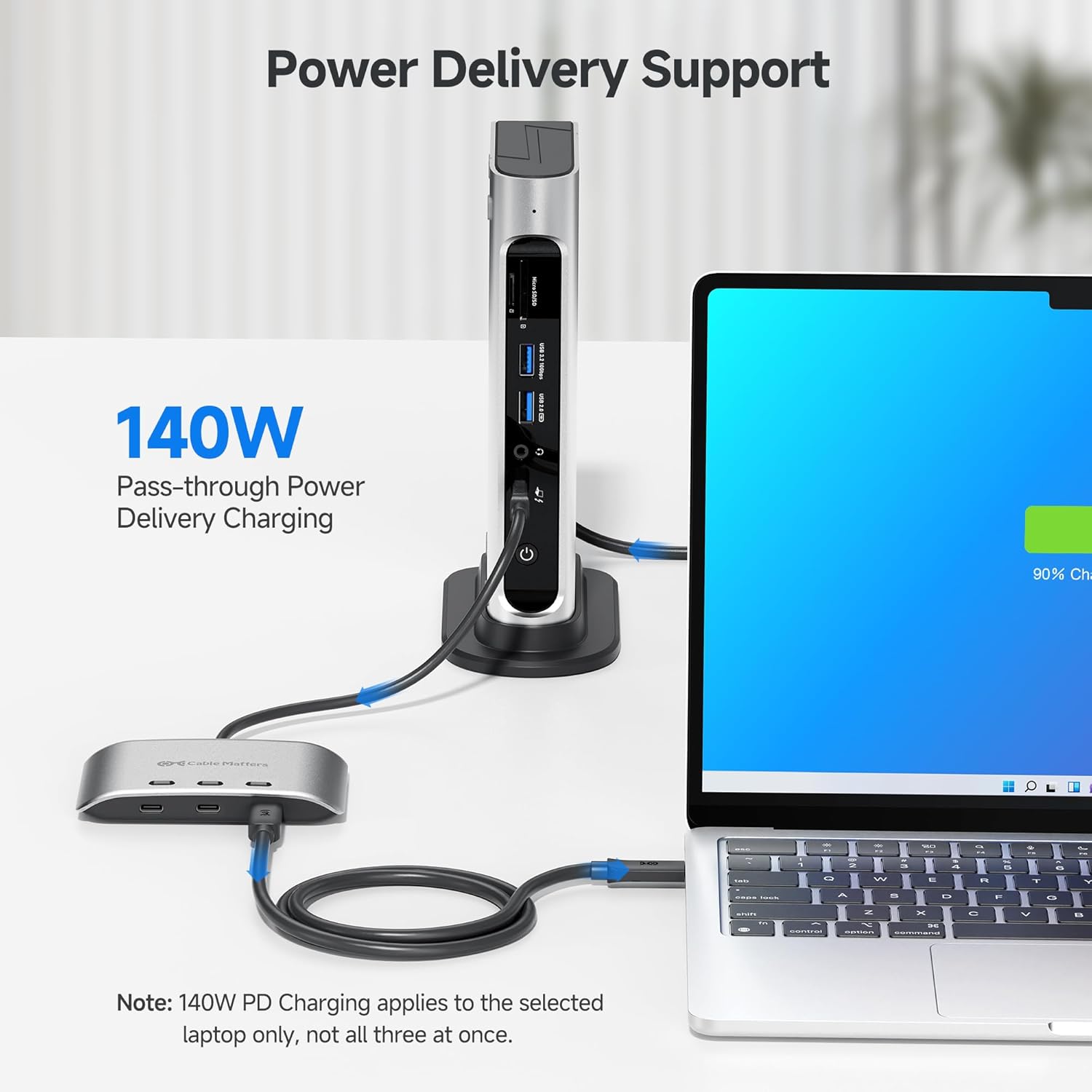
Image: A laptop connected to a docking station via the USB-C switch, showing the laptop charging with a 90% charge indicator, highlighting the 140W pass-through Power Delivery feature.
4. Mantemento
To ensure optimal performance and longevity of your USB-C Switch, follow these maintenance guidelines:
- Garda o dispositivo nun lugar fresco e seco, lonxe da luz solar directa e de temperaturas extremas.
- Limpa o exterior cun pano suave e seco. Evita o uso de produtos de limpeza líquidos ou materiais abrasivos.
- Asegúrate de que todos os cables estean conectados de forma segura para evitar perdas de sinal ou problemas intermitentes.
- Do not attempt to disassemble or repair the device yourself. Refer to qualified service personnel if needed.
5 Solución de problemas
If you encounter issues with your USB-C Switch, refer to the following common problems and solutions:
No Display or Intermittent Video:
- Comprobación do cable: Ensure you are using the included USB4 20Gbps cables. Verify all connections are secure.
- Compatibilidade: Confirm your monitor and computer support the selected resolution and refresh rate. Remember macOS supports only one external display.
- Limitación de ancho de banda: If using a docking station, the switch's 20Gbps bandwidth may limit the number of displays or maximum resolution compared to a direct 40Gbps connection.
- Ciclo de enerxía: Disconnect and reconnect all cables, then restart your computers and monitor.
No Data Transfer or Peripheral Functionality:
- Active Port: Ensure the correct input port is selected on the switch.
- Integridade do cable: Inspect USB4 cables for damage.
- Docking Station Type: Avoid USB-C docks with built-in pigtail/captive cables, as these can cause compatibility issues.
Sen carga:
- Active Computer: Only the currently selected computer receives Power Delivery. Ensure the desired computer is active.
- Fonte de enerxía: Verify your monitor or docking station is properly powered and capable of providing Power Delivery.
RF Remote Not Working:
- Batería: Comprobe e substitúa a pila do mando a distancia se é necesario.
- Emparejamento: Re-pair the remote control with the switch as described in the 'Operating the Switch' section.
Video: An official product video demonstrating the features and functionality of the Cable Matters 20Gbps USB-C Switch, including its ability to switch between multiple computers, support high resolutions, and provide power delivery.
6. Especificacións
| Característica | Especificación |
|---|---|
| Número de modelo | 201343 |
| Taxa de transferencia de datos | Ata 20 Gbps |
| Video Resolution (Windows) | Up to 8K@30Hz / 5K@60Hz / 4K@144Hz |
| Video Resolution (macOS) | Up to 4K@60Hz (single external display) |
| Entrega de enerxía | Up to 140W (to active device) |
| Tipo de conector | USB-C |
| Tipo de cambio | Estado sólido |
| Modo de operación | ACENDIDO-NINGÚN-ACENDIDO |
| Material | Cobre (compoñentes internos) |
| Dimensións do paquete | 6.77 x 5.59 x 1.61 polgadas |
| Peso do elemento | 12.7 onzas |
7. Garantía e soporte
Información da garantía:
Cable Matters products typically come with a limited warranty. Please refer to the warranty card included in your product packaging or visit the official Cable Matters websitio web para obter termos e condicións de garantía detallados específicos da súa rexión.
Atención ao cliente:
For technical assistance, troubleshooting, or product inquiries, please contact Cable Matters customer support through their official websitio web ou a información de contacto proporcionada na documentación do produto.
Tamén podes visitar o Tenda Cable Matters en Amazon para obter información e recursos adicionais sobre o produto.


