Introdución
The Mars Gaming MPB650SI is a 650W ATX power supply designed for desktop computers. It features an advanced cooling system with an SI fan, FDB bearings, and AI2-RPM smart control for optimal balance between silence and cooling efficiency. This power supply also incorporates DC-DC and SMD technologies for enhanced durability and energy efficiency, holding an 80 Plus Bronze 230V EU certification. This manual provides essential information for the proper installation, operation, maintenance, and troubleshooting of your MPB650SI power supply.
Información de seguridade
Please read all safety instructions before installing or operating the power supply. Failure to do so may result in damage to the unit, other components, or personal injury.
- Asegúrese de que a fonte de alimentación estea desconectada da toma de corrente alterna antes da instalación ou do mantemento.
- Non abra a fonte de alimentación casing. Alto volumetagHai pezas no interior e non hai pezas que o usuario poida reparar.
- Instale a fonte de alimentación nunha zona ben ventilada, lonxe de fontes de calor e humidade.
- Empregue só os cables incluídos coa fonte de alimentación.
- Ensure all connectors are securely attached to prevent electrical shorts or damage.
Contido do paquete
Verifica que todos os elementos estean presentes no paquete:
- Mars Gaming MPB650SI 650W ATX Power Supply
- Cable de alimentación de CA
- Parafusos de montaxe
- Manual de usuario (este documento)
Configuración e instalación
Follow these steps to install your Mars Gaming MPB650SI power supply:
- Prepara o teu sistema: Ensure your computer is completely powered off and unplugged from the wall outlet. Open your computer case.
- Retirar a fonte de alimentación antiga (se corresponde): Disconnect all cables from your old power supply to the motherboard, graphics card, drives, and other components. Unscrew and remove the old power supply from the case.
- Instalar unha nova fonte de alimentación: Carefully place the MPB650SI power supply into the designated power supply bay in your computer case. Ensure the fan is oriented correctly for optimal airflow (typically facing downwards if there's a bottom vent, or upwards if not). Secure the power supply with the provided mounting screws.

Figura 1: The SI fan with copper core, designed for extreme silence and efficient cooling. Ensure proper fan orientation during installation.
- Conectar os cables de alimentación principais:
- Connect the 24-pin ATX motherboard power cable to the corresponding port on your motherboard.
- Connect the 4+4-pin EPS +12V CPU power cable to the CPU power port on your motherboard.

Figura 2: Acabadoview of available connectors: 1x ATX MB 24 PIN, 1x EPS +12V 4+4 PIN, 2x PCIe 6+2 PIN, 5x SATA, 3x Molex 4 PIN.
- Connect Graphics Card Power: If your graphics card requires external power, connect the 6+2-pin PCIe power cables from the power supply to your graphics card. The MPB650SI provides two 6+2-pin PCIe connectors.
- Conectar a alimentación periférica: Connect SATA power cables to your SSDs, HDDs, and optical drives. Use Molex connectors for any other peripherals that require them.
- Xestión de cables Pasa os cables con coidado para mellorar a circulación do aire e a estética dentro da túa carcasa.
- Peche a caixa e conecte a alimentación CA: Close your computer case. Connect the AC power cord to the power supply's AC inlet and then plug it into a wall outlet. Ensure the power switch on the power supply is in the OFF position before plugging it in.
Instrucións de funcionamento
Operating the Mars Gaming MPB650SI power supply is straightforward:
- Encendido: After all connections are secure and the AC power cord is plugged in, flip the power switch on the back of the power supply to the ON (I) position.
- Arranque do sistema: Press the power button on your computer case to start your system. The power supply will provide stable power to all connected components.
- AI2-RPM Smart Control: The integrated AI2-RPM technology will automatically adjust the fan speed based on the system's load and temperature. This ensures optimal cooling while maintaining low noise levels.

Figura 3: The MPB650SI incorporates AI2-RPM for intelligent fan control, alongside DC-DC and SMD technologies for efficiency and durability.
- Apagado: To shut down your system, use the operating system's shutdown procedure. Once the system is off, you can flip the power switch on the power supply to the OFF (O) position for complete power disconnection.
Mantemento
Un mantemento axeitado garante a lonxevidade e o rendemento óptimo da súa fonte de alimentación:
- Limpeza do po: Periodically (every 3-6 months, depending on environment) disconnect the power supply from the AC outlet and use compressed air to clean dust from the fan and ventilation grilles. Dust accumulation can hinder cooling and reduce efficiency.
- Garantir un fluxo de aire adecuado: Make sure there are no obstructions blocking the air intake or exhaust vents of the power supply. Good airflow is crucial for heat dissipation.
- Inspección de cables: Occasionally check all power cables to ensure they are securely connected and not damaged.
Resolución de problemas
If you encounter issues with your MPB650SI power supply, refer to the following common problems and solutions:
| Problema | Causa posible | Solución |
|---|---|---|
| O sistema non se acende. |
|
|
| O sistema acéndese pero apágase inmediatamente. |
|
|
| Fan is noisy or not spinning. |
|
|
If the problem persists after attempting these solutions, please contact Mars Gaming customer support.
Especificacións
Key technical specifications for the Mars Gaming MPB650SI power supply:
| Característica | Detalle |
|---|---|
| Nome do modelo | MPB650SI |
| Marca | Marte Xogos |
| Potencia de saídatage | 650 W |
| Factor de forma | ATX |
| Certificación de eficiencia | 80 Plus Bronze 230V EU (90% efficiency) |
| Método de arrefriamento | Air (SI Extreme Silence Fan with Copper Core, FDB bearings, AI2-RPM) |
| Tecnoloxías | DC-DC, SMD |
| Sistemas de protección | OPP, OVP, UVP, SCP, OCP |
| Vol. De entradatage | 230 voltios (CA) |
| Dimensións (L x W x H) | 5.91 x 5.71 x 3.35 polgadas (150 x 145 x 85 mm) |
| Peso | 1.5 quilogramos |
| Conectores |
|

Figura 4: Power supply label detailing 650W total power and DC output voltages.
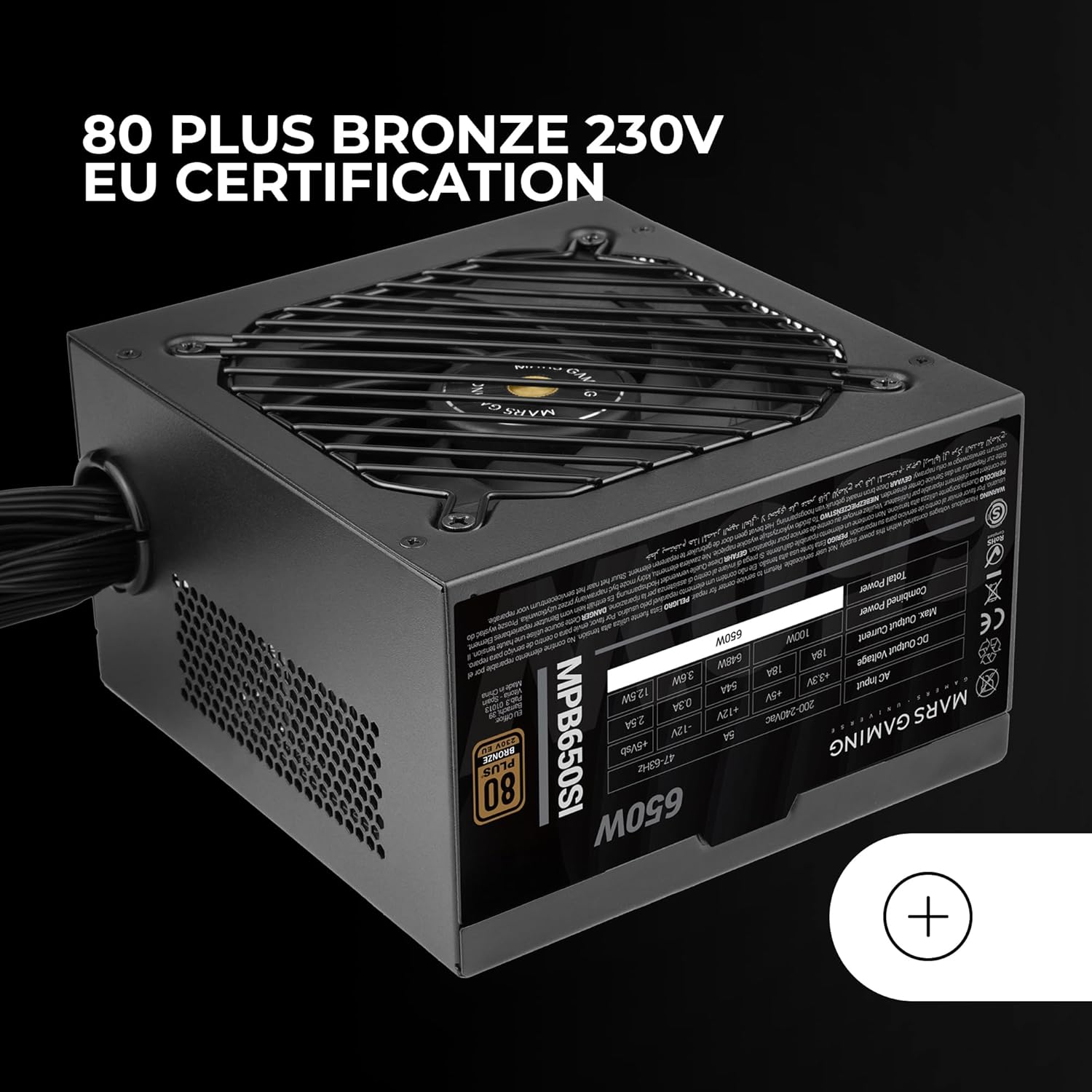
Figura 5: The 80 Plus Bronze 230V EU certification logo, indicating high energy efficiency.
Garantía e Soporte
Información da garantía
The Mars Gaming MPB650SI power supply comes with an extended 7 ano de garantía from the date of purchase. This warranty covers defects in materials and workmanship under normal use. It does not cover damage caused by improper installation, accident, abuse, misuse, natural disaster, or unauthorized modification.
For warranty claims, please retain your proof of purchase. The warranty is subject to the terms and conditions specified by Mars Gaming.
Atención ao cliente
If you have any questions, require technical assistance, or need to initiate a warranty claim, please contact Mars Gaming customer support through their official website or the retailer where you purchased the product. Please have your product model (MPB650SI) and proof of purchase ready when contacting support.
For the most up-to-date support information, visit the official Mars Gaming websitio: www.marsgaming.eu


