Introdución
The Tilta Camera Modular Full Cage is specifically designed to enhance the functionality and protection of your Blackmagic Pyxis 6K or Pyxis 12K camera. This robust cage provides a secure framework for your camera, offering numerous mounting points for accessories, improved handling, and dedicated slots for essential components like SSDs. Its modular design ensures compatibility and flexibility for various shooting setups.

Figure 1: Tilta Full Camera Cage installed on a Blackmagic Pyxis 6K camera.
O que hai na caixa
Verifica que todos os compoñentes estean presentes no teu paquete:
- Top Plate A for Blackmagic PYXIS 6K (21101.00065.00.00) x 1
- Left Side Arm for Blackmagic PYXIS 6K (21101.00066.00.00) x 1
- Right Side Arm for Blackmagic PYXIS 6K (21101.00067.00.00) x 1
- Bottom Plate for Blackmagic PYXIS 6K (21101.00068.00.00) x 1
- Side Plate for Blackmagic PYXIS 6K (12001.00160.00.00) x 1
- Tilta Multi-Functional Mini Tool Kit – Black (TA-MMT-B) x 1
- Manfrotto Quick Release Bottom Plate for Blackmagic PYXIS 6K (32101.00321.00.00) x 1

Figura 2: Máisview of the Tilta Full Camera Cage components.
Configuración e montaxe
The Tilta Full Camera Cage features a modular design for easy assembly and customization. Follow these general steps for installation:
- Attach the Bottom Plate to your Blackmagic Pyxis camera using the provided screws. Ensure it is securely fastened.
- Mount the Left and Right Side Arms to the camera body, aligning them with the Bottom Plate and securing them with the appropriate screws.
- Install the Top Plate onto the camera, connecting it to the Side Arms.
- Attach the dedicated Side Plate, which includes the SSD mounting slot, to the left side of the cage.
- Utilize the Tilta Multi-Functional Mini Tool Kit for all screw adjustments.

Figura 3: Explotado view illustrating the modular assembly of the camera cage.
Video Guide: Tilta Camera Cage for Blackmagic PYXIS 6K
Video 1: An official Tilta video demonstrating the features and assembly of the camera cage for Blackmagic PYXIS 6K.
Instrucións de funcionamento
Montaxe de accesorios
The cage offers extensive accessory mounting options to customize your camera rig. Utilize the integrated NATO rails, Arri Rosettes, cold shoe mounts, and multiple 1/4"-20 and 3/8"-16 threads with locating points to attach monitors, microphones, handles, and other essential gear securely.

Figura 4: detallada view of accessory mounting points on the cage.
SSD Integration
The dedicated side plate features an integrated SSD mounting slot, allowing you to securely attach and protect your solid-state drive for direct recording. This design ensures a compact and streamlined setup.
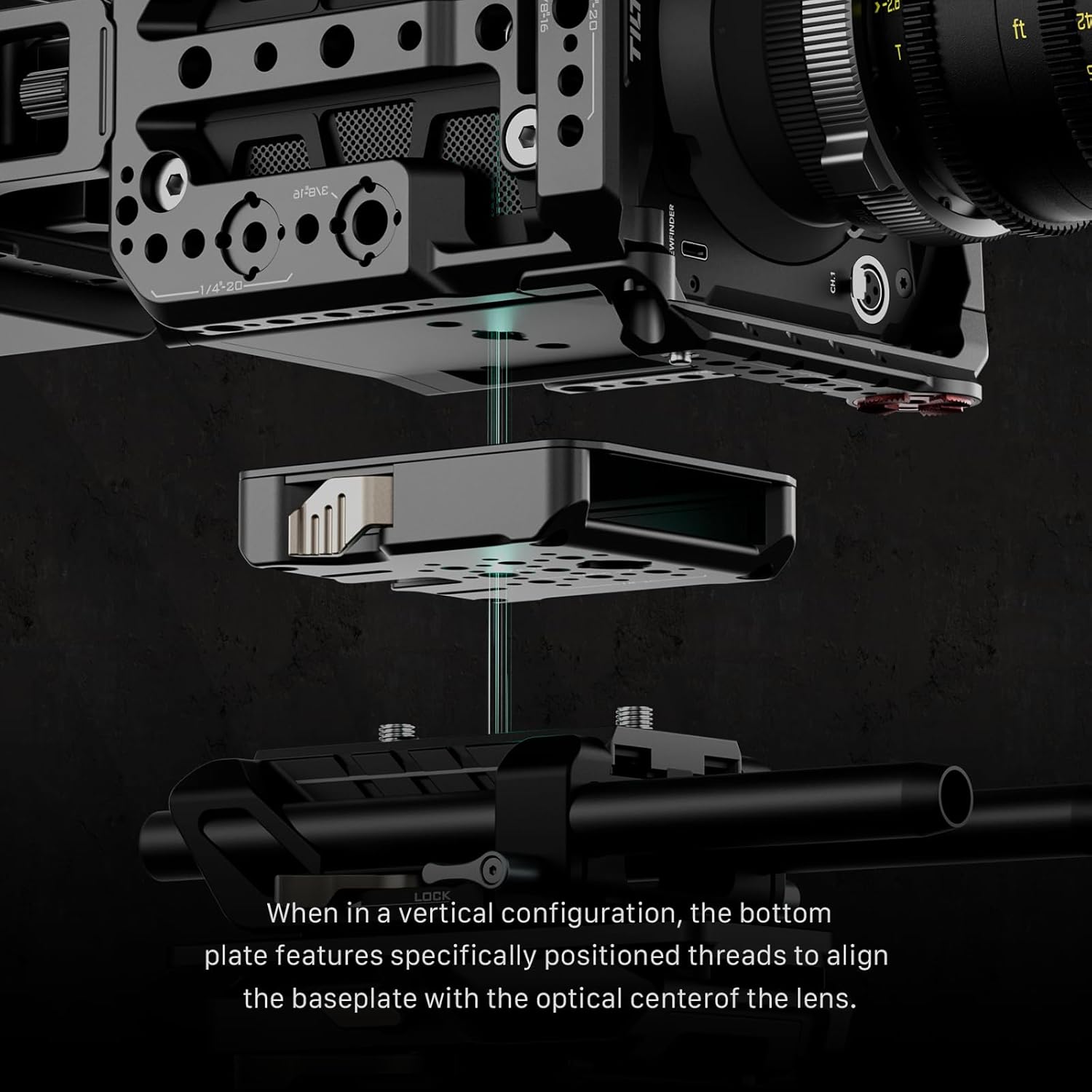
Figure 5: The side plate with an integrated SSD mounting slot.
Vertical and Horizontal Configurations
The modular design supports both traditional horizontal and modern vertical shooting setups. The quick-release bottom plate and side plate can be reconfigured to align the lens optically in vertical mode, providing versatility for different production needs.

Figure 6: Camera cage configured for vertical shooting.
Disipación de calor
The cage is engineered with strategic cutouts and clearances around the camera's heat dissipation vents. This design ensures optimal airflow, preventing overheating and maintaining the camera's performance during extended use.
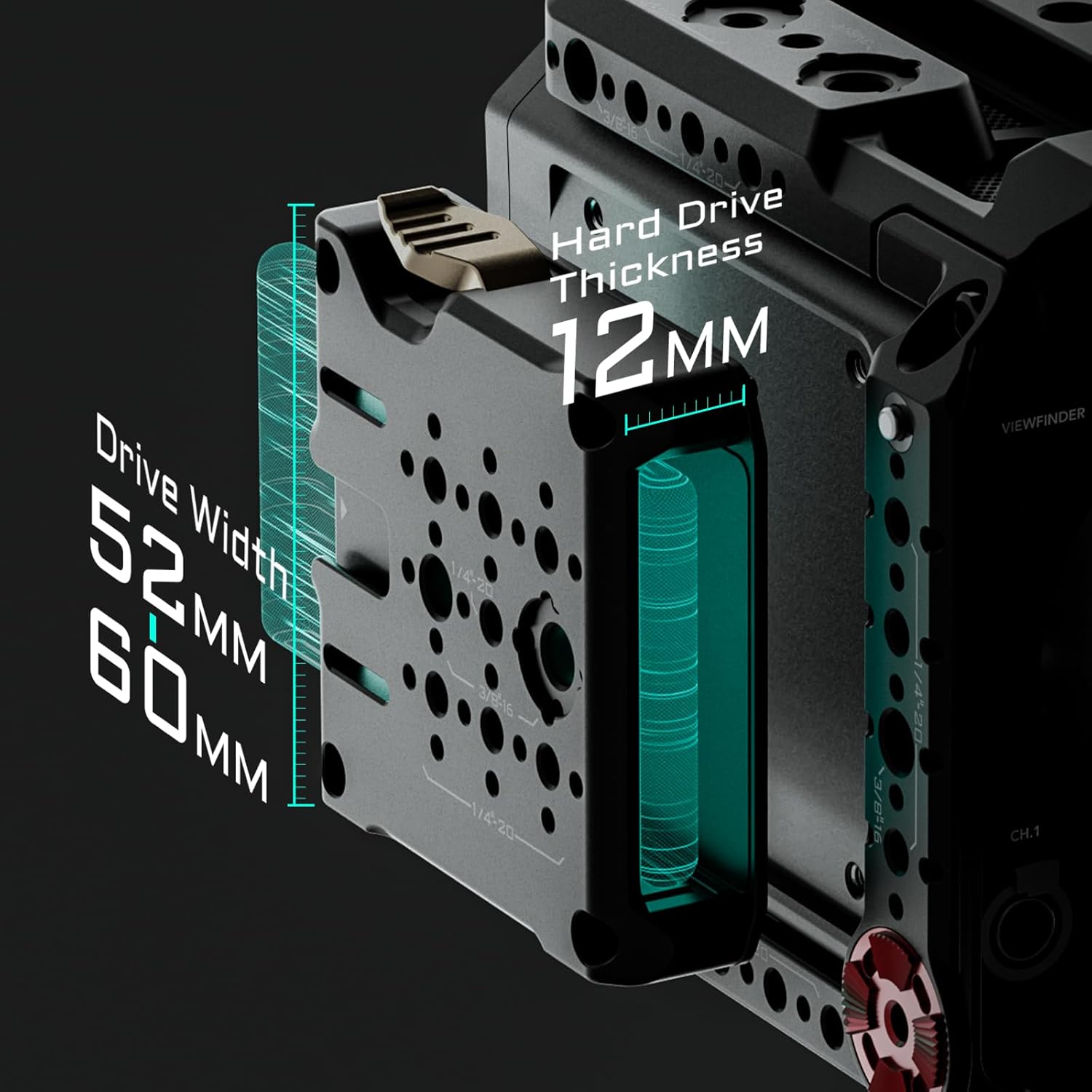
Figure 7: Design features for enhanced heat dissipation.
Mantemento
To ensure the longevity and optimal performance of your Tilta Camera Modular Full Cage, follow these maintenance guidelines:
- Limpeza: Regularly wipe down the cage with a soft, dry cloth to remove dust and debris. For stubborn grime, use a slightly damp cloth and ensure the cage is completely dry before re-attaching your camera. Avoid harsh chemicals or abrasive materials.
- Screw Inspection: Periodically check all screws and mounting points for tightness. Vibrations during transport or use can sometimes loosen fasteners. Use the provided Tilta Mini Tool Kit to re-tighten any loose screws.
- Almacenamento: When not in use, store the cage in a clean, dry environment, preferably in a protective bag or case to prevent scratches and damage.
Resolución de problemas
If you encounter any issues with your Tilta Camera Modular Full Cage, consider the following common troubleshooting steps:
- Cage Not Fitting Correctly: Ensure you have the correct model cage for your Blackmagic Pyxis 6K or 12K camera. Double-check that all components are aligned correctly during assembly. Refer to the 'Setup and Assembly' section and video guide.
- Accessories Not Mounting Securely: Verify that you are using the correct thread sizes (1/4"-20 or 3/8"-16) for your accessories. Ensure NATO rail clamps and Arri Rosette attachments are fully tightened.
- SSD Not Seating Properly: Check that the SSD is correctly oriented and fully inserted into the dedicated slot on the side plate. Ensure the locking mechanism is engaged.
- Compoñentes soltos: If any part of the cage feels loose, re-tighten all screws using the Tilta Mini Tool Kit. Avoid over-tightening, which can strip threads.
If problems persist, please contact Tilta customer support for further assistance.
Especificacións
| Dimensións do produto | 9 x 6.1 x 5.3 polgadas |
| Peso do elemento | 2.24 libras |
| Número de modelo | ES-T21-FCC |
| Fabricante | Tilta |
| Cor | Negro |
| Dispositivos compatibles | Blackmagic Pyxis 12K, Blackmagic Pyxis 6K, Camera |
| UPC | 810153172543 |
Garantía e Soporte
Tilta products are manufactured to high-quality standards and are covered by a manufacturer's warranty. For specific warranty details, duration, and terms, please refer to the official Tilta websitio web ou póñase en contacto directamente co servizo de atención ao cliente. Garde o comprobante de compra para calquera reclamación de garantía.
For technical support, product inquiries, or assistance with any issues not covered in this manual, please visit the Tilta official websitio web ou póñase en contacto co seu departamento de atención ao cliente a través da información de contacto proporcionada no seu sitio web.


