1. Introdución
This manual provides essential information for the installation, operation, and maintenance of the Cisco IE-3400-8T2S-E Catalyst IE3400 Rugged Series Network Essential Switch. This device is designed for industrial environments, offering robust network connectivity. Please read this manual thoroughly before operating the device.
2. Información de seguridade
Observe as seguintes precaucións de seguridade para evitar lesións e danos no equipo:
- Asegurar a correcta conexión a terra do dispositivo.
- Desconecte a alimentación antes de realizar calquera procedemento de mantemento ou instalación.
- Operate the switch within the specified environmental conditions (temperature, humidity).
- Só persoal cualificado debe instalar e realizar o mantemento deste equipo.
- Evite expoñer o dispositivo á humidade ou a temperaturas extremas.
3. Contido do paquete
Verifique que o seu paquete conteña os seguintes elementos:
- Cisco IE-3400-8T2S-E Catalyst IE3400 Rugged Series Network Essential Switch
- Documentación (Guía de inicio rápido, Información de seguridade)
- Mounting hardware (if included with specific model variant)
- Power connector terminal blocks
Se falta ou está danado algún elemento, póñase en contacto co seu provedor inmediatamente.
4. Sobrecarga físicaview
The following diagram illustrates the front panel components of the Cisco IE-3400-8T2S-E switch.
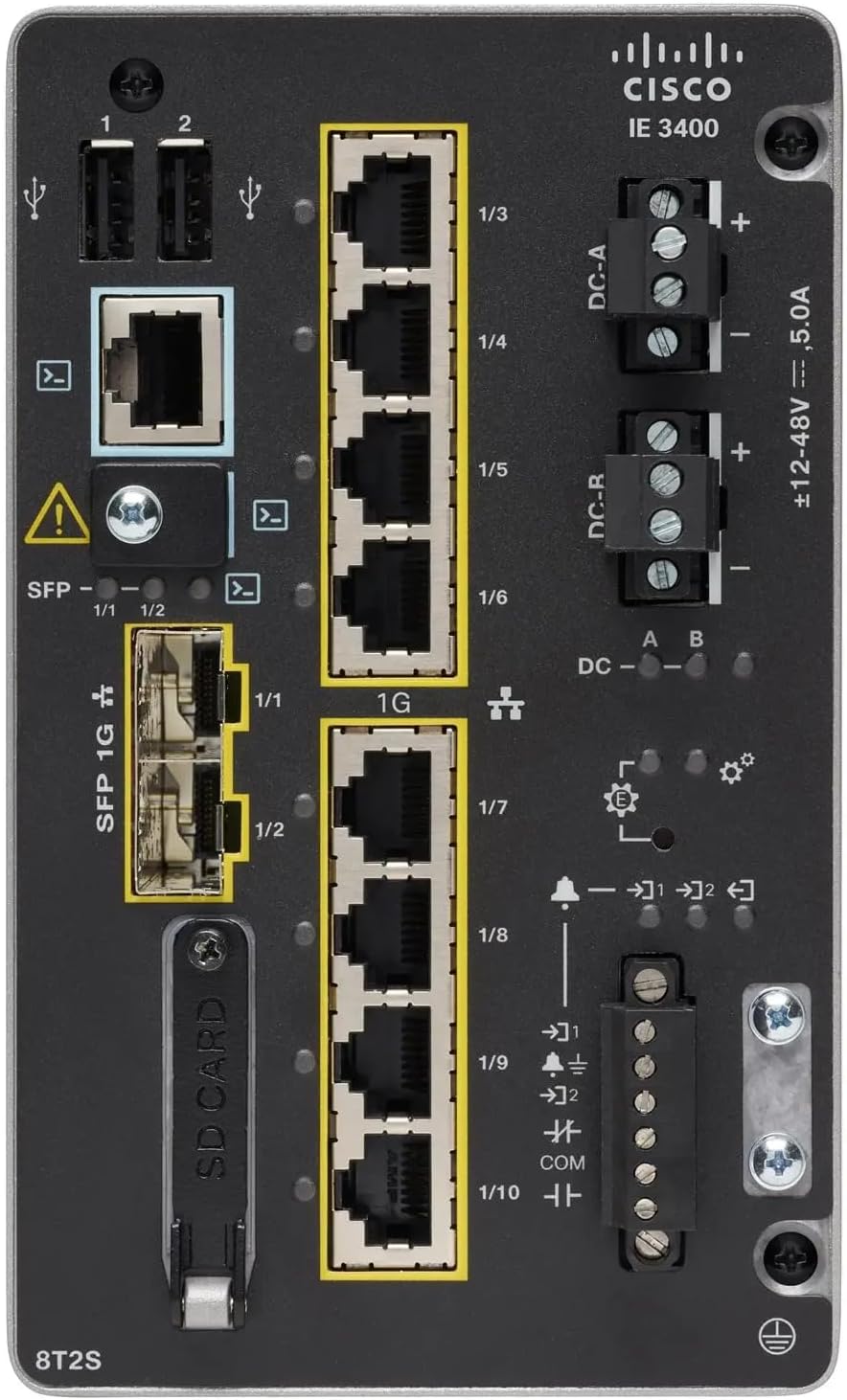
Figura 1: Front Panel Layout of the Cisco IE-3400-8T2S-E Switch
4.1. Front Panel Components Description
- USB Ports (1, 2): Two USB ports for connecting external devices or for configuration.
- Porto da consola: An RJ45 console port for local management and initial configuration.
- SFP 1G Ports (1/1, 1/2): Two Small Form-Factor Pluggable (SFP) ports supporting 1 Gigabit Ethernet for fiber optic connections.
- 1G Ethernet Ports (1/3 - 1/10): Eight 1 Gigabit Ethernet RJ45 ports for standard network connections.
- DC Power Inputs (DC-A, DC-R): Redundant DC power input terminals, supporting a voltage range of ±12-48V at 5.0A.
- Parafuso de posta a terra: Terminal for connecting the chassis to earth ground.
- Ranura para tarxetas SD: Slot for an SD card, typically used for configuration backup or software storage.
- Alarm/Relay Ports (1/9, 1/10): Terminals for connecting external alarm systems or relay controls.
- Indicadores LED: Various LEDs indicating power status (DC A/B), system status, link/activity for ports, and alarm status.
5. Configuración
5.1. Montaxe do interruptor
The IE3400 series switches are designed for industrial environments and typically support DIN rail or wall mounting. Refer to the specific mounting instructions provided with your mounting kit for detailed steps.
5.2. Potencia de conexión
- Ensure the power source is off before connecting.
- Connect the DC power cables to the DC-A and/or DC-R terminal blocks, observing polarity (+ and -). The switch supports redundant power inputs.
- Connect the grounding wire to the grounding screw on the front panel.
- Once all connections are secure, apply power to the switch. The DC-A and/or DC-B LEDs should illuminate.
5.3. Conexións de rede
- Portos Ethernet: Connect standard RJ45 Ethernet cables from your network devices to the 1G Ethernet ports (1/3 - 1/10).
- Portos SFP: Insert compatible SFP transceivers into the SFP 1G ports (1/1, 1/2) and connect fiber optic cables as required.
- Porto da consola: For initial configuration, connect a console cable from your management workstation to the RJ45 console port.
6. Instrucións de funcionamento
6.1. Acendamento inicial
Upon applying power, the switch will perform a power-on self-test (POST). The system LED will indicate the boot status. Once the boot process is complete, the switch will be ready for configuration.
6.2. Configuration Access
The switch can be configured via the console port using a terminal emulator or remotely via Telnet/SSH once an IP address is assigned. Refer to the Cisco IOS documentation for detailed configuration commands and procedures.
6.3. Indicadores LED
Monitor the LED indicators on the front panel to understand the switch's operational status:
- DC-A/DC-B LEDs: Indicate the status of the primary and redundant DC power inputs.
- LED do sistema: Indicates the overall operational status of the switch (e.g., green for normal operation, amber for warning, red for fault).
- LED de ligazón/actividade (por porto): Indicate network link status and data activity on each Ethernet and SFP port.
- LED de alarma: Illuminates when a critical system alarm is triggered.
7. Mantemento
7.1. Limpeza
Limpa periodicamente o exterior do interruptor cun pano suave e seco. Non empregues produtos de limpeza líquidos nin en aerosol. Asegúrate de que as aberturas de ventilación estean libres de po e residuos.
7.2. Actualizacións de firmware
Consulta regularmente o soporte técnico de Cisco website for the latest firmware updates. Applying updates can improve performance, add features, and address security vulnerabilities. Follow Cisco's official procedures for firmware upgrades.
7.3. Consideracións ambientais
Ensure the switch operates within its specified temperature and humidity ranges. Proper airflow around the device is crucial for heat dissipation.
8 Solución de problemas
Esta sección ofrece pasos básicos para a resolución de problemas comúns.
8.1. Sen poder
- Verify that the power source is active and the power cables are securely connected to the DC-A/DC-R terminals.
- Check the DC-A/DC-B LEDs. If they are off, there is no power or a power supply issue.
8.2. No Network Link
- Ensure Ethernet or fiber optic cables are properly connected to both the switch port and the connected device.
- Check the Link/Activity LED for the specific port. If it is off, there is no link.
- Comprobe que o dispositivo conectado estea acendido e funcione correctamente.
8.3. System Alarm
- If the Alarm LED is illuminated, consult the Cisco IOS documentation for specific alarm codes and their meanings.
- Check system logs via the console or network management interface for detailed error messages.
9. Especificacións
| Característica | Especificación |
|---|---|
| Modelo | IE-3400-8T2S-E |
| Fabricante | Cisco |
| Portos Ethernet | 8 x 1 Gigabit RJ45 |
| Portos SFP | 2 x 1 Gigabit SFP |
| Tipo de interface | RJ45, SFP, PoE, PoE+ (model dependent) |
| Entrada de enerxía | ±12-48V DC, 5.0A (Redundant) |
| Dimensións do produto | 36 x 9 x 55 cm |
| Peso do elemento | 2.28 quilogramos |
| Dispositivos compatibles | Escritorio, portátil, impresora |
| UPC | 703670760433 |
10. Garantía e soporte
This product is offered as an Amazon Renewed item. Warranty and return policies are typically managed by the reseller (Amazon Renewed) for a specified period. Please refer to your purchase documentation or contact Amazon Renewed support for details regarding your specific warranty coverage.
For technical documentation, software downloads, and advanced support for the Cisco IE-3400-8T2S-E switch, please visit the official Cisco support website and search for your specific model.


