1. Introdución
Thank you for choosing the Intenso O400HA Over-Ear Headphones. These headphones are designed to provide a superior audio experience with advanced features such as Hybrid Active Noise Cancelling (ANC), Transparency Mode, and Bluetooth 5.3 connectivity. This manual will guide you through the setup, operation, and maintenance of your new headphones.
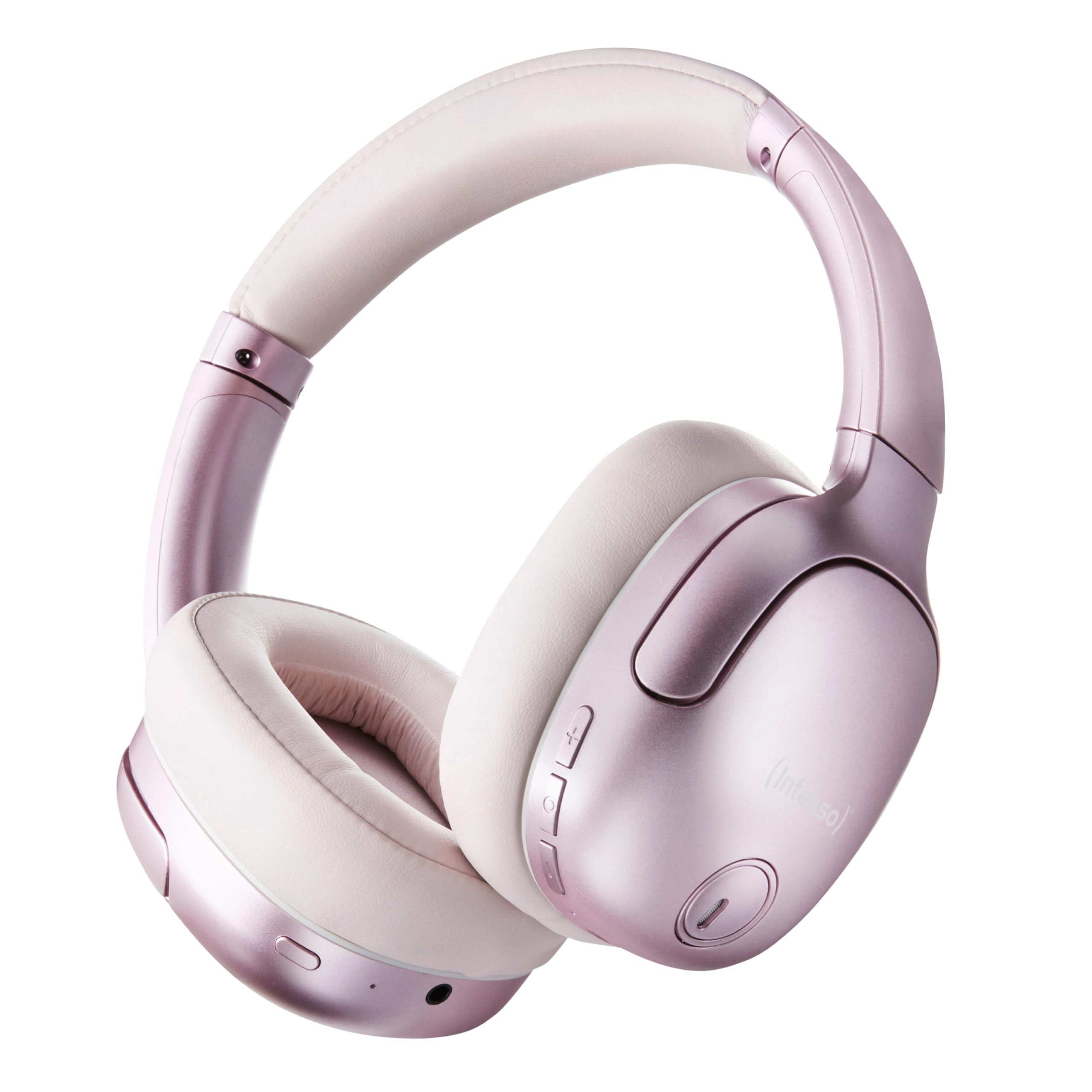
Image 1.1: Intenso O400HA Over-Ear Headphones (Pink)
The Intenso O400HA headphones feature a comfortable over-ear design with soft ear pads, an adjustable headband, and intuitive controls on the earcups.
2. Contido do paquete
Comprobe se o paquete contén os seguintes elementos:
- Intenso O400HA Over-Ear Headphones
- Cable de carga USB-C a USB-C
- 1.5m Audio Cable (3.5mm jack)
- Manual de usuario
3. Produto rematadoview
Familiarize yourself with the various parts and controls of your Intenso O400HA headphones.

Imaxe 3.1: Lateral view of Intenso O400HA headphones with controls
This image displays the right earcup with its control buttons and ports. These typically include power, volume, multi-function buttons, and a charging port.
Controis e portos:
- Botón de encendido: Used to turn the headphones on/off and initiate Bluetooth pairing.
- Botón para subir o volume/seguinte pista: Increases volume with a short press, skips to the next track with a long press.
- Botón para baixar o volume/pista anterior: Decreases volume with a short press, goes to the previous track with a long press.
- Botón multifunción (MFB): Controls playback (play/pause), answers/ends calls, activates voice assistant.
- Botón de modo ANC/transparencia: Toggles between Hybrid Active Noise Cancelling, Transparency Mode, and normal mode.
- Porto de carga USB-C: Para cargar os auriculares.
- Conector de audio de 3.5 mm: Para conexión por cable.
- Micrófonos: Internal and external microphones for ANC and calls.
4. Configuración
4.1. Carga dos auriculares
Antes do primeiro uso, carga completamente os auriculares.
- Connect the supplied USB-C charging cable to the USB-C port on the headphones.
- Conecta o outro extremo do cable a un adaptador de corrente USB (non incluído) ou ao porto USB dun ordenador.
- The LED indicator will show the charging status. It typically turns off or changes color when fully charged.
A full charge takes approximately 2 hours. A quick charge of 15 minutes provides up to 6 hours of playtime.
4.2. Emparellamento Bluetooth
Para conectar os auriculares a un dispositivo con Bluetooth:
- Asegúrese de que os auriculares estean apagados.
- Manteña premido o botón de acendido/apagado durante aproximadamente 5-7 segundos ata que o indicador LED parpadee en azul e vermello, indicando o modo de emparellamento.
- No teu dispositivo (teléfono intelixente, tableta, portátil), vai á configuración de Bluetooth e activa Bluetooth.
- Busca available devices and select "Intenso O400HA" from the list.
- Once connected, the LED indicator will typically flash blue slowly or remain solid blue.
Os auriculares tentarán reconectarse automaticamente co último dispositivo emparellado ao acenderse.
5. Uso dos auriculares
5.1. Acendido/apagado
- Encendido: Manteña premido o botón de acendido/apagado durante 2 ou 3 segundos.
- Apagado: Manteña premido o botón de acendido/apagado durante 3 ou 4 segundos.
5.2. Audio Modes: ANC, Transparency, Music
The Intenso O400HA headphones offer three distinct audio modes to suit your environment.

Imaxe 5.1: Acabadoview of Noise Control Modes
This image illustrates the key noise control technologies: Hybrid Active Noise Cancellation (ANC) for reducing ambient noise, Environmental Noise Cancellation (ENC) for clear calls, and Transparency Mode for hearing your surroundings.

Image 5.2: Hybrid Active Noise Cancelling Explained
This diagram shows how Hybrid ANC works using both external and internal microphones to filter out up to 95% of ambient noise, such as engine sounds.
- Cancelación activa de ruído híbrida (ANC): Press the ANC/Transparency Mode button to activate. This mode significantly reduces ambient noise, ideal for travel or noisy environments.
- Modo de transparencia: Press the ANC/Transparency Mode button again to switch to Transparency Mode. This allows external sounds to pass through, enabling you to hear your surroundings without removing the headphones.
- Normal Mode (Music Mode): Press the ANC/Transparency Mode button a third time to return to normal mode, where ANC and Transparency are off. This mode provides balanced sound for a comprehensive listening experience.
5.3. Music Playback and Calls
- Reproducir/Pausa: Short press the Multi-function Button (MFB).
- Próxima pista: Mantén premido o botón para subir volume.
- Pista anterior: Mantén premido o botón para baixar o volume.
- Subir volume: Prema brevemente o botón Subir volume.
- Baixar volume: Prema brevemente o botón para baixar o volume.
- Responder/Finalizar chamada: Prema brevemente o MFB.
- Rexeitar a chamada: Prema e manteña premido o botón multifunción.
- Activar o asistente de voz: Prema dúas veces o MFB.
5.4. Wired Connection (Passive Mode)
You can use the headphones in passive mode even if the battery is depleted or if you prefer a wired connection.
- Conecta un extremo do cable de audio de 3.5 mm á toma de audio dos auriculares.
- Conecta o outro extremo á saída de audio de 3.5 mm do teu dispositivo.
Note: ANC and Transparency modes may not function or may have reduced performance when using the wired connection without power.
6. Mantemento
To ensure the longevity and optimal performance of your Intenso O400HA headphones, follow these maintenance guidelines:
- Limpeza: Use a soft, dry cloth to clean the headphones. Do not use abrasive cleaners, solvents, or harsh chemicals.
- Almacenamento: Store the headphones in a cool, dry place away from direct sunlight and extreme temperatures. When not in use, it is recommended to store them in a protective case (if provided or purchased separately).
- Exposición á auga: These headphones are not waterproof. Avoid exposure to water, moisture, or rain.
- Coidado da batería: For optimal battery life, avoid fully discharging the battery frequently. Charge the headphones regularly, even if not used for extended periods.
- Coidado do cable: Handle the charging and audio cables gently. Avoid bending or twisting them excessively.
7 Solución de problemas
Se tes algún problema cos teus auriculares, consulta os seguintes problemas e solucións comúns:
| Problema | Causa posible | Solución |
|---|---|---|
| Os auriculares non se acenden | Batería baixa | Cargue os auriculares completamente. |
| Non se pode emparellar por Bluetooth | Auriculares sen modo de emparellamento; Bluetooth do dispositivo desactivado; Interferencia | Ensure headphones are in pairing mode (flashing blue/red). Turn Bluetooth on your device. Move closer to the device. Forget previous pairings and try again. |
| Sen son nin baixo volume | Volume too low; Incorrect audio source; Loose cable (wired mode) | Increase volume on headphones and device. Check if the correct audio output is selected on your device. Ensure 3.5mm cable is securely connected. |
| ANC non eficaz | ANC not activated; Improper fit | Press the ANC button to activate. Adjust headphones for a snug fit over your ears. |
| Distorsión do son | Distance from device; Interference; Low battery | Move closer to your device. Avoid strong electromagnetic fields. Charge the headphones. |
8. Especificacións
| Característica | Detalle |
|---|---|
| Nome do modelo | Over-Ear O400HA |
| Tecnoloxía de conectividade | Wireless (Bluetooth 5.3) / Wired (3.5mm jack) |
| Control de ruído | Cancelación de ruído híbrida |
| Duración da batería | Ata 75 horas |
| Tempo de carga | Approximately 2 Hours (15 min for 6 hours playtime) |
| distancia wireless | Ata 15 metros |
| Resposta en frecuencia | 20 Hz a 20 KHz |
| Impedancia | 32 ohmios |
| Método de control | Touch/Buttons |
| Peso | 0.25 quilogramos |
| Material | Elastómero termoplástico (TPE) |
| Dispositivos compatibles | Mobile phones, Laptops, Tablets, Gaming Consoles, Car Audio Systems |
9. Garantía e soporte
Intenso products are designed for reliability and performance. For warranty information and customer support, please refer to the warranty card included with your purchase or visit the official Intenso websitio. Garda o comprobante de compra para calquera reclamación de garantía.
For further assistance, you may contact Intenso customer service through their official channels.


