Introdución
Thank you for choosing the Cleer ARC 3 Gaming Earbuds. These true wireless open-ear headphones are designed to provide an immersive audio experience with ultra-low latency, optimized for gaming across various platforms. This manual provides comprehensive instructions for setting up, operating, maintaining, and troubleshooting your new earbuds to ensure optimal performance and longevity.
Produto rematadoview e Características clave
The Cleer ARC 3 Gaming Earbuds combine advanced audio technology with ergonomic design for extended comfort during gaming sessions and daily use. Key features include:
- Latencia ultra baixa: Experience audio-video synchronization under 30ms for seamless gameplay, ideal for VR, PlayStation, PC, and Switch.
- Tempo de reprodución ampliado: Up to 50 hours of total playtime with the charging case (10 hours per earbud, plus 40 hours from case). A quick 5-minute charge provides 1.5 hours of play.
- Calidade de audio excepcional: Features Dolby Atmos audio and Snapdragon Sound with 16.2mm drivers for spatial audio and optimized Dolby Atmos head tracking.
- Intuitive FHD Display & Touch Controls: The charging case features an FHD display for managing Dolby sound effects, EQ settings, and more. Earbuds offer touch controls.
- Ampla compatibilidade: Dual connections via 2.4GHz USB-C dongle and Bluetooth 5.4, compatible with PS4/5, Switch, Meta Quest 2/3, phones, laptops, and PCs.
- Emparejamento multipunto: Connect to two devices simultaneously and switch seamlessly.
- Deseño de orella aberta: Provides situational awareness while delivering high-quality audio.
Compoñentes
The Cleer ARC 3 Gaming Earbuds package includes:
- Cleer ARC 3 Open-Ear Gaming Earbuds (Left and Right)
- Charging Case with FHD Display
- Dongle USB-C
- Cable de carga USB
- Manual de usuario (este documento)
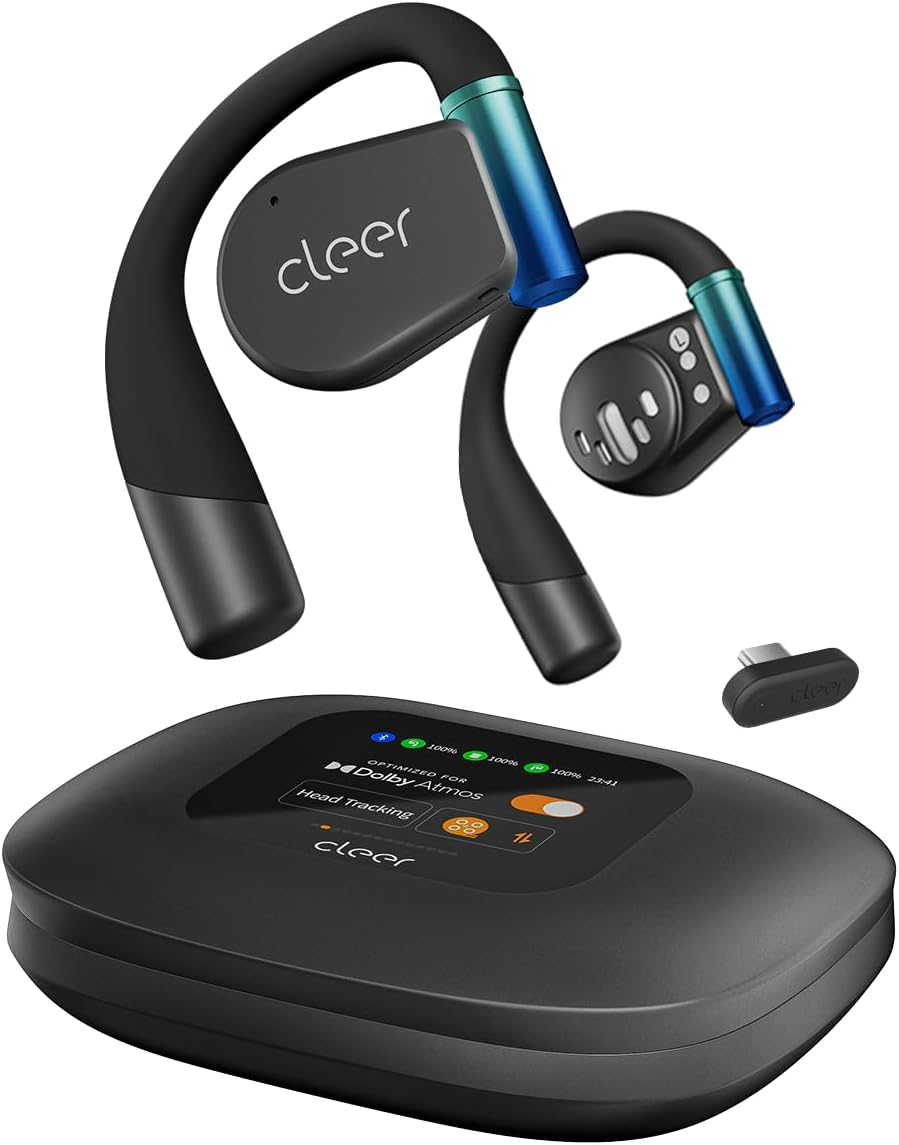
Image: The Cleer ARC 3 Gaming Earbuds, their smart charging case with a display, and the compact USB-C dongle. This image illustrates the main components included with the product.

Image: A person wearing the Cleer ARC 3 earbuds, highlighting their design and the "Powerful Sound Optimized for Dolby Atmos" feature. This demonstrates the earbuds in use and their audio capabilities.

Image: A close-up of the Cleer ARC 3 USB-C dongle, emphasizing its role in achieving ultra-low latency (under 30ms) with Bluetooth 5.4 connectivity. This image focuses on the connectivity technology.

Image: The Cleer ARC 3 earbuds inside their charging case, illustrating the impressive battery life of up to 50 hours total playtime, with details on quick charging. This highlights the product's endurance.

Image: A person wearing the Cleer ARC 3 earbuds, demonstrating their capability for "Crystal Clear Calls" through advanced voice capture and noise-cancelling microphones. This image focuses on communication features.

Image: The Cleer ARC 3 charging case display, surrounded by various gaming devices (PC, PS4/5, Switch, Meta Quest), illustrating the wide compatibility of the earbuds across multiple platforms. This image emphasizes versatility.

Image: The Cleer ARC 3 earbuds in their case next to a smartphone displaying the "Cleer+ App" interface, which allows for personalized controls and customized audio experiences. This image highlights the app integration.
Setup and Initial Pairing
Before first use, ensure your Cleer ARC 3 earbuds and charging case are fully charged. Remove any protective films from the earbuds.
Cargando os auriculares e o estuche
- Coloque os auriculares na caixa de carga.
- Connect the charging case to a power source using a USB-C cable. The FHD display on the case will indicate charging status.
- A funda tamén admite carga sen fíos.
Dongle Pairing (for PC, PS4/5, Switch, Meta Quest)

Image: A visual guide detailing the three steps for dongle pairing: plugging the dongle into a USB-C socket, long-pressing the MFB button on the dongle, and operating the headphones to enter pairing mode. This clarifies the dongle connection process.
- Paso 1: Plug the USB-C Dongle into your device (e.g., PC, PS5, Switch, Meta Quest).
- Paso 2: Long press the Multi-Function Button (MFB) on the Dongle until its LED starts flashing alternately between red and white. The Dongle is now ready for pairing.
- Paso 3: Operate the headphones to enter pairing mode. Place the headphones close to the Dongle. They will connect automatically. The LED of the Dongle will turn white (breathing).
Note: The Cleer dongle is not compatible with Xbox series. Xbox requires a different authorization.
Bluetooth Pairing (for Phones, Laptops)

Image: A diagram illustrating three methods for Bluetooth pairing the Cleer ARC 3 earbuds: first pairing by pressing the MFB for 2 seconds, touch pad pairing by tapping 5 times, and charging case pairing via the case's display. This provides multiple pairing options.
There are multiple ways to pair your Cleer ARC 3 earbuds via Bluetooth:
- Option 1: First Pairing
- Retire a película protectora dos auriculares.
- Press the MFB button on both earbuds for 2 seconds.
- Option 2: Touch Pad Pairing
- Tap the touch pad on either headphone 5 times and wait for the LED indicators to blink red and white.
- Option 3: Charging Case Pairing
- Place both headphones into the case and close the lid.
- Select "Pairing Mode" on the "Auxiliary" page of the charging case display.
- Abre o estuche de carga.
After initiating pairing on the earbuds, select "Cleer ARC 3" from the list of available Bluetooth devices on your phone or laptop.
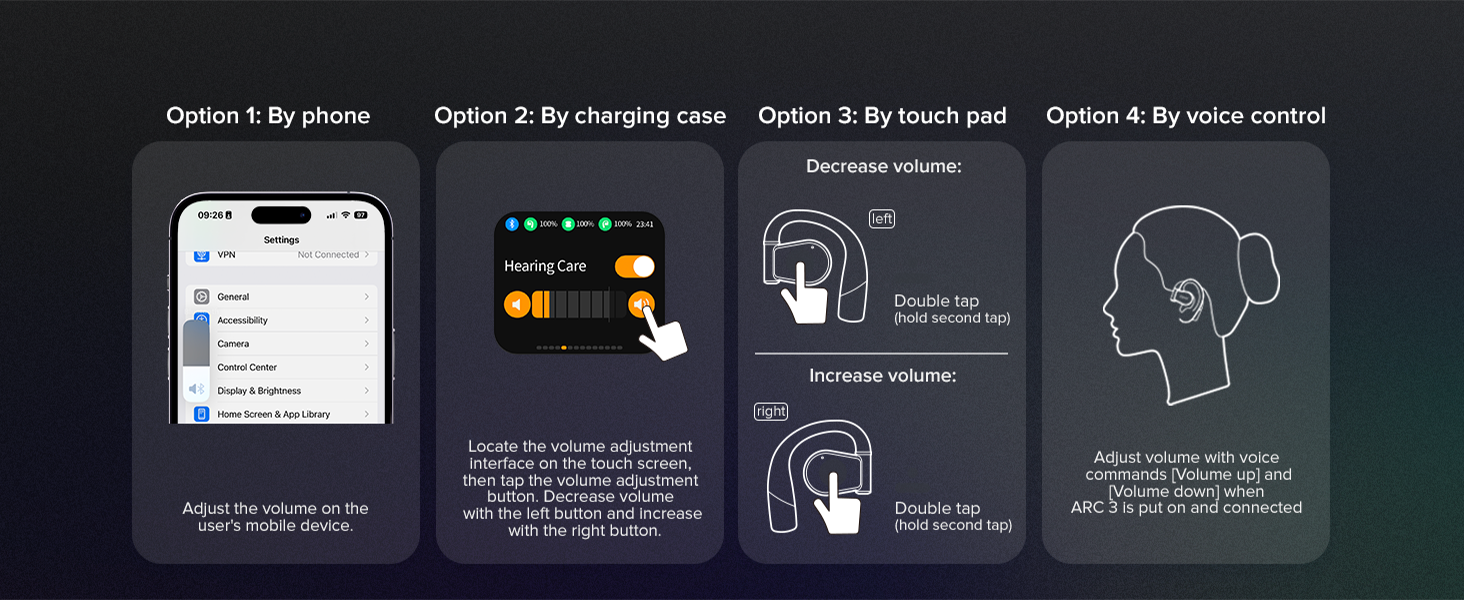
Image: A step-by-step guide for Bluetooth pairing the Cleer ARC 3 on a PC, including enabling Bluetooth, using touch pad pairing, and selecting the device from the list. This provides specific instructions for PC users.
Instrucións de funcionamento
Control de volume
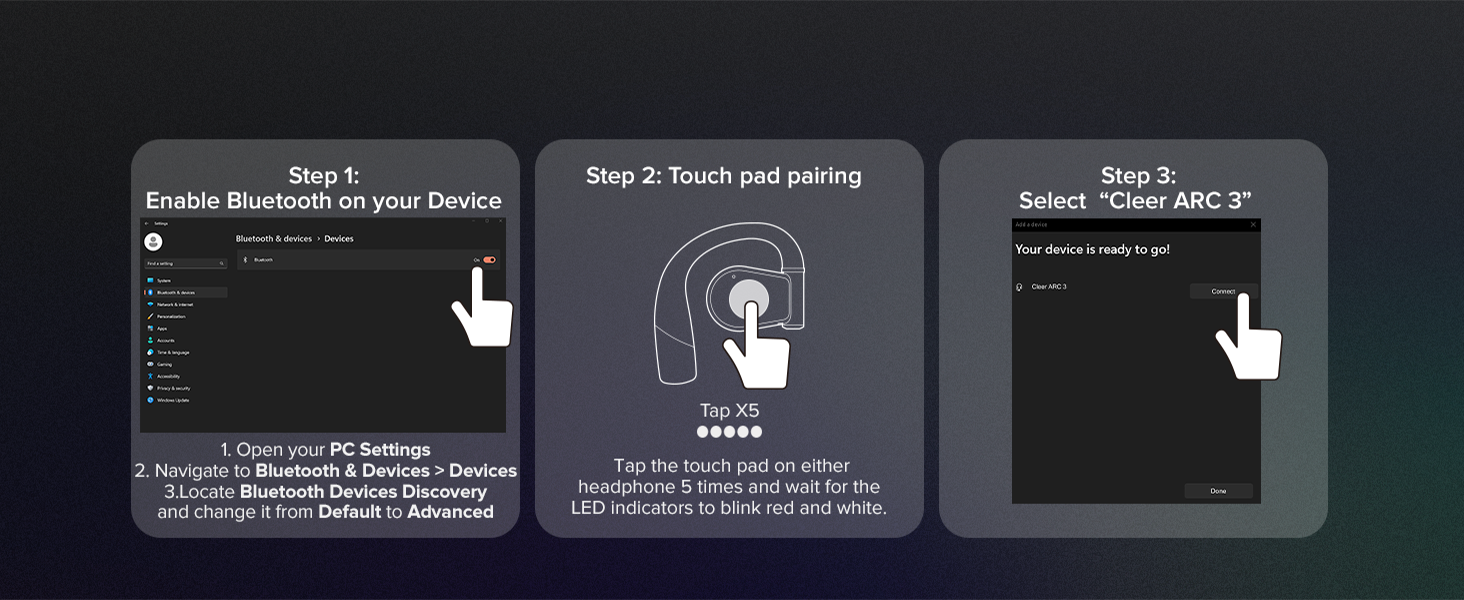
Image: A visual guide illustrating four methods for controlling volume on the Cleer ARC 3: via phone settings, the charging case display, earbud touch pads (double tap), and voice control. This offers comprehensive volume adjustment options.
You can adjust the volume of your Cleer ARC 3 Gaming Earbuds using several methods:
- By Phone/Device: Adjust the volume directly on your connected mobile device or computer.
- By Charging Case: Use the intuitive FHD display on the charging case to locate the volume adjustment interface. Tap the volume adjustment button, then use the left button to decrease and the right button to increase volume.
- By Touch Pad:
- Para diminuír volume: Double tap the touch pad on the esquerda earbud (hold second tap).
- Para aumentar volume: Double tap the touch pad on the certo earbud (hold second tap).
- By Voice Control: Adjust volume using voice commands (e.g., "Volume up", "Volume down") when ARC 3 is worn and connected.
Using the Cleer+ App
The Cleer+ App allows for personalized controls and a customized audio experience. Download the app from your device's app store. Through the app, you can:
- Adjust EQ settings.
- Manage Dolby sound effects and head tracking.
- Access motion control and intelligent voice control settings.
- Monitorizar os niveis da batería.
- Update firmware for earbuds and dongle.

Image: The Cleer+ App icon alongside smartphone screens displaying the app's interface, which allows users to personalize controls and customize their audio experience. This highlights the software component of the product.
Dual Mode Operation (Game Mode / Music Mode)

Image: A visual representation of the Cleer ARC 3's "Dual Mode" functionality, showing a "Game Mode" for ultra-low latency and a "Music Mode" for high-definition audio. This illustrates the versatility of the earbuds for different uses.
The Cleer ARC 3 supports two primary modes:
- Game Mode (Ultra-low Latency Mode): Optimized for gaming, providing audio-video synchronization under 30ms. This mode is typically active when connected via the USB-C dongle.
- Music Mode (High Definition Audio Mode): Provides high-fidelity audio for music listening. This mode is generally used when connected via Bluetooth.
Switching between modes may be managed automatically based on the connection type or manually via the Cleer+ App or charging case display.
Emparejamento multipunto
Leverage Bluetooth 5.4 technology to connect your ARC 3 earbuds to two devices simultaneously. This allows for seamless switching between audio sources, such as listening to game audio via the dongle and taking a call on your smartphone via Bluetooth.
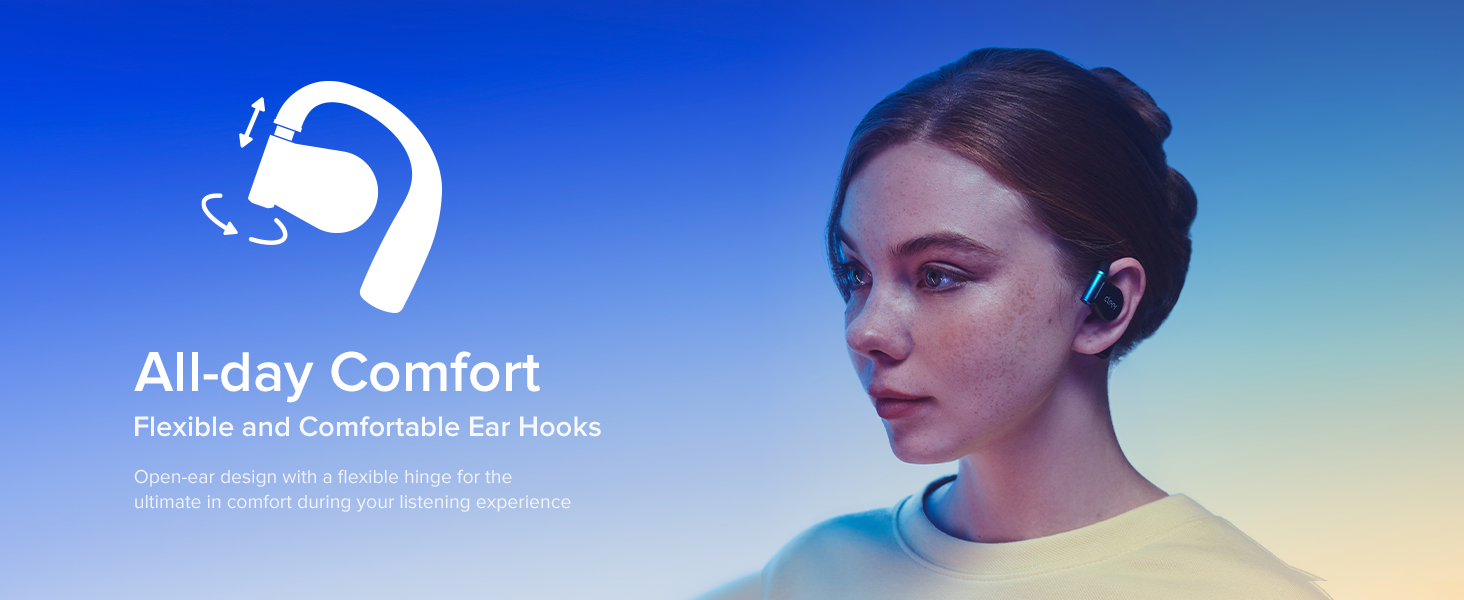
Image: A person simultaneously playing a game and engaging in a phone call, demonstrating the "Play & Chat At the Same Time" feature of the Cleer ARC 3 earbuds through multipoint pairing. This highlights the convenience of dual connectivity.
Mantemento e coidados
Proper care ensures the longevity and optimal performance of your Cleer ARC 3 Gaming Earbuds.
- Limpeza: Usa un pano suave, seco e sen pelusa para limpar os auriculares e a caixa de carga. Non uses produtos de limpeza abrasivos nin disolventes.
- Resistencia á auga: The earbuds are water resistant. Avoid submerging them in water or exposing them to excessive moisture. Dry them thoroughly if they get wet.
- Almacenamento: Cando non estean en uso, garde os auriculares no seu estoxo de carga para protexelos e mantelos cargados.
- Temperatura: Evita expoñer os auriculares a temperaturas extremas (calor ou frío).

Image: A close-up of the Cleer ARC 3 earbuds with small water droplets on their surface, visually representing their water-resistant feature. This image emphasizes the durability aspect of the product.
Resolución de problemas
If you encounter issues with your Cleer ARC 3 Gaming Earbuds, refer to the following common solutions:
| Problema | Posible Solución |
|---|---|
| Os auriculares non se emparellan/conectan. |
|
| Sen son ou volume baixo. |
|
| Audio cutting in/out or distortion. |
|
| Charging case display not responding. |
|
Especificacións
| Característica | Detalle |
|---|---|
| Nome do modelo | Xogos ARC 3 |
| Tecnoloxía de comunicación sen fíos | Bluetooth |
| Versión Bluetooth | 5.4 |
| Latencia de audio | Under 30 Milliseconds |
| Duración da batería (auriculares) | Ata 10 horas |
| Tempo total de reprodución coa funda | Ata 50 horas |
| Carga rápida | Carga de 5 minutos para 1.5 horas de reprodución |
| Tipo de controlador de audio | Driver dinámico |
| Tamaño do controlador de audio | 16.2 milímetros |
| Rango de frecuencias | 20 Hz a 20,000 Hz |
| Forma do auricular | Orella aberta |
| Método de control | Aplicación, Touch |
| Nivel de resistencia á auga | Resistente á auga |
| Peso do elemento | 4.6 onzas (130.02 gramos) |
| Dispositivos compatibles | Cellphones, Desktops, Gaming Consoles (PS4/5, Switch, Meta Quest 2/3), Laptops, Tablets |
| Fabricante | Máis intelixente |
| Cor | Negro |
Garantía e Soporte
For detailed warranty information, please refer to the warranty card included with your product or visit the official Cleer website. For technical support, product registration, or further assistance, please contact Cleer customer service.
You can also find additional resources and a downloadable PDF user manual at: Cleer ARC 3 User Manual (PDF)
Visit the official Cleer Store for more products and information: Cleer Store on Amazon


