1. Introdución
This manual provides detailed instructions for the installation, operation, and maintenance of your NB ERGONOMIC Gaming Monitor Arm A6. Designed for heavy-duty use, this monitor arm supports flat, ultrawide, and curved monitors ranging from 27 to 50 inches, with a load capacity of 2-18 kg (4-40 lbs). It features universal VESA 75x75mm/100x100mm compatibility and advanced mechanical spring technology for stable and precise monitor positioning.
Please read this manual thoroughly before installation and use to ensure proper setup and to maximize the ergonomic benefits of your monitor arm.
2. Información de seguridade
WARNING: Failure to follow these instructions may result in property damage or personal injury.
- Ensure your desk surface is stable and strong enough to support the combined weight of the monitor arm and your monitor.
- Non exceda a capacidade de peso máxima de 18 kg (40 lb).
- Verify that your monitor has VESA 75x75mm or 100x100mm mounting holes.
- Manteña as pezas pequenas lonxe dos nenos.
- Use only the provided hardware. Using incorrect screws may damage your monitor.
- Adjust tension screws only after the monitor is securely mounted to prevent sudden movement.
- Do not attempt to modify the monitor arm.
Nota importante: Certain desktop types are not suitable for monitor mount installation:

Unsuitable Desktops: Fragile desktops (e.g., marble, glass), desks with too narrow clamping surfaces due to baffles, or desks with irregular/beveled edges are not recommended for clamp montaxe.
3. Contido do paquete
Before proceeding with installation, please verify that all components are present and undamaged. Refer to the image below for a visual guide to the included parts.

Descrición da imaxe: This image displays all parts of the monitor arm kit, including the main arm, VESA plate, desk clamp components, grommet mount parts, various screws (M4x10, M4x12, M6x10, M6x12), washers, Allen wrenches, and cable management accessories.
4. Configuración
4.1 Comprobacións previas á instalación
- Compatibilidade de escritorio: Ensure your desk is suitable for mounting. Avoid fragile materials like glass or marble. For C-clamp mounting, the desk thickness should be 20-90mm (0.8"-3.5") and the bottom depth above 50mm (1.97"). For grommet mounting, the desk thickness should be 20-90mm (0.8"-3.5") and the hole diameter 10-60mm (0.4"-2.3").
- Compatibilidade VESA: Locate the VESA mounting holes on the back of your monitor. The arm supports 75x75mm and 100x100mm patterns. If your monitor has an embedded hole, ensure the panel can be placed directly. If the embedded position is small, use the heightening pads and lengthened screws provided.

Descrición da imaxe: This image shows how to identify VESA mounting holes on a monitor, including removing a back panel if necessary. It also illustrates the use of heightening pads and different screw sizes for monitors with embedded VESA mounts.

Descrición da imaxe: This diagram specifies the required desk dimensions for both Grommet and C-Clamp mounting methods, including desk thickness and hole diameter for grommet, and desk thickness and bottom depth for C-clamp.
4.2 Mounting the Arm to the Desk
The monitor arm supports two mounting methods: C-Clamp e Grommet.
- C-Clamp Instalación:
- Coloque o C-clamp da base ata a beira da túa mesa.
- Apretar o clamp screws securely until the base is firm and stable.
- Insert the main pole of the monitor arm into the C-clamp base.
- Instalación de arandelas:
- Se a súa mesa ten un orificio para ilhós, insira a base do ilhós a través del.
- Secure the base from underneath the desk using the provided plate and nut.
- Insert the main pole of the monitor arm into the grommet base.

Descrición da imaxe: Un detallado view of the C-clamp base, showing how it attaches to the desk edge with two tightening screws for stability.
4.3 Conexión do monitor
- Attach the VESA plate to the back of your monitor using the appropriate screws (M4x10, M4x12, M6x10, M6x12) and washers. Ensure the screws are not too long to avoid damaging the monitor's internal components.
- Carefully lift the monitor with the attached VESA plate and slide it onto the monitor arm's mounting head. Ensure it clicks securely into place.
- Confirm the quick-release mechanism is engaged.

Descrición da imaxe: This image demonstrates the quick installation of the monitor onto the arm. The VESA plate, already attached to the monitor, slides down onto the arm's head, with an inset showing the red quick-release lever in the locked position.
Descrición da imaxe: This image reiterates the quick installation and easy disassembly process, showing the VESA plate being attached to the arm's head and the red lever for securing or releasino monitor.
4.4 Xestión de cables
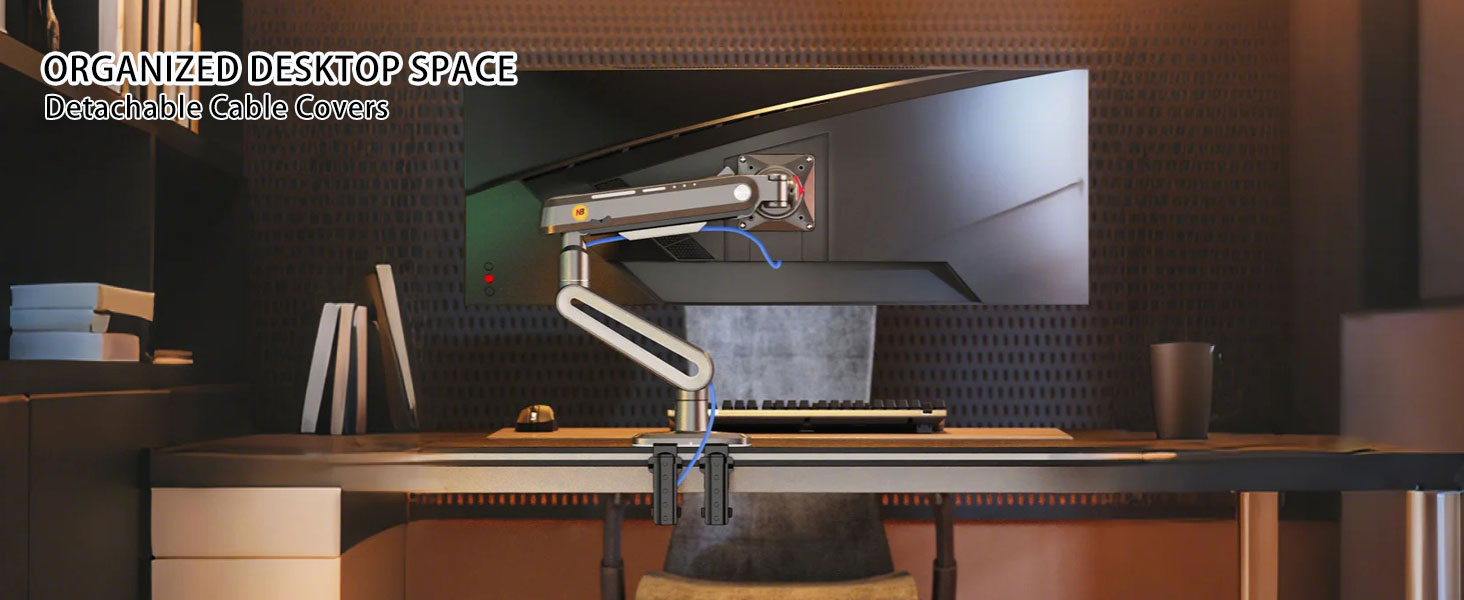
Pasa os cables do monitor polas canles de xestión de cables integradas no brazo para manter un espazo de traballo ordenado.

Descrición da imaxe: Un primeiro plano view of the monitor arm's cable management system, illustrating how a blue cable is neatly tucked into the arm's channel.
5. Funcionamento
5.1 Axustar a posición do monitor
The NB ERGONOMIC Gaming Monitor Arm A6 offers extensive adjustability for optimal viewconfort:
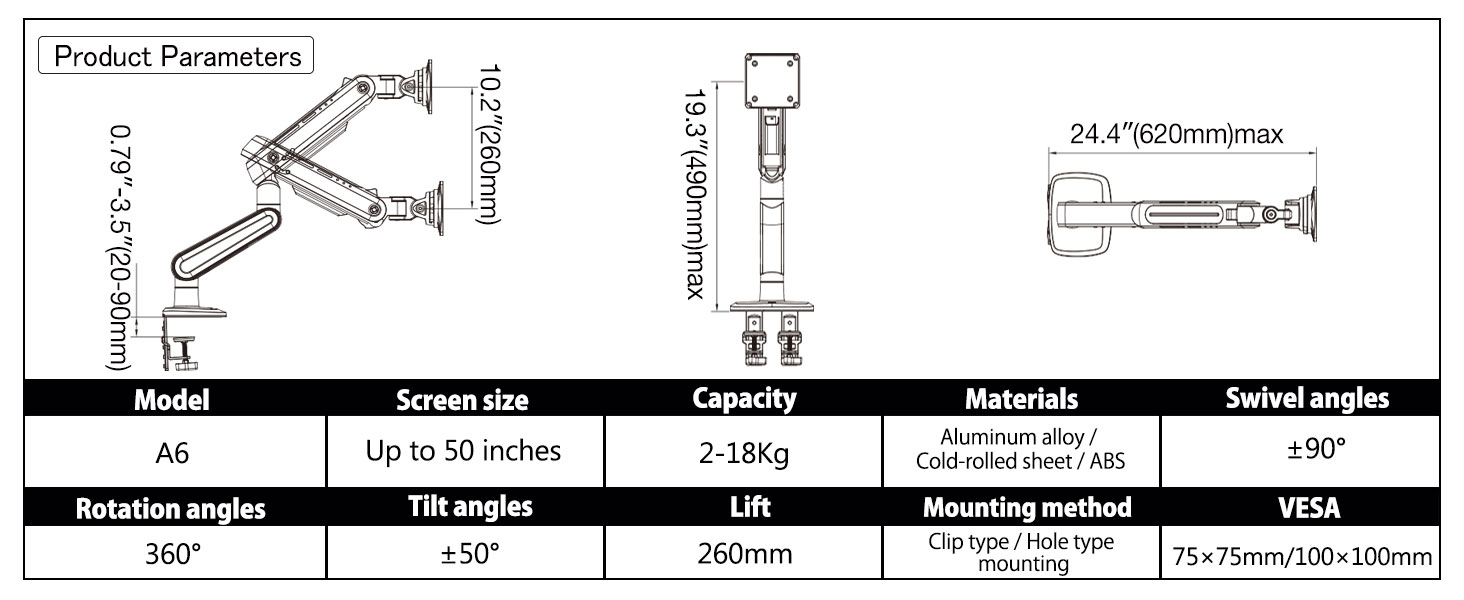
- Height Adjustment (Lift): The arm provides 260mm (10.2 inches) of vertical lift. Gently push or pull the monitor to the desired height.
- Inclinación: Adjust the monitor tilt by ±50° to reduce glare and find your preferred viewángulo de ing.
- Xiratorio: Swivel the monitor 360° at the VESA plate for easy screen sharing or portrait mode.
- Rotación: The arm allows 360° rotation at two points for flexible positioning.
- Extensión: The arm can extend up to 620mm (24.4 inches) from the mounting point.

Descrición da imaxe: This image illustrates the maximum extension (24.4 inches / 620mm) and vertical lift (10.2 inches / 260mm) capabilities of the monitor arm, demonstrating its range of motion.

Descrición da imaxe: This image visually explains the arm's articulation, including 360° swivel, 360° rotation at two joints, and ±50° tilt, showcasing a súa flexibilidade.
5.2 Axuste da tensión
The arm's gas spring tension needs to be adjusted to match the weight of your monitor for optimal performance and stability. This adjustment should only be done despois the monitor is mounted.
- Locate the tension adjustment screw on the arm (usually covered by a cap).
- Use the provided Allen wrench to turn the screw.
- Se o monitor raises up on its own: Turn the screw towards the "-" direction to reduce tension for a lighter monitor.
- Se o monitor falls down on its own: Turn the screw towards the "+" direction to increase tension for a heavier monitor.
- Adjust gradually until the monitor stays at the desired height without drifting up or down.

Descrición da imaxe: This image illustrates the tension adjustment process. It shows the monitor arm with a monitor and an inset detailing the tension screw. Instructions guide the user to adjust tension based on whether the monitor raises or falls, emphasizing that adjustment should occur after mounting.
6. Mantemento
- Comprobe regularmente todos os parafusos e conexións para garantir que estean ben axustados e seguros.
- Limpar o brazo do monitor cun pano suave eamp pano. Evite produtos de limpeza abrasivos ou solventes.
- If movement becomes stiff or jerky, a thin layer of silicone grease can be applied to the joints, if accessible, to improve glide.
7 Solución de problemas
| Problema | Causa posible | Solución |
|---|---|---|
| Monitor sags or falls down. | Insufficient gas spring tension for monitor weight. | Increase tension by turning the adjustment screw towards "+" (clockwise). Ensure monitor is mounted before adjusting. |
| Monitor floats up or is difficult to push down. | Excessive gas spring tension for monitor weight. | Decrease tension by turning the adjustment screw towards "-" (counter-clockwise). Ensure monitor is mounted before adjusting. |
| Arm feels loose or unstable. | Mounting screws or clamp not fully tightened. | Check and tighten all mounting screws (desk clamp/grommet and VESA plate screws). |
| Monitor does not fit VESA plate. | Incorrect VESA pattern or screw size. | Verify monitor VESA pattern (75x75mm or 100x100mm). Use correct screw length and heightening pads if necessary. |
8. Especificacións
| Característica | Detalle |
|---|---|
| Modelo | A6 |
| Compatibilidade do tamaño da pantalla | 27 to 50 inches (Flat, Ultrawide, Curved) |
| Capacidade de peso | 2-18 kg (4-40 lb) |
| Compatibilidade VESA | 75x75mm, 100x100mm |
| Método de montaxe | C-Clamp, Ilhá |
| Material | Liga de aluminio, aceiro laminado en frío, ABS |
| Height Adjustment (Lift) | 260 mm (10.2 polgadas) |
| Ángulo de inclinación | ± 50° |
| Ángulo de giro | 360° |
| Ángulo de rotación | 360° |
| Extensión máxima | 620 mm (24.4 polgadas) |
| Grosor do escritorio (C-Cl)amp) | 20-90 mm (0.8"-3.5") |
| Grosor do escritorio (ollazo) | 20-90 mm (0.8"-3.5") |
| Diámetro do orificio do ilhó | 10-60 mm (0.4"-2.3") |
Descrición da imaxe: This diagram provides a summary of the product's key specifications, including dimensions, weight capacity, VESA standards, and articulation ranges.
9. Garantía
The NB ERGONOMIC Gaming Monitor Arm A6 is backed by a 2 ano de garantía. This warranty covers manufacturing defects and ensures the product meets its stated performance standards. Please retain your proof of purchase for warranty claims.
10. Atención ao cliente
For technical assistance, warranty claims, or any questions regarding your NB ERGONOMIC Gaming Monitor Arm A6, please contact our customer support team. Refer to the product packaging or the official NB ERGONOMIC websitio para os detalles de contacto.


