1. Produto rematadoview
The IPASON G-SLIM Desktop PC is a high-performance, space-saving computer designed for both personal and business use. It features a slim tower design, powered by a 12th Gen Intel Core i3 processor, and equipped with a high-speed NVMe M.2 SSD for rapid data access and system responsiveness. This PC comes pre-installed with Windows 11, offering the latest operating system features and security.

Figura 1: Fronte view of the IPASON G-SLIM Desktop PC, showcasing o seu deseño compacto e elegante.
Key features include a functional slim design with conveniently located front USB and headphone jacks, eliminating the need for extended cables. It boasts robust performance suitable for multi-tasking, thanks to its ample memory and the high-speed NVMe SSD, which offers significantly faster transfer speeds compared to traditional SATA SSDs.
2. Características principais e deseño
2.1 Slim and Functional Design
The G-SLIM PC is engineered with a focus on functional beauty and space efficiency. Its compact dimensions make it ideal for various environments, from home offices to business settings, without compromising on performance.

Figure 2: Detailed dimensions of the IPASON G-SLIM Desktop PC, illustrating its compact form factor (100mm width x 336mm depth x 350mm height).
2.2 High Performance for Business and Personal Use
Equipped with a balanced CPU (Intel Core i3 12th Gen) and ample memory, the G-SLIM ensures stable high performance for various applications, from daily productivity tasks to more demanding business scenarios. The large capacity memory allows for comfortable multi-tasking, handling numerous applications simultaneously with ease.

Figure 3: The IPASON G-SLIM Desktop PC integrated into a business environment, demonstrating its suitability for professional use.
2.3 Advanced Storage and Operating System
The PC utilizes a PCIe Gen3 NVMe SSD, providing significantly faster data transfer speeds compared to traditional SATA SSDs, ensuring quick boot times and application loading. It comes with the latest Windows 11 operating system, offering a refreshed user interface, enhanced multitasking features like Snap Layouts, and improved widget functionality.
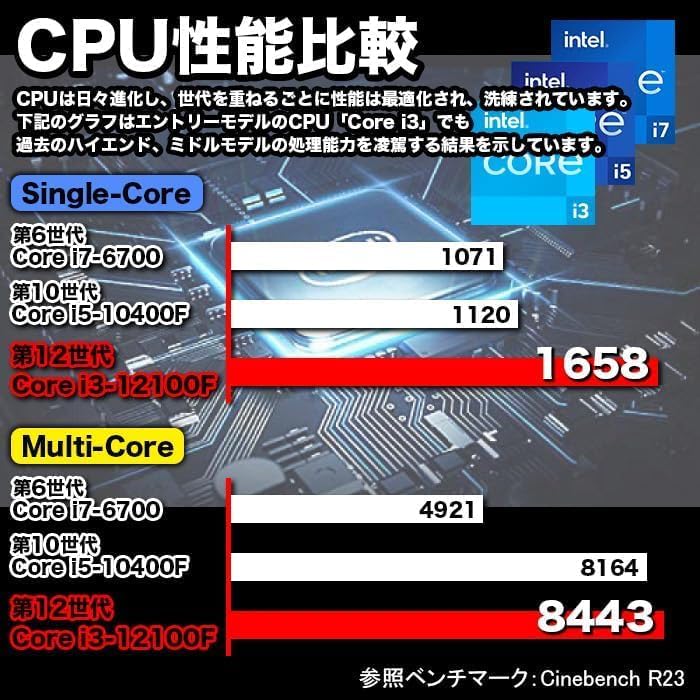
Figure 4: A visual representation of the Windows 11 operating system, highlighting its modern interface and features.
2.4 Performance Benchmarks and Quality Assurance
The G-SLIM's CPU performance is optimized for efficiency. IPASON ensures product reliability through rigorous testing, including 3C Certification, 6-sided drop tests, compatibility tests, degradation/durability tests, and high-load temperature control and noise tests, all conducted under strict standards.

Figure 5: A chart comparing CPU performance (Single-Core and Multi-Core) across different generations of Intel Core processors, demonstrating the G-SLIM's capabilities.

Figure 6: Visual representation of the strict quality control tests the IPASON G-SLIM undergoes, ensuring reliability and stability.
3. Guía de configuración
Follow these steps to set up your IPASON G-SLIM Desktop PC:
- Desembalaxe: Carefully remove the PC and all accessories from the packaging. Ensure all components listed in the packing list are present.
- Colocación: Place the PC on a stable, flat surface with adequate ventilation. Avoid placing it in direct sunlight or near heat sources.
- Conectar periféricos:
- Connect your monitor to the appropriate video output port (e.g., HDMI, DisplayPort) on the back of the PC.
- Conecta o teclado e o rato aos portos USB dispoñibles.
- If using a wired network, connect an Ethernet cable to the LAN port.
- Connect speakers or headphones to the audio output jack.
- Conexión de alimentación: Connect the provided power cable to the power input on the back of the PC, then plug the other end into a power outlet.
- Primeiro arranque: Press the power button on the front of the PC. The system will boot into Windows 11. Follow the on-screen instructions for initial setup, including language, region, and network configuration.
Nota: The PC comes with Windows 11 pre-installed and WPS Office for productivity tasks, offering high compatibility with Microsoft Office formats.
4. Instrucións de funcionamento
Your IPASON G-SLIM PC is ready for use after initial setup. Here are some general operating guidelines:
- Encendido/apagado: Press the power button to turn on the PC. To shut down, click the Start button in Windows 11, then select Power > Shut down.
- Portos do panel frontal: Utilize the conveniently located USB ports and headphone jack on the front panel for easy access to connect external devices like USB drives, external hard drives, or headphones.
- Multitarefa: Adántachetage of Windows 11's enhanced multitasking features, such as Snap Layouts, to efficiently arrange multiple application windows on your screen.
- Oficina de WPS: The pre-installed WPS Office suite provides essential word processing, spreadsheet, and presentation tools. It is fully compatible with Microsoft Office file formatos.
- Conectividade a Internet: Connect to the internet via the wired LAN port for stable and high-speed network access.
5. Mantemento
Regular maintenance helps ensure the longevity and optimal performance of your IPASON G-SLIM PC:
- Limpeza:
- Keep the PC case and vents free from dust. Use a soft, dry cloth to wipe external surfaces.
- For dust accumulation in vents, use compressed air to gently clear them. Ensure the PC is powered off before cleaning.
- Actualizacións de software: Comprobe e instale regularmente actualizacións de Windows para garantir que o seu sistema teña os parches de seguridade e as melloras de rendemento máis recentes.
- Protección antivirus: Maintain up-to-date antivirus software to protect against malware and other security threats.
- Copia de seguridade de datos: Fai copias de seguridade periódicas dos datos importantes nun disco duro externo ou nun almacenamento na nube para evitar a perda de datos.
- Ventilación: Ensure the PC has adequate airflow around it. Do not block the ventilation openings.
6 Solución de problemas
If you encounter issues with your IPASON G-SLIM PC, refer to the following common troubleshooting steps:
| Problema | Causa posible | Solución |
|---|---|---|
| O PC non se acende. | Cable de alimentación solto; problema coa toma de corrente. | Comproba as conexións do cable de alimentación. Proba cunha toma de corrente diferente. |
| Sen visualización no monitor. | Monitor cable loose; monitor off; incorrect input. | Ensure monitor is powered on and connected. Check monitor input source. |
| O sistema é lento ou non responde. | Too many programs running; low disk space. | Close unnecessary applications. Free up disk space. Restart the PC. |
| Sen conexión a internet. | Ethernet cable disconnected; network driver issue. | Check Ethernet cable connection. Restart router/modem. Update network drivers. |
If the issue persists after trying these steps, please contact IPASON customer support for further assistance.
7. Especificacións
| Característica | Detalle |
|---|---|
| Marca | IPASON |
| Serie modelo | G-SLIM |
| Sistema Operativo | Windows 11 |
| Marca da CPU | Intel (12th Gen Core i3) |
| Velocidade da CPU | 2.5 GHz |
| Capacidade RAM | 16 GB DDR4 |
| Tipo de almacenamento | SSD NVMe M.2 |
| Capacidade de almacenamento | 500 GB |
| Acelerador de gráficos | Gráficos Intel UHD 620 (integrados) |
| resolución máxima | 1920 x 1080 |
| Portos USB 2.0 | 3 |
| Portos USB 3.0 | 5 |
| Porto LAN con cable | Si |
| Unidade óptica | Non incluído |
| Fonte de alimentación | 300 W SFX |
| Dimensións (ancho x profundo x alto) | 100 mm x 336 mm x 350 mm |
8. Garantía e soporte
IPASON is committed to providing high-quality products. This product is manufactured in an ISO9001 certified factory, ensuring stringent quality control.
Garantía: Your IPASON G-SLIM Desktop PC comes with a 1 ano de garantía against manufacturing defects from the date of purchase. Please retain your proof of purchase for warranty claims.
Soporte: For technical assistance, troubleshooting beyond this manual, or warranty inquiries, please contact IPASON customer support through the vendor's official channels or the platform where the product was purchased. Refer to your purchase documentation for specific contact information.
Nota: A garantía non cobre os danos causados por mal uso, accidentes, modificacións non autorizadas ou desastres naturais.


