1. Introdución
The Audizio Avola is a comprehensive audio system designed to provide a wide range of listening options. It integrates Internet Radio, DAB+, FM radio, a CD player, and Bluetooth connectivity into a single, elegant unit. This manual will guide you through the setup, operation, and maintenance of your Avola system, ensuring you can fully utilize its features for an optimal audio experience.
2. Instrucións de seguridade
- Fonte de alimentación: Use só o adaptador de corrente fornecido. Asegúrese de que o volumetage coincide cos requisitos da súa rexión.
- Auga e humidade: Non expoña a unidade á choiva, á humidade ou a líquidos. Evite colocar obxectos cheos de líquidos, como vasos, enriba da unidade.
- Ventilación: Asegúrese de que haxa unha ventilación axeitada arredor da unidade. Non bloquee as aberturas de ventilación.
- Fontes de calor: Manteña a unidade lonxe de fontes de calor como radiadores, reixas de calor, estufas ou outros aparellos que produzan calor.
- Limpeza: Disconnect the unit from the power supply before cleaning. Use a soft, dry cloth. Do not use liquid cleaners or aerosol cleaners.
- Servizo: Non intente realizar o mantemento da unidade vostede mesmo. Encomende calquera mantemento a persoal de servizo cualificado.
- Reproductor de CD: Do not insert foreign objects into the CD tray. Handle CDs by their edges to avoid scratches.
3. Contido do paquete
Comprobe que todos os elementos estean presentes na embalaxe:
- 1x Audizio Avola Internet Radio
- 1 x mando a distancia
- 1 x adaptador de alimentación
- 1x Manual de usuario (guía de inicio rápido)

Image: Audizio Avola unit shown with its remote control and power adapter.
4. Produto rematadoview
4.1 Panel frontal

Imaxe: Fronte view of the Audizio Avola with the CD tray closed.
The front panel features the main display, control buttons, a CD tray, and input ports.
- Visualización: Color display for navigation and information.
- Botóns de control: MENU, INFO, REC/DEL, PRESET/REPEAT, STANDBY, I/R, Play/Pause, Stop, Skip/Fast Forward/Rewind.
- Bandexa de CD: Para inserir CD de son.
- Botón TUNE/SELECT: Rotate to navigate menus, press to select.
- Botón VOLUME: Axusta o nivel de saída de audio.
- Porto USB: Para conectar dispositivos de almacenamento USB.
- Ranura para tarxetas SD: Para inserir tarxetas de memoria SD.
- Entrada AUX: 3.5mm jack for external audio sources.
- Jack para auriculares: Conector de 3.5 mm para escoita privada.

Image: Close-up of the Audizio Avola front panel showing USB, SD, AUX, and headphone ports.
4.2 Panel posterior
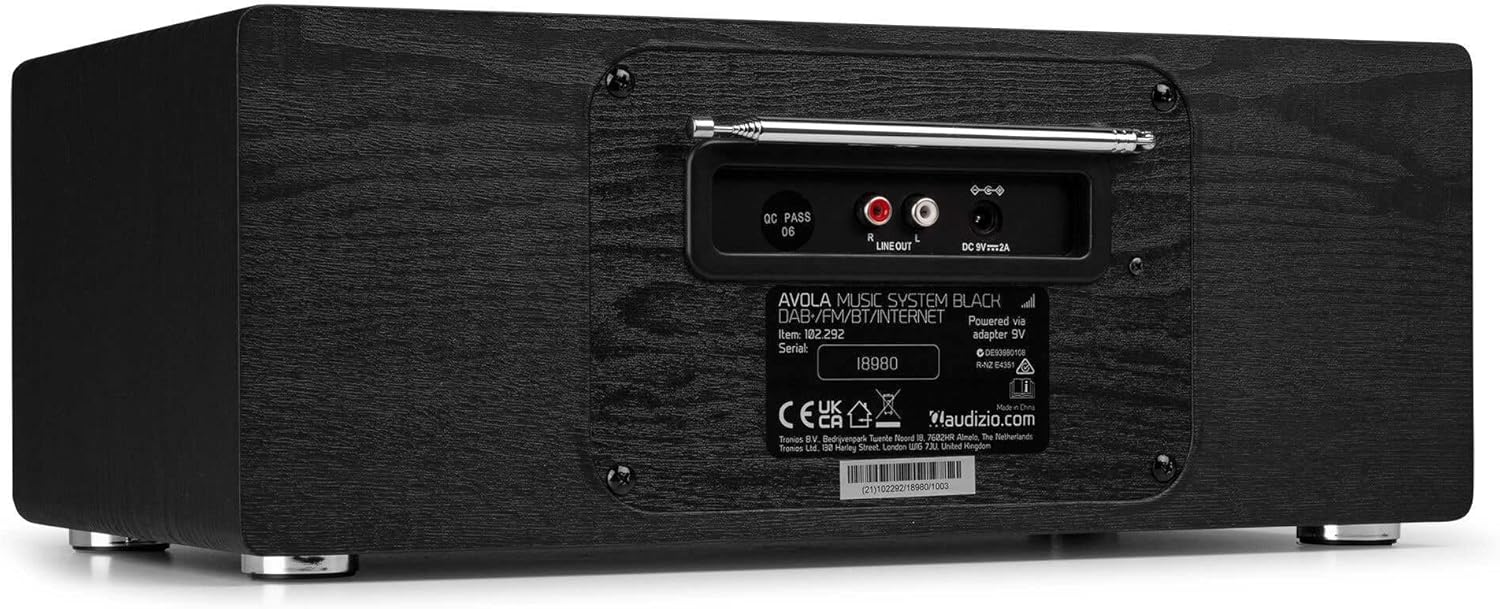
Imaxe: Traseira view of the Audizio Avola, highlighting the antenna and connection ports.
The rear panel houses essential connections:
- Antena telescópica: For DAB+ and FM radio reception. Extend fully for best signal.
- SAÍDA DE LIÑA (RCA): Para conectar a dispositivos externos amplificadores ou altofalantes.
- DC 9V 2A Power Input: Para conectar o adaptador de alimentación.
5. Configuración
5.1 Conexión de alimentación
- Connect the power adapter to the DC 9V 2A input on the rear of the Avola unit.
- Conecta o adaptador de corrente a unha toma de corrente axeitada.
- The unit will enter standby mode. Press the STANDBY button on the unit or remote control to power on.
5.2 Configuración da antena
For optimal DAB+ and FM radio reception, fully extend the telescopic antenna located on the rear panel. Adjust its position for the best signal quality.
5.3 Initial Setup (WLAN Connection)
To access Internet Radio features, the Avola must be connected to a Wi-Fi network.
- Upon first power-on, the unit may prompt you to set up the network connection. If not, press MENU, navigate to 'System Settings' and then 'Network'.
- Select 'Wi-Fi Network' and choose 'Scan' to find available networks.
- Selecciona a túa rede Wi-Fi da lista.
- Enter your Wi-Fi password using the TUNE/SELECT knob to navigate characters and press to confirm each character.
- Once connected, the display will show a Wi-Fi icon.
6. Modos de funcionamento
6.1 Radio por Internet
Access thousands of radio stations worldwide via your Wi-Fi connection.
- Press the MENU button and select 'Internet Radio'.
- Podes explorar as emisoras por localización, xénero ou buscar emisoras específicas.
- Use the TUNE/SELECT knob to navigate and select.
- To save a station as a preset, press and hold the PRESET/REPEAT button until the preset menu appears, then select a preset number.

Image: The Audizio Avola display showing the Internet Radio interface.
Radio DAB+ 6.2
Digital Audio Broadcasting Plus offers high-quality digital radio.
- Press the MENU button and select 'DAB Radio'.
- The unit will automatically scan for available DAB+ stations.
- Use the TUNE/SELECT knob to browse and select stations.
- Save presets as described for Internet Radio.
6.3 Radio FM
Listen to traditional analog FM radio broadcasts.
- Press the MENU button and select 'FM Radio'.
- Use the TUNE/SELECT knob to manually tune or press and hold to auto-scan for stations.
- Save presets as described for Internet Radio.
6.4 Reproductor de CD
Play your favorite audio CDs.
- Press the MENU button and select 'CD Player'.
- Press the 'Open' button next to the CD tray to open it.
- Carefully place an audio CD onto the tray with the label side facing up.
- Press the 'Open' button again to close the tray. The unit will begin playing the CD automatically.
- Use the Play/Pause, Stop, and Skip buttons for playback control.
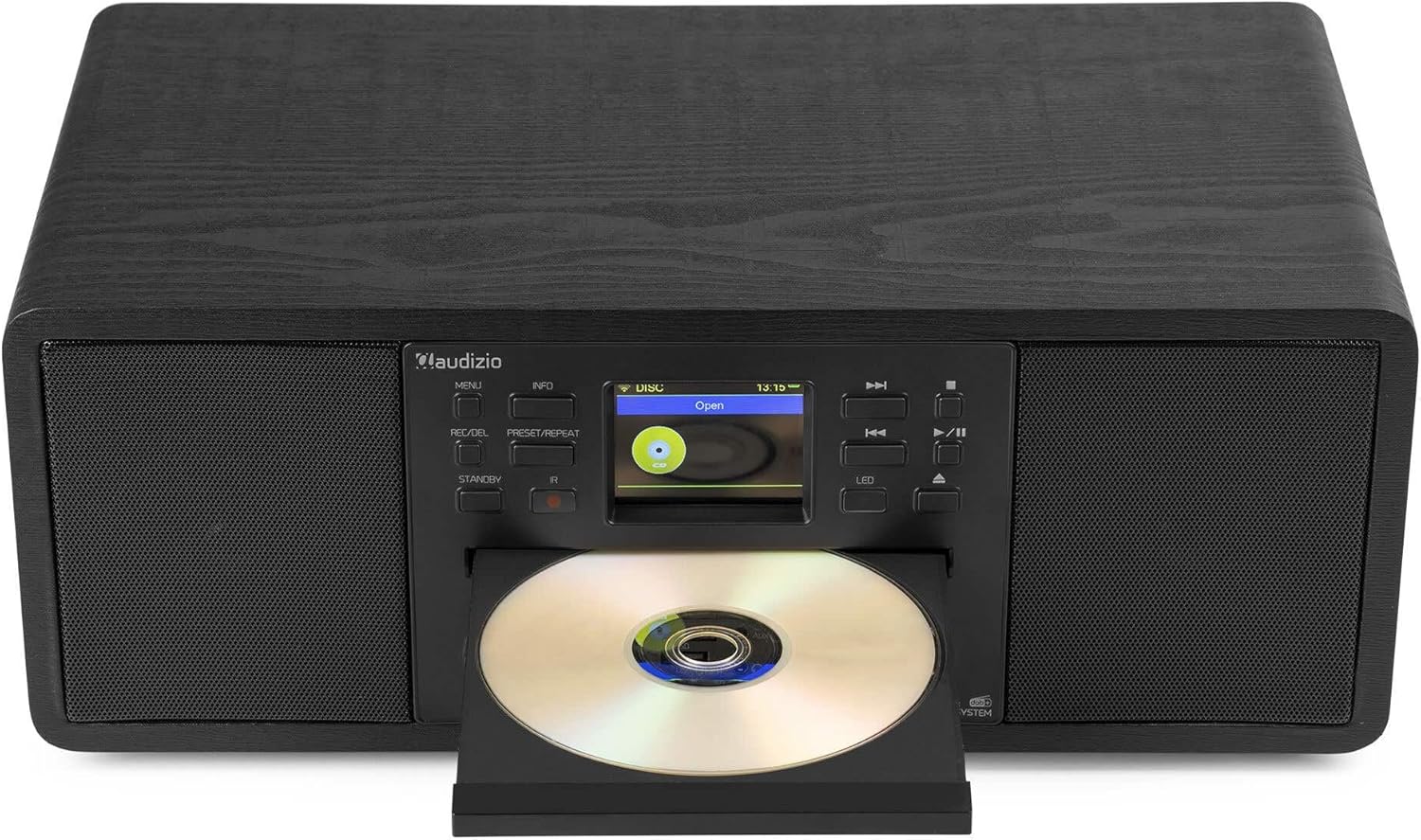
Image: The Audizio Avola with its CD tray open, ready for disc insertion.
6.5 Conectividade Bluetooth
Transmite audio sen fíos desde o teu teléfono intelixente, tableta ou outros dispositivos con Bluetooth.
- Press the MENU button and select 'Bluetooth'.
- The Avola will enter pairing mode and become discoverable.
- On your Bluetooth device, search for 'Audizio Avola' in the Bluetooth settings and select it to pair.
- Once connected, the display will show 'BT Connected'. You can now play audio from your device through the Avola.

Image: The Audizio Avola display indicating a successful Bluetooth connection.
6.6 Reprodución USB/SD
Reproducir audio filedesde unidades USB ou tarxetas SD.
- Insert a USB drive into the USB port or an SD card into the SD card slot on the front panel.
- Press the MENU button and select 'USB' or 'SD' (the unit may automatically switch to the correct mode).
- Navega polo teu files and folders using the TUNE/SELECT knob.
- Press the TUNE/SELECT knob to play a selected track.
7. Mantemento
- Limpeza da unidade: Use a soft, dry, lint-free cloth to clean the exterior of the unit. Do not use abrasive cleaners, waxes, or solvents.
- Limpeza de lentes de CD: Se a reprodución de CD se volve errática, use un disco limpador de lentes de CD dispoñible comercialmente para limpar a lente láser.
- Almacenamento: Se vai gardar a unidade durante un período prolongado, desconéctea da fonte de alimentación e gárdea nun lugar fresco e seco.
8 Solución de problemas
| Problema | Causa posible | Solución |
|---|---|---|
| Sen poder | O adaptador de corrente non está conectado ou a toma de corrente está defectuosa. | Comproba as conexións de alimentación. Proba cunha toma de corrente diferente. |
| Sen son | Volume too low, mute activated, or incorrect source selected. | Increase volume. Check if mute is active. Ensure correct input source is selected. |
| A radio por internet non se conecta | Incorrect Wi-Fi password, weak signal, or network issue. | Re-enter Wi-Fi password. Move unit closer to router. Check router status. |
| DAB+/FM reception poor | Antena non estendida ou sinal deficiente na zona. | Estenda e axuste completamente a antena telescópica. Tente recolocar a unidade. |
| Non se reproduce o CD | CD inserted incorrectly, dirty/scratched CD, or unsupported format. | Ensure CD is inserted label-side up. Clean or replace CD. Verify CD format (supports CD-DA, MP3). |
| Bluetooth non se sincroniza | Device not in pairing mode, or Avola not discoverable. | Ensure both devices are in pairing mode. Check Bluetooth settings on your device. |
9. Especificacións
| Característica | Especificación |
|---|---|
| Nome do modelo | Avola |
| Número de elemento | 102.292 |
| Dimensións (LxWxH) | 45.8 x 25.8 x 19.7 cm |
| Peso | 4 kg |
| Entrada de enerxía | 220 Volt (via power adapter) |
| Speaker Output Power (Max) | 60 Watts |
| Modo de saída de audio | Estéreo |
| Formatos de audio admitidos | CD-DA, MP3 |
| Tecnoloxía de conectividade | WLAN, Bluetooth, AUX, RCA |
| Dispositivos compatibles | MP3 Player, PC, Smartphone, Tablet |
| Cor | Negro |
10. Garantía e soporte
Audizio products are designed and manufactured to the highest standards. In the unlikely event of a problem with your product, please contact your retailer for assistance. Keep your proof of purchase for warranty claims. For further support or inquiries, please refer to the official Audizio websitio ou póñase en contacto co seu servizo de atención ao cliente.