1. Introdución
Grazas pola compraasing the XO F41 Mirror Bluetooth Speaker. This device combines a digital clock display with a portable Bluetooth speaker, offering multiple playback options including Bluetooth, TF card, and FM radio. Please read this manual carefully before use to ensure proper operation and to maximize your experience with the product.

Image 1.1: The XO F41 Mirror Bluetooth Speaker in use, showing its digital clock display.
2. Características do produto
- Conectividade Bluetooth 5.3: Para unha transmisión de audio sen fíos estable e eficiente.
- Pantalla espellada: Clear digital time display with adjustable brightness.
- Múltiples modos de reprodución: Supports Bluetooth, TF card, and FM radio.
- Micrófono integrado: Para chamadas mans libres.
- Tempo de reprodución longo: Up to 8 hours at 50% volume, 5 hours at 100% volume.
- Deseño compacto e portátil: Easy to carry and place anywhere.
- Carga USB-C: Porto de carga moderno e cómodo.
3. Contido do paquete
Comprobe se o paquete contén os seguintes elementos:
- XO F41 Mirror Bluetooth Speaker
- Cable de carga USB-C
- Manual de usuario

Image 3.1: The XO F41 Mirror Bluetooth Speaker packaging.
4. Disposición e controis do dispositivo
Familiarízate cos botóns e portos do altofalante:
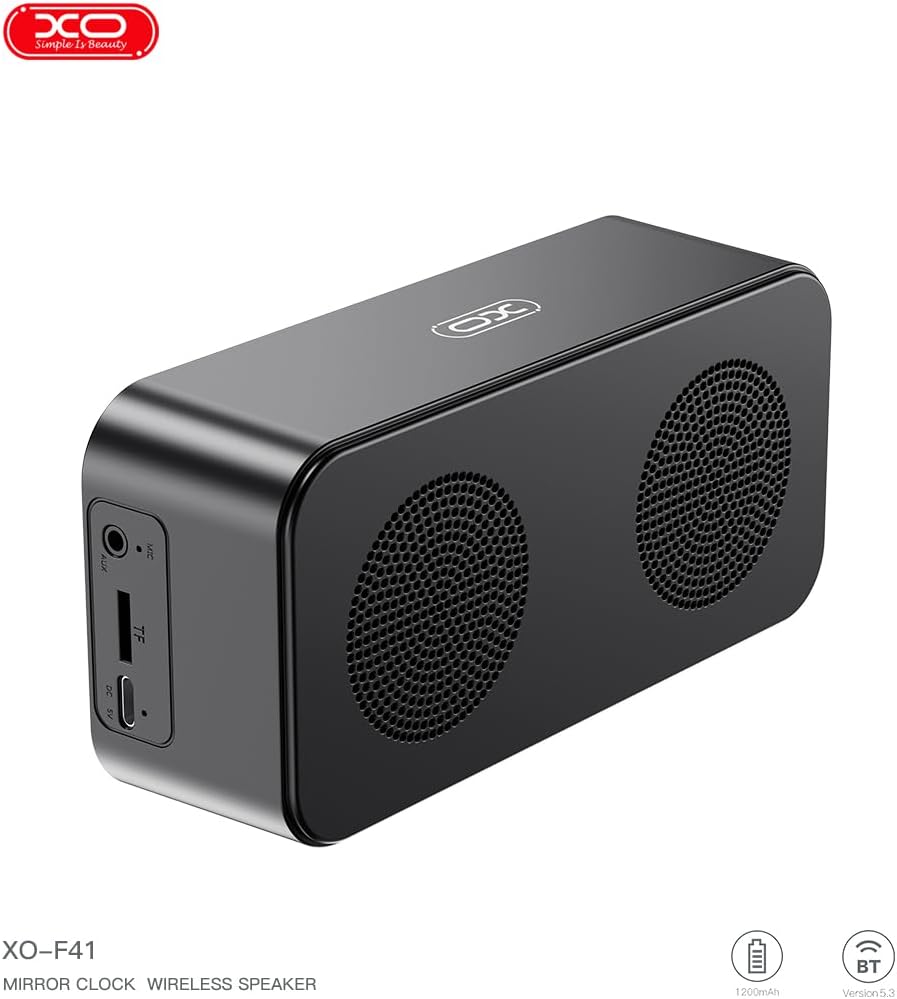
Imaxe 4.1: Lateral view of the XO F41 with ports labeled.
- Botón de encendido: Press and hold to power on/off. Short press to switch modes.
- Botón Reproducir/Pausa: Play or pause audio. Answer/end calls.
- Subir volume / seguinte pista: Prema brevemente para subir o volume, preme longa para a seguinte pista.
- Baixar volume / pista anterior: Presión curta para baixar o volume, presión longa para a pista anterior.
- Porto USB-C: Para cargar o dispositivo.
- Ranura para tarxetas TF: Insira unha tarxeta TF (MicroSD) para reproducir música localmente.
- Porto AUX: Para entrada de audio con cable.
5. Configuración
5.1 Carga do altofalante
- Conecta o cable USB-C fornecido ao porto de carga do altofalante.
- Conecta o outro extremo do cable a un adaptador de corrente USB (non incluído) ou ao porto USB dun ordenador.
- The charging indicator will illuminate. It takes approximately 3 hours for a full charge.
- The indicator will turn off or change color once fully charged.
5.2 Encendido/apagado
- Para acender: Press and hold the Power button for approximately 3 seconds. You will hear an audible prompt.
- Para apagar: Press and hold the Power button for approximately 3 seconds. You will hear an audible prompt.
6. Instrucións de funcionamento
6.1 Emparejamento Bluetooth
- Ensure the speaker is powered on and in Bluetooth mode. If not, short press the Power button to cycle through modes until "BT" or a Bluetooth icon appears on the display.
- No teu dispositivo móbil, activa o Bluetooth e busca os dispositivos dispoñibles.
- Select "XO-F41" from the list of devices.
- Unha vez emparellado, o altofalante indicará unha conexión correcta e poderás comezar a reproducir audio desde o teu dispositivo.
6.2 Modo de tarxeta TF
- Inserir unha tarxeta TF (MicroSD) con son MP3 files na ranura para tarxetas TF.
- The speaker will automatically switch to TF card mode and begin playing music. If not, short press the Power button to cycle to TF card mode.
- Use the Volume Up/Down buttons for track navigation and the Play/Pause button for playback control.
Modo de radio FM 6.3
- Short press the Power button to switch to FM radio mode. The display will show the FM frequency.
- Mantén premido o botón Reproducir/Pausa para buscar e gardar automaticamente as emisoras de FM dispoñibles.
- Prema brevemente os botóns Subir/Baixar volume para cambiar entre as emisoras gardadas.
6.4 Axustes do reloxo e da alarma
The XO F41 features a digital clock display. Specific instructions for setting the time and alarm are typically found in the detailed manual included with the product. Generally, a dedicated 'M' (Mode) or 'Set' button is used to enter time/alarm setting mode, and volume buttons are used to adjust values.

Image 6.1: The XO F41 speaker functioning as a bedside clock.
6.5 Axustar o brillo da pantalla
The display brightness is adjustable. Look for a dedicated button (often labeled with a sun icon or similar) or a combination of button presses (e.g., double-pressing the Power button) to cycle through brightness levels. Refer to the included quick start guide for exact steps.
7. Mantemento
- Limpeza: Usa un pano suave e seco para limpar a superficie do altofalante. Non empregues produtos de limpeza abrasivos nin solventes.
- Almacenamento: Garde o altofalante nun lugar fresco e seco, lonxe da luz solar directa e de temperaturas extremas, cando non o use durante períodos prolongados.
- Resistencia á auga: Este dispositivo non é impermeable. Evite a exposición á auga ou á humidade excesiva.
- Coidado da batería: Para prolongar a duración da batería, evite descargala completamente con frecuencia. Cargue o dispositivo regularmente, mesmo se non o usa de forma constante.
8 Solución de problemas
| Problema | Causa posible | Solución |
|---|---|---|
| O altofalante non se acende. | Batería baixa. | Cargue o altofalante durante polo menos 30 minutos. |
| Non se pode emparellar por Bluetooth. | O altofalante non está en modo de emparellamento; o Bluetooth está desactivado no dispositivo; está demasiado lonxe do dispositivo. | Ensure speaker is in Bluetooth mode. Enable Bluetooth on your device. Move speaker closer to your device (within 10 meters). |
| No sound from TF card. | Tarxeta TF non inserida correctamente; non compatible file format; no audio files on card. | Volva inserir a tarxeta TF. Asegúrese de files are in MP3 format. Verify audio files are present on the card. |
| Mala recepción de radio FM. | Sinal débil; interferencias ambientais. | Move the speaker to a different location. Re-scan for stations. |
9. Especificacións
| Característica | Detalle |
|---|---|
| Número de modelo | XO-F41 |
| Versión Bluetooth | Bluetooth V5.3 |
| Frecuencia Bluetooth | 2.402 GHz-2.480 GHz |
| Capacidade da batería | 1200 mAh |
| Entrada de carga | USB-C, CC 5 V/0.5 A |
| Tempo de carga | Aproximadamente 3 horas |
| Tempo de xogo | 8H (50% volume); 5H (100% volume) |
| Distancia efectiva | Menos de 10 metros |
| Potencia máxima | 5W |
| Unidade de altofalante | 52 mm |
| Relación sinal-ruído | > 80 dB |
| Dimensións do produto | 15 x 3.81 x 11 cm (aprox. 150 x 45 x 72 mm) |
| Peso do produto | 320 g (approx. 0.28 kg) |
| Material | Plástico |
| Característica especial | Brillo axustable |

Image 9.1: Detailed product parameters.
10. Información da garantía
The XO F41 Mirror Bluetooth Speaker comes with a standard manufacturer's warranty. Please refer to the warranty card included in your package for specific terms, conditions, and duration. Keep your purchase receipt as proof of purchase for any warranty claims.
11. Atención ao cliente
For further assistance, technical support, or inquiries regarding your XO F41 Mirror Bluetooth Speaker, please contact the retailer or manufacturer's customer service department. Contact details are typically provided on the product packaging or the official brand websitio.