1. Introdución
This manual provides detailed instructions for the setup, operation, and maintenance of your TANLANIN TE-3008BR-TA Vinyl Record Player. Please read this manual thoroughly before using the product to ensure proper function and longevity. Keep this manual for future reference.

Image 1.1: TANLANIN TE-3008BR-TA Vinyl Record Player. This image shows the overall design of the record player with its dust cover open, revealing the platter, tonearm, and a vinyl record.
2. Contido do paquete
Verifique que todos os elementos que se indican a continuación estean incluídos no seu paquete:
- 1x reprodutor de gravacións
- 1x Manual de instrucións (este documento)
- 1x 45 RPM Record Adapter
- 1x Replacement Needle (Stylus)
- 1x Adaptador AC
3. Produto rematadoview
Familiarize yourself with the components and controls of your record player.

Image 3.1: Front Panel Controls and Components. This diagram labels key parts of the record player, including the tonearm, headphone jack, AUX-in jack, mode selector, power/volume knob, and Bluetooth IN/OUT switch.
- Tone Arm: Suxeita o punteiro e o cartucho.
- Jack para auriculares: Para conectar auriculares para escoita privada.
- Conector de entrada AUX: Para conectar dispositivos de son externos mediante un cable de 3.5 mm.
- Selector de modo: Switches between Bluetooth input, LP mode (vinyl playback), and AUX input.
- Power ON/OFF & Volume Knob: Controls power and adjusts the volume of the built-in speakers or connected headphones.
- Bluetooth IN/OUT Switch: Toggles Bluetooth functionality between receiving audio (input) and transmitting audio (output).

Image 3.2: Adjustable Counterweight. This image highlights the counterweight located at the rear of the tonearm, used for balancing the tonearm and setting tracking force.

Image 3.3: Rear Panel Ports. This image shows the RCA Line Out jacks (red for right, white for left) and the DC 5V power input port on the back of the unit.
4. Instrucións de configuración
- Unpack the Record Player: Retire con coidado todos os compoñentes da embalaxe. Garde a embalaxe para futuros transportes ou almacenamentos.
- Colocación: Place the record player on a stable, level surface away from direct sunlight, heat sources, and excessive dust or vibrations. Ensure adequate ventilation around the unit.
- Conectar enerxía: Insert the AC adapter into the DC 5V input port on the rear of the record player (refer to Image 3.3). Plug the other end into a suitable wall outlet.
- Retirar o protector do punteiro: Gently remove the clear plastic stylus protector from the needle assembly. Be careful not to bend the stylus.
- Axustar o contrapeso:
- Carefully balance the tonearm by rotating the counterweight (refer to Image 3.2) until the tonearm floats horizontally.
- Once balanced, return the tonearm to its rest.
- Rotate the counterweight to apply the recommended tracking force. While a specific value is not provided, a common starting point for ceramic cartridges is 3-5 grams. Adjust slightly for optimal sound and to prevent skipping.
5. Instrucións de funcionamento
5.1. Playing Vinyl Records

Image 5.1: 3-Speed Playback. This image illustrates the record player's capability to play 7", 10", and 12" records at 33 1/3, 45, and 78 RPM speeds.
- Encendido: Turn the Power ON/OFF & Volume Knob clockwise to power on the unit.
- Select LP Mode: Rotate the Mode Selector to the "LP" position.
- Rexistro do lugar: Place a vinyl record on the platter. If playing a 7-inch (45 RPM) record with a large center hole, place the included 45 RPM adapter on the spindle first.
- Seleccionar velocidade: Set the speed switch (usually located near the platter) to the correct speed for your record (33 1/3, 45, or 78 RPM).
- Posición do brazo: Gently lift the tonearm using the cueing lever. Move the tonearm over the desired starting groove of the record.
- Brazo inferior: Slowly lower the tonearm onto the record using the cueing lever. The music will begin to play.
- Axustar o volume: Use the Power ON/OFF & Volume Knob to adjust the listening volume.
- Deter a reprodución: At the end of the record, the tonearm may automatically return to its rest (auto-stop feature, if present). Alternatively, manually lift the tonearm using the cueing lever and return it to its rest.
5.2. Bluetooth Input (Receiving Audio)

Image 5.2: Bluetooth Input Playback. This image demonstrates connecting a smartphone or tablet to the record player via Bluetooth to play digital music through its built-in speakers.
- Encendido: Turn the Power ON/OFF & Volume Knob clockwise to power on the unit.
- Select Bluetooth Input: Rotate the Mode Selector to the "BT" position. The Bluetooth indicator light will flash, indicating it's in pairing mode.
- Activate Bluetooth on Device: Activa o Bluetooth no teu teléfono intelixente, tableta ou outro dispositivo de son.
- Parear dispositivo: Busca "TANLANIN" (or similar device name) in your device's Bluetooth settings and select it to pair. Once connected, the Bluetooth indicator light will stop flashing and remain solid.
- Reproducir música: Start playing music on your connected device. The audio will play through the record player's built-in speakers.
- Axustar o volume: Use the Power ON/OFF & Volume Knob on the record player and/or the volume controls on your connected device to adjust the volume.
5.3. Bluetooth Output (Transmitting Audio)

Image 5.3: Bluetooth Output Ready. This image shows the record player transmitting audio to an external Bluetooth speaker, allowing for flexible audio setups.
- Encendido: Turn the Power ON/OFF & Volume Knob clockwise to power on the unit.
- Prepare External Bluetooth Device: Ensure your external Bluetooth speaker or headphones are in pairing mode.
- Activate Bluetooth Output: Press the Bluetooth IN/OUT Switch (TX mode). The Bluetooth indicator light will flash rapidly, searching for an external device.
- Conectar: The record player will automatically attempt to connect to the nearest available Bluetooth receiving device. Once connected, the indicator light will stop flashing and remain solid.
- Reproducir audio: Start playing a vinyl record or AUX input. The audio will be transmitted to your external Bluetooth device.
- Axustar o volume: Adjust the volume directly on your connected Bluetooth speaker or headphones. The record player's volume knob may not control the output volume in TX mode.
5.4. AUX Input (Connecting External Wired Devices)
- Encendido: Turn the Power ON/OFF & Volume Knob clockwise to power on the unit.
- Seleccionar o modo AUX: Rotate the Mode Selector to the "AUX" position.
- Conectar dispositivo: Connect your external audio device (e.g., smartphone, MP3 player) to the AUX-in Jack (3.5mm) on the front panel using an audio cable (not included).
- Reproducir música: Start playing music on your connected device. The audio will play through the record player's built-in speakers.
- Axustar o volume: Use the Power ON/OFF & Volume Knob on the record player and/or the volume controls on your connected device to adjust the volume.
5.5. RCA Line Out (Connecting to External Amplifiers/Speakers)
- Apagado: Ensure the record player and your external amplifier/speakers are powered off before making connections.
- Conectar os cables RCA: Connect RCA cables (not included) from the "LINE OUT" ports on the rear of the record player (refer to Image 3.3) to the corresponding audio input on your amplifier or powered speakers. Match red to red (right channel) and white to white (left channel).
- Encendido: Acenda o seu dispositivo externo amplifier/speakers, then power on the record player.
- Reproducir audio: Play a vinyl record. The audio will be routed through your external system.
- Axustar o volume: Adjust the volume using the controls on your external amplifier ou altofalantes alimentados.
5.6. Headphone Jack (Private Listening)
- Conectar auriculares: Plug your headphones into the Headphone Jack on the front panel.
- Reproducir audio: Play a vinyl record or use AUX input. The audio will automatically switch from the built-in speakers to your headphones.
- Axustar o volume: Use the Power ON/OFF & Volume Knob on the record player to adjust the headphone volume.
6. Mantemento
6.1. Limpeza do punteiro
A clean stylus ensures optimal sound quality and extends the life of your records. Use a soft brush designed for stylus cleaning, brushing gently from back to front (in the direction of play). Do not use excessive force or harsh chemicals.
6.2. Cleaning the Record Player
Wipe the exterior of the record player with a soft, dry, lint-free cloth. For stubborn marks, a slightly damp cloth can be used, followed by a dry cloth. Avoid using abrasive cleaners, waxes, or solvents.
6.3. Replacing the Stylus
The stylus (needle) will wear out over time and should be replaced after approximately 300-500 hours of playback. A replacement needle is included in your package. Refer to the following steps:
- Gently pull the old stylus cartridge downwards and forwards to detach it from the tonearm.
- Align the new stylus cartridge with the tonearm and push it upwards and backwards until it clicks securely into place.
- Ensure the stylus is firmly attached before playing any records.
7 Solución de problemas
| Problema | Causa posible | Solución |
|---|---|---|
| Sen poder | AC adapter not connected or power outlet faulty. | Ensure AC adapter is securely connected to the unit and a working power outlet. Check if the power knob is turned on. |
| Non hai son dos altofalantes | Volume too low, wrong mode selected, headphones connected, or external speakers connected via RCA. | Increase volume. Ensure Mode Selector is on "LP" or "AUX" (if applicable). Disconnect headphones. If using RCA, ensure external system is powered on and volume is adjusted there. |
| Son con saltos ou distorsión | Dirty record, dirty/worn stylus, incorrect counterweight setting, or unstable surface. | Clean the record. Clean or replace the stylus. Re-adjust the counterweight. Place the record player on a stable, level surface. |
| Bluetooth pairing issues (Input) | Record player not in pairing mode, device too far, or previously paired device interfering. | Ensure Mode Selector is on "BT" and indicator is flashing. Move device closer. Turn off Bluetooth on other nearby devices. Try unpairing and re-pairing. |
| Bluetooth pairing issues (Output) | External device not in pairing mode, record player not in TX mode, or device too far. | Ensure external speaker/headphones are in pairing mode. Press the Bluetooth IN/OUT Switch to activate TX mode (rapid flashing). Move devices closer. |
| Poor sound quality from built-in speakers | Inherent speaker limitations. | For enhanced audio, consider connecting to external powered speakers or an amplifier via the RCA Line Out ports. |
8. Especificacións
| Marca | TANLANINO |
| Número de modelo | TE-3008BR-TA |
| Dimensións do produto | 14.64 x 12.83 x 5.43 polgadas |
| Peso do elemento | 9.58 libras (4.35 quilogramos) |
| Velocidades compatibles | 33 1/3, 45, 78 RPM |
| Record Sizes Supported | 7", 10", 12" |
| Conectividade | Bluetooth Input, Bluetooth Output, AUX-in, RCA Line Out, Headphone Jack |
| Características especiais | Adjustable Counterweight, Built-in Stereo Speakers, Full-size Platter |
| Material | Acrylic, Wood |
| Cor | marrón |
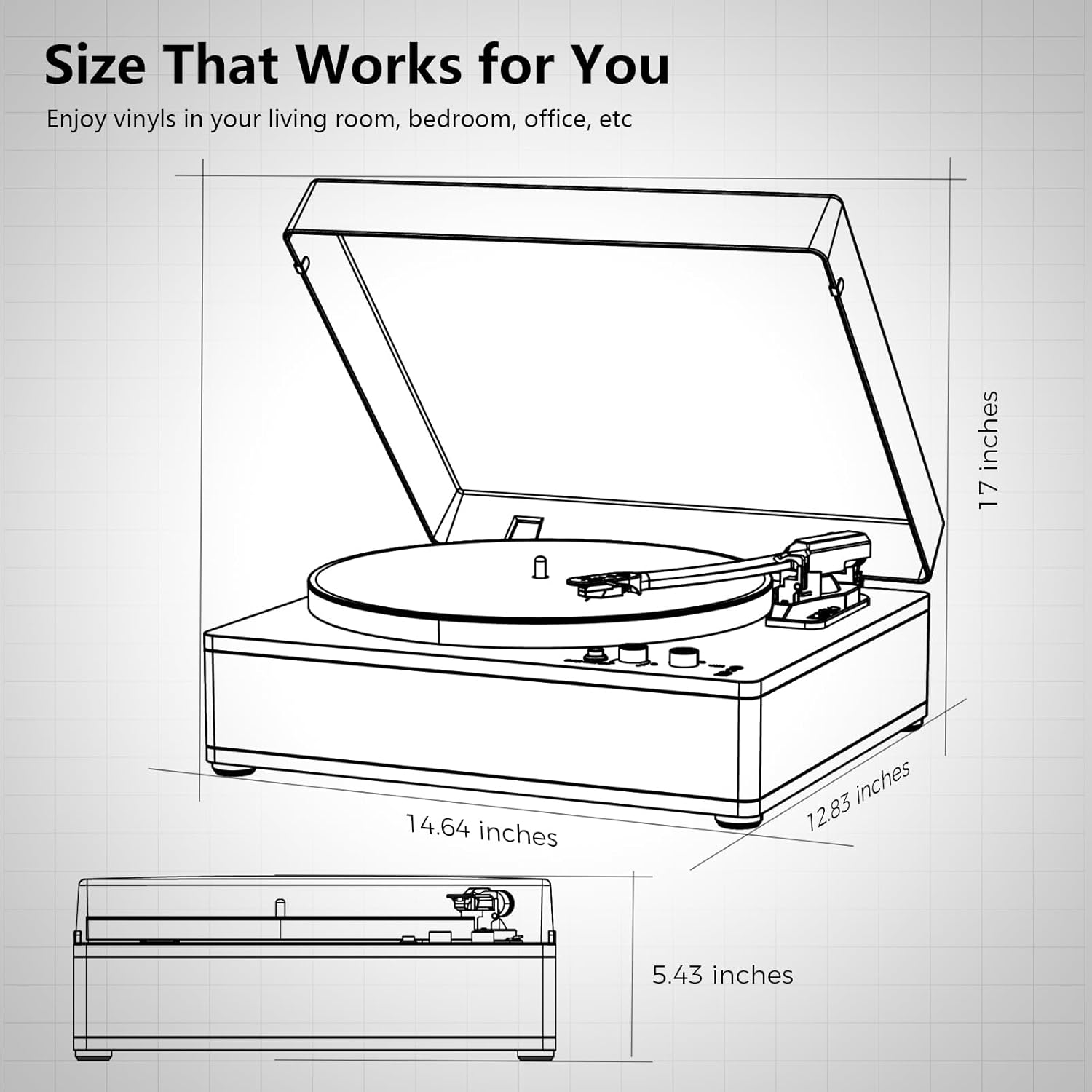
Image 8.1: Product Dimensions. This diagram provides a visual representation of the record player's measurements: 14.64 inches (width), 12.83 inches (depth), and 5.43 inches (height with dust cover closed).
9. Garantía e soporte
This product is covered by a manufacturer's warranty. For specific warranty terms and conditions, please refer to the documentation provided with your purchase or contact TANLANIN customer support. For technical assistance or further inquiries, please visit the official TANLANIN websitio ou póñase en contacto co seu departamento de atención ao cliente.
Para obter máis información, pode visitar o TANLANIN Store on Amazon.


