1. Introdución
This manual provides comprehensive instructions for the installation, operation, maintenance, and troubleshooting of your Xigmatek Bano EN44250 computer case. Please read this manual thoroughly before beginning assembly to ensure proper setup and optimal performance.
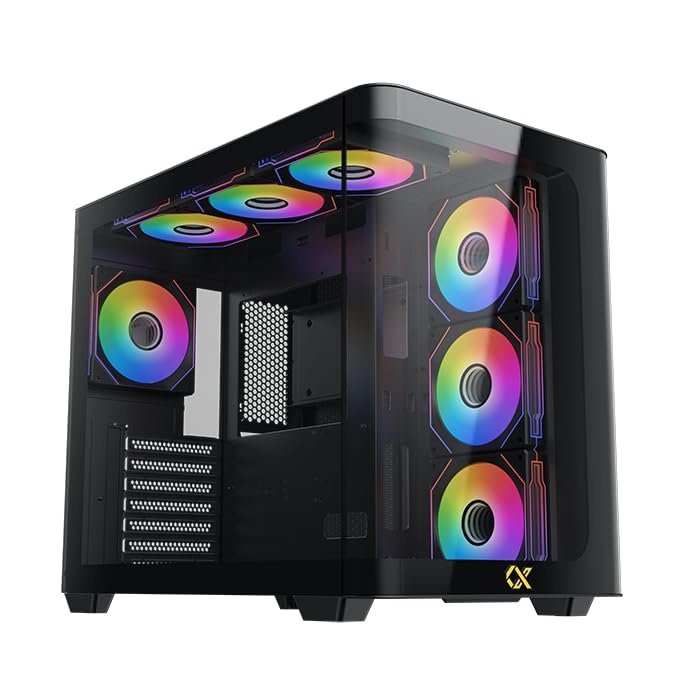
Figure 1: Xigmatek Bano EN44250 Computer Case (Exterior View)
2. Características
- Material: Constructed from high-quality steel alloy for durability and long-term use.
- Soporte para placa base: Compatible with E-ATX, ATX, Micro ATX, and Mini ITX motherboards.
- Sistema de refrixeración: Supports both air and liquid cooling solutions, with multiple fan and radiator mounting options.
- Baías de condución: Features five internal drive bays compatible with both 2.5-inch and 3.5-inch hard drives/SSDs.
- Panel de E/S: Equipped with one USB 3.0 port, two USB 2.0 ports, and HD audio jacks for seamless connectivity.
- Deseño: Stylish black finish with a curved tempered glass panel for showcasing internal components and superior airflow.
- Slots de expansión: Includes 7 expansion slots.
- Montaxe da fonte de alimentación: Supports rear-mounted power supplies.

Figure 2: Internal Layout of the Case
3. Instrucións de configuración
3.1 Preparación do caso
- Desembale a caixa e retire todos os materiais de embalaxe.
- Carefully remove the tempered glass side panel by unscrewing the thumb screws. Place it on a soft, flat surface to prevent scratches.
- Identify the accessory box inside the case, which contains screws, standoffs, and cable ties.
3.2 Instalación da placa base
- Install the I/O shield (if not pre-installed) into the rear opening of the case.
- Align your motherboard with the pre-installed standoffs. If your motherboard form factor (E-ATX, ATX, Micro ATX, Mini ITX) requires additional standoffs, install them in the appropriate holes.
- Carefully place the motherboard onto the standoffs and secure it with the provided screws.
3.3 Instalación da Unidade de Alimentación (PSU).
- Mount the PSU into the designated rear compartment of the case.
- Fixe a fonte de alimentación con parafusos na parte traseira da caixa.
- Route the necessary power cables through the cable management cutouts to the motherboard and other components.
3.4 Storage Drive Installation (2.5"/3.5" HDDs/SSDs)
- Locate the internal drive bays. The case supports five drive bays compatible with 2.5-inch and 3.5-inch drives.
- For 3.5-inch drives, slide the drive into the tool-less tray (if applicable) or secure it with screws.
- For 2.5-inch drives, secure them to the designated mounting points or adapters.
- Connect SATA data and power cables to each installed drive.
3.5 Cooling System Installation (Fans/Radiators)
The Xigmatek Bano EN44250 supports various fan and radiator configurations for optimal airflow. Refer to the diagrams below for compatible sizes and locations.

Figure 3: Fan and Radiator Mounting Options (Side View)

Figure 4: Fan and Radiator Mounting Options (Top View)
- Install case fans or liquid cooling radiators into the desired mounting positions using the appropriate screws.
- Connect fan power cables to the motherboard fan headers or a fan controller.
3.6 Front I/O Panel Connections
Connect the front I/O panel cables to the corresponding headers on your motherboard. These include:
- Cabeceira USB 3.0
- Cabeceiras USB 2.0
- HD Audio header
- Power switch, reset switch, HDD LED, and power LED headers

Figura 5: Panel frontal de E/S
4. Directrices de funcionamento
Once all components are installed and connected, replace the side panel. Ensure all cables are neatly managed to avoid obstructing airflow. Power on your system using the front panel power button. Monitor temperatures and fan speeds to ensure optimal cooling performance.
5. Mantemento
Regular maintenance helps prolong the life of your computer components and ensures efficient cooling.
- Limpeza do po: Limpe periodicamente os filtros de po (se os hai) e os compoñentes internos con aire comprimido. Asegúrese de que o sistema estea apagado e desconectado antes de limpalo.
- Xestión de cables Review cable routing periodically to ensure no cables are obstructing fan blades or airflow paths.
- Limpeza exterior: Limpe as superficies exteriores cun suave, damp pano. Evite produtos de limpeza abrasivos ou solventes.
6 Solución de problemas
If you encounter issues during or after assembly, consider the following common troubleshooting steps:
- O sistema non se acende:
- Check all power connections, including the PSU to wall outlet, PSU to motherboard (24-pin and CPU 8-pin), and front panel power switch header.
- Asegúrese de que o interruptor da fonte de alimentación estea na posición "ON".
- Sen saída de visualización:
- Verify that your monitor is connected to the graphics card (not the motherboard I/O if using a dedicated GPU).
- Reinstala a tarxeta gráfica e os módulos de RAM.
- Problemas de sobrequecemento:
- Ensure all case fans are spinning and correctly oriented for optimal airflow (intake/exhaust).
- Check CPU cooler installation and thermal paste application.
- Clean any dust buildup from fans and radiators.
- O USB/audio do panel frontal non funciona:
- Verify that the front panel USB and audio headers are correctly connected to the motherboard.
7. Especificacións
| Característica | Detalle |
|---|---|
| Fabricante | XIGMATEK Co., Ltd. |
| Número de modelo | EN 44250 |
| Dimensións do produto (L x W x H) | 45 x 53.3 x 25.8 cm |
| Peso | 9.44 kg |
| Compatibilidade da placa base | E-ATX, ATX, Micro ATX, Mini ITX |
| Tipo de caso | Torre |
| Cor | Negro |
| Material | Aliaxe de aceiro |
| Montaxe da fonte de alimentación | Montaxe traseira |
| Método de arrefriamento | Aire, Auga |
| Liquidación do refrigerador da CPU | Ata 16 cm |
| VGA Card Length Support | Ata 41 cm |
| PSU Length Support | Ata 22 cm |
| Ranuras de expansión | 7 |
| Baxas de unidades internas | 5 (compatible with 2.5" and 3.5" drives) |
| Portos de E / S dianteiros | 1x USB 3.0, 2x USB 2.0, Audio HD |
8. Garantía e soporte
For warranty information and technical support, please refer to the official Xigmatek websitio web ou póñase en contacto co seu distribuidor local. Garde o comprobante de compra para reclamacións de garantía.
Recursos en liña: www.xigmatek.com


