1. Introdución
The COLBOR CF5 Portable Fog Machine is a compact and versatile device designed for creating atmospheric fog effects in various settings, including photography, videography, parties, and stage performances. It features adjustable smoke density, RGB lighting, a foldable body, and convenient wireless control.
2. Que hai na caixa
Carefully unpack all items and ensure everything listed below is present:
- COLBOR CF5 Fog Machine (x1)
- Fog Juice (60ml) (x1)
- Magnetic Fan & RGB Light (x1)
- Chamber (x1)
- Tube Adapter (x1)
- Straight Tube (x1)
- Open Cell Foam (x1)
- Adapter Cover (x1)
- Bent Tube (x2)
- Control remoto (x1)
- Flexible Pipe (x1)
- Cable de carga tipo C (x1)
- Bolsa de transporte (x1)
- Tarxeta de garantía (x1)

Image: COLBOR CF5 Fog Machine with all accessories, including fog liquid, remote, various tubes, and carrying case.

Image: Detailed diagram illustrating each component included with the COLBOR CF5 Fog Machine.
3. Guía de configuración
Carga inicial:
Before first use, fully charge the COLBOR CF5 using the provided USB-C charging cable. The device features a display that indicates battery level. A full charge can take approximately one hour.
Filling Fog Liquid:
Unpack the oil canister (chamber) and screw it into the designated port on the fog machine. Carefully pull up the rubber cap on the canister and pour the vegetable-based fog liquid into the chamber. Fill it to at least three-quarters full for the first use. Ensure the rubber cap is firmly replaced after filling.
Video: Demonstrates how to set up the COLBOR CF5, including charging and filling the fog liquid. (Source: FotoPal)
Importante: After filling the fog liquid for the first time, wait for 5 minutes to allow the liquid to properly seep into the system. This prevents dry burning and potential damage to the unit.
Accesorios de montaxe:
The device features a magnetic attachment point for the fan and RGB light module. Simply place it on top of the fog machine. Various tubes and adapters can be attached to the output for different fog dispersion effects.

Image: The COLBOR CF5 demonstrating its foldable body and various tube attachments for directing smoke flow.
4. Instrucións de funcionamento
Encendido/apagado:
Press and hold the power button (yellow circle) for 3 seconds to turn the device on or off. The display will illuminate upon activation.
Adjusting Smoke Density and Fan Speed:
Use the control buttons on the side of the unit to adjust the smoke density (25 levels available) and fan speed. The display will show the current settings. You can also set interval durations and the number of cycles for automated fog output.
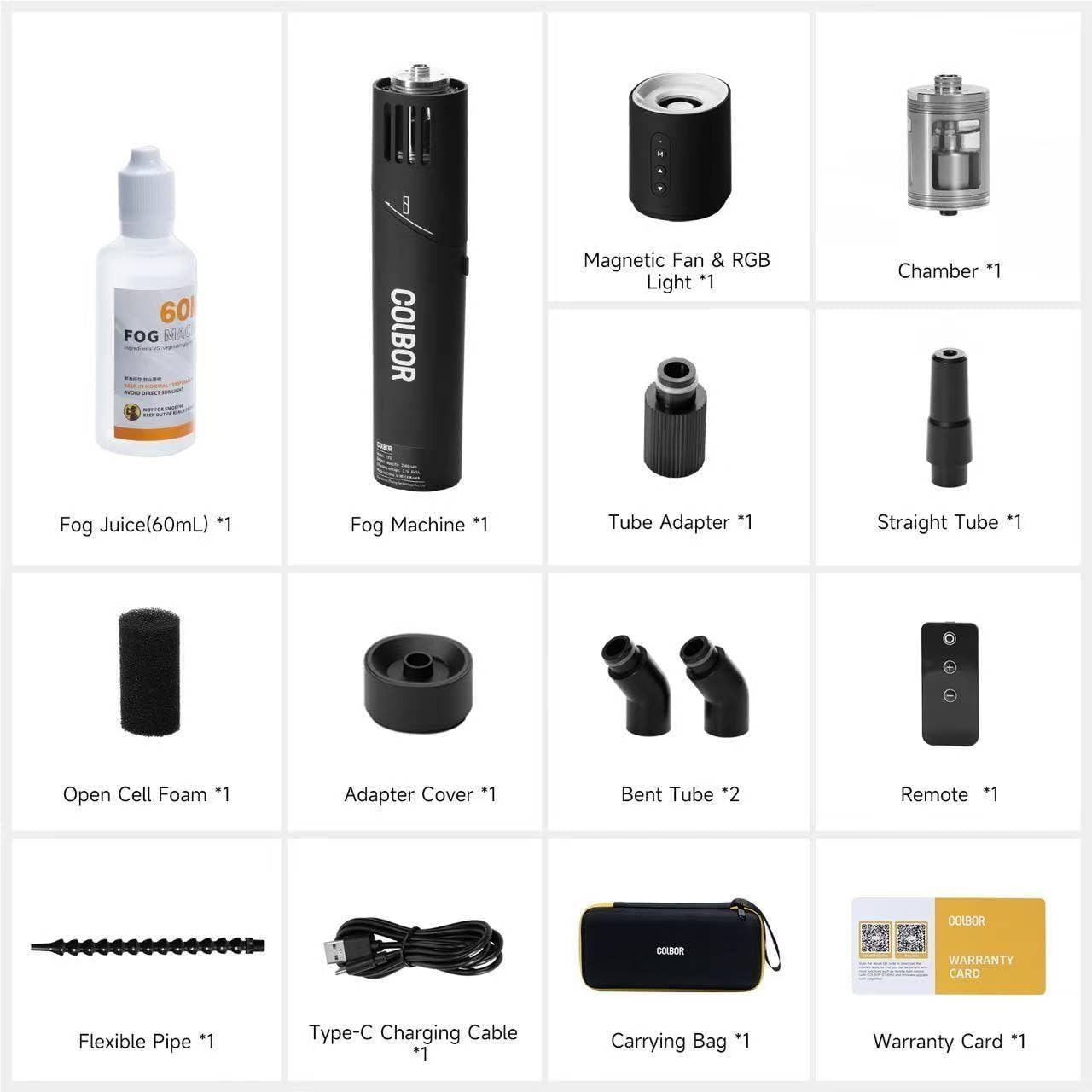
Image: Close-up of the COLBOR CF5 display, illustrating the controls for adjusting smoke density and fan speed.
Control remoto sen fíos:
The included remote control allows for convenient adjustment of smoke output from up to 10 meters away. Use the remote to activate fog, adjust settings, and control the RGB lighting.
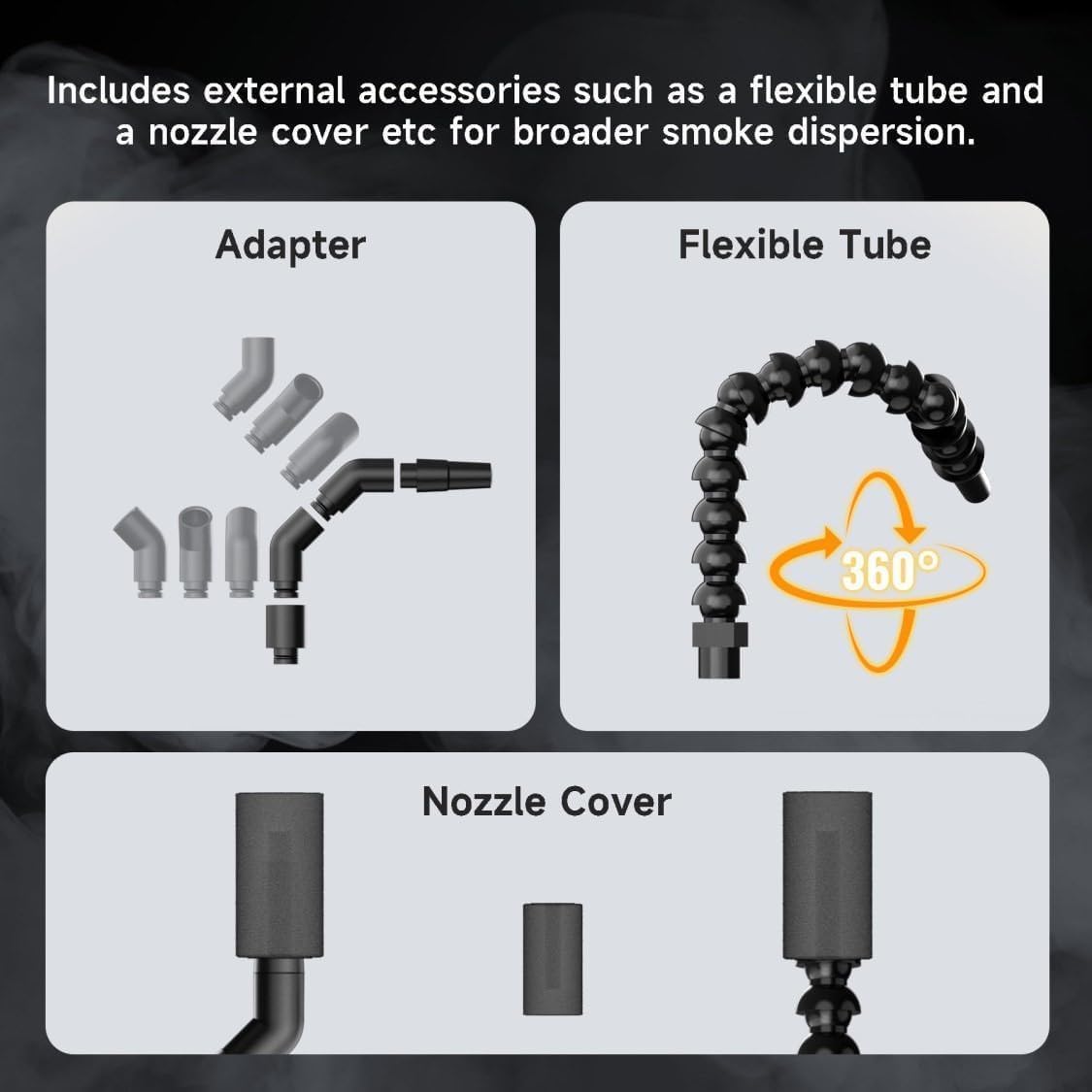
Image: The wireless remote control for the COLBOR CF5, enabling convenient operation from a distance.
Iluminación RGB:
The magnetic RGB light module offers 360-degree color ring adjustments and a 3-level fan speed adjustment to enhance your fog effects with various colors.

Image: The COLBOR CF5 with its magnetic RGB light and fan attachment, showcasinOpcións de cor g.
5. Mantemento
- Limpeza: Regularly wipe down the exterior of the fog machine with a soft, dry cloth. If fog residue accumulates, gently clean it.
- Almacenamento de líquidos: Store the fog liquid in a cool, dry place away from direct sunlight. Ensure the liquid container is sealed when not in use.
- Almacenamento a longo prazo: For extended periods of non-use, ensure the fog machine is clean and the liquid chamber is empty. Store the device and all accessories in the provided carrying case.
6 Solución de problemas
| Problema | Causa posible | Solución |
|---|---|---|
| No fog output or weak fog | Low fog liquid level; liquid not fully absorbed; unit not heated sufficiently. | Refill fog liquid. Ensure 5-minute waiting period after initial fill. Allow unit to warm up for a few seconds after turning on. |
| O dispositivo non se acende | Batería baixa; o botón de acendido non se mantivo premido o tempo suficiente. | Carga o dispositivo completamente. Mantén premido o botón de acendido durante 3 segundos. |
| O control remoto non funciona | Remote battery low; out of range. | Replace remote battery. Ensure remote is within 10 meters of the device. |
| Fog liquid leakage | Canister not screwed in tightly; rubber cap not sealed. | Ensure the oil canister is tightly screwed and the rubber cap is firmly pushed in. |
7. Especificacións
- Modelo: CF5
- Peso do artigo: 2.13 libras
- Dimensións do paquete: 11.61 x 5.83 x 3.62 polgadas
- País de orixe: China
- Baterías: 1 batería non estándar (incluída)
- Saída: 40W (for 10 min continuous smoke)
- Smoke Density Control: 25 niveis
- Iluminación RGB: Magnetic, 360-degree color ring adjustments
- Velocidade do ventilador: 3 niveis
- Wireless Control Range: Ata 10 metros
- Primeiro dispoñible: 20 de decembro de 2024
8. Garantía e soporte
The COLBOR CF5 Portable Fog Machine comes with a Warranty Card. Please refer to the card for detailed information regarding warranty coverage and terms. For technical support, troubleshooting assistance, or any inquiries not covered in this manual, please contact COLBOR customer service through the official channels provided on the warranty card or product packaging.


