Introdución
This manual provides instructions for the MOFII Bluetooth Wireless Keyboard, Model B0DR2NLFYW. This keyboard is designed for multi-device compatibility, featuring a retro typewriter-style design with round keys and Bluetooth 5.1 connectivity.
Lea este manual detidamente antes de usar o produto para garantir o seu correcto funcionamento e evitar danos.
Contido do paquete
- MOFII Bluetooth Wireless Keyboard
- Manual de usuario
- Keycap Puller (for maintenance)
Configuración
1. Instalación da batería
The keyboard requires batteries for operation. Locate the battery compartment on the underside of the keyboard. Insert the required batteries, ensuring correct polarity.

Image: Underside of the MOFII keyboard, showing the battery compartment and adjustable feet.
2. Adjusting Keyboard Angle
For ergonomic comfort, you can adjust the keyboard's typing angle. Flip the keyboard over and extend the two small feet located at the top corners of the underside.
Refer to the image above for the location of the adjustable feet.
3. Emparellamento con dispositivos (Bluetooth)
The MOFII Bluetooth Wireless Keyboard supports connecting up to three Bluetooth devices simultaneously. Follow these steps to pair your keyboard:
- Asegúrate de que o teclado estea acendido.
- Press and hold one of the Bluetooth channel buttons (BT1, BT2, or BT3) for 3 seconds until the indicator light flashes, indicating pairing mode.
- On your device (iPad, Laptop, PC, Mac, Smartphone), navigate to Bluetooth settings.
- Busca "CANDY BT" or a similar device name and select it to connect.
- Once connected, the indicator light for the selected channel will stop flashing and remain solid.

Image: The MOFII keyboard illustrating the Bluetooth pairing process with indicator lights for BT1, BT2, and BT3.
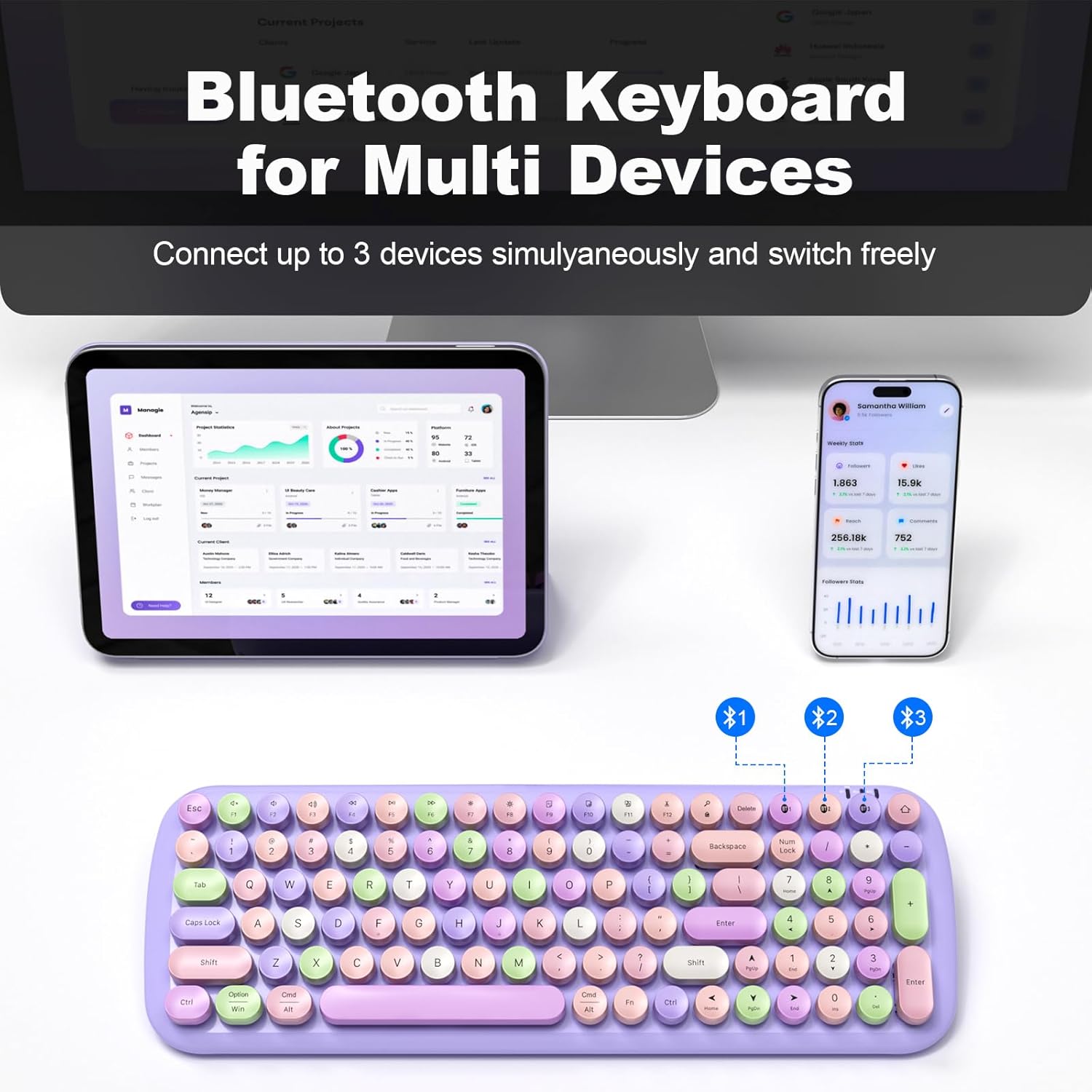
Image: The MOFII keyboard demonstrating multi-device connectivity via Bluetooth, with indicators for three paired devices.
Instrucións de funcionamento
1. Cambio entre dispositivos conectados
To switch between your three paired Bluetooth devices, simply press the corresponding BT1, BT2, or BT3 button. The keyboard will automatically connect to the selected device.
2. Keyboard Layout and Special Functions
The keyboard features a full-size layout with round, retro-style keys. It includes standard alphanumeric keys, a numeric keypad, and function keys (F1-F12) with additional multimedia and system control functions accessible via the Fn chave.

Imaxe: Máis deview of the full-size MOFII keyboard layout, highlighting the function keys and their secondary actions.
3. Modo de aforro de enerxía
To conserve battery life, the keyboard will automatically enter sleep mode after 5 minutes of inactivity. To wake it up, press any key.
4. Compatibilidade
This keyboard is compatible with a wide range of operating systems and devices, including:
- Windows
- Mac OS
- iOS (iPad, iPhone)
- Android (Tablets, Smartphones)

Image: The MOFII keyboard wirelessly connected to a Smart TV, illustrating its use for controlling smart devices from a distance.
Mantemento
1. Limpeza do teclado
Para limpar o teclado, limpe a superficie con coidado cun pano suave eamp pano. Evite o uso de produtos químicos agresivos ou materiais abrasivos.
2. Detachable Keycaps
The keycaps are detachable for easier cleaning. Use the provided keycap puller to carefully remove individual keycaps. Reattach them by aligning and pressing firmly until they click into place.

Imaxe: Primeiro plano view of the MOFII keyboard showing detachable keycaps and the keycap puller tool for easy cleaning.
3. Substitución da batería
When the keyboard's performance diminishes or it fails to power on, it may be time to replace the batteries. Open the battery compartment on the underside and replace with new batteries of the correct type and size.
Resolución de problemas
Keyboard Not Connecting/Pairing:
- Ensure the keyboard has fresh batteries and is powered on.
- Asegúrate de que o Bluetooth estea activado no teu dispositivo.
- Confirm the keyboard is in pairing mode (indicator light flashing) by pressing and holding a BT channel button for 3 seconds.
- Tenta desvincular e volver vincular o teclado desde a configuración de Bluetooth do teu dispositivo.
- Ensure the keyboard is within the 33-foot (10-meter) operating range of your device.
As teclas non responden:
- Comprobe o nivel da batería e substitúela se é necesario.
- Asegúrate de que o teclado estea conectado correctamente ao teu dispositivo.
- Clean under the keycaps if debris is suspected to be interfering with key presses.
Keyboard Enters Sleep Mode Too Quickly:
- This is a power-saving feature. Press any key to wake the keyboard. This setting is not user-adjustable.
Especificacións
| Marca | MOFII |
| Modelo | B0DR2NLFYW |
| Tecnoloxía de conectividade | Bluetooth 5.1 |
| Dispositivos compatibles | iPad, Laptop, PC, iPhone, Tablets, Smartphone (Windows, Mac OS, iOS, Android) |
| Rango de operación | Ata 33 pés (10 metros) |
| Fonte de enerxía | Alimentado por batería |
| Dimensións do produto | 15.35 x 5.31 x 1.38 polgadas |
| Peso do elemento | 1.63 libras |
| Material | Plástico |
| Característica especial | Round Key, Multi-Device Connectivity |
Garantía e Soporte
For warranty information and technical support, please refer to the official MOFII websitio web ou póñase en contacto directamente co servizo de atención ao cliente. Garde o recibo de compra para reclamacións de garantía.
Manufacturer: MOFII


