1. Introdución
This manual provides detailed instructions for the safe and efficient installation, operation, and maintenance of your NB ERGONOMIC G80 Extra Height Gaming Monitor Arm. Please read this manual thoroughly before installation and retain it for future reference. This monitor arm is designed to support monitors from 32 to 60 inches, weighing between 2 kg and 20 kg, with VESA 75x75mm or 100x100mm mounting patterns.
2. Información de seguridade
Warning: Please be careful when releasing the arm to avoid injury from mechanical spring force. Always follow the installation steps carefully.
- Ensure your desktop is suitable for monitor arm installation. Avoid fragile surfaces like marble or glass, desktops with too narrow clamp surfaces due to bottom baffles, or those with irregular or beveled edges.
- Verify your monitor's VESA compatibility (75x75mm or 100x100mm). If your monitor has an embedded hole, ensure the panel can be placed directly. If not, use the provided heightening pads and lengthened screws.
- Do not exceed the maximum weight capacity of 20 kg (44 lbs) or the specified screen size range (32-60 inches).
- Manteña os nenos e as mascotas afastados durante a instalación.
- Tighten all screws securely but do not overtighten.
3. Contido do paquete
Comprobe que estean presentes todos os compoñentes antes de comezar a instalación:

Image: All parts included in the NB ERGONOMIC G80 monitor arm package.
- Monitor Arm Assembly (Main Arm, Pole, Base)
- Prato VESA
- C-Clamp Hardware de montaxe
- Grommet Mounting Hardware
- Clips de xestión de cables
- Hex Keys and Installation Tools
- Various Screws and Spacers for VESA Mounting
4. Configuración e instalación
4.1 Comprobacións previas á instalación
Before mounting, ensure your desk and monitor meet the compatibility requirements.

Imaxe: Examples of desktop types unsuitable for monitor arm mounting.
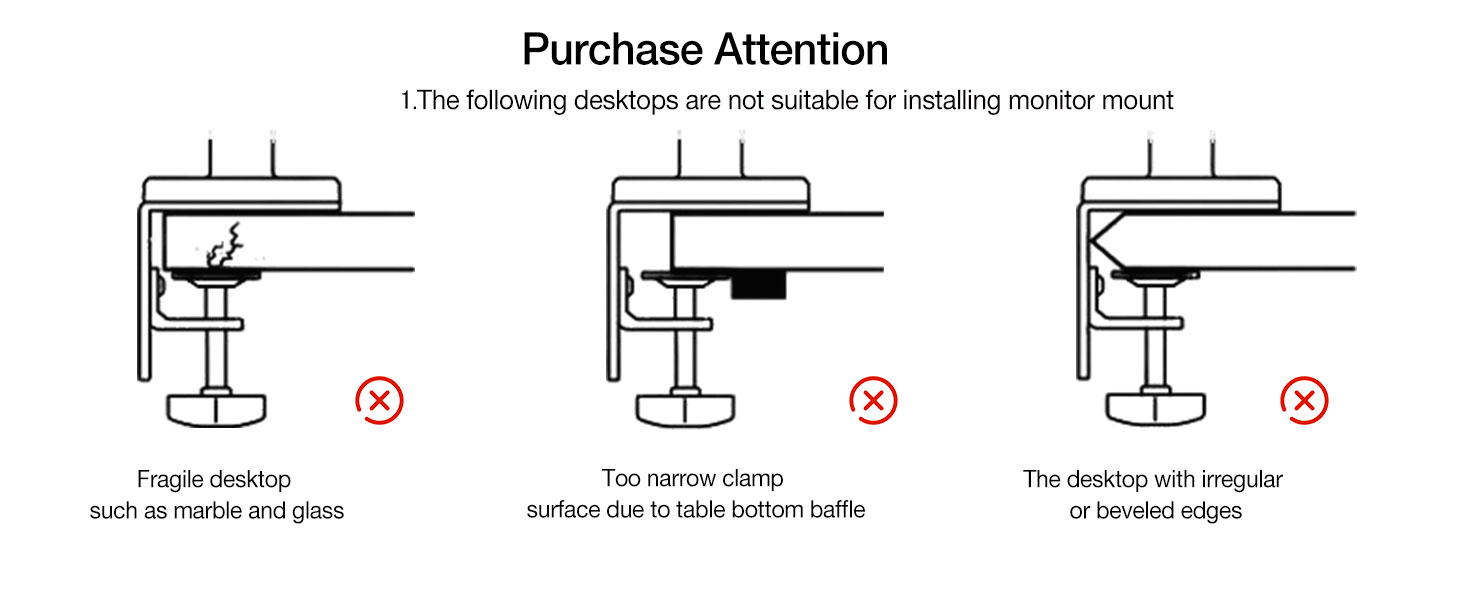
Image: Guide to confirming VESA hole positions on your monitor.
4.2 Opcións de montaxe
The G80 monitor arm offers two installation methods: C-Clamp and Grommet.

Image: Two available mounting methods: Grommet and C-Clamp.
C-Clamp Tipo:
- Suitable for desk thickness: 20-90mm (0.8"-3.5").
- Minimum depth of bottom above: 50mm (1.97").
Grommet Type:
- Suitable for desk thickness: 20-90mm (0.8"-3.5").
- Hole diameter: 10-60mm (0.4"-2.3").
4.3 Instalación paso a paso

Image: Product Installation Guide, steps 1-4.
- Instalar a base: Securely attach the chosen mounting base (C-Clamp or Grommet) to your desk. Ensure it is stable and tight.
- Prepare the Arm: The arm comes pre-compressed. Carefully press the upper arm down to relieve tension.
- Release Spring Force: While pressing the upper arm, slowly release the wrapping tape that secures the arm. Maintain control to prevent sudden movement.
- Unfold the Bracket: Slowly release the arm until the bracket is fully unfolded.
4.4 Monitor Attachment
The G80 features a quick-release VESA plate for easy monitor attachment.

Image: Quick Installation and Disassembly of the VESA plate.
- Attach the VESA plate to the back of your monitor using the appropriate screws and spacers.
- Slide the VESA plate with the attached monitor onto the arm's mounting head until it clicks securely into place.
5. Funcionamento
5.1 Axustar a posición do monitor
The G80 monitor arm offers extensive adjustability for optimal viewcomodidade.

Image: Monitor arm demonstrating swivel, rotation, and tilt adjustments.
- Axuste de altura: The arm allows for significant vertical movement, rising up to 27 inches above the desk.
- Inclinación: Adjust the monitor angle from -50° to +50° to reduce glare and optimize viewing.
- Xiratorio: Rotate the monitor arm 360° horizontally.
- Rotación: Rotate the monitor 360° from landscape to portrait orientation.
- Extensión: The arm provides a maximum extension of 25 inches (635mm).
5.2 Tension Adjustment
Adjust the arm's tension to match your monitor's weight for smooth movement and stable positioning.

Image: Guide for adjusting arm tension based on monitor weight.
- If the monitor rises: Turn the adjustment screw in the '–' direction to reduce tension for a lighter monitor.
- If the monitor falls: Turn the adjustment screw in the '+' direction to increase tension for a heavier monitor.
- Nota: Always hang your monitor before performing tension adjustment.
5.3 Control de iluminación RGB
The integrated RGB lighting adds aesthetic appeal to your setup.

Image: Instructions for controlling the RGB lighting on the monitor arm base.
- Activar: Press the button on the base once to turn on the RGB light.
- Modo de axuste: Press the button again to cycle through different light modes/colors.
- Desactivar: Mantén presionado o botón para apagar a luz RGB.
6. Mantemento
To ensure the longevity and optimal performance of your monitor arm, follow these maintenance guidelines:
- Comprobe regularmente todos os parafusos e conexións para garantir que estean ben axustados.
- Clean the arm and base with a soft, dry cloth. Avoid abrasive cleaners or solvents.
- Do not apply excessive force when adjusting the arm; it is designed for smooth movement.
- Periodically check the cable management system to ensure cables are not pinched or damaged.
7 Solución de problemas
| Problema | Causa posible | Solución |
|---|---|---|
| Monitor arm rises too high or won't stay down. | Tension is too high for the monitor's weight. | Turn the tension adjustment screw in the '–' direction to decrease tension. |
| Monitor arm sags or won't stay up. | Tension is too low for the monitor's weight. | Turn the tension adjustment screw in the '+' direction to increase tension. |
| O monitor oscila ou parece inestable. | Mounting base or VESA plate not securely tightened. | Check and tighten all screws on the desk clamp/grommet and the VESA plate connection. Ensure desk is stable. |
| RGB light is not working. | Power cable not connected or light is off. | Ensure the USB power cable for the RGB light is properly connected. Press the control button on the base to turn it on. |
| Difficulty adjusting arm movement. | Tension is not correctly set for monitor weight. | Adjust the tension screw as described in Section 5.2. |
8. Especificacións
| Característica | Especificación |
|---|---|
| Modelo | G80 |
| Compatibilidade do tamaño da pantalla | 32 to 60 inches (Curved / Ultra-wide / Flat) |
| Capacidade de carga | 2 kg a 20 kg (4.4 lb a 44 lb) |
| Compatibilidade VESA | 75x75mm, 100x100mm |
| Axuste de altura | Up to 27 inches above desk (Max. 29.1" / 740mm lift, 10.2" / 260mm range) |
| Ángulo de inclinación | ±50° (-50° to +50°) |
| Ángulo de giro | 360° |
| Ángulo de rotación | 360° (±90° at VESA plate) |
| Extensión máxima do brazo | 25 polgadas (635 mm) |
| Método de montaxe | C-Clamp or Grommet |
| Grosor do escritorio (C-Cl)amp/Ollal) | 20-90 mm (0.8"-3.5") |
| Diámetro do orificio do ilhó | 10-60 mm (0.4"-2.3") |
| Material | Aluminum alloy, Cold-rolled steel, ABS |
| Características especiais | Built-in RGB-Light, Mechanical ProSpring Technology, Cable Management |
9. Garantía e soporte
For warranty information and technical support, please refer to the product packaging or contact NB ERGONOMIC customer service through the retailer where the product was purchased. Keep your proof of purchase for warranty claims.


