Introdución
Thank you for choosing the AOLON Curve Smart Watch. This device is designed to enhance your daily life with advanced health monitoring, fitness tracking, and smart communication features. This manual provides essential information for setting up, operating, and maintaining your new smart watch.

Image: The AOLON Curve Smart Watch in Rose Gold, showcasinpolo seu deseño elegante e a súa pantalla vibrante.
O que hai na caixa
Upon opening your AOLON Curve Smart Watch package, you should find the following items:
- AOLON Curve Smart Watch (with Watch Band attached)
- Cable de carga
- Manual de usuario (este documento)

Image: A visual representation of the product packaging contents, showing the watch, charging cable, and user manual.
Configuración
1. Carga inicial
Before first use, fully charge your smart watch. A full charge typically takes approximately 2.5 hours. The watch offers up to 7 days of normal use and over 20 days in power-saving mode on a single charge.
- Conecta o cable de carga magnético aos puntos de carga da parte traseira do reloxo.
- Conecta o extremo USB do cable a un adaptador de corrente USB estándar (non incluído) ou a un porto USB dun ordenador.
- A pantalla do reloxo indicará o estado de carga.

Image: The smart watch connected to its magnetic charging cable, illustrating the charging process and battery icon.
2. Descarga da aplicación e emparellamento
To unlock the full potential of your AOLON Curve Smart Watch, download the companion app and pair it with your smartphone.
- Scan the QR code in your physical manual or search for "GloryFit" in the Apple App Store (for iOS) or Google Play Store (for Android).
- Instala o GloryFit aplicación no teu smartphone.
- Asegúrate de que o Bluetooth estea activado no teu smartphone.
- Open the GloryFit app, navigate to the "Device" section, and tap "Add Device".
- Select "Aolon Curve2" from the list of available devices to pair.
- Siga as indicacións en pantalla para completar o proceso de vinculación.

Image: A step-by-step guide illustrating how to download the GloryFit app and connect the AOLON Curve Smart Watch to a smartphone.
Funcionamento do reloxo intelixente
1. Navegación básica
The AOLON Curve Smart Watch features a 1.83-inch HD full-view curved display with a responsive touchscreen and an optical rotary button for intuitive navigation.
- Pase o dedo cara arriba/abaixo: Desprácese polos menús e as notificacións.
- Pase o dedo cara á esquerda/dereita: Access quick functions or different watch faces.
- Toca: Selecciona un elemento ou confirma unha acción.
- Prema o botón lateral: Return to the home screen or power on/off.
- Rotate Side Button: Scroll through menus or adjust settings.

Imaxe: Unha detallada view of the smart watch's 1.83-inch HD display with 3D curved glass, highlighting its visual clarity.
2. Personalización das esferas do reloxo
Personalize your watch with over 120 customizable watch faces available through the GloryFit app. You can also set your own photos as watch faces.
- From the watch home screen, long-press the display to quickly change watch faces.
- For more options, open the GloryFit app and navigate to the watch face selection menu.

Image: Various digital and analog watch faces shown on the smart watch, demonstrating customization options.
3. Chamadas por Bluetooth
With its built-in microphone and speaker, the smart watch allows you to make and receive calls directly from your wrist when connected to your phone via Bluetooth.
- Para facer unha chamada, accede ao teclado numérico ou á lista de contactos do reloxo.
- To answer an incoming call, tap the green phone icon on the watch screen.
- To reject a call, tap the red phone icon.

Image: A user interacting with the smart watch to manage calls while driving, highlighting the Bluetooth calling feature.
4. Notificacións intelixentes
Receive real-time notifications for messages, alarms, and other app alerts directly on your watch. Note that message reply is not supported directly from the watch.
- Ensure notification permissions are granted to the GloryFit app on your smartphone.
- Desliza o dedo cara abaixo na esfera do reloxo para view notificacións recentes.

Image: The smart watch displaying various app notifications, indicating its intelligent notification reminder feature.
5. Monitorización da saúde
The AOLON Curve Smart Watch provides continuous monitoring of key health metrics.
- Frecuencia cardíaca: Continuous heart rate tracking with alerts for abnormal rates.
- Oxíxeno no sangue (SpO2): Monitorea os teus niveis de osíxeno no sangue.
- Monitorización do sono: Tracks sleep duration, quality, and stages (deep, light, REM, awake).
- Monitorización do estrés: Ofrece información sobre os teus niveis de estrés.
- Women's Cycle Tracking: Supports tracking of menstrual cycles.
- Recordatorios de sedentarismo: Alerts you to move after prolonged periods of inactivity.
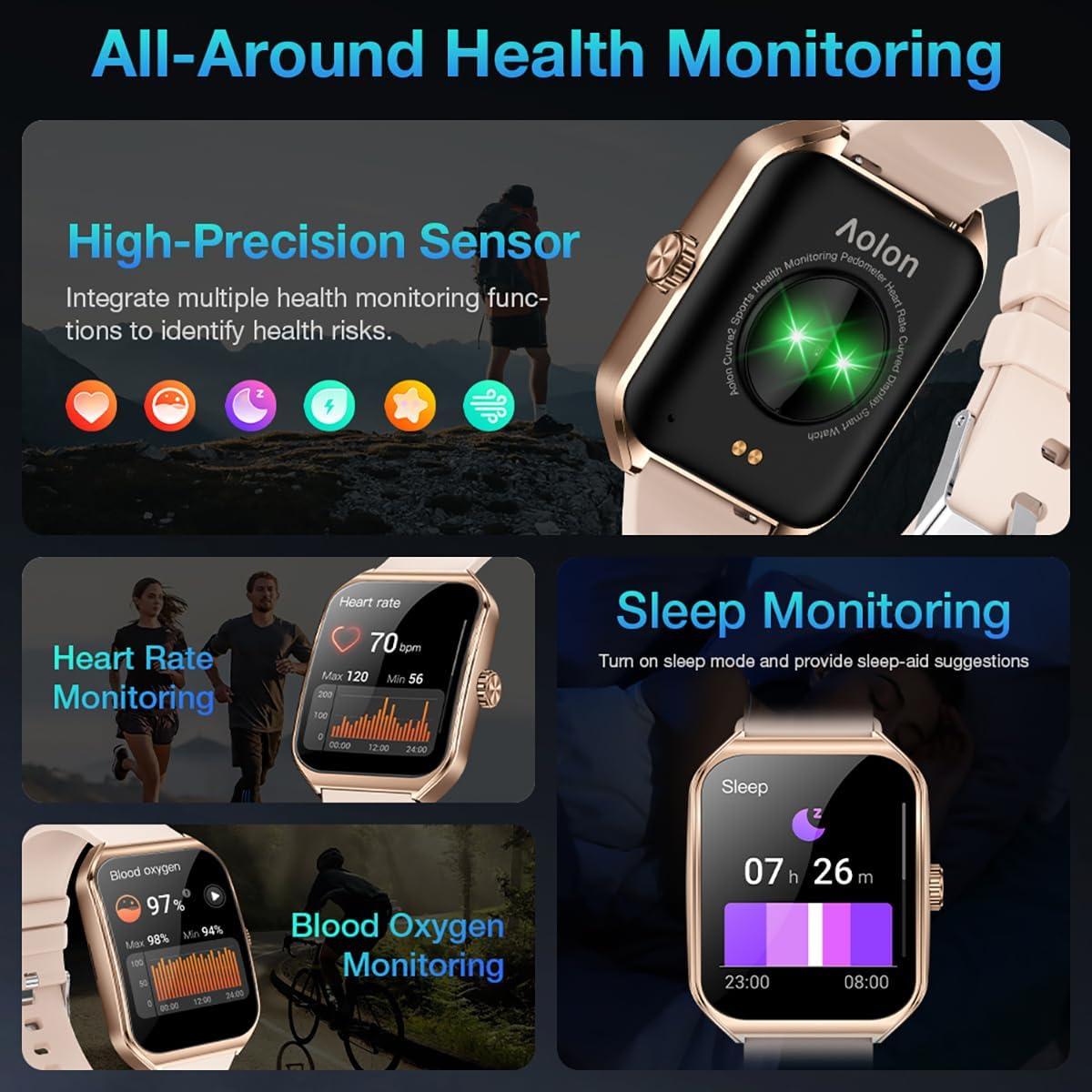
Image: A collage showing the smart watch monitoring heart rate, blood oxygen, and sleep, emphasizing its comprehensive health tracking capabilities.
Video: Demonstrates the 24/7 health monitoring features of the AOLON Smart Watch, including heart rate and SpO2 tracking.
6. Modos deportivos e seguimento da actividade
The watch supports over 60 sports modes, allowing you to accurately monitor heart rate, calorie consumption, and exercise duration.
- Select your desired sports mode from the watch menu (e.g., outdoor run, indoor run, outdoor walk, ball games, dance, gymnastics).
- When connected to your phone, the watch can record and track your exercise routes using your phone's GPS.
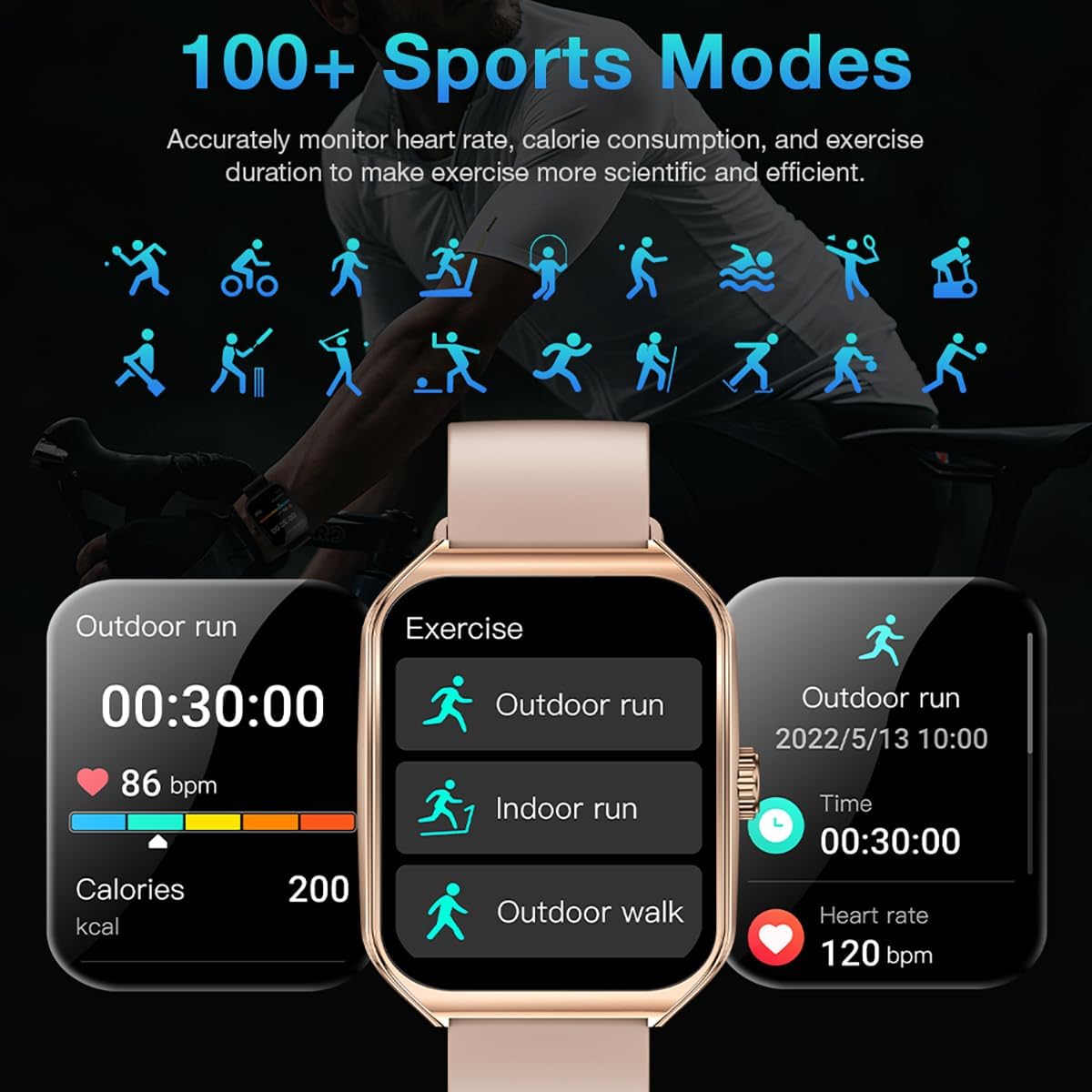
Image: The smart watch interface showing different sports modes and real-time exercise data like heart rate, calories, and distance.
7. Outras funcións intelixentes
The AOLON Curve Smart Watch integrates several convenient features for daily use:
- Asistente de voz AI: Quickly activate your voice assistant for tasks like making calls, checking weather, or setting alarms.
- Pronóstico do tempo: Obtén actualizacións meteorolóxicas en tempo real.
- Control de música: Controla a reprodución de música no teu smartphone.
- Espertador: Configurar e xestionar alarmas.
- Cronómetro e temporizador: Essential timing functions.
- Atopa o teu teléfono: Localiza o teu teléfono intelixente emparellado.
- Lanterna: A simple flashlight function.
- Calculadora: Basic calculations on your wrist.
- Función SOS: Para situacións de emerxencia.
Vídeo: Un overview of the Curve2 Smart Watch features, including fitness tracking, notifications, and various smart functions.
Mantemento
1. Limpeza do reloxo
Regular cleaning helps maintain the appearance and functionality of your smart watch.
- Limpe a pantalla e o corpo cun pano suave eamp pano.
- The silicone strap is washable. You can gently clean it with mild soap and water.
- Evite o uso de produtos químicos agresivos ou materiais abrasivos.
2. Resistencia á auga (IP67)
The AOLON Curve Smart Watch is IP67 waterproof, meaning it is resistant to dust and can withstand immersion in water up to 1 meter for 30 minutes. It is suitable for daily use and light water activities like hand washing or rain exposure.
- Do not use the watch for diving, hot showers, or prolonged submersion in water.
- Avoid exposing the watch to high-pressure water or steam.

Image: The smart watch partially submerged in water, illustrating its IP67 water resistance feature.
Resolución de problemas
If you encounter issues with your AOLON Curve Smart Watch, please refer to the following common solutions:
- O reloxo non se acende: Ensure the watch is fully charged. Connect it to the charging cable and allow it to charge for at least 30 minutes before attempting to power it on.
- Non se pode emparellar co teléfono:
- Asegúrate de que o Bluetooth estea activado no teu teléfono e de que o reloxo estea dentro do alcance.
- Reinicia tanto o teléfono como o reloxo.
- Check if the GloryFit app has necessary permissions (location, Bluetooth, notifications).
- If previously paired, try unpairing and re-pairing the device through the GloryFit app.
- Datos sanitarios inexactos:
- Asegúrate de levar o reloxo ben axustado ao pulso, nin demasiado axustado nin demasiado solto.
- Limpa o sensor que está na parte traseira do reloxo.
- Environmental factors or skin conditions can sometimes affect sensor accuracy.
- Non aparecen as notificacións:
- Verify that notification permissions are enabled for the GloryFit app in your phone's settings.
- Asegúrate de que o reloxo estea conectado ao teléfono mediante Bluetooth.
- Check the notification settings within the GloryFit app to ensure specific app notifications are enabled.
Especificacións
| Tamaño de visualización | 1.83 polgadas |
| Tipo de visualización | HD Curved Display with 3D Curved Glass |
| Conectividade | Bluetooth 5.0 |
| Capacidade da batería | 245 millónsamp Horario |
| Duración da batería (uso normal) | Ata 7 días |
| Battery Life (Power-Saving Mode) | Máis de 20 días |
| Tempo de carga | Aprox. 2.5 horas |
| Resistencia á auga | IP67 |
| Vixilancia da Saúde | Heart Rate, SpO2, Sleep, Stress, Women's Cycle |
| Modos deportivos | Máis de 60 modos |
| Compatibilidade | Android e iOS |
| Peso | 40g (watch body only) |
| Número de modelo | 5d738664-f1e0-4256-942f-d938b44e5e53 |
Garantía e Soporte
AOLON provides a 12 meses de garantía for your smart watch. If you encounter any issues or require assistance, please contact our customer service team.
- Atención ao cliente: Available 24 hours a day. Please contact us through Amazon Customer Service for prompt assistance.


