1. Produto rematadoview
The DJI Osmo Pocket 3 Creator Combo is a compact, handheld camera system designed for capturing high-quality video and photos with advanced stabilization. It features a 1-inch CMOS sensor, 4K/120fps video recording, and a 3-axis mechanical gimbal for smooth footage. The rotatable touchscreen allows for easy control and framing, while the included DJI Mic 2 ensures clear audio capture.
1.1 Que hai na caixa
The Creator Combo includes the following components:
- Cámara DJI Osmo Pocket 3
- Transmisor DJI Mic 2
- Mango de batería
- Lente gran angular
- Mini trípode
- Funda protectora
- Cable PD de tipo C a tipo C
- Bolsa de transporte
- Correa de pulso
- 64GB microSDXC Memory Card
- Kit de limpeza de cámaras
- Lector de tarxetas de memoria

Figure 1.1: DJI Osmo Pocket 3 Creator Combo components.
2. Configuración
2.1 Carga inicial
Before first use, fully charge the DJI Osmo Pocket 3 using the provided Type-C to Type-C PD Cable. The device supports fast charging, reaching 80% charge in approximately 16 minutes.
2.2 Inserción da tarxeta MicroSD
Locate the microSD card slot on the side of the Osmo Pocket 3. Insert the 64GB microSDXC memory card until it clicks into place. Ensure the card is inserted correctly to avoid damage.
2.3 Instalación de accesorios
- Mango da batería: Attach the battery handle to the bottom of the Osmo Pocket 3 for extended operating time.
- Mini trípode: The mini tripod can be screwed onto the bottom of the battery handle for stable placement on flat surfaces.
- DJI Mic 2 Transmitter: The DJI Mic 2 can be paired wirelessly for enhanced audio recording. Refer to the DJI Mic 2 specific manual for detailed pairing instructions.
- Lente gran angular: The wide-angle lens can be magnetically attached to the camera lens for a broader field of view.
Video 2.1: Unboxing and initial setup of the DJI Osmo Pocket 3 Creator Combo, demonstrating how to attach accessories.
3. Funcionamento
3.1 Powering On/Off and Screen Rotation
To power on the device, press and hold the power button. The 2-inch rotatable touchscreen allows you to switch between horizontal and vertical shooting modes by simply rotating the screen. This action also powers on/off the device.

Figure 3.1: The rotatable screen enables quick switching between horizontal and vertical filming.
3.2 Video Recording and Image Capture
The Osmo Pocket 3 captures UHD 4K/120fps video and high-quality photos. Use the dedicated record button to start and stop video recording, and the shutter button for still images. The 3-axis mechanical gimbal provides smooth, stable footage, automatically compensating for camera shake.

Figure 3.2: High-quality imagery with 4K/120fps video and a 1-inch CMOS sensor.
3.3 Funcións intelixentes
- ActiveTrack 6.0: This feature precisely locks onto moving subjects, ensuring they remain in the center of the frame. To activate, tap the subject on the touchscreen.
- Modos creativos: Explore various shooting modes including 4K120 slow motion, motion-lapse, hyperlapse, and panoramic modes. These can be accessed via the touchscreen menu.
- 10-bit D-Log M: For advanced users, this color profile captures a wider dynamic range, providing more flexibility in post-production color grading.
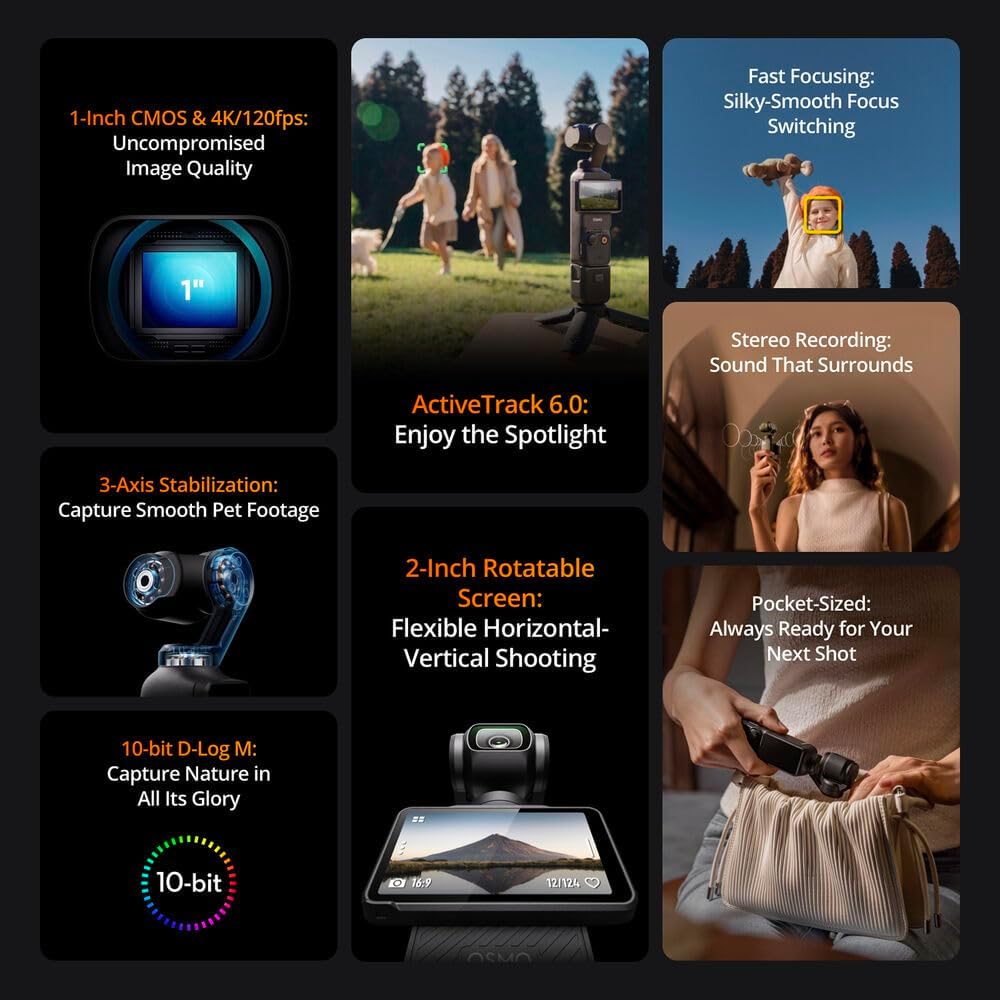
Figura 3.3: Máisview of key features including ActiveTrack 6.0 and 10-bit D-Log M.
3.4 Gravación de audio
The built-in stereo microphones capture immersive sound and minimize ambient noise. For professional-grade audio, use the included DJI Mic 2 transmitter, which offers clear, noise-cancelled audio with a range of up to 820 feet and 8GB of onboard storage for up to 14 hours of recording.
3.5 Conectividade da aplicación
Connect the Osmo Pocket 3 to your smartphone via Wi-Fi or Bluetooth using the DJI Mimo app. This app allows for live streaming, remote control, and file sharing. For quick and easy editing, utilize the LightCut app, which offers one-tap editing features.
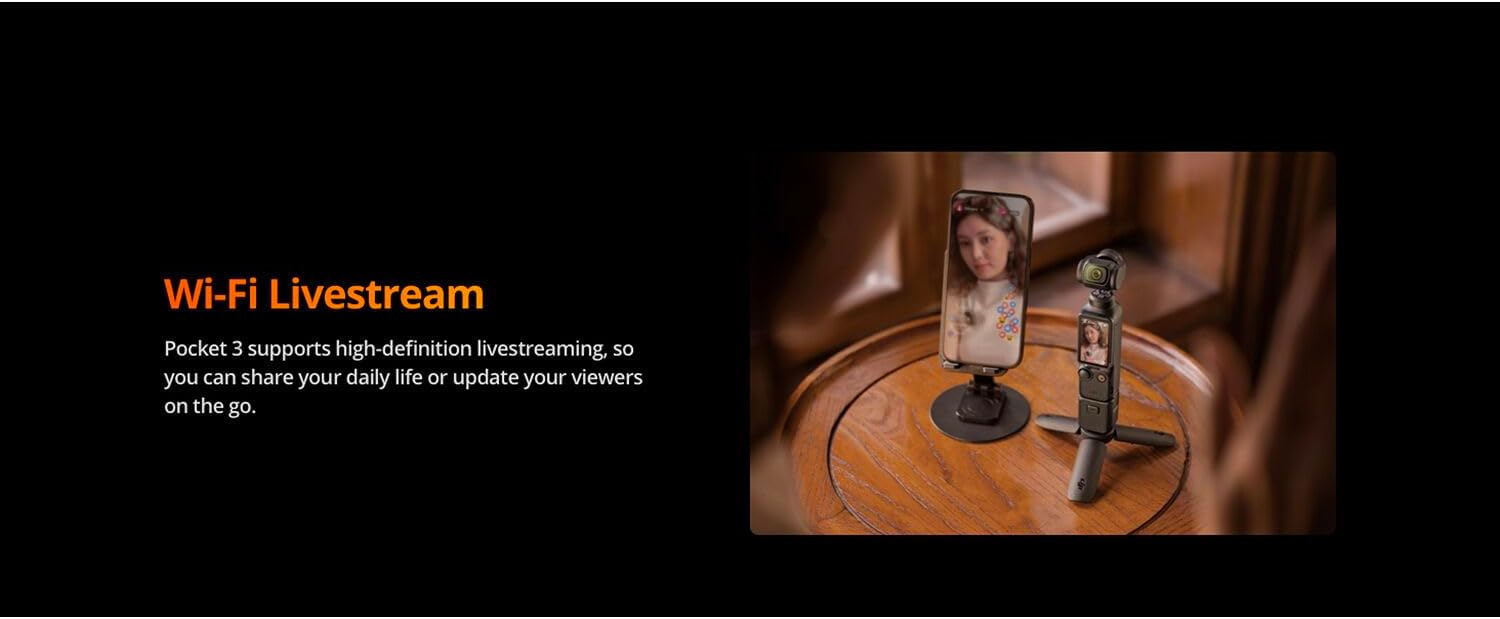
Figure 3.4: Wi-Fi Livestreaming via the DJI Mimo app.
4. Mantemento
- Limpeza: Use the provided camera cleaning kit to gently clean the lens and screen. Avoid harsh chemicals.
- Almacenamento: When not in use, store the Osmo Pocket 3 in its protective cover and carrying bag to prevent dust and scratches.
- Coidado da batería: For optimal battery life, avoid fully discharging the battery frequently. Charge the device regularly, even if not in active use.
- Actualizacións de firmware: Comprobe e instale regularmente actualizacións de firmware a través da aplicación DJI Mimo para garantir un rendemento óptimo e o acceso a novas funcións.
Video 4.1: Demonstration of cleaning and protecting the DJI Osmo Pocket 3 screen.
5 Solución de problemas
| Problema | Causa posible | Solución |
|---|---|---|
| O dispositivo non se acende | Low battery; Firmware issue | Charge the device fully. If problem persists, attempt a firmware update via DJI Mimo app. |
| Comida inestabletage | Gimbal obstruction; Calibration needed | Ensure no obstructions around the gimbal. Perform gimbal calibration through the device settings. |
| MicroSD card error | Improper insertion; Corrupted card | Reinsert the microSD card. Try a different card. Format the card (this will erase all data). |
| DJI Mic 2 not connecting | Not paired; Out of range | Ensure the Mic 2 is charged and within range (up to 820 ft). Re-pair the Mic 2 with the Osmo Pocket 3. |
6. Especificacións
| Característica | Detalle |
|---|---|
| Marca | DJI |
| Número de modelo | CP.OS.00000302.01 |
| Peso do elemento | 2.16 libras |
| Dimensións do produto | 6 x 2 x 8 polgadas |
| Cor | Negro |
| Tecnoloxía do sensor fotográfico | CMOS (1 polgada) |
| Resolución de captura de vídeo | 4K (up to 120fps) |
| Tipo de memoria flash | Micro SDXC |
| Formato de captura de vídeo | MP4 |
| Formato de audio compatible | AAC, MP3 |
| Tecnoloxía de conectividade | Bluetooth, WiFi |
| Características especiais | 4K120 Video Recording, 3-Axis Gimbal Stabilization, ActiveTrack 6.0, DJI Mic 2 Integration |
| Tipo de videocámara | Cámara de acción |
7. Garantía e soporte
For detailed warranty information and customer support, please visit the official DJI website or refer to the warranty card included in your product packaging. DJI offers various support resources, including online FAQs, tutorials, and direct customer service.
Consider registering your product with DJI Care Refresh for comprehensive protection plans, including low-cost replacements and international warranty service.
You can download the DJI Mimo and LightCut apps from the App Store (iOS) or Google Play Store (Android) for full functionality and firmware updates.


