1. Introdución
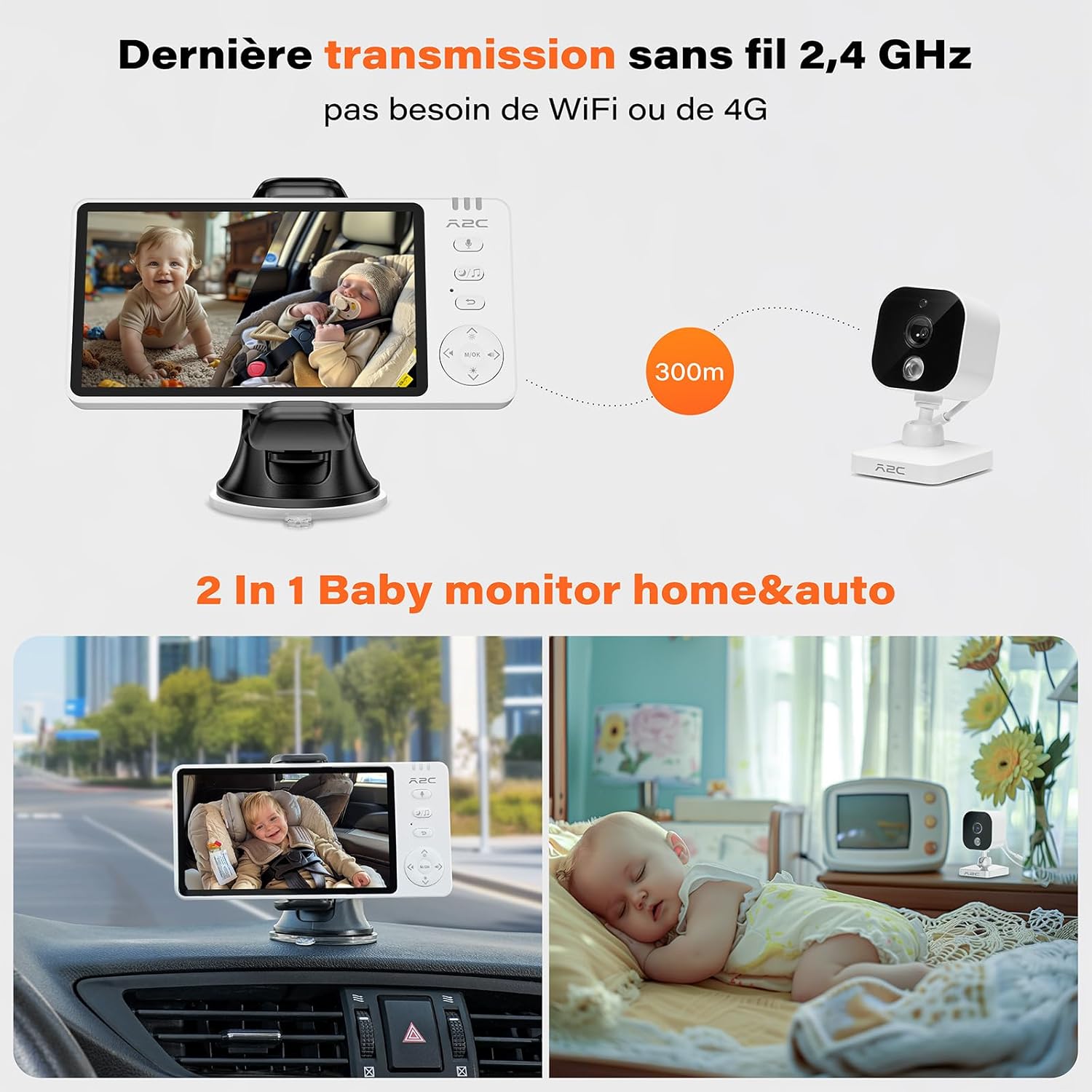
The APPS2Car Baby Monitor Car Camera System (Model WT-EU-V3-S02-BM1) is a versatile 2-in-1 monitoring solution designed for both home and car use. This system provides clear 1080p HD real-time video of your baby, ensuring peace of mind whether you are driving or at home. It operates on a secure 2.4 GHz wireless radio technology, eliminating the need for WiFi or complex app installations.
Key features include a 5-inch HD IPS display, automatic and manual night vision, two-way audio communication, VOX (Voice Operated eXchange) mode, ambient temperature monitoring, built-in lullabies, and feeding reminders. Its flexible design allows for easy installation and adjustment, making it an ideal choice for monitoring infants, children, and even pets.

2. Compoñentes do produto
Verifique que todos os seguintes compoñentes estean incluídos no seu paquete:
- 1 x 5-inch HD IPS Monitor
- 1 x 1080p HD Camera (1/4" CMOS)
- 1 x Monitor Stand (Suction Cup Mount)
- 1 x Camera Mounting Accessory Kit (Strap Mount)
- 2 x USB Power Cables
- 1 x adaptador de alimentación

3. Guía de configuración
3.1 Instalación da cámara
The camera can be installed in two primary ways: for home use or for car use.
- Para uso doméstico: Place the camera on a flat surface near your baby's crib or play area. Ensure it has a clear line of sight to the baby. Connect the camera to a power source using one of the provided USB cables and the power adapter.
- Para uso en coche: Use the camera mounting accessory kit (strap mount) to securely attach the camera to the headrest of the seat facing your baby's car seat. Ensure the camera is stable and provides a clear view. Connect the camera to a USB power source in your car (e.g., a USB port or a car charger adapter). The camera requires continuous power to operate.
3.2 Configuración do monitor
The monitor comes with a suction cup mount for flexible placement, especially in a car. It can also be placed on any flat surface at home.
- Attach the monitor to the suction cup mount.
- Secure the suction cup mount to a clean, smooth surface (e.g., car dashboard or windshield) by pressing firmly and engaging the lever.
- Axusta o ángulo do monitor para un ángulo óptimo viewing. The camera also features a 270° adjustable angle for flexible orientation.
- Power on the monitor. It has a built-in 3500 mAh battery providing over 5 hours of operation. For extended use, connect it to a power source using the USB cable.
3.3 Pairing the Camera with the Monitor
The camera and monitor are typically pre-paired from the factory. If pairing is lost or you need to re-pair, follow these steps:
- Ensure both the camera and monitor are powered on.
- On the monitor, navigate to the pairing menu (refer to the on-screen interface for specific button presses, usually indicated by a camera icon or 'Pair').
- Press and hold the pairing button on the back of the camera until the monitor indicates successful pairing.

The system is ready for use within 3 minutes of connecting the camera via USB. The wireless range is up to 300 meters (approximately 1000 feet) in open areas, providing stable image transmission.

4. Instrucións de funcionamento
4.1 Pantalla e controis do monitor
The 5-inch HD IPS screen provides a clear view of your baby. The monitor features intuitive buttons for navigation and function control. Familiarize yourself with the button layout for easy operation.
4.2 Visión nocturna
The system offers both automatic and manual night vision modes to ensure clear visibility in low-light conditions.
- Visión nocturna automática: The camera automatically switches to night vision mode when the ambient light is insufficient, providing a clear black and white image. This is ideal for home use.
- Manual Night Vision: You can manually activate or deactivate night vision through the monitor's menu. This can be useful in specific car lighting conditions.


4.3 Audio bidireccional
The two-way audio feature allows you to speak to your baby through the monitor, providing comfort and reassurance. Press and hold the microphone button on the monitor to speak, and release it to listen.


4.4 VOX Mode (Voice Operated eXchange)
In VOX mode, the monitor's screen will automatically activate when it detects sound above a certain threshold from the baby's room or car. This conserves battery life and reduces unnecessary screen time.
4.5 Monitorización da temperatura
The camera includes a built-in temperature sensor that displays the ambient temperature on the monitor. This helps ensure your baby is in a comfortable environment.
4.6 Cantos de berce
The monitor has several pre-programmed lullabies. Access the lullaby menu to select and play soothing melodies for your baby.
4.7 Feeding Reminders
Set up feeding reminders through the monitor's menu to help maintain a consistent feeding schedule for your baby.
4.8 Cry Alarm
The system can detect and alert you to your baby's cries, ensuring you are promptly notified if your baby needs attention.


5. Mantemento
To ensure the longevity and optimal performance of your APPS2Car Baby Monitor, follow these maintenance guidelines:
- Limpeza: Use a soft, dry cloth to clean the monitor screen and camera lens. Avoid using abrasive cleaners or solvents that could damage the surfaces.
- Coidado da batería: For the monitor's built-in battery, avoid fully discharging it frequently. Charge it regularly, especially if storing the device for an extended period.
- Almacenamento: Garde o dispositivo nun lugar fresco e seco, lonxe da luz solar directa e de temperaturas extremas cando non o estea a usar.
- Xestión de cables Ensure all cables are neatly routed and not pinched or damaged, especially in a car environment where they might be subject to movement.
6 Solución de problemas
If you encounter issues with your baby monitor, refer to the following common troubleshooting steps:
- No Signal/Poor Image:
- Ensure both the camera and monitor are powered on and fully charged or connected to a power source.
- Check if the camera and monitor are within the effective range (up to 300 meters). Obstacles like thick walls can reduce range.
- Re-pair the camera and monitor as described in Section 3.3.
- Ensure there are no strong interference sources (e.g., other 2.4 GHz devices) nearby.
- A cámara non se acende:
- Verify the USB power cable is securely connected to the camera and the power source.
- Ensure the power source (wall adapter or car USB port) is functional. The camera requires continuous power as it does not have an internal battery.
- Monitor Battery Drains Quickly:
- The monitor's 3500 mAh battery provides over 5 hours of use. For longer periods, keep the monitor connected to a power source.
- Reduce screen brightness or activate VOX mode to conserve battery.
- Audio Issues (No Sound/Distorted Sound):
- Check the volume settings on the monitor.
- Ensure there are no obstructions blocking the microphone on the camera or the speaker on the monitor.
7. Especificacións
| Característica | Detalle |
|---|---|
| Marca | APPS2Car |
| Nome do modelo | WT-EU-V3-S02-BM1 |
| Tecnoloxía de conectividade | Wireless (2.4 GHz FHSS Technology) |
| Resolución de gravación de vídeo | 1080 p |
| Tamaño do monitor | 5 polgadas |
| Viewángulo ing | 75 graos |
| Range de visión nocturna | 30 metros |
| Características especiais | Two-way audio, Cry detection, Portable, HD Resolution, Night vision |
| Uso interior/exterior | Indoor/Outdoor (Car) |
| Material | Plástico |
| Dimensións do artigo (L x W x H) | 10 x 3 x 5 centímetros |
| Peso do produto | 750 gramos |
| Monitor Battery Type | Ion de litio (1 incluído) |
| Tipo de montaxe | Table Mount (Suction Cup Mount for car) |
| Cor | Branco |
| Fabricante | Wiiki-Tech Direct |
| Data de primeira dispoñibilidade | 23 de febreiro de 2025 |
8. Garantía e soporte
For warranty information, technical support, or any inquiries regarding your APPS2Car Baby Monitor Car Camera System, please contact the manufacturer, Wiiki-Tech Direct, or refer to the official APPS2Car website. Details regarding specific warranty periods and support channels are typically provided with your purchase documentation.


