1. Introdución
This manual provides essential information for the safe and efficient use of your SBS Powerbank 10K Slim. Please read these instructions carefully before using the device and retain them for future reference.
The SBS Powerbank 10K Slim is a portable charging device designed to provide power to various electronic devices, including smartphones, tablets, and other USB-powered gadgets. It features a 10,000 mAh capacity, intelligent charging technology, and multiple output ports for versatile use.
2. Contido do paquete
Verifica que todos os elementos estean presentes no paquete:
- SBS Powerbank 10K Slim
- Cable USB-A a USB-C
- Manual de usuario
3. Características do produto
- Capacidade 10,000 mAh: Capable of recharging a smartphone up to 4 times or a tablet up to 2 times.
- Intelligent Charge (IC) 10 Watts: Automatically detects the maximum power your device can accept and adjusts output accordingly, providing protection against overheating and short circuits.
- Deseño fino e compacto: Portable and lightweight for easy transport in a pocket or bag.
- Entrada/Saída USB-C: The USB-C port functions for both charging the power bank and charging external devices.
- Indicadores LED de estado: Easily monitor the remaining charge level of the power bank.
- Múltiples portos de saída: Includes 1x USB-C port and 2x USB-A ports for charging various devices simultaneously.
4. Configuración
4.1 Carga inicial da batería externa
Before first use, fully charge the power bank. Connect the supplied USB-A to USB-C cable to the power bank's USB-C port and the USB-A end to a compatible USB wall charger (not included) or a computer's USB port. The LED indicators will illuminate to show the charging progress.

Image: The power bank being charged using the included USB-C to USB-A cable connected to a laptop.
4.2 Identificación de portos
The power bank features various ports for charging and discharging:
- USB 1 (USB-A 1A Standard): Output for standard charging (5W).
- USB-C (Type-C Fast Charge): Input/Output for fast charging (10W).
- USB 2 (USB-A 2.1A Intelligent Charge): Output for intelligent fast charging (10W).

Imaxe: Detallada view of the power bank's charging ports, indicating their types and power outputs.
5. Instrucións de funcionamento
5.1 Carga de dispositivos externos
To charge your device, connect it to one of the power bank's output ports (USB 1, USB 2, or USB-C) using an appropriate charging cable. The power bank will automatically begin charging. You can charge up to three devices simultaneously.

Image: The power bank actively charging a smartphone and a pair of wireless earbuds.
5.2 Comprobación do estado da batería
Press the power button once to activate the LED indicators. The blue LEDs will show the remaining charge level of the power bank. Each LED typically represents approximately 25% of the battery capacity.

Image: The power bank's side with the power button and LED indicators displaying the charge level.
5.3 Intelligent Charge (IC) Function
The Intelligent Charge feature on the USB 2 (USB-A 2.1A) and USB-C ports automatically identifies the connected device and delivers the optimal charging current up to 10W. This ensures efficient and safe charging for a wide range of devices.

Image: The power bank charging a smartphone, highlighting its 10,000 mAh capacity and recharge capability.
6. Mantemento
6.1 Coidados xerais
- Manteña o banco de enerxía seco e lonxe da humidade.
- Evitar temperaturas extremas (frío ou calor).
- Limpa o dispositivo cun pano suave e seco. Non empregues produtos químicos agresivos nin materiais abrasivos.
- Non deixe caer, desmonte nin intente reparar o banco de enerxía vostede mesmo.
6.2 Almacenamento
When storing the power bank for extended periods, ensure it is charged to approximately 50-75% capacity. Recharge it every 3-6 months to maintain battery health.
6.3 Precaucións de seguridade
- This power bank includes built-in protections against short circuits, overcharging, and over-discharging.
- Do not expose the power bank to fire or direct sunlight.
- Manter fóra do alcance dos nenos.
7 Solución de problemas
7.1 O banco de enerxía non carga
- Asegúrate de que o cable de carga estea conectado correctamente tanto ao banco de enerxía como á fonte de alimentación.
- Proba cun adaptador de parede USB ou un porto USB diferente.
- Verifica que a fonte de alimentación estea activa.
7.2 O dispositivo non se carga desde o banco de enerxía
- Check if the power bank has sufficient charge (press the button to check LEDs).
- Ensure the charging cable connecting your device to the power bank is functional and correctly inserted.
- Proba cun porto de saída diferente no banco de enerxía.
- Some devices may require a specific charging cable or adapter.
7.3 Carga lenta
- Ensure you are using the appropriate port for faster charging (USB-C or USB 2).
- The charging speed can be affected by the cable quality, the device being charged, and the power bank's remaining charge level.
8. Especificacións
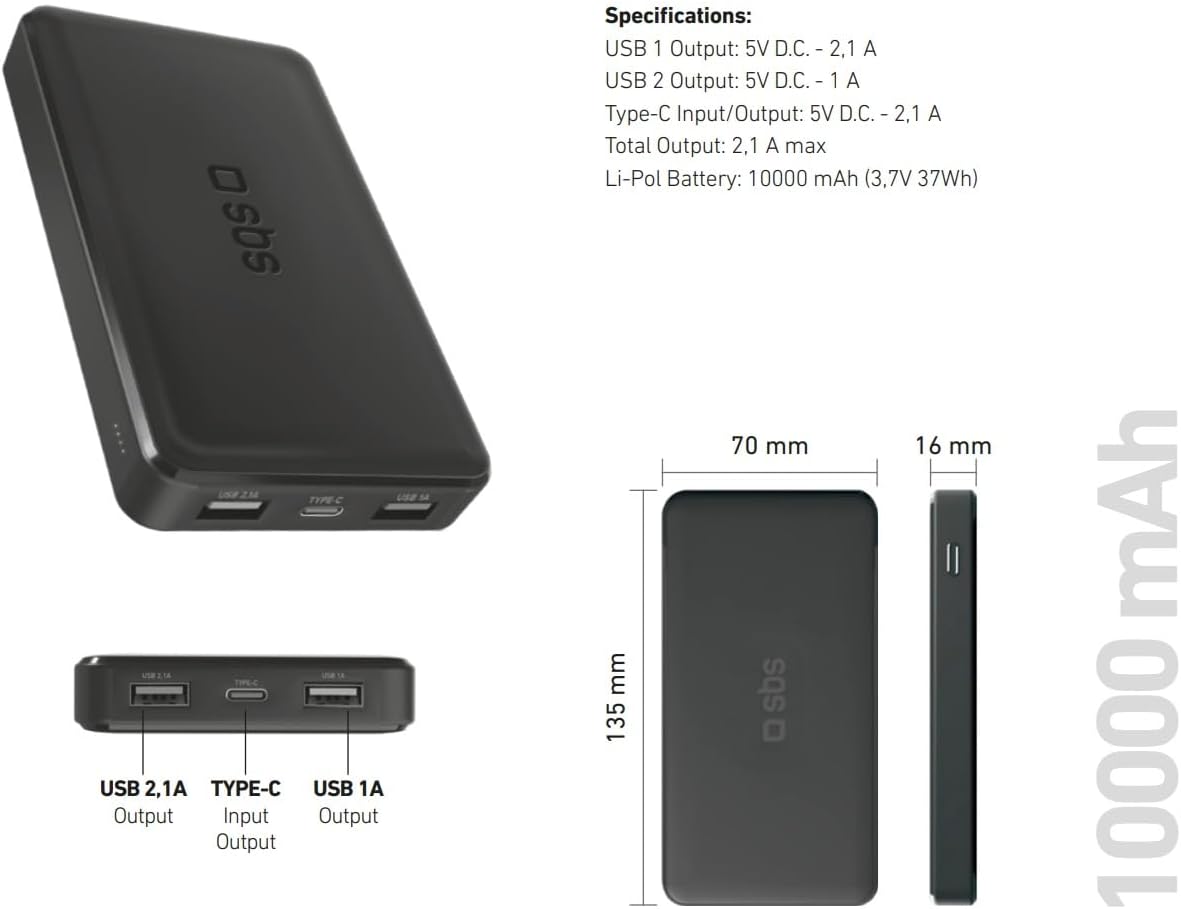
Image: Technical specifications and physical dimensions of the power bank.
| Característica | Detalle |
|---|---|
| Nome do modelo | TTBB10000TCK |
| Capacidade da batería | 10,000 mAh (3.7 V 37 Wh) |
| Tipo de batería | Polímero de litio |
| Saída 1 USB | 5V D.C. - 1A (5W) |
| Saída 2 USB | 5V D.C. - 2.1A (10W Intelligent Charge) |
| Entrada/Saída USB-C | 5V D.C. - 2.1A (10W Fast Charge) |
| Produción total | 2.1 A máx |
| Cor | Negro |
| Dimensións | 135 mm x 70 mm x 16 mm |
| Peso | 230 gramos |
| Características especiais | Fast Charge, Lightweight, Short-circuit Protection, Over-discharge Protection, Slim Design |
| Dispositivos compatibles | Smartphone, Tablet, Smartwatch, Speaker, Laptop (charging only) |
9. Garantía e soporte
9.1 Garantía do fabricante
This SBS Powerbank 10K Slim comes with a 2 anos de garantía do fabricanteConserva o comprobante de compra para reclamacións de garantía. A garantía cobre defectos de materiais e fabricación en condicións normais de uso.
9.2 Atención ao cliente
For further assistance, technical support, or warranty inquiries, please visit the official SBS website or contact their customer service department. You can find more information and products from SBS by visiting their official store: SBS Brand Store.