1. Introdución
This manual provides detailed instructions for the setup, operation, maintenance, and troubleshooting of your Keychron Q6 HE QMK Wireless Custom Mechanical Keyboard. Please read this guide thoroughly to ensure optimal performance and longevity of your device.
The Keychron Q6 HE is a full-size layout wireless QMK custom keyboard featuring Hall Effect Gateron 2.0 magnetic switches, offering advanced customization and a premium typing experience.
2. Contido do paquete
Verifica que todos os elementos estean presentes no teu paquete:
- Keychron Q6 HE Keyboard
- Keyboard PCB
- Caso
- Placa de aluminio
- Keycaps (Mac & Windows compatible)
- Cable USB-C a USB-C
- Adaptador USB-A a USB-C
- Extractor de interruptor
- Tirador de chaves
- Manual de usuario

Image: Keychron Q6 HE keyboard with included accessories, showcasing the full package contents.
3. Configuración
3.1 Conexión inicial
The Keychron Q6 HE supports three connection modes: 2.4 GHz Wireless, Bluetooth 5.1, and Wired (USB-C).
3.1.1 conexión por cable
- Conecta o cable USB-C fornecido ao porto USB-C do teclado.
- Conecta o outro extremo do cable ao porto USB do teu ordenador.
- Ensure the mode switch on the back of the keyboard is set to 'Cable' mode.
- O teclado será recoñecido automaticamente polo teu sistema operativo.
Conexión sen fíos de 3.1.2 a 2.4 GHz
- Locate the 2.4 GHz receiver (dongle) included with your keyboard.
- Plug the 2.4 GHz receiver into an available USB port on your computer.
- Set the mode switch on the back of the keyboard to '2.4G' mode.
- The keyboard should automatically connect to the receiver. If not, press and hold the 'Fn' + '4' keys for 4 seconds to initiate pairing.
3.1.3 Conexión Bluetooth
- Set the mode switch on the back of the keyboard to 'Bluetooth' mode.
- To enter pairing mode, press and hold 'Fn' + '1' (for device 1), 'Fn' + '2' (for device 2), or 'Fn' + '3' (for device 3) for 4 seconds until the indicator light flashes rapidly.
- On your computer, smartphone, or tablet, enable Bluetooth and search for 'Keychron Q6 HE'.
- Selecciona o teclado que queres emparellar. A luz indicadora deixará de parpadear unha vez conectado.
- You can switch between paired Bluetooth devices by pressing 'Fn' + '1', 'Fn' + '2', or 'Fn' + '3' briefly.
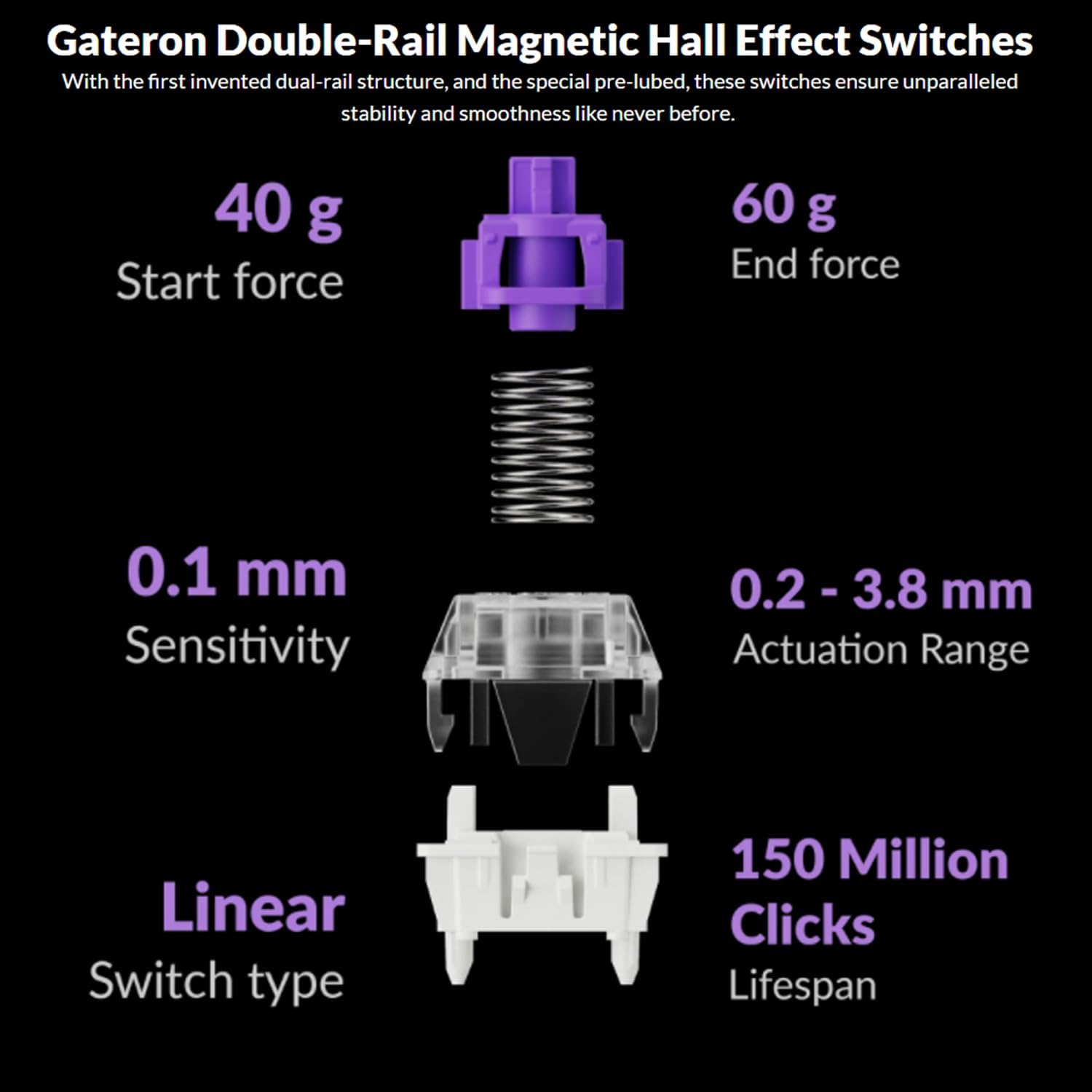
Image: The Keychron Q6 HE keyboard connected to a computer and a tablet, demonstrating its multi-device connectivity.
3.2 Cambio de sistema operativo
The keyboard has a switch to toggle between Mac and Windows layouts. Ensure this switch, located on the back of the keyboard, is set to your current operating system for correct key mapping.
3.3 Carga da batería
The keyboard is equipped with a 4000 mAh Lithium Ion battery. Connect the USB-C cable to the keyboard and a power source (computer USB port or USB wall adapter) to charge. The charging indicator light will show the charging status.
4. Instrucións de funcionamento
4.1 Funcións básicas das teclas
The Q6 HE features a standard 100% layout. All keys function as labeled. Use the 'Fn' key in combination with other keys for secondary functions (e.g., media controls, backlight adjustments).
4.2 Programmable Knob
The rotary knob on the top right of the keyboard is programmable. By default, it controls volume (rotate) and media play/pause (press). Its functions can be customized using the Keychron Launcher web aplicación.
4.3 Gateron Magnetic Hall Effect Switches
The Q6 HE utilizes Gateron Double-Rail Magnetic Hall Effect Switches, which allow for dynamic customization of key behavior.

Image: Diagram illustrating the adjustable actuation points of the magnetic switches, ranging from 0.5mm to 3.5mm.
4.3.1 Adjustable Actuation Points
The actuation point (the distance a key needs to travel to register a press) can be adjusted from 0.1 mm to 3.8 mm using the Keychron Launcher web app. This allows for personalized typing and gaming sensitivity.
4.3.2 Rapid Trigger
Rapid Trigger functionality allows a key to reactivate instantly upon reset, without needing to return to its original position. This feature is highly beneficial for competitive gaming and can be configured via the Keychron Launcher.

Image: Detailed breakdown of Gateron Double-Rail Magnetic Hall Effect Switches, showing components and specifications like start force, end force, sensitivity, actuation range, switch type, and lifespan.
4.4 Retroiluminación RGB
The keyboard features south-facing RGB LED lights. You can cycle through various lighting effects and adjust brightness using 'Fn' key combinations or through the Keychron Launcher web aplicación.
4.5 Keychron Launcher Web Aplicación
The Keychron Launcher is a web-based application for advanced customization. It allows you to:
- Remapear claves
- Adjust actuation points for magnetic switches
- Create personalized macro commands
- Set shortcuts and key combinations
- Personaliza os efectos de iluminación RGB

Image: Screenshot of the Keychron Launcher web app interface, showing options for key remapping, actuation point adjustment, and macro creation.
5. Mantemento
5.1 Limpeza do teclado
Para limpar o teclado:
- Desconecte o teclado de todas as fontes de alimentación e dispositivos.
- Use un pano suave e sen pelusa lixeiramente dampened with water or a mild cleaning solution to wipe the keycaps and case.
- Para unha limpeza máis profunda, use o extractor de teclas incluído para retirar as teclas e limpar a parte inferior con aire comprimido ou un pequeno cepillo.
- Evite pulverizar líquidos directamente sobre o teclado.
5.2 Interruptores intercambiables en quente
The Q6 HE features hot-swappable magnetic switches, allowing you to replace individual switches without soldering.

Imaxe: Primeiro plano view of the Keychron Q6 HE keyboard with several keycaps and switches removed, highlighting the hot-swappable magnetic switch design.
5.2.1 Substitución de interruptores
- Use the switch puller to carefully remove the desired switch. Grip the switch firmly and pull straight up.
- Aliña os pines do novo interruptor cos orificios da placa de circuíto impreso.
- Gently press the new switch into place until it clicks. Ensure it is seated correctly and not bent.
5.3 Coidado coa batería
Para prolongar a duración da batería:
- Evite descargar completamente a batería con frecuencia.
- Garde o teclado nun lugar fresco e seco cando non o use durante períodos prolongados.
- Non expoña o teclado a temperaturas extremas.
6 Solución de problemas
6.1 O teclado non responde
- Modo cableado: Asegúrate de que o cable USB-C estea conectado correctamente tanto ao teclado como ao ordenador. Proba cun porto ou cable USB diferente.
- Modo 2.4 GHz: Verify the 2.4 GHz receiver is plugged in and the keyboard is set to '2.4G' mode. Re-pair by holding 'Fn' + '4' for 4 seconds.
- Modo Bluetooth: Check if Bluetooth is enabled on your device and the keyboard is paired. Re-pair if necessary by holding 'Fn' + '1/2/3' for 4 seconds.
- Batería: Ensure the keyboard battery is charged. Connect it to a power source.
6.2 Keys Not Registering or Double Typing
- Punto de actuación: Adjust the actuation point for the affected keys using the Keychron Launcher. A higher actuation point (e.g., 2.0mm or 3.0mm) can help prevent accidental presses or double typing.
- Problema co interruptor: If a specific key consistently malfunctions, the magnetic switch might be faulty. Consider replacing the hot-swappable switch.
- Firmware: Ensure your keyboard firmware is up to date via the Keychron Launcher.
6.3 RGB Backlight Issues
- Brillo: Adjust backlight brightness using 'Fn' key combinations.
- Efectos: Cycle through different RGB effects using 'Fn' key combinations.
- Software: Use the Keychron Launcher to customize and troubleshoot RGB settings.
7. Especificacións
| Número de modelo | Q6H-P1 |
| Marca | Keychron |
| Tecnoloxía de conectividade | 2.4 GHz Wireless, Bluetooth 5.1, USB-C Wired |
| Descrición do teclado | Full-size, Ergonomic |
| Características especiais | Hall Effect Magnetic Switches, Programmable Knob, Large Battery Capacity, Hot-Swappable |
| Dispositivos compatibles | PC, Mac, Smartphone, Tablet, Gaming Console |
| Retroiluminación del teclado | RGB (orientado ao sur) |
| Material | 6063 Aluminum (Case) |
| Batería | Ión de litio de 4000 mAh (incluída) |
| Peso do elemento | 6.49 libras (aprox. 2.94 kg) |
| Dimensións do paquete | 19 x 8.5 x 3 polgadas |

Image: An exploded diagram showing the internal layers and components of the Keychron Q6 HE keyboard, including keycaps, knob, magnetic switches, top case, sound absorbing foam, gaskets, plate, PCB, latex bottom pad, bottom case PET film, bottom case acoustic foam, battery, and silicone gaskets.
8. Información da garantía
Keychron products typically come with a limited manufacturer's warranty. For specific warranty terms, conditions, and duration, please refer to the official Keychron websitio web ou a tarxeta de garantía incluída co produto. Garde o comprobante de compra para reclamacións de garantía.
9. Apoio
For further assistance, technical support, or to download the latest firmware and software, please visit the official Keychron websitio:
You can also visit the Keychron store on Amazon for product information and customer service:


