Introdución
The STRONG Leap-UNA TV Streaming Stick is a compact and powerful device designed to transform your television into a smart TV, providing instant access to a vast array of streaming content. Powered by Android TV 11, it offers seamless 2K resolution streaming with Wi-Fi 5 connectivity. This manual provides detailed instructions for setting up, operating, and maintaining your Leap-UNA streaming stick to ensure an optimal entertainment experience.
Información de seguridade
- Le todas as instrucións antes de usar o dispositivo.
- Non expoñas o dispositivo á choiva, á humidade nin a temperaturas extremas.
- Asegúrese de ventilar adecuadamente o dispositivo para evitar o sobreenriquecido.
- Use só o adaptador de alimentación que se proporciona co dispositivo.
- Non intente desmontar nin reparar o dispositivo vostede mesmo. Encargue todo o mantemento a persoal cualificado.
- Manteña o dispositivo lonxe da luz solar directa e fontes de calor.
Contido do paquete
Comprobe que todos os elementos estean presentes e en bo estado:
- STRONG Leap-UNA 2K Android TV Streaming Stick
- Control remoto
- Power Adapter (or USB cable for power)
- HDMI Extender (if included)
- Manual de usuario (este documento)
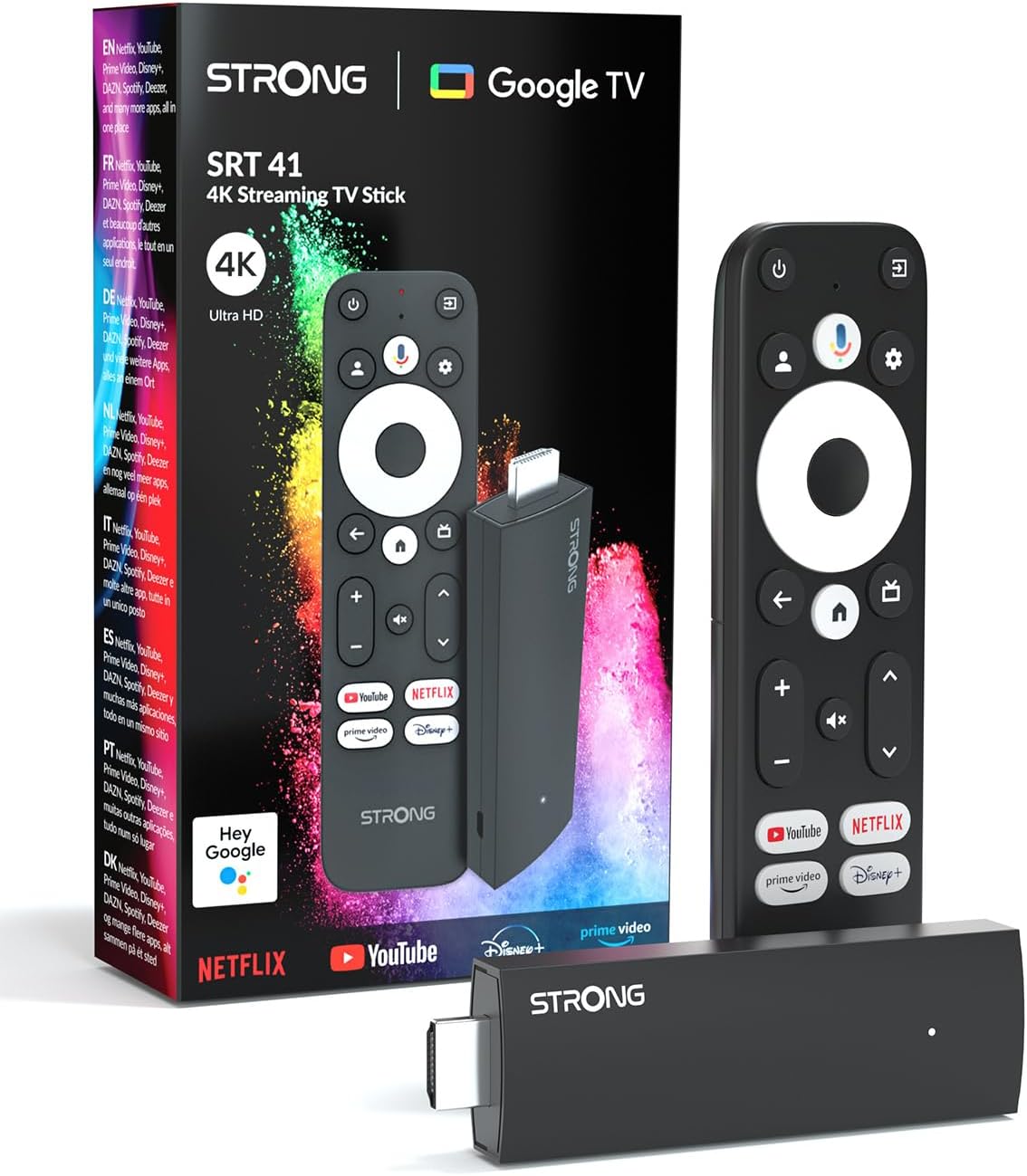
Image: The STRONG Leap-UNA streaming stick, its remote control, and the product packaging. This shows the main components included in the box.
Produto rematadoview
The Leap-UNA stick is designed for ease of use and portability. It connects directly to your TV's HDMI port.
Compoñentes do dispositivo:
- Streaming Stick: Compact device with an HDMI connector for TV and a Micro USB port for power.
- Control remoto: Features dedicated buttons for power, navigation, volume, Google Assistant, and quick access to popular streaming services like Netflix and YouTube.

Image: A close-up of the STRONG Leap-UNA streaming stick, highlighting its compact design and connectivity options including HDMI and Micro USB ports.
Configuración
Follow these steps to set up your STRONG Leap-UNA streaming stick:
- Conectar á televisión: Plug the STRONG Leap-UNA streaming stick directly into an available HDMI port on your television. If space is limited, use an HDMI extender (if provided).
- Encendido: Connect the power adapter to the Micro USB port on the streaming stick and then plug the adapter into a power outlet. The device will power on automatically.
- Seleccione entrada HDMI: Use your TV's remote control to select the correct HDMI input source to which the Leap-UNA stick is connected.
- Par de control remoto: Follow the on-screen instructions to pair your remote control. This usually involves pressing and holding specific buttons on the remote close to the stick.
- Conectar a wifi: On the screen, select your Wi-Fi network from the list and enter the password. Ensure you have a stable internet connection for optimal streaming.
- Configuración da conta de Google: Sign in with your Google account. This is necessary to access the Google Play Store, Google Assistant, and other Google services. If you don't have one, you can create one.
- Instalar aplicacións: After initial setup, you can download and install your favorite streaming applications like Netflix, Amazon Prime Video, YouTube, and Disney+ from the Google Play Store.

Image: Visual representation of the simple setup process: 1. Connect the stick to your TV. 2. Connect to your internet box (Wi-Fi). 3. Start streaming your content.
Instrucións de funcionamento
Usando o mando a distancia:
The included remote control allows you to navigate the Android TV interface and control your streaming experience.
- Pad de navegación: Use the circular pad to move through menus and select items.
- Botón Atrás: Volve á pantalla anterior.
- Botón de inicio: Volve á pantalla de inicio de Android TV.
- Botón do Asistente de Google: Prema para activar os comandos de voz.
- Botóns de volume: Axusta o volume do televisor.
- Botóns de aplicación dedicados: Quickly launch Netflix, YouTube, Prime Video, and Disney+ (if available).

Image: The remote control for the STRONG Leap-UNA, highlighting its dedicated app buttons and the wide range of applications available through Google Play.
Control por voz con Google Assistant:
The integrated Google Assistant allows you to control your device and search for content using your voice. Press the Google Assistant button on your remote and speak your command. Exampos inclúen:
- "Abre Netflix"
- "Find action movies"
- "Play [Movie Title]"
- "Que tempo fai?"

Image: The STRONG Leap-UNA remote control positioned in front of a TV screen, illustrating the use of Google Assistant for voice commands, such as "Avvia Netflix" (Start Netflix).
Chromecast integrado:
With Chromecast built-in, you can cast content directly from your smartphone, tablet, or computer to your TV. Simply open a compatible app on your mobile device and tap the Cast icon ▶ to send the content to your TV.

Image: A TV screen displaying content being cast via Google Cast, with a smartphone in the foreground demonstrating the casting functionality.
Mantemento
To ensure the longevity and optimal performance of your STRONG Leap-UNA streaming stick, follow these maintenance guidelines:
- Limpeza: Usa un pano suave e seco para limpar o dispositivo. Non empregues produtos de limpeza líquidos nin aerosois.
- Ventilación: Ensure the device is placed in a well-ventilated area and that its vents are not blocked.
- Actualizacións de software: The device may receive automatic software updates. Ensure it is connected to the internet to receive these updates, which improve performance and add new features.
- Almacenamento: Cando non o use durante períodos prolongados, garde o dispositivo nun lugar fresco e seco.
Resolución de problemas
If you encounter issues with your STRONG Leap-UNA streaming stick, refer to the following common problems and solutions:
| Problema | Causa posible | Solución |
|---|---|---|
| Sen alimentación/Dispositivo non acende | Power cable not connected properly; Faulty power adapter; Power outlet issue. | Check all power connections. Try a different power outlet. Ensure the power adapter is working. |
| Sen imaxe na televisión | Incorrect HDMI input selected; Loose HDMI connection; TV compatibility issue. | Ensure your TV is on the correct HDMI input. Reconnect the HDMI cable. Try a different HDMI port on your TV. |
| O control remoto non responde | Batteries are low or dead; Remote not paired; Obstruction between remote and stick. | Replace batteries. Re-pair the remote control (refer to Setup section). Ensure no obstructions. |
| Almacenamento en búfer ou mala calidade de transmisión | Weak Wi-Fi signal; Internet speed issues; Network congestion. | Move the stick closer to your Wi-Fi router. Restart your router. Check your internet speed. Reduce other network activity. |
| As aplicacións fallan ou conxélanse | App error; Insufficient memory; Software glitch. | Restart the app. Clear the app's cache (Settings > Apps > [App Name] > Clear cache). Restart the streaming stick. |
Especificacións
| Característica | Detalle |
|---|---|
| Marca | Forte |
| Nome do modelo | Leap-UNA |
| Sistema Operativo | Android TV 11 |
| Resolución | 2K |
| Tecnoloxía de conectividade | Bluetooth, HDMI, IR, Wi-Fi (Wi-Fi 5) |
| Servizos de Internet compatibles | Netflix, Amazon Prime Video, Disney+, YouTube |
| Tamaño da RAM | 1 GB |
| Dimensións | 9 L x 3 W x 1.5 H centímetros |
| Dispositivos compatibles | TV, smartphone, tablet, personal computer, laptop |
| Cor | Negro |
Garantía e Soporte
STRONG products are designed for reliability and performance. For warranty information and technical support, please refer to the warranty card included with your product or visit the official STRONG website. You can also contact customer support through the details provided on the packaging or websitio web para obter axuda con calquera problema non tratado neste manual.
Para obter a información e a asistencia máis recentes, visite: www.strong.tv


