1. Introdución
This manual provides essential information for the safe and efficient operation of your DOOGEE V40 Pro 5G Rugged Smartphone. Please read it thoroughly before using your device to ensure proper setup, usage, and maintenance. The DOOGEE V40 Pro is designed for durability and high performance, featuring a Dimensity 7300 4nm 5G processor, a 200MP AI camera, an 8680mAh battery, and a 1.47-inch multi-functional rear screen.
2. Que hai na caixa
Verifica que todos os elementos estean presentes na embalaxe do produto:
- 1 x DOOGEE V40 Pro Rugged Phone
- 1 x cable USB tipo C
- 1 x cargador
- 1 x Packing Box/ 1 x Manual
Descrición do vídeo: An unboxing video of the DOOGEE V40 Pro, showing the phone and its included accessories such as the charger and USB cable.
3. Produto rematadoview
The DOOGEE V40 Pro features a robust design with advanced functionalities. It includes a large main display and an innovative rear screen for quick access to information and controls.
3.1 Dianteiro e traseiro Views
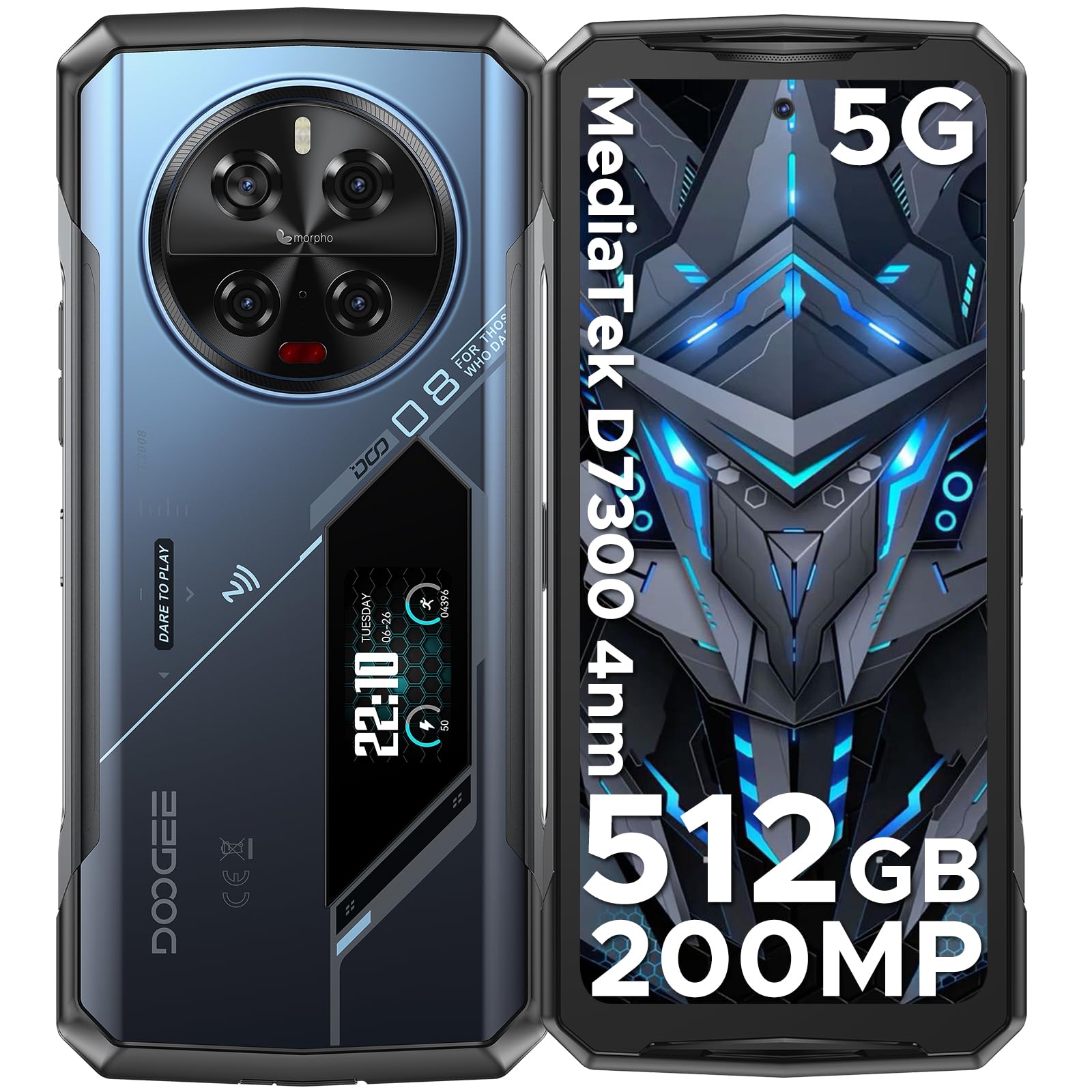
Descrición da imaxe: Unha completa view of the DOOGEE V40 Pro, showcasing its front display and the unique rear panel with the camera module and secondary screen.
3.2 Pantalla principal
The device is equipped with a 6.78-inch FHD+ display offering a 120Hz dynamic refresh rate for smooth visuals and efficient power consumption.

Descrición da imaxe: The DOOGEE V40 Pro's main 6.78-inch FHD+ display, illustrating its vibrant screen quality.
3.3 Multi-functional Rear Display
A 1.47-inch secondary display on the rear provides quick access to essential information and controls without needing to activate the main screen. Functions include time, date, notifications, music control, and battery level.

Descrición da imaxe: A close-up of the DOOGEE V40 Pro's 1.47-inch rear display, showing various customizable widgets and information displays.
Sistema de cámara 3.4
The device features a versatile camera setup, including a 200MP AI main camera with OIS, a 20MP night vision camera, an 8MP telephoto camera, an 8MP macro camera, and a 32MP front-facing camera.

Descrición da imaxe: Un detallado view of the DOOGEE V40 Pro's circular rear camera module, highlighting its multiple lenses and flash.
4. Configuración
4.1 Instalación da tarxeta SIM e da tarxeta TF
To install your SIM card(s) and/or TF card (microSD card for expandable storage), locate the SIM tray on the side of the device. Use the provided SIM ejector tool to open the tray. Carefully place your nano-SIM cards and/or TF card into the designated slots, ensuring correct orientation. Close the tray securely.
4.2 Encendido inicial
Press and hold the Power button located on the side of the device until the DOOGEE logo appears. Follow the on-screen instructions to complete the initial setup, including language selection, network connection, and account configuration.
5. Instrucións de funcionamento
5.1 Funcións básicas do teléfono
Navigate the Android 14 operating system using touch gestures. Swipe down from the top for notifications and quick settings. Use the volume buttons on the side to adjust audio levels. The power button can be configured for various actions, including screen lock/unlock and power options.
5.2 Using the Rear Display
The 1.47-inch rear display offers quick access to information and controls. Swipe left or right to cycle through different widgets such as time, date, battery status, music playback controls, and notification alerts. This display can also be used for enhanced selfie previews.

Descrición da imaxe: A person holding the DOOGEE V40 Pro, demonstrating the visibility and utility of the rear display.
5.3 Funcionamento da cámara
Open the Camera application to access the 200MP AI main camera, 20MP night vision camera, 8MP telephoto, 8MP macro, and 32MP front camera. Select different modes for photos, videos (including 4K recording), and special features like anti-shake and night vision. The rear display can assist with framing selfies using the main camera.
Descrición do vídeo: Unha presentación de vídeo promocionalasing the DOOGEE V40 Pro's features, including its camera capabilities and rugged design.
5.4 Rendemento e xogos
The Dimensity 7300 4nm 5G processor and 36GB RAM (16GB physical + 20GB virtual) provide smooth performance for demanding applications and games. The DOOGEE OS 4.0 includes features like Game Mode Without Disturb for an uninterrupted gaming experience.
Descrición do vídeo: A video highlighting the DOOGEE V40 Pro's e-sports design and performance, suitable for gaming enthusiasts.
5.5 DOOGEE OS 4.0 Features
Experience enhanced user interface and features with DOOGEE OS 4.0, including App Cloning, Drama Mode (Video), and Dynamic Capsule for improved multitasking and user interaction.
6. Conectividade
The DOOGEE V40 Pro supports a range of connectivity options:
- Rede: 5G connectivity. Supports AT&T, Verizon, T-Mobile. Not compatible with CDMA carriers such as Cricket, Sprint, Boost Mobile, Straight Talk, or U.S. Cellular.
- Wi-Fi: Wi-Fi 6 for fast and stable wireless internet.
- Bluetooth: Bluetooth 5.2 para conectar accesorios sen fíos.
- NFC: Comunicación de campo próximo para pagamentos sen contacto e intercambio de datos.
- GPS: Integrated GPS with Beidou, Galileo, and Glonass support for accurate navigation.
7. Xestión da batería
The DOOGEE V40 Pro is equipped with an 8680mAh battery, providing extended usage times. It supports 33W fast charging to quickly replenish power.

Descrición da imaxe: An illustration highlighting the large 8680mAh battery capacity of the DOOGEE V40 Pro.
Carga inversa OTG 7.1
Utilize the OTG (On-The-Go) function to use your V40 Pro as a power bank to charge other compatible devices.
7.2 Intelligent Battery Management
The device features an intelligent battery management system with Ultra Power Saving mode to extend battery life when needed and an option to display battery percentage na barra de estado.
8. Características robustas
The DOOGEE V40 Pro is built to withstand harsh environments, certified with IP68, IP69K, and MIL-STD-810H ratings.
- IP68: Dust and water resistant up to 1.5 meters for 30 minutes.
- IP69K: Resistente a chorros de auga a alta presión e alta temperatura.
- Norma MIL-STD-810H: Military-grade durability against drops, shocks, and extreme temperatures.
- Resistencia á temperatura: Operates reliably in temperatures ranging from -40°C (-40°F) to +70°C (158°F).

Descrición da imaxe: The DOOGEE V40 Pro submerged in water and being dropped, illustrating its IP68/IP69K and MIL-STD-810H ruggedness ratings.
9. Especificacións
| Característica | Detalle |
|---|---|
| Dimensións do produto | 7.2 x 3.3 x 0.6 polgadas |
| Peso do elemento | 12.8 onzas (0.8 libras) |
| Sistema Operativo | Android 14 |
| Modelo CPU | Dimensity 7300 4nm 5G Octa-core Processor |
| Velocidade da CPU | 2.5 GHz |
| Tamaño da memoria RAM instalada | 36 GB (16 GB + 20 GB virtuais) |
| Capacidade de almacenamento da memoria | 512 GB (ampliable ata 2 TB con tarxeta TF) |
| Tamaño de visualización da pantalla de pé | 6.78 polgadas |
| Resolución | 1080 x 2400 (FHD+) |
| Taxa de actualización | 120 Hz |
| Pantalla traseira | 1.47" All-Purpose Secondary Display |
| Cámara principal | Cámara principal de 200 MP con IA e OIS |
| Cámara de visión nocturna | Cámara de visión nocturna de 20 MP |
| Other Rear Cameras | 8MP Telephoto Camera, 8MP Macro Camera |
| Cámara frontal | Cámara frontal de 32 MP |
| Capacidade da batería | 8680 millónsamp Horario |
| Cargando | Carga rápida de 33 W, carga inversa OTG |
| Tecnoloxías de Conectividade | Bluetooth 5.2, NFC, WiFi 6 |
| GPS | Beidou, Galileo, Glonass, GPS |
| Robusteza | IP68, IP69K, MIL-STD-810H |
| Jack de audio | Tipo-C |
| Orador | 1216 Super-linear Waterproof 121dB 1.5W BOX Speaker with SMART PA chip |
| Entrada da interface humana | Pantalla táctil |
| Cor | Azul |
10 Solución de problemas
If you encounter issues with your DOOGEE V40 Pro, try the following steps:
- O dispositivo non se acende: Asegúrate de que a batería estea cargada. Conecta o teléfono ao cargador e agarda uns minutos antes de tentar acendelo de novo.
- Pantalla non responde: Mantén premido o botón de acendido/apagado durante uns 10-15 segundos para forzar un reinicio.
- Problemas de conectividade de rede: Check if your SIM card is correctly inserted. Verify that mobile data or Wi-Fi is enabled. Restart the device.
- Avarías da aplicación: Close and reopen the problematic application. If the issue persists, clear the app's cache and data in Settings > Apps.
- Rendemento lento: Close unnecessary background applications. Clear cache regularly. Consider a factory reset as a last resort (back up your data first).
11. Garantía e soporte
DOOGEE provides comprehensive support for your V40 Pro smartphone:
- Garantía de devolución do diñeiro de 30 días: Se non estás satisfeito coa túa compra, podes optar a un reembolso completo dentro de 30 días.
- Garantía limitada de 2 ano: Your device is covered by a 2-year limited warranty against manufacturing defects. Please refer to the warranty card included in the box for detailed terms and conditions.
- Asistencia en liña 24/7: For any technical assistance or inquiries, contact DOOGEE customer service available 24 hours a day, 7 days a week.


