Introdución
Thank you for choosing the Redragon K736 PRO Rapid Trigger Wireless Gaming Keyboard. This manual provides essential information for setting up, operating, and maintaining your new keyboard. Please read thoroughly to ensure optimal performance and longevity of your device.
Características clave
- HE Magnetic Switches: Experience hyper-fast actuation and a longer lifespan compared to traditional mechanical switches.
- Tecnoloxía de disparo rápido: Customize actuation points from 0.1mm to 4.0mm via software for ultra-precise input and dynamic activation/deactivation.
- Conectividade de 3 modos: Seamlessly switch between 2.4Ghz wireless, Bluetooth, and wired USB-C connections.
- Disposición de 94 teclas ao 90 %: Efficient design maximizing space usage while retaining essential keys.
- 2 Actions in 1 Tap: Assign two different movements to a single key based on actuation pressure using the professional software.
- Batería de 2500 mAh: Batería de alta capacidade para un uso inalámbrico prolongado.
- Ruído Dampening Layers: Features multiple layers for a neat sound profile and improved typing experience.
Configuración
Contido do paquete
- Teclado Redragon K736 PRO
- Cable USB-C
- Tirador de chaves
- Extractor de interruptor
- Manual de usuario
Conectividade
The K736 PRO supports three connection modes: 2.4Ghz wireless, Bluetooth, and wired USB-C.
- Modo cableado: Connect the keyboard directly to your PC using the provided USB-C cable. The keyboard will be plug-and-play, requiring no additional drivers for basic functionality.
- Modo sen fíos de 2.4 GHz: Insert the 2.4Ghz USB receiver into an available USB port on your computer. Toggle the switch on the keyboard to 2.4G mode. The keyboard should connect automatically.
- Modo Bluetooth: Toggle the switch on the keyboard to BT mode. On your device (PC, laptop, tablet), search for Bluetooth devices and select the K736 PRO to pair. The keyboard can store up to 3 Bluetooth profiles (FN+1, FN+2, FN+3).
Cargando
The keyboard is equipped with a 2500 mAh Lithium Polymer battery. Connect the USB-C cable to the keyboard and a power source (PC USB port or wall adapter) to charge. The keyboard can be used while charging in wired mode. Check battery level by pressing FN + Right Shift.
Instrucións de funcionamento
Funcións básicas das teclas
The K736 PRO features a 90% layout with 94 keys. Many functions are accessed via the FN key combinations.
- FN + F1-F12: Access multimedia and system functions (e.g., volume control, media playback).
- FN + Teclas de frecha: Control cursor movement.
- FN + Win: Tecla de bloqueo/desbloqueo de Windows.
- FN + W/M: Switch between Windows and Mac OS layouts.

Image: Redragon K736 PRO keyboard highlighting the FN + W/M keys for switching between Windows and Mac OS compatibility.
Control de retroiluminación RGB
The keyboard features dynamic RGB backlighting. You can control various aspects of the lighting directly from the keyboard.
- FN + Alt: Switch between over 14 backlight patterns.
- FN + M: Axusta o brillo da retroiluminación (5 niveis).
- FN + < / >: Adjust backlight rotating speed.
- FN + Espazo: Turn RGB backlight ON/OFF.
Control de software
For advanced customization, including actuation point adjustment, macro programming, and detailed RGB effects, download the dedicated PC (Windows) driver from the Redragon official website. The magnetic switch features are fully unlocked via this software.
Vídeo: Unha reestruturación detalladaview and testing of the Redragon K736 PRO keyboard, showcasing as súas características e rendemento.
Personalización
The Redragon K736 PRO offers extensive customization options through its dedicated software.
Rapid Trigger & Actuation Point Adjustment
The Hall magnetic switches combined with rapid trigger technology allow for precise actuation point adjustment. Via the software, you can set the actuation point between 0.1mm and 4.0mm. This ultra-precise control, along with dynamic activation/deactivation, enhances responsiveness for competitive gaming.
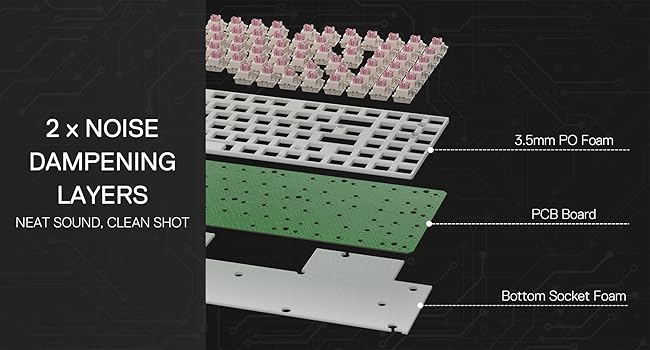
Image: Software interface for the Redragon K736 PRO, illustrating the adjustable actuation point settings for individual keys.
2 Actions in 1 Tap (DKS/MT/TGL Mode)
The professional software allows you to assign two different actions to a single key based on the key's actuation pressure. This feature, known as DKS/MT/TGL mode, simplifies complex skill combinations and provides a competitive edge in games.

Image: Diagram explaining the DKS/MT/TGL modes, allowing users to define multiple actions or continuous triggers based on key press depth.
Vídeo: Un curto remateview highlighting the magnetic switches and their benefits for gaming.
Mantemento
Proper maintenance ensures the longevity and performance of your Redragon K736 PRO keyboard.
- Limpeza: Regularly clean the keycaps and the keyboard body with a soft, dry cloth. For deeper cleaning, use the provided keycap puller to remove keycaps and clean underneath with compressed air or a soft brush.
- Xestión de vertidos: In case of liquid spills, immediately unplug the keyboard from your computer. Wipe off excess liquid and place the keyboard in a warm, well-ventilated area to dry completely before next use.
- Substitución do interruptor: The hot-swappable design allows for easy switch replacement. Use the provided switch puller to carefully remove and replace switches if needed.
Resolución de problemas
- O teclado non responde: Ensure the USB cable is correctly inserted into the corresponding USB port on the computer. Try a different USB port or restart your computer. In wireless modes, check battery level and ensure the receiver is properly connected or Bluetooth is paired.
- Red 'W' Key Issue: Some users may experience the 'W' key glowing red constantly, indicating Windows mode. If this is undesired, contact Redragon support for a firmware update specifically designed to disable this feature.
- O software non detecta o teclado: Ensure the keyboard is connected via USB-C and the correct PC (Windows) driver is installed. Restart the software and keyboard if necessary.
- Magnetic Switch Incompatibility: Note that the magnetic switch features require a dedicated PC (Windows) driver and are not compatible with Mac or non-PC platforms like PS5 and NS.
Especificacións
- Nome do modelo: K736 PRO (Nephrite Pro)
- Conectividade: 2.4Ghz Wireless, Bluetooth, USB-C Wired
- Tipo de interruptor: HE Magnetic Mechanical Switch
- Punto de actuación: Axustable de 0.1 mm a 4.0 mm
- Batería: 1 Lithium Polymer battery required (2500 mAh)
- Deseño: 90% (94 teclas)
- Teclas: Double-shot PBT (commonplace)
- Material: Plástico
- Cor: Negro
- Peso do artigo: 2.51 libras
- Dimensións do paquete: 14.88 x 7.44 x 2.28 polgadas
- Dispositivos compatibles: PC (Windows for full magnetic switch features)
Garantía e Soporte
Redragon products typically come with an 18-month warranty from the date of purchase. This warranty covers manufacturing defects and ensures proper functioning under normal use. For warranty claims, technical support, or any inquiries regarding your K736 PRO keyboard, please contact Redragon customer service through their official websitio web ou o vendedor onde se comprou o produto.
Please retain your proof of purchase for warranty validation. The warranty may not cover damages caused by misuse, unauthorized modifications, accidents, or natural disasters.


