1. Introdución
Thank you for choosing the BLUETTI AORA 100 Portable Power Station. This manual provides essential information for the safe and efficient use of your device. The AORA 100 is designed for versatility, offering a reliable power source for various applications, from emergency backup to outdoor adventures. It features a 1152Wh capacity, 1800W AC output, ultra-fast UPS functionality, and multiple charging options.
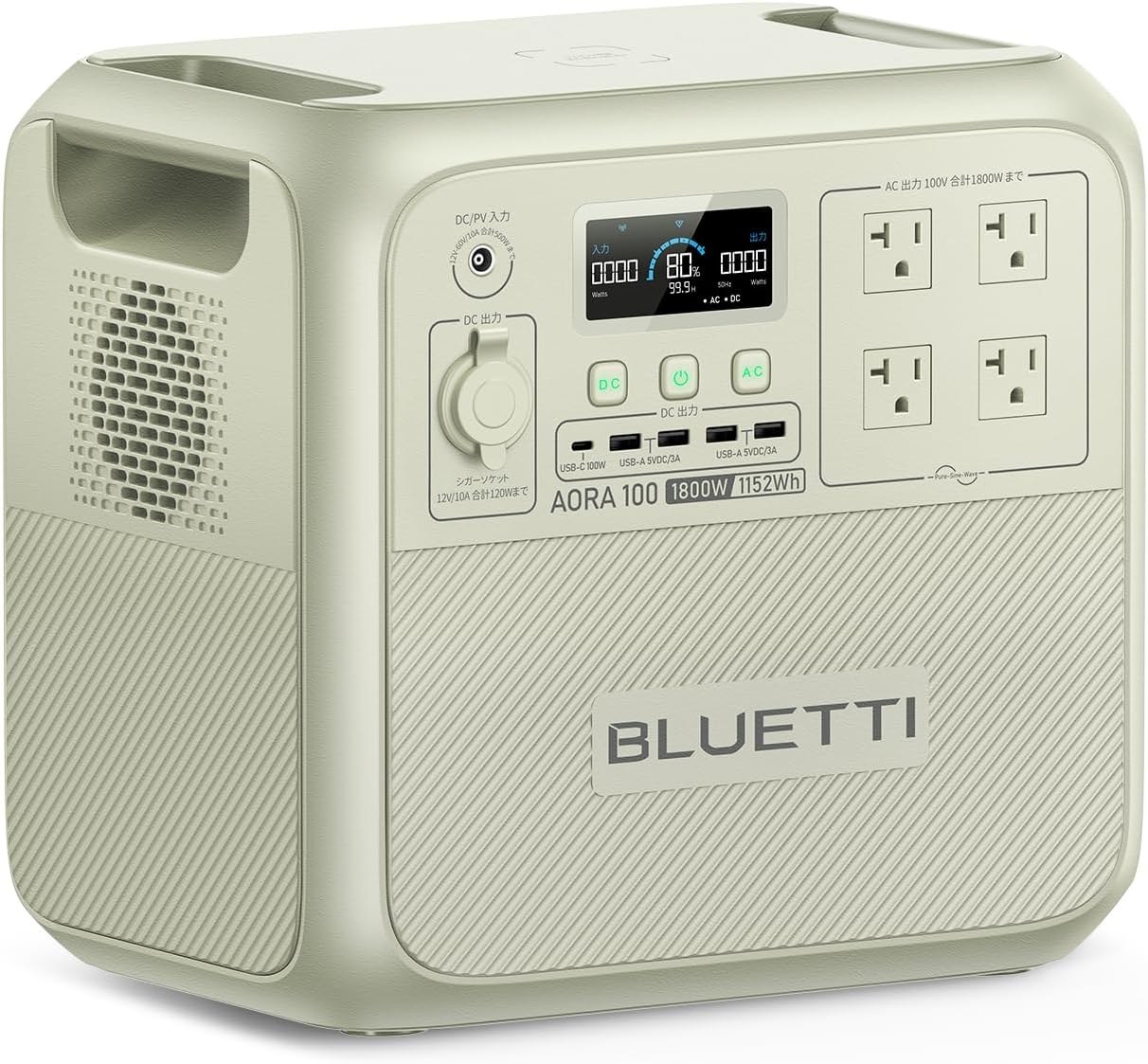
Image 1.1: The BLUETTI AORA 100 Portable Power Station, showcasinpolo seu deseño compacto e os seus múltiples portos de saída.
2. Instrucións de seguridade
Please read and understand all safety instructions before operating the BLUETTI AORA 100. Failure to follow these instructions may result in electric shock, fire, or serious injury.
- Non desmonte, repare nin modifique a unidade.
- Manteña a unidade lonxe de fontes de calor, luz solar directa e materiais inflamables.
- Non expoña a unidade á auga ou a outros líquidos.
- Asegúrate dunha ventilación axeitada durante o uso e a carga. Non bloquees as aberturas de ventilación.
- Emprega só accesorios e cables de carga aprobados por BLUETTI.
- Almacene a unidade nun lugar fresco e seco cando non estea en uso.
- O casing is made from UL94V-0 certified flame-retardant material for enhanced safety.
- The BLUETOPUS BMS (Battery Management System) monitors for overcharge and overheating in real-time.
3. Contido do paquete
Verifica que todos os elementos estean incluídos no teu paquete:
- BLUETTI AORA 100 Portable Power Station Unit
- Cable de carga AC
- MC4 Solar Charging Cable / Car Charging Cable
- Manual de usuario (este documento)
4. Produto rematadoview
Familiarize yourself with the ports and controls of your AORA 100 unit.

Image 4.1: Front panel of the BLUETTI AORA 100, highlighting the 11 output ports and wireless charging pad.
4.1. Portos e controis
- 15W Qi Wireless Charging Pad: Located on the top surface for compatible devices.
- Portos de saída de CA: 4 x 100V AC outlets (1800W total, 2700W Power Lift mode).
- Portos USB-A: 4 x USB-A ports (18W each).
- Porto USB-C: 1 x USB-C port (PD3.0/100W).
- Enchufe do chisqueiro: 1 x 12V/10A (150W) cigarette lighter socket.
- Entrada CC/FV: For charging via AC adapter, solar panels, or car charger.
- Pantalla LCD: Displays power consumption, battery status, and other operational information.
5. Configuración
Before first use, fully charge your BLUETTI AORA 100.
5.1. Carga inicial
- Connect the AC charging cable to the DC/PV input port on the AORA 100.
- Conecte o outro extremo do cable de carga de CA a unha toma de parede estándar.
- The LCD screen will indicate charging status. The unit can charge to 80% in approximately 45 minutes using TurboBoost 1440W AC charging.
- Unha vez cargado completamente, desconecta o cable.

Image 5.1: The BLUETTI AORA 100 connected to a wall outlet for rapid AC charging.
6. Instrucións de funcionamento
6.1. Acendido/apagado
Press and hold the main power button to turn the unit on or off. The LCD screen will illuminate upon power-on.
6.2. Charging the AORA 100
The AORA 100 supports 7 charging methods:
- Toma de corrente de parede: Use the provided AC charging cable. Supports TurboBoost 1440W for 80% charge in 45 minutes.
- Paneis solares: Connect compatible solar panels (up to 500W input) using the MC4 solar charging cable. MPPT technology ensures up to 97% charging efficiency even on cloudy days. Full charge in approximately 3.4 hours with 500W solar input.
- Carga do coche: Connect to your vehicle's cigarette lighter socket using the car charging cable. A full charge can be achieved in 2.5 hours with BLUETTI Charger1 car charging (500W).
- Other methods may include generator, lead-acid battery, etc. Refer to the full manual for details.

Image 6.1: The BLUETTI AORA 100 being charged via a car's cigarette lighter socket, ideal for travel.
6.3. Discharging (Powering Devices)
Connect your devices to the appropriate output ports:
- Saída CA: For household appliances (e.g., refrigerators, microwave ovens, rice cookers).
- USB-A/USB-C Output: For smartphones, tablets, laptops, and other USB-powered devices.
- Enchufe do chisqueiro: For 12V DC devices (e.g., car refrigerators).
- Carga sen fíos: Place Qi-compatible devices on the charging pad.

Image 6.2: The BLUETTI AORA 100 powering a kettle and a refrigerator, demonstrating its high output capability.
6.4. Funcionalidade do SAI
The AORA 100 features an ultra-fast Uninterruptible Power Supply (UPS) function. In the event of a power outage, it detects the interruption in 0.02 seconds and automatically switches to battery power, protecting sensitive electronics like computers from data loss or damage.
6.5. Power Lift Mode (2700W)
The 1800W high output can be boosted to 2700W in Power Lift mode for resistive load appliances with heating elements that exceed 1800W. This allows for simultaneous use of multiple high-power devices, such as a toaster (1000W) and a hairdryer (1200W).
6.6. Carga de paso
The AORA 100 supports pass-through charging, allowing you to power devices while the unit itself is being charged. This is particularly useful during extended power outages or at job sites.
6.7. Control de aplicacións
Download the BLUETTI app to remotely control your AORA 100. The app allows you to:
- Turn output ports on/off.
- Monitor power consumption and usage data.
- Perform wireless firmware updates (OTA).
7. Mantemento
Proper maintenance ensures the longevity and optimal performance of your AORA 100.
- Limpeza: Use un pano seco e suave para limpar a unidade. Non empregue produtos de limpeza abrasivos nin solventes.
- Almacenamento: If storing for an extended period, charge the unit to 50-80% every 3-6 months to maintain battery health. Store in a cool, dry environment.
- Duración da batería: The AORA 100 uses LiFePO4 batteries, offering over 3500 charge/discharge cycles and a 10-year lifespan.

Image 7.1: Internal structure of the BLUETTI AORA 100, highlighting the LiFePO4 battery cells and the advanced Battery Management System (BMS).
8 Solución de problemas
If you encounter issues with your AORA 100, refer to the following common problems and solutions:
| Problema | Causa posible | Solución |
|---|---|---|
| A unidade non se acende | A batería está esgotada; o botón de acendido non se premeu correctamente | Cargar a unidade; premer e manter premido o botón de acendido durante 3 segundos. |
| A saída de CA non funciona | AC output is off; Overload protection activated | Ensure AC output is enabled; Reduce connected load; Restart unit. |
| Carga lenta | Baixa potencia de entrada; Alta temperatura ambiente | Ensure charger is fully connected; Use higher wattage input (e.g., TurboBoost AC); Move to a cooler environment. |
| Problemas de conexión da aplicación | Bluetooth/Wi-Fi off; App not updated | Ensure Bluetooth/Wi-Fi is enabled on your device and AORA 100; Update the app to the latest version. |
If the problem persists, please contact BLUETTI customer support.
9. Especificacións
| Característica | Especificación |
|---|---|
| Modelo | BLUETTI AORA 100 |
| Capacidade da batería | 1152 Wh |
| Potencia de saída de CA. | 1800W (Rated), 2700W (Power Lift Mode) |
| Tipo de batería | LiFePO4 (fosfato de ferro de litio) |
| Vida útil | Over 3500 cycles to 80% capacity, 10-year lifespan |
| Tempo de conmutación do UPS | 0.02 segundos (20 ms) |
| Potencia de entrada de CA | Up to 1440W (TurboBoost) |
| Potencia de entrada solar | Ata 500W |
| Carga sen fíos | Qi de 15 W |
| Peso | 16.4 kg |
| Voltage | 100 voltios (CA) |
| Tipos de conectores | USB Type A, USB Type C, AC, Cigarette Lighter |
| Características de seguridade | UL94V-0 flame-retardant casing, BLUETOPUS BMS (overcharge, overheat protection) |
| Usos recomendados | Camping, Household, Outdoor work, Commercial, Emergency |
10. Garantía e soporte
BLUETTI offers an industry-leading Servizo de garantía de 5 ano for the AORA 100 Portable Power Station, demonstrating confidence in its quality and durability. This warranty covers manufacturing defects and ensures comprehensive after-sales support.
10.1. Atención ao cliente
For technical assistance, warranty claims, or any inquiries, please contact BLUETTI customer support through the official website or your purchase platform. Please have your product model and purchase date available when contacting support.
Para máis información, visite o oficial BLUETTI Store on Amazon.


