1. Introdución
This manual provides detailed instructions for the safe and effective use of your TOTAL TMT57026 Laser Distance Meter. Please read this manual thoroughly before operating the device and keep it for future reference. This device is designed for accurate distance measurements up to 70 meters, suitable for various professional and DIY applications.
2. Instrucións de seguridade
- Radiación láser: This device emits Class 2 laser radiation. Do not stare into the laser beam or direct it at other people or animals.
- Protección ocular: Evite a exposición directa dos ollos ao raio láser.
- Entorno operativo: Non opere o dispositivo en atmosferas explosivas nin preto de materiais inflamables.
- Resistencia á auga: Este dispositivo é non resistente á augaEvitar a exposición á auga ou a unha humidade elevada.
- Mantemento: Only qualified personnel should repair the device.
- Baterías: Use only specified AAA batteries. Do not mix old and new batteries or different types of batteries.
3. Produto rematadoview
Familiarize yourself with the components of your TOTAL TMT57026 Laser Distance Meter.
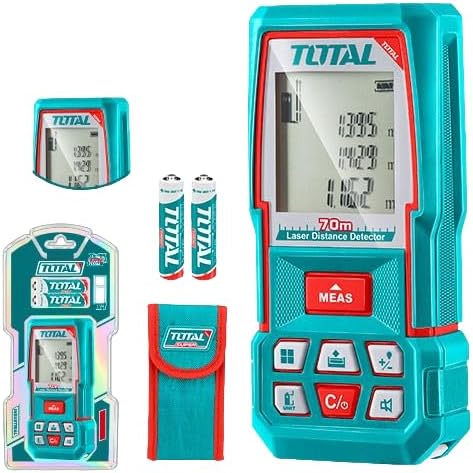
Figure 1: The TOTAL TMT57026 Laser Distance Meter, showing the device itself, two AAA batteries, a carrying pouch, and retail packaging. The device features a digital display and multiple function buttons.
Compoñentes clave:
- Emisor/Receptor láser: Situado na parte superior do dispositivo.
- Pantalla de visualización: Shows measurements, units, and mode indicators.
- Botón MEDIR: Initiates single or continuous measurement.
- Botón UNIT: Changes measurement units (e.g., meters, feet, inches).
- C/O Button: Clears the last measurement or turns the device off.
- Botóns de función: For area, volume, addition, subtraction, and other calculations.
- Compartimento de batería: Located at the rear of the device.
4. Configuración
4.1 Instalación da batería
- Localiza a tapa do compartimento da batería na parte traseira do dispositivo.
- Deslice ou solte a tapa para abrila.
- Insert two (2) AAA 1.5V disposable batteries, ensuring correct polarity (+/-). The device includes two AAA batteries.
- Pecha a tapa do compartimento da batería de forma segura.
4.2 Acendido/Apagado
- Para acender: Preme o MEAS button briefly. The display will light up.
- Para apagar: Manteña premido o C/O button for approximately 3 seconds. The device will also automatically power off after a period of inactivity to conserve battery life.
5. Instrucións de funcionamento
5.1 Medición básica de distancias
- Asegúrese de que o dispositivo estea acendido.
- Apunte o raio láser á superficie obxectivo.
- Preme o MEAS button once. The laser will activate, and the measurement will appear on the display.
- The measurement will be held on the screen until a new measurement is taken or the device is turned off.
5.2 Medición continua (seguimento)
- Manteña premido o MEAS botón durante aproximadamente 2 segundos.
- The device will enter continuous measurement mode, displaying real-time distance as you move the device.
- Preme o MEAS de novo para deter a medición continua e manter o último valor.
5.3 Cambio de unidades de medida
- Preme o UNIDADE button repeatedly to cycle through available units: meters (m), feet (ft), and inches (in).
- The selected unit will be indicated on the display.
5.4 Medición de área e volume
The device supports calculation of area and volume. Refer to the icons on the function buttons for specific modes.
- Press the appropriate function button (e.g., the button with the square icon for area, or cube icon for volume).
- Follow the on-screen prompts to take the required measurements (e.g., length, width for area; length, width, height for volume).
- Mostrarase o resultado calculado.
5.5 Suma e resta
Usa o +/- button to add or subtract measurements.
- Toma a primeira medida.
- Preme o +/- button to select addition or subtraction mode.
- Take the second measurement. The device will automatically perform the calculation and display the result.
6. Mantemento
6.1 Limpeza
- Limpe o dispositivo cun suave, damp pano. Non use produtos de limpeza ou disolventes abrasivos.
- Clean the laser lens carefully with a soft, lint-free cloth, similar to cleaning camera lenses.
6.2 Almacenamento
- Garde o dispositivo nun lugar seco e fresco, lonxe da luz solar directa e de temperaturas extremas.
- Se o gardas durante un período prolongado, retira as baterías para evitar fugas.
6.3 Substitución da batería
- When the battery indicator on the display shows low power, replace both AAA batteries following the instructions in Section 4.1.
7 Solución de problemas
| Problema | Causa posible | Solución |
|---|---|---|
| O dispositivo non se acende. | As baterías están agotadas ou están mal instaladas. | Comprobe a polaridade das pilas ou substitúaas por pilas AAA novas. |
| Medicións inexactas. | Laser lens is dirty; target surface is too reflective/non-reflective; device is unstable. | Clean the laser lens. Measure against a suitable, stable surface. Ensure device is held steady. |
| O raio láser non é visible. | Bright ambient light; laser is off. | Operate in lower light conditions. Ensure device is powered on and MEAS button is pressed. |
| A pantalla mostra un código de erro. | Medición fóra de rango; erro interno. | Ensure target is within 0.05m to 70m range. Try restarting the device. If error persists, contact support. |
8. Especificacións
- Modelo: TMT57026
- Marca: TOTAL
- Rango de medición: 0.05 a 70 metros
- Unidades de medida: Metros (m), Pés (ft), Polgadas (in)
- Clase láser: Clase 2
- Baterías: 2 x AAA, 1.5V (included)
- Tipo de batería: Desbotable
- Automatic Laser Shut-off: Yes (after inactivity)
- Automatic Device Shut-off: Yes (after inactivity)
- Dimensións do produto: Aproximadamente 17 x 5 x 0.1 cm
- Peso do artigo: Approximately 160 g (0.16 Kilograms)
- Material: Plástico
- Cor: Turquesa
- Nivel de resistencia á auga: Non resistente á auga
- Fabricante: Total
- País de orixe: China
9. Garantía e soporte
For warranty information and technical support, please contact TOTAL customer service. Keep your purchase receipt as proof of purchase.
For further assistance, please refer to the official TOTAL websitio web ou póñase en contacto co seu distribuidor local.


