1. Produto rematadoview
The CHOETECH B695 is a versatile 10000mAh magnetic power bank designed for convenient charging of multiple devices. It features both wireless charging capabilities and multiple wired output options, including built-in USB-C and Lightning cables. Its compact design and integrated safety features make it an ideal portable power solution.

Imaxe: Anverso e reverso view of the CHOETECH B695 Magnetic Power Bank, showcasinpolo seu deseño compacto e os seus diversos portos.
Características principais:
- Capacidade 10000 mAh: Proporciona ample poder para varias cargas.
- Carga 2 en 1: Supports both magnetic wireless charging and wired charging.
- Cables incorporados: Integrated USB-C and Lightning cables for direct device connection.
- Saídas múltiples: Includes USB-A, Type-C (input/output), and dedicated wireless charging for phones and watches.
- Aliñación magnética: Ensures secure and efficient wireless charging for compatible devices.
- Pantalla dixital LED: Clearly indicates remaining battery percentage.
- Protección de seguridade integral: Built-in safeguards against overcharge, overdischarge, overcurrent, overvoltage, temperature, short circuit, overpower, recovery, and electromagnetic field issues.
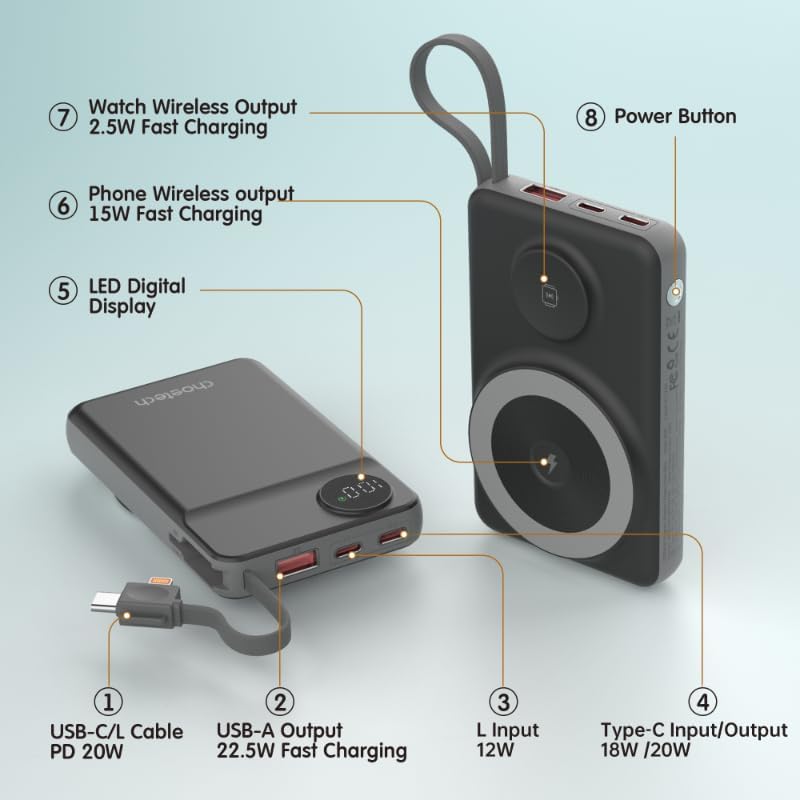
Image: Detailed diagram labeling the ports and features of the CHOETECH B695, including USB-C/L cable, USB-A output, L input, Type-C input/output, LED display, phone wireless output, watch wireless output, and power button.
2. Primeiros pasos: Configuración
2.1 Carga da batería externa
Before initial use, fully charge your CHOETECH B695 power bank. This ensures optimal performance and battery longevity.
- Connect a compatible USB-C charging cable (not included) to the Type-C Input/Output port (4) on the power bank.
- Connect the other end of the cable to a USB wall adapter (not included).
- The LED Digital Display (5) will show the charging progress. It will display "100" when fully charged.
- Alternatively, you can use the built-in Lightning input (3) to charge the power bank with a Lightning cable and adapter.
Nota: For fastest charging of the power bank, use a PD (Power Delivery) compatible wall adapter with the Type-C port.
3. Instrucións de funcionamento
3.1 Comprobación do nivel da batería
Press the Power Button (8) once to activate the LED Digital Display (5), which will show the current battery percentage.
Carga con cable 3.2
The CHOETECH B695 offers multiple wired charging options:
- Using Built-in USB-C/L Cable (1):
- Pull out the integrated USB-C or Lightning cable from its storage slot.
- Connect the appropriate cable end to your device's charging port.
- A carga comezará automaticamente.
- Using USB-A Output (2):
- Connect your device's USB charging cable to the USB-A Output port (2).
- Conecta o outro extremo do cable ao teu dispositivo.
- Charging will commence.
- Using Type-C Input/Output (4):
- Connect your device's USB-C charging cable to the Type-C Input/Output port (4).
- Conecta o outro extremo do cable ao teu dispositivo.
- Charging will commence.

Image: The CHOETECH B695 power bank connected to a smartphone via its built-in USB-C cable, demonstrating wired charging.
3.3 Wireless Charging (Phone)
The power bank supports magnetic wireless charging for compatible smartphones (e.g., iPhone 12 series and newer, or Android phones with magnetic cases).
- Asegúrate de que o banco de enerxía estea suficientemente cargado.
- Align your compatible smartphone with the larger magnetic charging pad (6) on the power bank.
- The phone should snap into place magnetically, and wireless charging will begin.

Image: A smartphone magnetically attached to the larger wireless charging pad and a smartwatch on the smaller pad of the CHOETECH B695, illustrating simultaneous wireless charging.
3.4 Wireless Charging (Watch)
The power bank includes a dedicated smaller magnetic charging pad for smartwatches.
- Asegúrate de que o banco de enerxía estea suficientemente cargado.
- Place your compatible smartwatch onto the smaller magnetic charging pad (7).
- The watch should align magnetically, and wireless charging will begin.
3.5 Carga simultánea
The CHOETECH B695 can charge multiple devices simultaneously using a combination of its wired and wireless outputs.

Image: The CHOETECH B695 power bank connected to and wirelessly charging multiple devices, including smartphones and a smartwatch, demonstrating its multi-output capability.
4. Información de seguridade e funcións de protección
The CHOETECH B695 is equipped with multiple safety mechanisms to protect your devices and the power bank itself.
- Protección de sobrecarga: Prevents the battery from being charged beyond its capacity.
- Protección contra sobredescarga: Protects the battery from being fully depleted, extending its lifespan.
- Protección contra sobrecorriente: Protección contra o fluxo excesivo de corrente.
- Sobrevoltage Protección: Protexe contra o volumetage subidas.
- Protección de temperatura: Monitors and regulates the internal temperature to prevent overheating.
- Protección contra curtocircuítos: Apágase automaticamente en caso de curtocircuíto.
- Protección de sobrepoder: Prevents power output beyond safe limits.
- Recovery Protection: Allows the device to recover from protection states.
- Electromagnetic Field Protection: Shields against harmful electromagnetic interference.

Image: An infographic detailing the nine safety protection features integrated into the CHOETECH B695 power bank, including overcharge, overdischarge, overcurrent, overvoltage, temperature, short circuit, overpower, recovery, and electromagnetic field protection.
Importante: Do not expose the power bank to extreme temperatures, direct sunlight, or water. Do not disassemble or attempt to repair the device. Keep out of reach of children.
5. Mantemento
- Limpeza: Use a soft, dry cloth to clean the power bank. Avoid liquid cleaners.
- Almacenamento: Garda o banco de enerxía nun lugar fresco e seco, lonxe da luz solar directa e de temperaturas extremas.
- Saúde da batería: To maintain battery health, fully charge and discharge the power bank at least once every three months if not in regular use.
- Coidado do cable: Handle the built-in cables gently. Avoid excessive bending or pulling to prevent damage.
6 Solución de problemas
6.1 O banco de enerxía non carga
- Ensure the charging cable is securely connected to both the power bank's input port and the wall adapter.
- Verify that the wall adapter is functioning correctly and plugged into a live power outlet.
- Try a different USB-C or Lightning charging cable and wall adapter.
6.2 O dispositivo non se carga desde o banco de enerxía
- Carga por cable:
- Check if the power bank has sufficient charge (refer to the LED display).
- Ensure the charging cable is securely connected to both the power bank's output port and your device.
- Proba cun cable de carga diferente ou cun porto de saída diferente no banco de enerxía.
- Press the power button once to activate output if necessary.
- Carga sen fíos:
- Ensure your device is compatible with magnetic wireless charging.
- Remove any thick cases or metallic objects from your device that might interfere with wireless charging.
- Ensure your device is correctly aligned with the magnetic charging pad on the power bank.
- Comproba se o banco de enerxía ten carga suficiente.
6.3 Carga lenta
- Ensure you are using a fast-charging compatible cable and adapter for both charging the power bank and charging your devices.
- Some devices may limit charging speed when multiple devices are connected simultaneously.
- Os factores ambientais (por exemplo, as altas temperaturas) poden afectar á eficiencia da carga.
6.4 LED Display Not Working
- Prema firmemente o botón de acendido.
- If the power bank is completely depleted, the display may not light up until it receives some charge.
7. Especificacións
| Modelo | B695 |
| Capacidade da batería | 10000 mAh |
| Saída de cable incorporada | USB-C/L Cable PD 20W |
| Saída USB-A | Carga rápida de 22.5 W |
| Entrada/Saída tipo C | 18 W / 20 W |
| Entrada Lightning | 12 W |
| Saída sen fíos do teléfono | Carga rápida de 15 W |
| Mira a saída sen fíos | Carga rápida de 2.5 W |
| Dimensions (L x W x Thickness) | 7.7L x 9.7W x 16.2Th centimeters |
| Peso do elemento | 0.05 quilogramos (50 g) |
| Cor | Negro |
8. Garantía e soporte
CHOETECH products are designed and manufactured to the highest quality standards. For warranty information and customer support, please refer to the warranty card included with your purchase or visit the official CHOETECH websitio.
If you encounter any issues or have questions regarding your CHOETECH B695 power bank, please contact CHOETECH customer service for assistance.


