Introdución
Welcome and thank you for choosing the HTC Wireless Earbuds TWS6 5.3. This manual provides detailed instructions to help you set up, operate, and maintain your earbuds for optimal performance. Please read this manual thoroughly before using your device.
Contido do paquete
Verifique que todos os elementos estean presentes no seu paquete:
- 2 x HTC Earbuds
- 1 x cable de carga USB-C
- 1 x estuche de carga
- 2 pares de almofadas de goma para os oídos (T/G)
- 1 x Quick Start Guide (physical document)

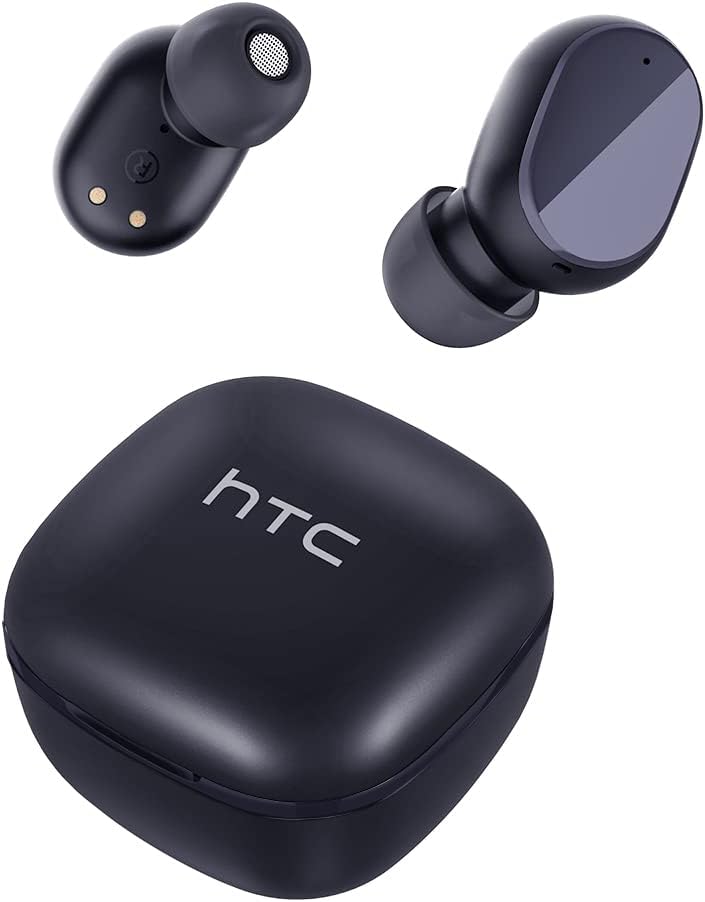
Produto rematadoview
Familiarize yourself with the components of your HTC TWS6 earbuds.

Configuración
Cargando os auriculares e o estuche
Antes do primeiro uso, carga completamente os auriculares e a caixa de carga.
- Coloque os auriculares na caixa de carga.
- Conecta o cable USB-C ao porto de carga da carcasa e a unha fonte de alimentación.
- O indicador luminoso da caixa mostrará o estado de carga.
- A full charge provides approximately 5 hours of playback for earbuds and up to 22 hours with the charging case.

Emparejamento Bluetooth
Sigue estes pasos para emparellar os teus auriculares co teu dispositivo:
- Abre a caixa de carga. Os auriculares entrarán automaticamente no modo de emparellamento.
- No teu dispositivo (teléfono intelixente, tableta, etc.), activa o Bluetooth.
- Busca "HTC TWS6" in the list of available Bluetooth devices.
- Select "HTC TWS6" to connect. A voice prompt will confirm successful pairing.

Usando os auriculares
For optimal sound quality and comfort, choose the correct eartip size and wear the earbuds properly.
- Select the eartips (S, M, L) that best fit your ears.
- Insira con coidado cada auricular no conduto auditivo.
- Rotate slightly to ensure a secure and comfortable fit.
Instrucións de funcionamento
Controis táctiles intelixentes
The HTC TWS6 earbuds feature intuitive touch controls:
- Reproducir/pausar música: Toca un só auricular en calquera dos auriculares.
- Próxima pista: Toca dúas veces no auricular dereito.
- Pista anterior: Toca dúas veces no auricular esquerdo.
- Subir volume: Toca tres veces no auricular dereito.
- Baixar volume: Toque tres veces no auricular esquerdo.
- Responder/Finalizar chamada: Toca un só auricular en calquera dos auriculares.
- Rexeitar a chamada: Mantén premido calquera dos auriculares durante 2 segundos.
- Activar o asistente de voz: Mantén premido calquera dos auriculares durante 3 segundos.

Encendido/apagado
The earbuds automatically power on when removed from the charging case and power off when placed back into the case and the lid is closed.
To manually power on, press and hold the touch area for 3 seconds. To manually power off, press and hold the touch area for 5 seconds.
Mantemento e coidados
Limpeza
Limpa os auriculares e a funda de carga regularmente para garantir un rendemento e unha hixiene óptimos.
- Usa un pano suave, seco e sen fiapos para limpar os auriculares e a funda de carga.
- Retire as almofadas para os oídos e límpeas con auga e xabón suave, logo séqueas ben antes de volvelas colocar.
- Non use produtos de limpeza ou disolventes abrasivos.
Resistencia á auga (IPX5)
The HTC TWS6 earbuds are IPX5 sweatproof, meaning they are resistant to splashes and sweat.
Nota: They are not designed for submersion in water. Avoid exposing them to heavy rain, showering, or swimming. Ensure the charging port is dry before charging.

Almacenamento
Cando non estean en uso, garde os auriculares no seu estoxo de carga para protexelos e mantelos cargados.
Gardar nun lugar fresco e seco, lonxe de temperaturas extremas.
Resolución de problemas
| Problema | Solución |
|---|---|
| Os auriculares non se emparejan | Ensure earbuds are charged. Turn off and on Bluetooth on your device. Forget "HTC TWS6" from your device's Bluetooth list and re-pair. |
| Só funciona un auricular | Volva colocar os dous auriculares na caixa de carga, peche a tapa e ábraa de novo. Asegúrese de que os dous auriculares estean cargados. |
| Volume baixo ou mala calidade de son | Adjust volume on your device. Clean eartips and earbud mesh. Try different eartip sizes for a better seal. |
| Problema de carga | Check USB-C cable and power adapter. Ensure charging contacts on earbuds and case are clean and dry. |
| Os auriculares desconéctanse con frecuencia | Ensure your device is within the Bluetooth range (approx. 10 meters/33 feet) and there are no significant obstructions. |
Se os problemas persisten, póñase en contacto co servizo de atención ao cliente.
Especificacións
| Característica | Detalle |
|---|---|
| Nome do modelo | TWS 6 |
| Versión Bluetooth | 5.3 |
| Tecnoloxía de conectividade | Sen fíos |
| Tecnoloxía de comunicación sen fíos | Bluetooth |
| Duración da batería (auriculares) | 5 horas |
| Tempo de reprodución total (con estuche) | 22 horas |
| Tempo de carga (caso) | Aproximadamente 5 Horas |
| Nivel de resistencia á auga | IPX5 (resistente á suor) |
| Método de control | Toca |
| Micrófono | Yes (with ENC) |
| Dispositivos compatibles | Android and iOS Smartphones, Gaming Devices |
| Material | Plástico |
| Peso do elemento | 3.17 onzas |
| UPC | 734257974554 |
| Control de ruído | Cancelación adaptativa de ruído |
| Tipo de controlador de audio | Driver dinámico |
| Impedancia | 199.99 ohmios |
Garantía e Soporte
HTC provides a 360-day warranty extension for this product, as detailed in the product information.
For technical assistance, warranty claims, or any inquiries, please contact HTC customer support.
Atención ao cliente: Refer to the contact information provided in your product packaging or visit the official HTC websitio para obter as opcións de asistencia máis actualizadas.


