Introdución
This manual provides detailed instructions for the setup, operation, and maintenance of your DAREU EK87PRO 80% TKL Wireless Mechanical Gaming Keyboard and DAREU A955 Wireless Gaming Mouse Combo. Please read this manual thoroughly before using the products to ensure optimal performance and longevity.
Contido do paquete
- DAREU EK87PRO Wireless Mechanical Gaming Keyboard
- DAREU A955 Wireless Gaming Mouse
- Cable USB-C (para carga e conexión con cable)
- Receptor USB de 2.4 GHz
- Manual de usuario
Configuración
Conexión de teclado
The EK87PRO keyboard supports three connection modes: Bluetooth (BT 5.1), 2.4GHz wireless, and USB-C wired.

Image: Diagram illustrating the three connection modes (USB wired, 2.4GHz wireless, Bluetooth 5.1) for the DAREU EK87PRO keyboard, showing connection to a laptop, smartphone, and a digital clock device.
- Modo sen fíos de 2.4 GHz:
- Localiza o receptor USB de 2.4 GHz.
- Conecte o receptor a un porto USB dispoñible no seu ordenador.
- Ensure the keyboard's mode switch (usually on the back or side) is set to 2.4GHz mode. The keyboard should automatically connect.
- Modo Bluetooth:
- Axusta o selector de modo do teclado ao modo Bluetooth.
- On your device (computer, smartphone), enable Bluetooth and search for new devices.
- Select "DAREU EK87PRO" from the list of available devices to pair. The keyboard can connect to up to five devices simultaneously. Use Fn + 1/2/3 to switch between paired Bluetooth devices.
- Modo con cable USB-C:
- Conecta o cable USB-C fornecido ao porto USB-C do teclado.
- Conecte o outro extremo do cable a un porto USB do seu ordenador.
- O teclado cambiará automaticamente ao modo con fíos e comezará a cargar.
Conexión do rato
The A955 mouse also supports three connection modes: Bluetooth (BT 5.0), 2.4GHz wireless, and USB-C wired.

Image: Diagram showing the DAREU A955 mouse connecting via Bluetooth 5.0, 2.4GHz, and USB-C to various devices including Windows, Android, and Apple operating systems.
- Modo sen fíos de 2.4 GHz:
- Plug the 2.4GHz USB receiver (shared with keyboard or separate if provided) into your computer.
- Ensure the mouse's mode switch is set to 2.4GHz mode. The mouse should connect automatically.
- Modo Bluetooth:
- Set the mouse's mode switch to Bluetooth mode.
- No teu dispositivo, activa o Bluetooth e busca novos dispositivos.
- Select "DAREU A955" from the list to pair.
- Modo con cable USB-C:
- Connect the USB-C cable to the mouse's USB-C port and to your computer.
- The mouse will operate in wired mode and charge simultaneously.
Cargando
Both the keyboard and mouse are equipped with rechargeable batteries.
- Keyboard (4000mAh): Connect the USB-C cable to the keyboard and a power source (computer USB port or USB wall adapter). A full charge provides approximately 45 days of playtime with lights off.
- Mouse (930mAh): Connect the USB-C cable to the mouse and a power source. The A955 mouse also supports charging via its magnetic charging dock (if included). A full charge provides approximately 120 hours of playtime.

Image: The DAREU A955 mouse on its RGB rainbow charging stand, connected via USB-C cable, highlighting magnetic fixation and 30 days playtime.
Operación
Keyboard Features (EK87PRO)
- Gasket Mount & PCB Single Key Slotting: The keyboard features a gasket structure with a 1.2mm thick FR4 PCB and single key slotted design for enhanced resilience and stability. Six layers of padding reduce internal noise, providing a focused and crisp sound profile.

Imaxe: Explosión view diagram of the DAREU EK87PRO keyboard's gasket structure, detailing layers like PBT keycaps, customized switch, top cover, center frame, PC positioning plate, latex foam, IXPE under shaft pad, silicone sleeve, PCB circuit board, latex backing foam, and EVA bottom pad.
- Interruptores intercambiables en quente: The EK87PRO is equipped with a hot-swappable PCB, supporting most 3-pin or 5-pin mechanical switches. This allows for easy customization and replacement of switches without soldering. It comes with pre-lubed Cloud linear switches.

Imaxe: Primeiro plano view of the DAREU EK87PRO keyboard's PCB hot-swappable sockets, showing compatibility with both 3-pin and 5-pin mechanical switches, and an image of a switch being removed with a puller.
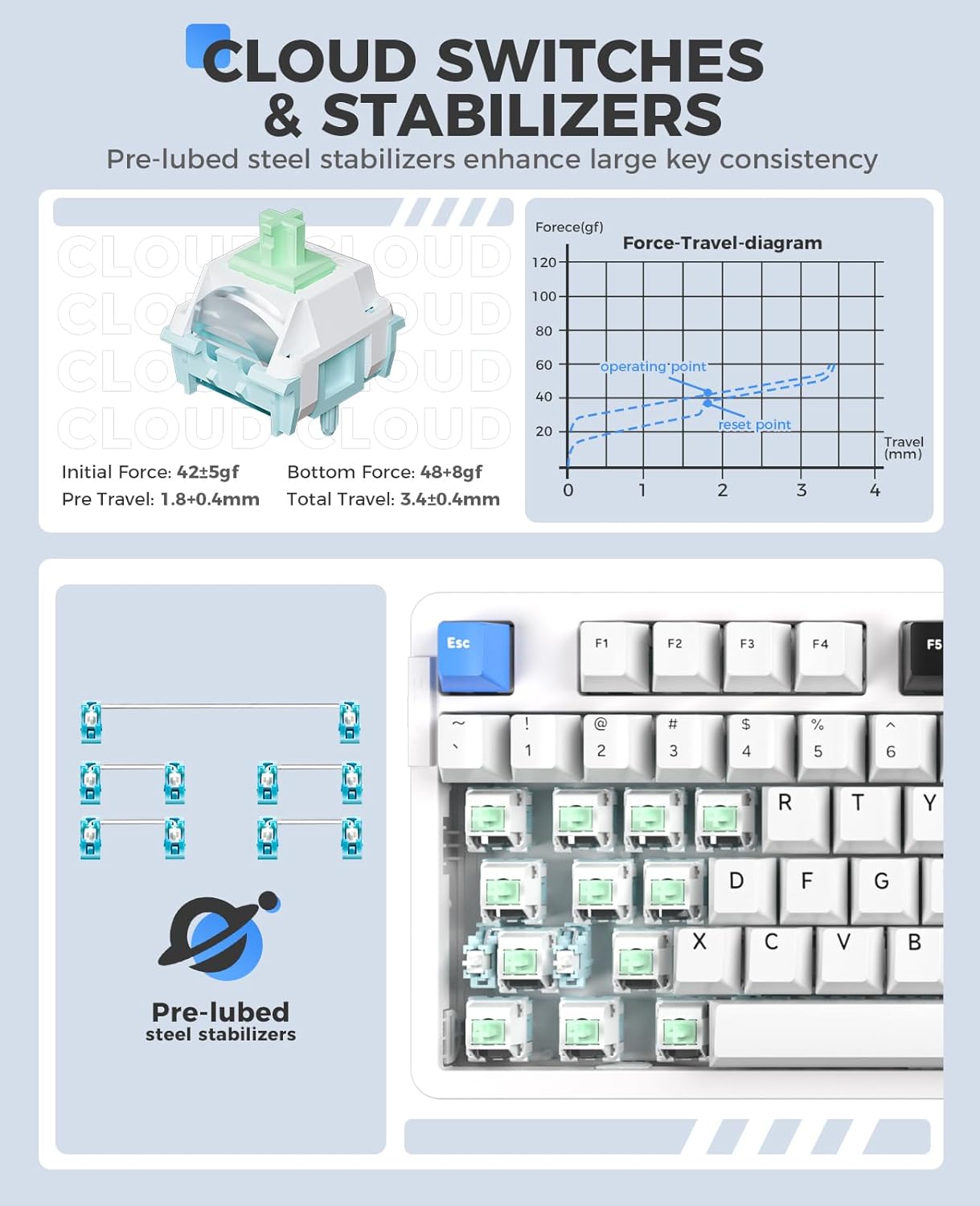
Imaxe: Detallada view of DAREU Cloud switches and pre-lubed steel stabilizers on the EK87PRO keyboard, including a force-travel diagram for the Cloud switch.
- South-Facing RGB Lighting: The keyboard features up to 26 backlight modes and 16.8 million colors. Brightness and speed can be adjusted via the driver software.
- Axustar o brillo: Preme Fn + Frecha cara arriba (Brightness+) / Fn + frecha cara abaixo (Brightness-).
- Cambiar as cores da retroiluminación: Preme Fn + { / Fn + }.
- More lighting effects and macros are customizable through the official DAREU driver software.

Image: The DAREU EK87PRO keyboard showcasing its 16.8 million RGB lighting with various color patterns, and key combinations for adjusting brightness and backlight colors.
- Substitución de claves: All 87 keys are conflict-free, supporting N-key rollover for accurate input during fast typing or gaming.
Mouse Features (A955)
- High Performance Sensor: Equipped with an AIM-WL sensor, offering up to 12000 DPI, 300 IPS tracking speed, and 50G acceleration for precise control.
- KBS II Button: Specific button for enhanced click response.
- Botóns programables: The mouse buttons are programmable via the DAREU driver software.
- Deseño lixeiro: Weighs 88g for comfortable and agile movement.
- Interruptores duradeiros: Rated for 80 million clicks.
- Custom RGB Light: Customize over 16.8 million colors and 6 lighting effects via software.

Image: The DAREU A955 mouse with a transparent bottom cover, showcasing its internal components and customizable RGB lighting effects.
Mantemento
- Limpeza:
- Use un pano suave e seco para limpar as superficies do teclado e do rato.
- Para a sucidade persistente, d lixeiramenteampEnxágüe o pano con auga ou unha solución de limpeza suave. Evite produtos químicos agresivos.
- Use compressed air to remove dust and debris from between keycaps and mouse crevices.
- Switch Replacement (Keyboard):
- Apaga o teclado ou desconéctao do ordenador.
- Usa o extractor de teclas fornecido para retirar con coidado a tecla desexada.
- Use the provided switch puller to gently extract the switch from its socket.
- Aliña os pines do novo interruptor cos orificios da placa de circuíto impreso e preme firmemente ata que encaixen no seu lugar. Asegúrate de que os pines non estean dobrados.
- Volva colocar a tapa das teclas.
- Coidado da batería:
- Evite descargar completamente a batería con frecuencia.
- Store the devices in a cool, dry place when not in use for extended periods.
Resolución de problemas
| Problema | Posible Solución |
|---|---|
| Device not connecting (Wireless) |
|
| Keys/Mouse clicks not responding |
|
| RGB lighting not working/incorrect |
|
| Mouse cursor erratic/lagging |
|
Especificacións
DAREU EK87PRO Keyboard
- Modelo: EK87PRO
- Deseño: 80 % TKL (87 teclas)
- Conectividade: Bluetooth 5.1, sen fíos de 2.4 GHz, USB-C con cable
- Interruptores: Pre-lubed Cloud Linear (Hot-swappable, supports 3/5 pin switches)
- Estrutura: Gasket Mount with FR4 PCB
- Batería: 4000 mAh
- Iluminación: South-facing RGB (26 modes, 16.8 million colors)
- Substitución de claves: N-Key Rollover (all 87 keys conflict-free)
- Dispositivos compatibles: Portátil, Ordenador persoal, Smartphone
DAREU A955 Mouse
- Modelo: A955
- Conectividade: Bluetooth 5.0, sen fíos de 2.4 GHz, USB-C con cable
- Sensor: AIM-WL
- DPI: Ata 12000
- IPS: 300
- Aceleración: 50G
- Interruptores: 80 million clicks lifespan
- Batería: 930mAh (120 hours playtime)
- Peso: 88 g
- Iluminación: Customizable RGB (16.8 million colors, 6 effects)
- Dispositivos compatibles: Portátil, Ordenador persoal, Smartphone
Garantía e Soporte
DAREU products are designed and manufactured to the highest quality standards. For information regarding warranty coverage, please refer to the warranty card included with your product or visit the official DAREU websitio.
If you encounter any issues or have questions not covered in this manual, please contact DAREU customer support through their official website or the retailer from whom you purchased the product. Please have your product model and purchase information ready when contacting support.
Official DAREU Websitio: www.dareu.com (Nota: Este é un marcador de posición) URL, please refer to actual product documentation for correct support links.)