1. Introdución
Thank you for choosing the ZUMIMALL Dual Lens 2K Wireless Outdoor Security Camera. This manual provides detailed instructions for setting up, operating, and maintaining your camera to ensure optimal performance and security for your home or property. Please read this manual thoroughly before use and retain it for future reference.
2. Información de seguridade
- Ensure the camera is installed in a location where it is protected from extreme weather conditions beyond its IP65 rating.
- Use only the specified power adapter or solar panel for charging.
- Non desmonte nin intente reparar o dispositivo vostede mesmo. Póñase en contacto co servizo de atención ao cliente para obter asistencia.
- Manteña a cámara e os seus accesorios fóra do alcance dos nenos.
- Avoid placing the camera near strong magnetic fields or sources of interference.
- Desfágase do produto e da batería de forma responsable segundo a normativa local.
3. Contido do paquete
Comprobe que todos os compoñentes estean presentes e en bo estado:
- ZUMIMALL Dual Lens 2K Wireless Outdoor Security Camera
- Panel solar de 5 W
- Soporte de montaxe e parafusos
- Cable de carga USB
- Manual de usuario
4. Produto rematadoview
The ZUMIMALL Dual Lens 2K Wireless Outdoor Security Camera offers advanced surveillance features with a focus on wide-area coverage and intelligent detection.

Image: The ZUMIMALL Dual Lens 2K Wireless Outdoor Security Camera, featuring a main PTZ camera unit, a separate smaller camera, and a solar panel for continuous power.
Características principais:
- Sistema de lente dual: Combines a fixed lens and a rotating lens for simultaneous viewing of two different areas.
- Resolución 2K HD: Provides clear and detailed images and videos (3MP+3MP for a total of 6MP effective resolution).
- Wide Angle & PTZ: Offers a 220° ultra-wide-angle view from the fixed lens and 360° pan/tilt/zoom (PTZ) capabilities for comprehensive coverage.
- Visión nocturna a toda cor: Equipped with white and infrared lamps, offering full-color, infrared, or smart night vision modes.
- Alimentación solar: Includes a 5W solar panel and a built-in 10000mAh battery for continuous, uninterrupted operation.
- Detección intelixente de intelixencia artificial: Advanced AI can identify people, vehicles, pets, and packages, reducing false alerts.
- Charla bidireccional: O micrófono e o altofalante integrados permiten a comunicación en tempo real.
- Conectividade WiFi de 2.4 GHz: Ensures a stable and reliable wireless connection.
- Resistencia ás inclemencias do tempo IP65: Deseñado para soportar diversas condicións meteorolóxicas no exterior.
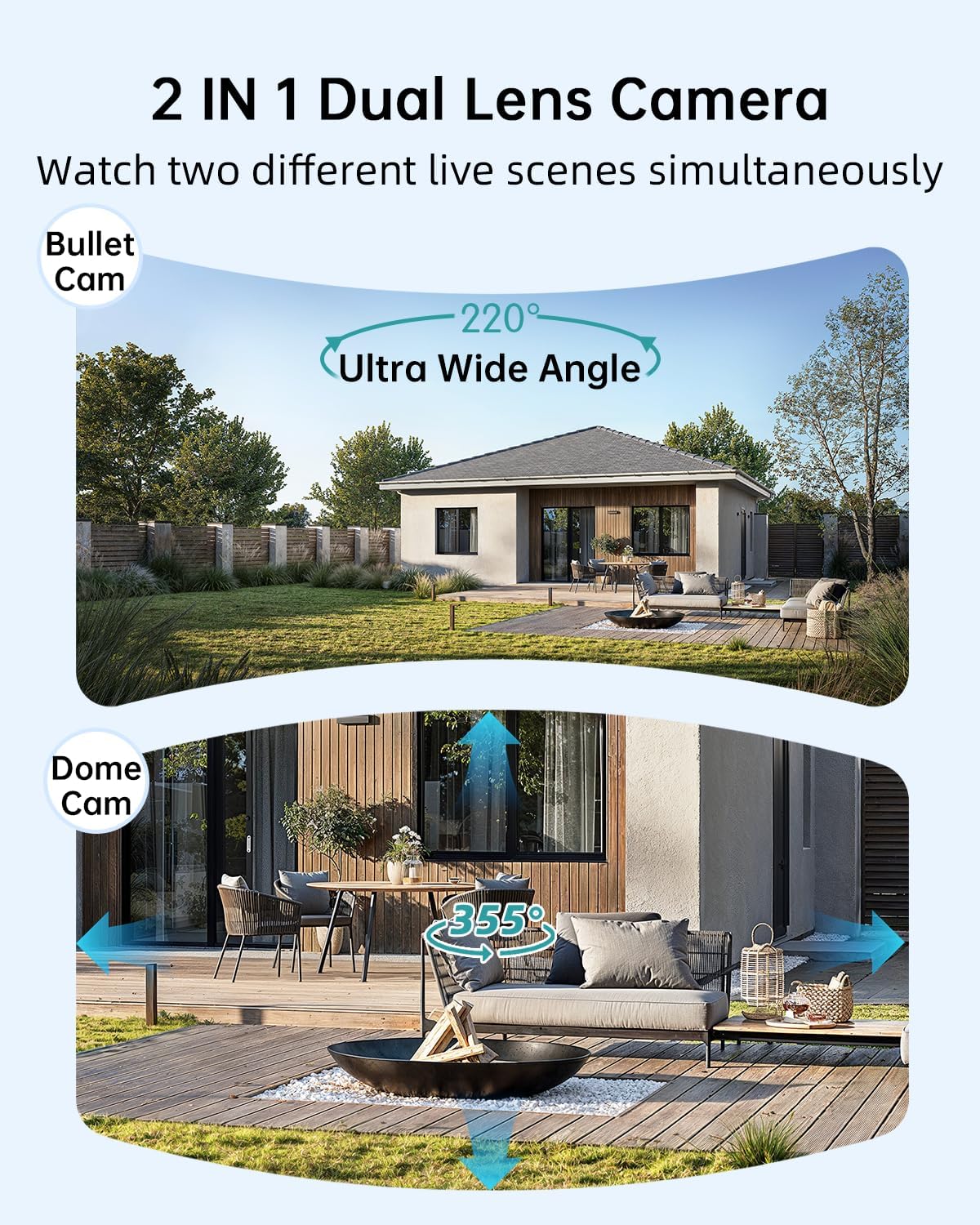
Image: Illustration of the dual-lens functionality, displaying a wide-angle 'Bullet Cam' view and a pan-tilt-zoom 'Dome Cam' view simultaneamente.

Image: The ZUMIMALL camera connected to its 5W solar panel, highlighting its non-stop solar power capability and IP66 water resistance (note: product specification is IP65).

Image: A demonstration of the 2K ultra-colorful image quality, showing a clear view of a car's license plate at night, with indicators for 3MP FHD Image, 4X Digital Zoom, and 55FT Night Vision Range.

Image: The ZUMIMALL camera shown enduring heavy rain and snow, illustrating its IP65 waterproof rating and suitability for outdoor use in various weather conditions.
5. Configuración
5.1 Carga inicial
Before first use, fully charge the camera's built-in 10000mAh battery using the provided USB cable and a 5V/2A power adapter (not included). A full charge typically takes several hours.
5.2 Descarga da aplicación e rexistro da conta
- Scan the QR code on the packaging or search for 'ZUMIMALL' in your mobile app store (iOS or Android).
- Download and install the ZUMIMALL app.
- Abre a aplicación e rexistra unha nova conta ou inicia sesión se xa tes unha.
5.3 Conectando a Wi-Fi
- Asegúrate de que o teu teléfono intelixente estea conectado a unha rede wifi de 2.4 GHz. A cámara non é compatible con wifi de 5 GHz.
- In the ZUMIMALL app, tap '+' to add a new device.
- Follow the on-screen instructions to power on the camera and enter Wi-Fi configuration mode.
- Scan the QR code displayed on your phone screen with the camera lens.
- Wait for the camera to connect to your Wi-Fi network. Once connected, you will hear a confirmation sound.
5.4 Mounting the Camera and Solar Panel
The camera offers flexible installation options, including magnetic support and bracket support.

Image: Demonstrates two installation methods for the ZUMIMALL camera: a compact magnetic mount for easy placement and a more robust bracket mount for secure, permanent installation.
- Escolle unha localización: Escolla unha localización que proporcione o desexado viewing angle, is within Wi-Fi range, and receives ampluz solar directa para o panel solar.
- Instale o soporte: Use the provided screws to securely attach the mounting bracket to a wall or ceiling.
- Engade a cámara: Secure the camera to the bracket. For magnetic support, simply attach the camera to the magnetic base.
- Coloca o panel solar: Mount the 5W solar panel in a location that receives maximum direct sunlight throughout the day. Connect the solar panel cable to the camera's charging port.
- Axustar ángulo: Adjust the camera's angle to cover the desired surveillance area.
6. Instrucións de funcionamento
6.1 En directo View e control de dobre lente
Open the ZUMIMALL app and select your camera to access the live view. The app will display two video feeds simultaneously from the fixed and PTZ lenses. You can switch between views or control the PTZ lens by swiping on the screen or using the directional controls within the app.
6.2 Modos de visión nocturna
The camera offers three night vision modes, configurable in the app settings:
- Visión nocturna a toda cor: Utilizes the built-in white light to provide color images in low-light conditions.
- Visión nocturna por infravermellos: Uses infrared LEDs for black and white images in complete darkness.
- Visión nocturna intelixente: Automatically switches between infrared and full-color based on detected motion or ambient light.

Image: A comparison of night vision modes, showing a scene with a spotlight on (color night vision) and a spotlight off (infrared night vision), demonstrating the camera's ability to capture clear images in various low-light conditions.
6.3 Detección intelixente de IA
Configure AI detection settings in the app to receive alerts for specific events.

Image: An illustration of the camera's Intelligent AI Analysis feature, highlighting its capability to detect and differentiate between humans, packages, vehicles, and pets within the surveillance area.
- Tipos de detección: The camera can identify humans, vehicles, pets, and packages.
- Alertas: When motion is detected, an alert notification will be sent to your smartphone.
- Sensibilidade: Axusta a sensibilidade da detección de movemento para minimizar as falsas alarmas.
6.4 Conversación bidireccional
Use the two-way talk feature to communicate with visitors or deter intruders.

Image: Depicts scenarios where the two-way voice intercom is used, showing a user communicating with a delivery person at the door and a parent speaking to a child playing outside.
- No directo view, toca a icona do micrófono para falar polo altofalante da cámara.
- Release the icon to listen.
6.5 Gravación e reprodución
The camera records events triggered by motion detection. Recordings are stored on a local SD card (not included) or in cloud storage (subscription may be required).
- Reprodución: Access recorded videos through the 'Playback' section in the ZUMIMALL app.
- Descargar: Download important video clips to your phone.
7. Mantemento
- Limpeza: Limpe periodicamente a lente da cámara e o panel solar cun pano suave eamp cloth to ensure clear images and efficient solar charging. Do not use harsh chemicals.
- Coidado da batería: For optimal battery life, avoid prolonged exposure to extreme temperatures. Ensure the solar panel is free from obstructions to maintain consistent charging.
- Actualizacións de firmware: Check the ZUMIMALL app regularly for firmware updates. Keeping your camera's firmware updated ensures the latest features and security enhancements.
8 Solución de problemas
8.1 A cámara non se conecta á wifi
- Asegúrate de que a túa rede Wi-Fi sexa de 2.4 GHz.
- Comproba a intensidade do sinal wifi na localización da cámara.
- Verifica que o contrasinal da wifi introducido sexa correcto.
- Reinicia o teu enrutador e a cámara.
8.2 A batería esgótase rapidamente
- Asegúrate de que o panel solar reciba luz solar directa durante varias horas ao día.
- Reduce motion detection sensitivity or frequency of recordings.
- Check for excessive live view streaming, which consumes battery.
8.3 Mala calidade de imaxe
- Limpar a lente da cámara.
- Asegúrate de que non haxa obstáculos no campo de acción da cámara view.
- Check your Wi-Fi connection speed.
8.4 Alertas de movemento falso
- Axusta a sensibilidade da detección de movemento na aplicación.
- Utilize AI detection filters (human, vehicle, pet, package) to ignore irrelevant motion.
- Ensure the camera is not pointing at busy public areas or moving foliage.
9. Especificacións
| Característica | Especificación |
|---|---|
| Modelo | B0F189QLFH |
| Resolución | 2K (3MP + 3MP Dual Lens) |
| Campo de View | 220° Ultra Wide Angle (fixed lens), 360° PTZ (rotating lens) |
| Capacidade da batería | 10000 mAh |
| Enerxía do panel solar | 5W |
| Conectividade Wi-Fi | 2.4 GHz (IEEE 802.11b/g/n) |
| Resistencia á intemperie | IP65 |
| Visión Nocturna | Full-Color, Infrared, Smart |
| Detección | Smart AI (Human, Vehicle, Pet, Package) |
| Audio | Conversa bidireccional |
| Fabricante | ZUMIMALL |
| Primeira data dispoñible | 12 de marzo de 2025 |
10. Información da garantía
ZUMIMALL products are covered by a limited warranty from the date of purchase. Please refer to the warranty card included with your product or visit the official ZUMIMALL websitio web para obter información detallada sobre os termos e condicións da garantía.
11. Atención ao cliente
If you encounter any issues or have questions regarding your ZUMIMALL camera, please contact our customer support team:
- Correo electrónico: support@zumimall.com (Example)
- Websitio: ZUMIMALL Official Store
Please have your model number (B0F189QLFH) and purchase information ready when contacting support.


