Produto rematadoview
The Orbit 62045 Daybreak Programmable Hose Watering Timer is designed to automate your garden watering tasks. It offers two primary modes: Daybreak, which activates watering at sunrise, and Set Time, which allows for scheduled watering at specific intervals and durations. This timer helps ensure consistent watering for your plants while conserving water.
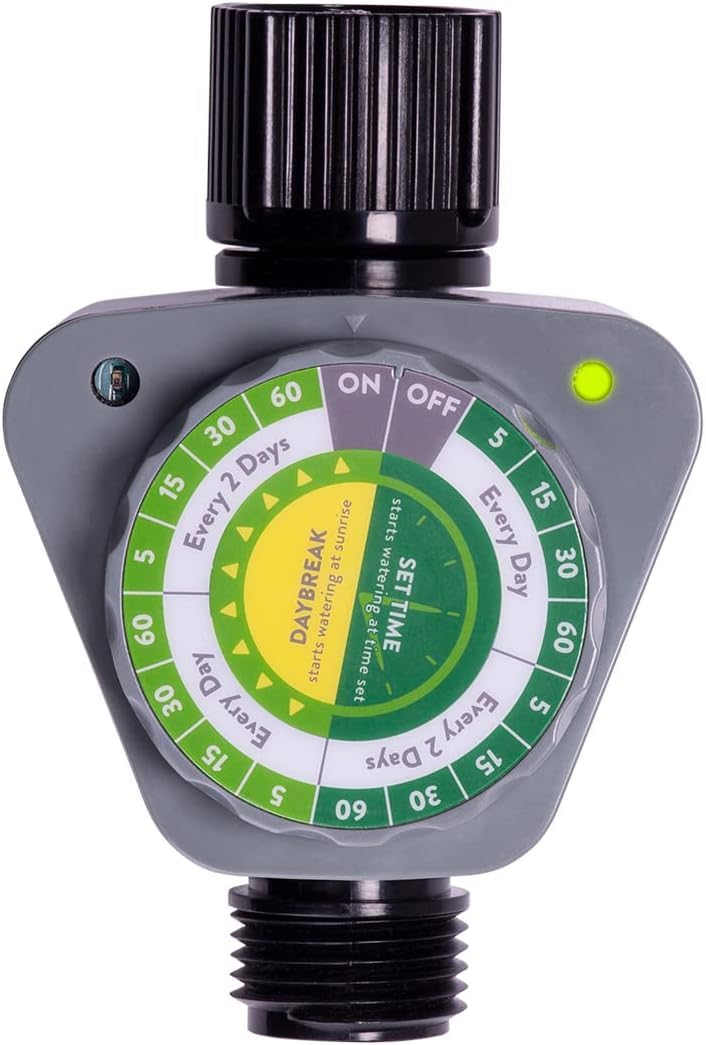
Figura 1: The Orbit 62045 Daybreak Programmable Hose Watering Timer. This image displays the gray timer unit with its black hose connectors and the prominent green and white control dial. The dial features settings for 'ON', 'OFF', 'Every Day', 'Every 2 Days', and various watering durations.
Configuración
- Instalación da batería:
- Localiza o compartimento das pilas na parte traseira do temporizador.
- Open the compartment and insert two (2) AA alkaline batteries (not included), ensuring correct polarity.
- Close the battery compartment securely to maintain water resistance.
- Conexión á billa:
- Thread the top connector of the timer onto your outdoor faucet. Hand-tighten only. Do not overtighten.
- Ensure the rubber washer is properly seated in the connector to prevent leaks.
- Connecting to Hose:
- Thread your garden hose onto the bottom connector of the timer. Hand-tighten only. Do not overtighten.
Instrucións de funcionamento
The timer features a large, easy-to-read dial for setting your watering preferences.
- Encendido/apagado:
- Turn the dial to the 'ON' position to activate the timer for automatic watering.
- Turn the dial to the 'OFF' position to stop all automatic watering.
- Selecting Watering Mode:
- Daybreak Mode: Rotate the dial to the 'DAYBREAK' section. The photocell on the timer will automatically detect sunlight and initiate watering at sunrise.
- Establecer o modo de hora: Rotate the dial to the 'SET TIME' section. This mode allows you to specify watering duration and frequency.
- Setting Watering Duration (Set Time Mode):
- Within the 'SET TIME' section, select your desired watering duration: 5, 15, 30, or 60 minutes.
- Setting Watering Interval (Set Time Mode):
- Choose between 'Every Day' or 'Every 2 Days' for the watering frequency.
- Rego manual:
- To manually water without altering programmed settings, simply turn the faucet on. The timer allows water to flow through when the faucet is open, regardless of the dial setting.
- Indicador luminoso:
- A green light indicates that a timer setting has been successfully selected.
- A red light indicates that the batteries are low and need to be replaced.
Mantemento
- Substitución da batería: Replace batteries when the red indicator light appears. Always use fresh AA alkaline batteries.
- Limpeza de filtros: Periodically check the filter washer located in the top connector. Remove and rinse it to clear any debris that may obstruct water flow.
- Invernización: Before freezing temperatures occur, disconnect the timer from the faucet and hose. Drain any remaining water and store the timer indoors in a dry, protected area to prevent damage from freezing.
Resolución de problemas
- Timer Not Watering:
- Ensure the dial is set to an 'ON' or a specific watering mode (Daybreak or Set Time) and not 'OFF'.
- Check battery levels. If the indicator light is red, replace the batteries.
- Verify that the faucet is turned on.
- Inspect the filter washer for clogs and clean if necessary.
- Water Leaking from Connections:
- Ensure all connections are hand-tightened.
- Check that rubber washers are properly seated in both the faucet and hose connections. Replace if damaged.
- Indicator Light Not Functioning:
- Confirm batteries are correctly installed and have sufficient charge.
- The indicator light typically illuminates for a few seconds when a new dial position is selected.
Especificacións
| Marca | Órbita |
| Número de modelo | 62045 |
| Dimensións do produto | 4 x 3 x 3 polgadas (aproximado) |
| Fonte de enerxía | 2 pilas alcalinas AA (non incluídas) |
| Watering Durations | 5, 15, 30, 60 minutos |
| Watering Intervals | Every Day, Every 2 Days |
| Cor | Gris |
| UPC | 840041575385 |
Garantía e Soporte
For warranty information or technical support, please refer to the official Orbit website or contact Orbit customer service directly. Keep your purchase receipt for warranty claims.
Orbit Customer Service: Visit Orbit Support Page


