1. Introdución
Welcome to the TABWEE T80 Tablet user manual. This guide provides comprehensive instructions to help you get the most out of your new Android 15 tablet. The T80 is designed for a seamless and powerful user experience, featuring advanced AI capabilities, a vibrant display, and robust performance for both work and entertainment.
Características principais:
- Sistema operativo Android 15: Experience the latest features and security enhancements.
- Gemini AI 2.0: Enhanced AI for smarter interactions and controls.
- 10.5-inch HD+ IPS Display: Enjoy clear and vibrant visuals with a wide viewángulo de ing.
- Potente rendemento: Equipped with a 2.0GHz CPU, 12GB RAM, and 64GB ROM (expandable up to 2TB via TF card).
- Batería de longa duración: 6000mAh mega battery for extended use.
- Conectividade avanzada: Supports 5G WiFi and Bluetooth 5.0.
- 5MP Google Lens Camera: For clear photos and smart scene recognition.

Figure 1.1: The TABWEE T80 Tablet, showcasinpolo seu elegante deseño e pantalla.
2. Configuración
2.1 Desembalaxe e carga inicial
Carefully remove your TABWEE T80 Tablet from its packaging. Before first use, it is recommended to fully charge the device using the provided USB-C cable and power adapter. The charging port is located on the side of the tablet.
2.2 Acendido e configuración inicial
- Press and hold the Power button (located on the side) until the TABWEE logo appears on the screen.
- Segue as instrucións na pantalla para seleccionar o idioma, conectarte a unha rede wifi e configurar a túa conta de Google.
- Review e acepta os termos e condicións para completar o proceso de configuración.

Figura 2.1: Un excesoview of the TABWEE T80's core specifications and features.
3. Funcionamento da tableta
3.1 Características de Android 15
Your TABWEE T80 runs on the latest Android 15, offering enhanced user experience, improved privacy, and smart features.
Split-Screen Combo
The split-screen feature allows you to run two applications simultaneously, enhancing multitasking and productivity. You can easily save app pairs for quick access.
Video 3.1: Demonstrates how to use the split-screen feature to run two applications concurrently on the TABWEE T80 tablet.
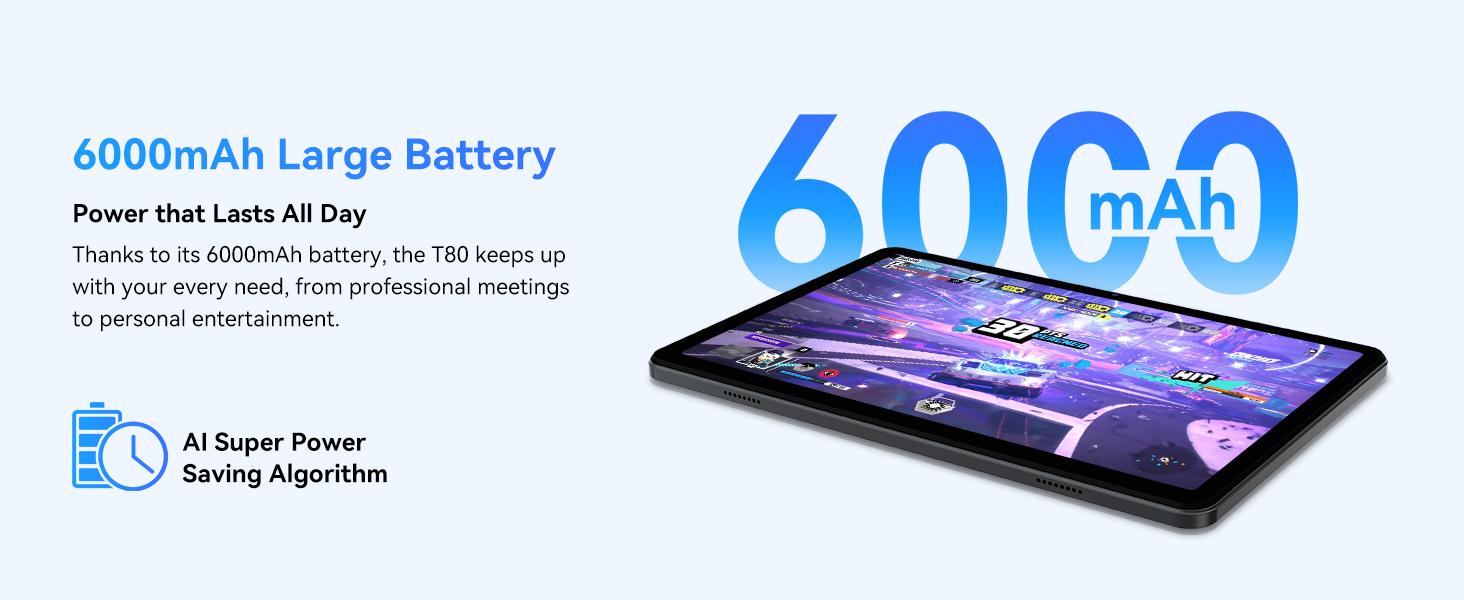
Figure 3.1: Visual representation of the split-screen functionality, allowing for efficient multitasking.
Desktop Customization and Widgets
Personalize your home screen by dragging and grouping apps freely. You can also add various widgets, such as the calendar, to quickly access information and tasks.
Video 3.2: Illustrates how to customize your desktop layout and add widgets for quick access to information.
Control de privacidade
Android 15 offers enhanced privacy controls, allowing you to manage app permissions and secure your data. You can block app access to sensitive information like location.
Video 3.3: Shows how to manage privacy settings and control app access to your data on the TABWEE T80.
Parental Controls with Gemini AI
Utilize Gemini AI parental controls to manage screen time, automatically lock games during homework, and ensure a safe digital environment for children.
Figure 3.2: The Digital Wellbeing interface, demonstrating options for managing screen time and parental controls.
3.2 Pantalla e elementos visuais
The 10.5-inch HD+ IPS display provides a clear and immersive viewing experience with a 1280x800 resolution and 84.9% screen-to-body ratio. It's ideal for watching videos, browsing, and reading.

Figure 3.3: Details of the tablet's display, highlighting its resolution and IPS full view capacidades.
3.3 Rendemento e almacenamento
Powered by a 2.0GHz Unisoc T310 CPU and 12GB RAM (expandable via software memory extension), the T80 ensures smooth multitasking and responsive performance. With 64GB of internal storage and support for up to 2TB TF cards, you have ampespazo para todos os teus files, aplicacións e medios.

Figure 3.4: Illustration of the tablet's processing power and memory, enabling seamless multitasking and productivity.
3.4 Duración da batería
The 6000mAh mega battery provides extended usage, offering up to 8 hours of video streaming, 6 hours of gaming, or 30 hours of music playback. Smart power-saving modes further optimize battery longevity.

Figure 3.5: Depiction of the tablet's large 6000mAh battery and its USB-C charging port.
3.5 Características da cámara
The T80 features a 5MP Google Lens enabled camera. This allows for scene recognition, night mode optimization, and useful functions like text translation and object identification.

Figura 3.6: Un excesoview of the tablet's camera and its integration with Google Lens for smart functions.
4. Mantemento
To ensure the longevity and optimal performance of your TABWEE T80 Tablet, follow these maintenance guidelines:
- Limpeza: Usa un pano suave e sen fiapos para limpar a pantalla e a carcasa. Evita materiais abrasivos ou produtos químicos agresivos.
- Actualizacións de software: Comprobe e instale regularmente actualizacións do sistema para aproveitar as últimas funcións, parches de seguranza e melloras de rendemento.
- Coidado da batería: Avoid extreme temperatures. Do not let the battery fully drain frequently. For long-term storage, charge the battery to about 50%.
- Xestión de almacenamento: Limpar periodicamente o innecesario filee aplicacións para liberar espazo de almacenamento e manter un funcionamento sen problemas.
- Protección: Considera usar unha funda protectora e un protector de pantalla para protexerte de caídas e rabuñaduras.
5 Solución de problemas
This section addresses common issues you might encounter with your TABWEE T80 Tablet.
5.1 O dispositivo non se acende
- Comprobar a batería: Ensure the tablet has sufficient charge. Connect it to the charger and wait a few minutes before attempting to power on again.
- Hard Reset: Manteña premido o botón de acendido durante uns 10-15 segundos ata que o dispositivo se reinicie.
5.2 Problemas de conectividade Wi-Fi
- Activar/desactivar Wi-Fi: Desactiva o Wi-Fi e actívao de novo en Axustes.
- Reiniciar o router: Apaga e reinicia o enrutador Wi-Fi.
- Esquecer a rede: Go to Wi-Fi settings, forget the problematic network, and then reconnect.
5.3 Rendemento lento
- Pechar aplicacións en segundo plano: Pecha as aplicacións non utilizadas que se executan en segundo plano.
- Borrar caché: Regularly clear app caches in Settings > Apps.
- Liberar almacenamento: Eliminar innecesario files or uninstall rarely used apps.
- Reiniciar o dispositivo: A simple restart can often resolve temporary slowdowns.
5.4 As aplicacións fallan ou non responden
- Aplicación de parada forzada: Go to Settings > Apps, select the problematic app, and choose 'Force Stop'.
- Clear App Data/Cache: In the same app settings, try clearing its cache or data (note: clearing data will reset the app to its default state).
- Reinstalar aplicación: Uninstall and then reinstall the app from the Google Play Store.
6. Especificacións
Detailed technical specifications for the TABWEE T80 Tablet:
| Característica | Especificación |
|---|---|
| Marca | TABWEE |
| Nome do modelo | T80 |
| Sistema Operativo | Android 15 |
| Tamaño da pantalla | 10.5 polgadas |
| Resolución de pantalla | 1280 x 800 píxeles |
| Procesador | 2.0 GHz Unisoc T310 |
| Memoria (RAM) | 12 GB |
| Almacenamento (ROM) | 64 GB |
| Almacenamento ampliable | Tarxeta TF de ata 2 TB |
| Traseira WebResolución de cámara | 5 MP |
| Tipo sen fíos | 802.11n, 802.11b, 802.11a, 802.11ac, 802.11g (5G WiFi) |
| Bluetooth | Bluetooth 5.0 |
| Capacidade da batería | 6000 mAh |
| Duración media da batería | 550 horas (en espera) |
| Peso do elemento | 1.1 libras (aprox. 523 gramos) |
| Dimensións do produto | 9.5 x 6.4 x 0.3 polgadas |
| Cor | Gris |
7. Garantía e soporte
TABWEE is committed to quality and customer satisfaction. Your T80 Tablet comes with comprehensive support to ensure a worry-free experience.
7.1 Información da garantía
The TABWEE T80 Tablet is backed by a 2 ano de garantía. This warranty covers manufacturing defects and ensures free repair service for eligible issues. Please retain your proof of purchase for warranty claims.
7.2 Atención ao cliente
For any questions, technical assistance, or warranty claims, please contact our dedicated support team:
- 24/7 Online Call Support: Dispoñible para asistencia inmediata.
- Soporte técnico de por vida: Expert help whenever you need it.
- Hassle-Free Service: Assistance available through the TABWEE Official Flagship Store.
We are dedicated to providing prompt and effective solutions to all your inquiries.

Figure 7.1: Our dedicated customer support team is ready to assist you.


