1. Introdución
Welcome to the user manual for your new FLEXISPOT 63x28 Inch Dual Motor Electric Standing Desk. This manual provides essential information for the safe assembly, operation, maintenance, and troubleshooting of your desk. Please read it thoroughly before use and retain it for future reference.
2. Instrucións de seguridade
- Ensure all components are present and undamaged before assembly. Do not use if any parts are missing or damaged.
- Manteña os nenos e as mascotas lonxe da mesa durante o funcionamento para evitar lesións.
- Do not place hands or other body parts near moving parts of the desk during height adjustment.
- Asegúrate de colocar o escritorio sobre unha superficie nivelada para evitar que se volque.
- Non sobrecargues o escritorio. Consulta as especificacións para coñecer a capacidade máxima de peso.
- Keep all electrical cords organized and away from moving parts to prevent damage or entanglement.
- Desconecte o escritorio da toma de corrente antes de limpalo ou realizar calquera mantemento.
- Only use the desk for its intended purpose as a workstation.
3. Contido do paquete
Verifique que todos os elementos que se indican a continuación estean incluídos no seu paquete:
- Desktop Surface (Black)
- Desk Frame (Black, including dual motors and lifting columns)
- Control Panel with Memory Controller
- Adaptador de alimentación e cable
- Assembly Hardware (screws, tools, etc.)
- Manual de instrucións

Imaxe: Máis deview of the FLEXISPOT 63x28 Inch Dual Motor Electric Standing Desk, showing the desktop, frame, and control panel.
4. Instrucións de configuración
4.1 Desembalaxe
Carefully remove all components from the packaging. Place them on a soft, clean surface to prevent scratches or damage during assembly. Keep all packaging materials until assembly is complete and you are satisfied with the product.
4.2 Montaxe da estrutura
Follow the detailed diagrams provided in the separate assembly guide to connect the lifting columns to the crossbar and attach the footings. Ensure all screws are tightened securely.
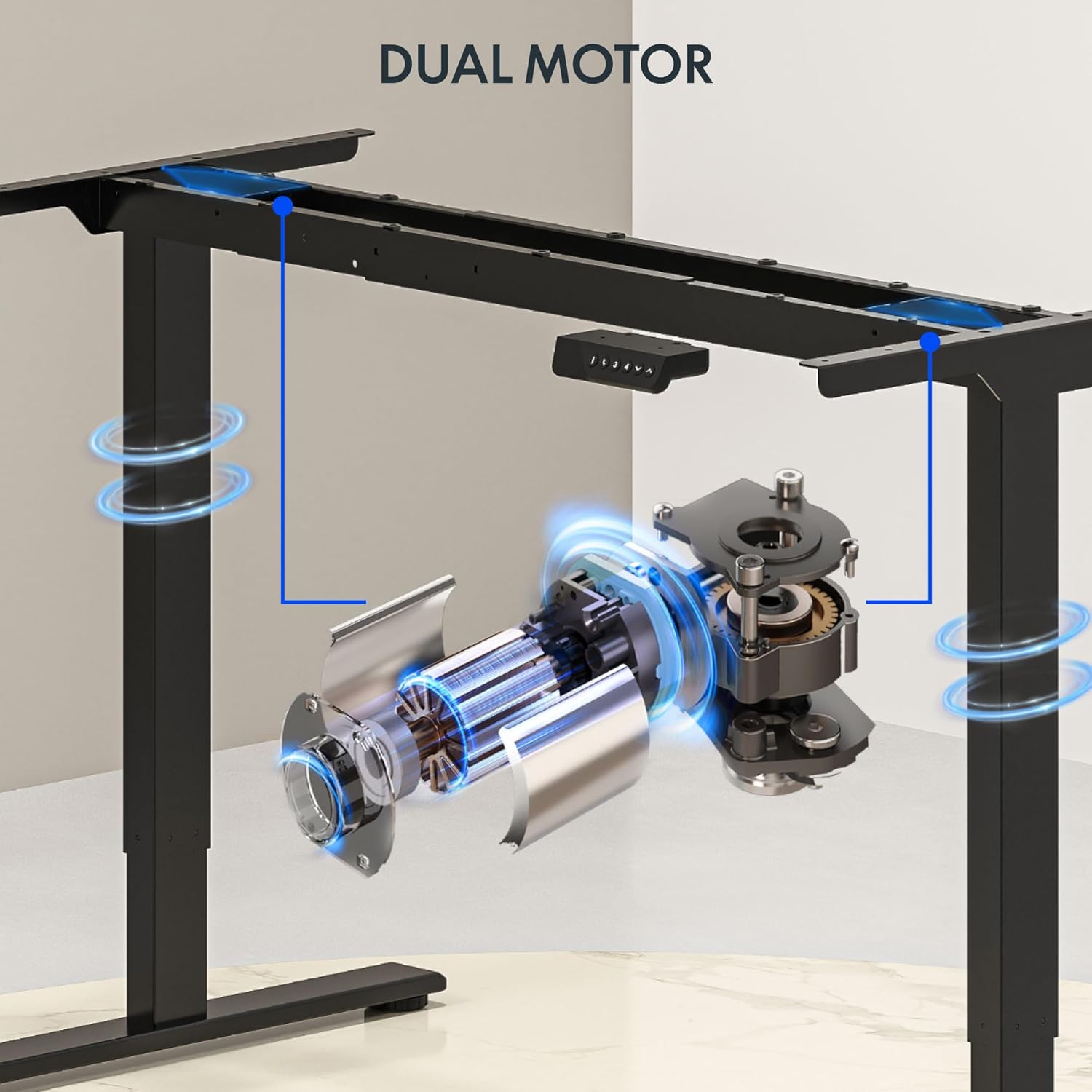
Imaxe: Detallada view of the dual motor desk frame, illustrating the motor placement and structural components.
4.3 Conexión do escritorio
Carefully place the desktop upside down on a soft surface. Align the assembled frame with the pre-drilled holes on the desktop. Secure the desktop to the frame using the provided screws. Once secured, carefully flip the desk upright with assistance.
4.4 Conexión do panel de control e da alimentación
Connect the control panel cable to the control box, and then connect the power adapter to the control box. Plug the power cable into a standard electrical outlet. The desk is now ready for initial operation.

Image: Close-up of the desk's control panel, showing the LED display and buttons for height adjustment and memory presets.
Video: Demonstrates the dual-motor strength and smooth operation of the FLEXISPOT standing desk, highlighting its robust design and functionality.
5. Instrucións de funcionamento
5.1 Axuste da altura
- Preme o Up (∧) botón para levantar o escritorio.
- Preme o Abaixo (∨) botón para baixar o escritorio.
- Release the button at your desired height. The LED display will show the current height.
5.2 Usando predefinicións de memoria
The control panel features four memory presets (1, 2, 3, 4) to save and recall your preferred sitting and standing heights.
- Axuste o escritorio á altura desexada usando os botóns Arriba/Abaixo.
- Preme o "M" button (or similar memory set button, indicated by 'i' on some models) once. The display will flash.
- Prema inmediatamente un dos botóns numéricos (1, 2, 3 ou 4) para gardar a altura actual nesa predefinición.
- To recall a saved height, simply press the corresponding number button (1, 2, 3, or 4). The desk will automatically move to the saved position.

Image: Close-up of the memory controller, highlighting the numbered preset buttons and the up/down controls for precise height adjustments.
5.3 Sistema anticolisión
The desk is equipped with an anti-collision system. If the desk encounters an obstacle during height adjustment, it will automatically stop and reverse slightly to prevent damage. This feature enhances safety during operation.
6. Mantemento
- Limpeza: Limpa a superficie e a estrutura do escritorio cun pano suave eamp pano. Evite produtos de limpeza abrasivos ou produtos químicos agresivos que poidan danar o acabado.
- Inspección: Regularly check all screws and connections to ensure they are tight. Re-tighten if necessary.
- Xestión de cables Ensure all cables are neatly organized and not pinched or tangled, especially during height adjustments.
- Cable de alimentación: Inspeccione o cable de alimentación para detectar calquera signo de dano. Se está danado, interrompa o uso e póñase en contacto co servizo de atención ao cliente.
7 Solución de problemas
| Problema | Causa posible | Solución |
|---|---|---|
| O escritorio non se move. | Power cable disconnected; motor cable loose; overload. | Check power connection; ensure all cables are securely plugged in; reduce weight on desk. |
| O escritorio móvese de forma irregular ou fai un ruído inusual. | Uneven load; loose connections; obstruction. | Distribute weight evenly; check and tighten all screws; remove any obstructions. |
| Os preajustes de altura non funcionan. | Presets not properly set. | Re-program the memory presets following section 5.2. |
| Anti-collision system frequently triggers. | Obstacles in the path of movement; sensitivity setting too high. | Clear the area around the desk; consult the full manual for adjusting anti-collision sensitivity if available. |
If you encounter issues not listed here or if the solutions do not resolve the problem, please contact FLEXISPOT customer support.
8. Especificacións
| Característica | Detalle |
|---|---|
| Marca | FLEXISPOT |
| Modelo | 63x28 Inch Dual Motor Electric Standing Desk |
| Dimensións do escritorio | 63" de ancho x 28" de fondo |
| Rango de altura | 28.3" a 47.6" |
| Capacidade máxima de peso | 198 libras |
| Tipo de motor | Motor dual |
| Panel de control | Memory Controller with 4 Presets |
| Material de escritorio | Engineered Wood (Black Top) |
| Material do marco | Alloy Steel (Black Frame) |
| Características especiais | Dual Motor, 198 lbs Heavy-Duty Capacity, Memory Controller, 63"x28" Large Desktop |

Image: Diagram illustrating the dimensions of the FLEXISPOT 63x28 Inch Electric Standing Desk, including height range, width, and depth.
9. Garantía e soporte
9.1 Garantía limitada
This FLEXISPOT product comes with a limited warranty against defects in materials and workmanship. The specific terms and duration of the warranty may vary. Please refer to the warranty card included in your package or visit the official FLEXISPOT websitio para obter información detallada sobre a garantía.
The warranty typically covers the desk frame, motors, and control panel under normal use conditions. Damage resulting from misuse, accidents, unauthorized modifications, or improper assembly is not covered.
9.2 Atención ao cliente
For technical assistance, warranty claims, or any questions regarding your FLEXISPOT standing desk, please contact our customer support team:
- Websitio: www.flexispot.com
- Correo electrónico: support@flexispot.com
- Teléfono: (Refer to your product packaging or website for regional contact numbers)
Please have your model number (B0F29ZD4DN) and purchase date ready when contacting support.


