Introdución
Transform your iPad into a versatile workstation with the Epico iPad Keyboard Case. This innovative accessory features a detachable keyboard with seven-colour backlighting, a multi-finger gesture touchpad, and comprehensive iPadOS shortcuts. Designed for both functionality and protection, it enhances your iPad experience for typing, watching, and browsing.

Image: The Epico iPad Keyboard Case with an iPad inserted, shown in a tilted typing position.
Características
- Teclado retroiluminado: Seven distinct backlight colours with adjustable brightness levels for comfortable typing in any lighting condition.
- Funcionalidade do panel táctil: Multi-finger gesture touchpad provides precise control and enhanced navigation capabilities.
- Shortcut Integration: Comprehensive range of iPadOS shortcuts built into the keyboard for efficient device control and workflow optimisation.
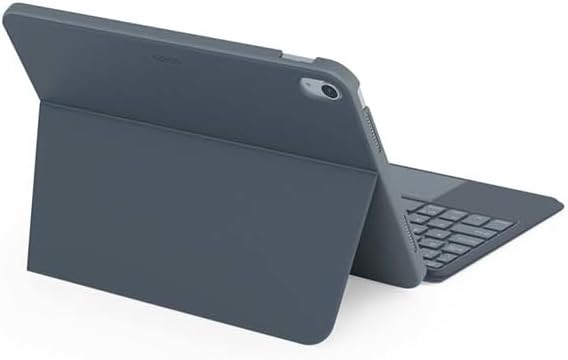
- Deseño versátil: Includes detachable keyboard and tilted backside stand for multiple viewing angles and usage modes.
- Power Solution: Equipped with Li-ion battery and USB-C charging capability, operating independently from iPad's power source.
Contido do paquete
- Epico iPad Keyboard Case
- Cable de carga USB-C a USB-C
- Manual de usuario (este documento)
Configuración
1. Cargar o teclado
Before first use, fully charge the keyboard. Connect the provided USB-C to USB-C charging cable to the keyboard's USB-C port and the other end to a compatible USB-C power adapter (not included).
Imaxe: Lateral view of the keyboard case, highlighting the USB-C charging port.
2. Inserción do iPad
- Gently align your iPad with the case's frame.
- Press firmly but carefully to secure the iPad into the protective shell. Ensure all edges are properly seated.

Imaxe: Traseira view of the Epico iPad Keyboard Case, demonstrating the secure fit of the iPad.
3. Emparellar co iPad
- Turn on the keyboard by sliding the power switch (usually located on the side or back of the keyboard).
- No teu iPad, vai a Configuración > Bluetooth.
- Enable Bluetooth. The keyboard should appear in the "Other Devices" list as "Epico Keyboard" or similar.
- Tap on the keyboard name to pair. Follow any on-screen prompts.
- Once paired, the keyboard's indicator light will change, and it will be ready for use.
Instrucións de funcionamento
Uso do teclado
The keyboard functions like a standard QWERTY keyboard. Ensure the keyboard is paired with your iPad before typing.

Imaxe: Fronte view of the Epico iPad Keyboard Case, displaying the full keyboard layout and touchpad.
Control de retroiluminación
- Preme o Bombilla key (often near the function keys) to cycle through backlight colours.
- Preme Fn + Lámpada key to adjust backlight brightness levels.
Xestos do touchpad
The integrated touchpad supports multi-finger gestures for enhanced navigation:
- Toque cun só dedo: Fai clic co botón esquerdo.
- Toque con dous dedos: Right-click (context menu).
- Desprazamento con dous dedos: Desprazarse cara arriba/abaixo ou cara á esquerda/dereita.
- Pinzar para ampliar: Achegar/afastar o contido.
- Refer to iPadOS settings for additional gesture customization.
iPadOS Shortcuts
The keyboard includes dedicated function keys for common iPadOS shortcuts. These may vary slightly by iPadOS version, but typically include:
- Casa: Volver á pantalla de inicio.
- Busca: Activate Spotlight search.
- Control de brillo: Axusta o brillo da pantalla.
- Control de medios: Play/Pause, Previous/Next track.
- Control de volume: Axustar o volume do sistema.
- Pantalla de bloqueo: Lock your iPad.
Mantemento
Limpeza
- Use a soft, lint-free cloth to wipe the exterior of the case and keyboard.
- Para marcas difíciles, d lixeiramenteampgl o pano con auga ou un limpador suave e non abrasivo.
- Avoid getting moisture into the keyboard keys or ports.
- Non empregue produtos químicos agresivos, solventes nin materiais abrasivos.
Almacenamento
When not in use for extended periods, store the keyboard case in a cool, dry place. Ensure the keyboard is turned off to preserve battery life.
Resolución de problemas
- O teclado non se conecta:
Ensure the keyboard is charged and turned on. Check iPad's Bluetooth settings to confirm it's enabled and the keyboard is paired. Try unpairing and re-pairing the keyboard.
- As teclas non responden:
Check battery level. Restart both the keyboard and your iPad. Ensure no debris is lodged under the keys.
- A retroiluminación non funciona:
Ensure the keyboard is on and charged. Cycle through backlight settings using the dedicated key.
- O panel táctil non responde:
Ensure the touchpad is enabled (some keyboards have a function key to toggle it). Check iPadOS settings for touchpad functionality.
Especificacións
| Marca | Épica |
| Nome do modelo | Epico Keyboard Case |
| Dispositivos compatibles | Apple iPad |
| Conectividade | Bluetooth |
| Retroiluminación | 7-Colour, Adjustable Brightness |
| Touchpad | Multi-finger Gesture Support |
| Porto de carga | USB-C |
| Fonte de enerxía | Batería de iones de litio incorporada |
| Peso do elemento | 15.9 onzas (aprox. 450 g) |
| Dimensións do produto (LxWxH) | 9.94 x 7.24 x 0.48 polgadas (aprox. 25.25 x 18.39 x 1.22 cm) |
| Material | Plástico, Metal |
Garantía e Soporte
This Epico product is covered by a manufacturer's warranty. Please refer to the warranty card included with your purchase or visit the official Epico websitio web para obter información detallada sobre os termos e condicións da garantía.
For technical support, troubleshooting assistance, or inquiries about your product, please contact Epico customer service through their official websitio web ou a información de contacto proporcionada no seu recibo de compra.


