Introdución
This manual provides detailed instructions for the safe and effective operation, setup, and maintenance of your Dasqua 8400-0020 Digital Levelling Box. Please read this manual thoroughly before using the device to ensure proper handling and to prevent damage or injury.
Instrucións de seguridade
Precaucións xerais de seguridade:
- Always handle the device with care to avoid dropping or impact, which can affect its accuracy.
- Keep the device away from strong magnetic fields, except for its integrated magnet, to prevent interference with internal components.
- Non expoña o dispositivo a temperaturas extremas, humidade ou luz solar directa.
- Limpa o dispositivo cun pano suave e seco. Non empregues produtos de limpeza abrasivos nin disolventes.
- Este dispositivo non é impermeable. Evita o contacto con líquidos.
- Manter fóra do alcance dos nenos.
Produto rematadoview
The Dasqua 8400-0020 is a compact digital levelling box designed for precise angle measurements. It features a clear digital display, intuitive controls, and a magnetic base for secure attachment to ferrous surfaces.
Compoñentes e controis
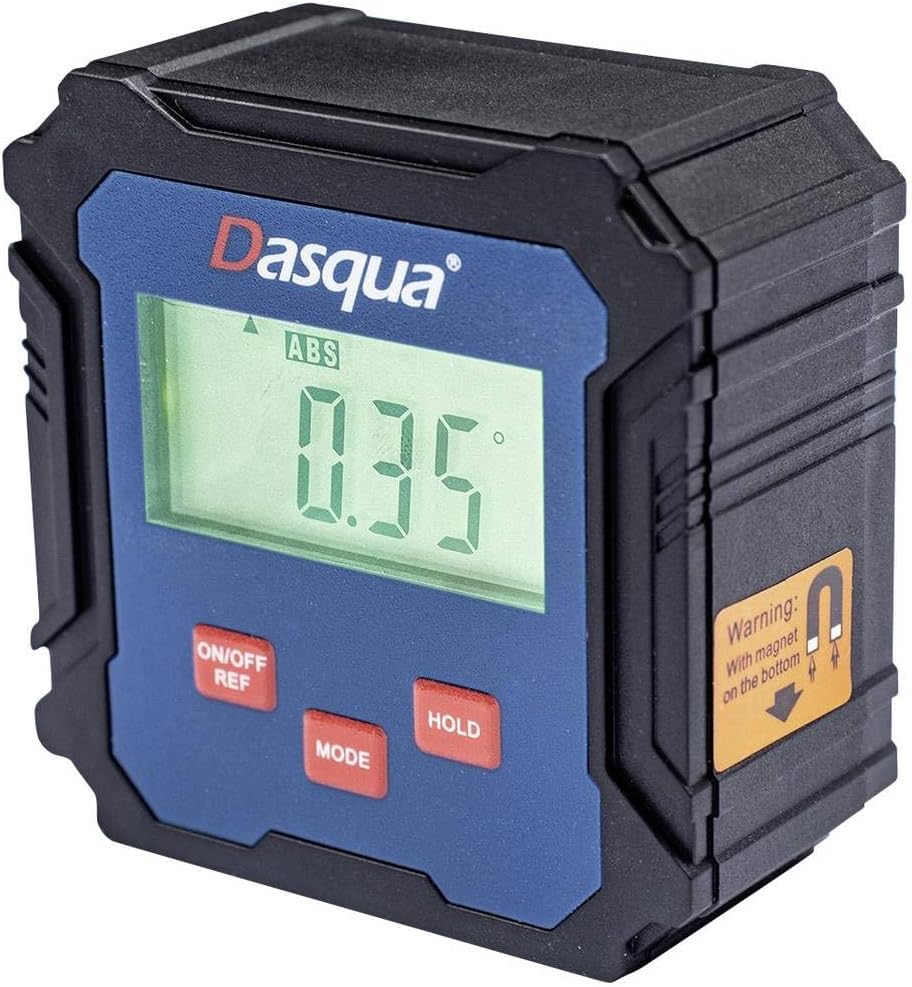
Figure 1: Dasqua 8400-0020 Digital Levelling Box. This image shows the front face of the device, highlighting the digital display, control buttons, and a warning label for the magnetic base.
- 1. Pantalla dixital: Shows angle readings in degrees, absolute (ABS) or relative (REF) mode, and battery indicator.
- 2. ON/OFF REF Button: Powers the unit on or off. Also used to set a relative zero point (REF).
- 3. MODE Button: Switches between absolute (ABS) and relative (REF) measurement modes.
- 4. Botón HOLD: Conxela a lectura actual na pantalla.
- 5. Magnetic Base: Located on the bottom of the unit, allows for secure attachment to metal surfaces for hands-free operation.
Configuración
Before first use, ensure the device has sufficient power. The Dasqua 8400-0020 typically uses standard AAA batteries. Open the battery compartment, insert batteries with correct polarity, and close the compartment securely.
Instalación da batería:
- Locate the battery compartment cover on the back or side of the unit.
- Abre a tapa.
- Insert [Number] AAA batteries (not included) observing the correct polarity (+/-).
- Peche firmemente a tapa do compartimento da batería.
Note: The exact battery type and quantity should be confirmed from the product packaging or device itself.
Instrucións de funcionamento
1. Encendido/apagado:
Preme o ON/OFF REF botón para acender o dispositivo. Manteña premido o botón ON/OFF REF botón durante uns segundos para desactivalo.
2. Absolute Measurement (ABS Mode):
When the device is powered on, it typically defaults to Absolute (ABS) mode. In this mode, the display shows the angle relative to a true horizontal (0°) or vertical (90°) plane. The "ABS" indicator will be visible on the display.
3. Relative Measurement (REF Mode):
To measure an angle relative to a specific surface (e.g., to find the difference between two angles), use the Relative (REF) mode:
- Place the device on the first surface you wish to set as your reference.
- Preme o ON/OFF REF button briefly. The display will show "0.00°" and the "REF" indicator will appear, indicating that this position is now your zero reference.
- Move the device to the second surface. The display will now show the angle difference between the first and second surfaces.
- To exit REF mode and return to ABS mode, press the MODO botón.
4. Función de retención:
Preme o ATENCIÓN button to freeze the current reading on the display. This is useful when taking measurements in hard-to-see areas. Press the ATENCIÓN de novo para liberar a lectura e retomar a medición en directo.
5. Calibration (Self-Calibration):
For optimal accuracy, it is recommended to perform a self-calibration periodically or if you suspect the readings are inaccurate. Refer to the device's specific instructions for calibration, which usually involves placing the unit on a flat, level surface and following a sequence of button presses.
Note: Consult the manufacturer's full instructions for detailed calibration procedures if available.
Mantemento
Limpeza:
Wipe the device with a soft, dry, lint-free cloth. Do not use liquid cleaners, aerosols, or solvents. Ensure no dust or debris accumulates around the display or buttons.
Almacenamento:
When not in use, store the digital levelling box in a dry, cool place, away from direct sunlight and extreme temperatures. If storing for an extended period, remove the batteries to prevent leakage and potential damage to the device.
Resolución de problemas
| Problema | Causa posible | Solución |
|---|---|---|
| O dispositivo non se acende. | Pilas baixas ou gastadas. Polaridade incorrecta da pila. | Substitúa as pilas por outras novas. Asegúrese de que as pilas estean inseridas coa polaridade correcta. |
| Lecturas inexactas. | Device not calibrated. Device exposed to strong magnetic fields (other than its base magnet). Physical damage. | Perform self-calibration. Move device away from other magnetic sources. Inspect for damage; if damaged, contact support. |
| A pantalla está escura ou parpadea. | Batería baixa. | Substitúe as pilas. |
| Os botóns non responden. | Device frozen. Low battery. | Remove and reinsert batteries to reset. Replace batteries. |
Especificacións
| Característica | Detalle |
|---|---|
| Número de modelo | 8400-0020 |
| Marca | Dasqua |
| Rango de medición | 90° x 4 (360°) |
| Resolución | 0.1° |
| Dimensións do produto | 13.3 x 12.5 x 5.5 cm |
| Peso | 140 g |
| Características | Digital display, Magnetic base, ABS/REF mode, Hold function |
Garantía e Soporte
For warranty information and technical support, please contact Dasqua customer service or refer to the official Dasqua websitio. Garde o recibo da compra como proba de compra para calquera reclamación de garantía.
Manufacturer: Dasqua


