Produto rematadoview
The RadioShack AM/FM 2-Band Vintage Radio with Bluetooth Function and USB/TF Ports (Black) is a versatile audio device designed for both classic radio listening and modern digital media playback. It features a vintage aesthetic combined with contemporary functionalities like Bluetooth connectivity and USB/TF card support.

Fronte view of the RadioShack Vintage Radio, showcasing its classic design and LED display.
O que hai na caixa
- 1 x RadioShack Vintage Radio (Model 1202265)
- 1 x cable de carga USB tipo C

The package includes the RadioShack Vintage Radio and its Type-C charging cable.
Características do produto
- AM/FM 2-Band Radio with LED Display: For clear reception of radio stations.
- Función Bluetooth: Transmisión de audio sen fíos desde dispositivos compatibles.
- Reproducción multimedia versátil: Soporta MP3 files via USB/TF ports and AUX-in.
- High Power Dual Speakers: Delivers rich sound with preset EQ function.
- Deseño portátil: Features a rechargeable battery, built-in antenna, and carry handle.

Key features of the radio include a rechargeable battery, Bluetooth connectivity, AM/FM radio, and AUX input.
Configuración
1. Cargando a batería
Before first use, fully charge the radio's internal rechargeable battery. Connect the supplied Type-C USB cable to the radio's charging port and the other end to a compatible USB power adapter (not included) or a computer USB port. The LED indicator will show charging status.
2. Configuración da antena
For optimal radio reception, extend the telescopic antenna fully. Adjust its direction to improve signal clarity for both AM and FM bands.
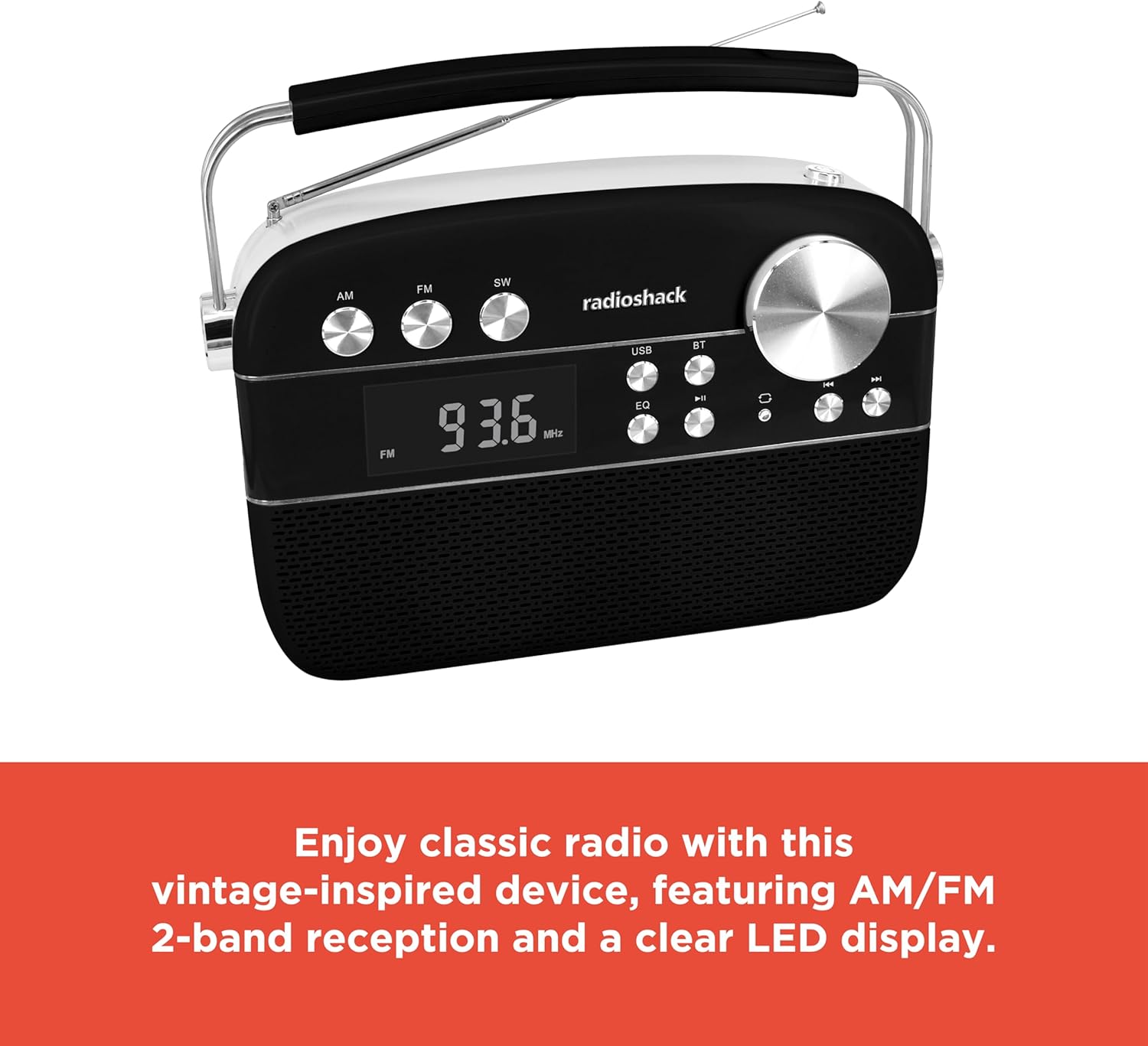
The radio features an extendable antenna for improved reception and a clear LED display for tuning.
Instrucións de funcionamento
Encendido/apagado
Press the Power button to turn the radio on or off.
Selección de modo
Use the Mode button to switch between FM, AM, Bluetooth (BT), USB/TF, and AUX input modes. The LED display will indicate the current mode.
Funcionamento da radio (AM/FM)
- Switch to FM or AM mode using the Mode button.
- Rotate the Tuning knob to scan for available radio stations. The frequency will be displayed on the LED screen.
- Adjust the Volume knob to your desired listening level.
Emparejamento Bluetooth
- Switch the radio to Bluetooth (BT) mode. The display will show "BLUE" and the Bluetooth indicator will flash, indicating it's ready for pairing.
- No teu teléfono intelixente ou tableta, activa o Bluetooth e busca os dispositivos dispoñibles.
- Select "RadioShack" from the list of devices. Once paired, the Bluetooth indicator will stop flashing and remain solid.
- You can now stream audio wirelessly from your device to the radio.
Reproducción de tarxetas USB/TF
- Insira unha unidade flash USB ou unha tarxeta TF (microSD) que conteña son MP3 files no porto respectivo.
- Switch the radio to USB/TF mode. The radio will automatically detect and begin playing the audio files.
- Use the Previous/Next buttons to navigate between tracks.
- Prema o botón Reproducir/Pausa para pausar ou retomar a reprodución.
- The "ONE/ALL/RND" button allows you to cycle through playback modes (single track repeat, all tracks repeat, random playback).
- The "FOLDER" button allows navigation through folders on the storage device.
Modo AUX-in
Connect an external audio device (e.g., MP3 player, smartphone) to the radio's AUX-in port using a 3.5mm audio cable (not included). Switch the radio to AUX mode to play audio from the connected device.
Función de ecualizador (EQ).
Press the EQ button to cycle through preset equalizer modes, adjusting the audio output to suit different music genres or personal preferences.

Detallado view of the control panel, highlighting the various buttons and the tuning knob for different playback options.
Vídeo de demostración do produto
This video demonstrates the key features and operation of the RadioShack Vintage Radio, including tuning to FM stations and connecting via Bluetooth.
Mantemento
Limpeza
Wipe the exterior of the radio with a soft, dry cloth. Do not use abrasive cleaners, waxes, or solvents as they may damage the finish. Avoid getting moisture into any openings.
Coidado da batería
Para prolongar a duración da batería, evite descargala completamente con frecuencia. Se a radio non se vai usar durante un período prolongado, cárguea periodicamente (por exemplo, cada 3 meses) para manter a batería en bo estado.
Resolución de problemas
| Problema | Causa posible | Solución |
|---|---|---|
| Sen poder | A batería está descargada. | Charge the radio using the supplied Type-C USB cable. |
| Sen son | O volume está demasiado baixo ou silenciado. Seleccionouse o modo incorrecto. | Increase the volume. Ensure the correct input mode (FM, AM, BT, USB/TF, AUX) is selected. |
| Mala recepción de radio | Antenna not extended or positioned incorrectly. Weak signal area. | Estenda e axuste completamente a antena telescópica. Probe a mover a radio a unha localización diferente. |
| Bluetooth non se conecta | Radio not in pairing mode. Device too far. Previously paired device connected. | Ensure radio is in BT mode and "BLUE" is flashing. Move device closer. Disconnect from other Bluetooth devices. |
| USB/TF playback not working | Incorrecto file format. USB/TF card not inserted correctly or corrupted. | Garantir files are in MP3 format. Reinsert the USB/TF card. Try a different USB/TF card. |
Especificacións
| Característica | Detalle |
|---|---|
| Marca | RadioShack |
| Número de modelo | 1202265 |
| Dimensións do produto | 4.53 x 11.42 x 7.36 polgadas |
| Peso do elemento | 3.41 libras |
| Fonte de enerxía | Rechargeable Battery (included), Corded Electric |
| Bandas de radio admitidas | AM/FM 2-Band |
| Tecnoloxía de conectividade | Bluetooth, USB, TF Card, AUX-in |
| Cor | Negro |
Garantía e Soporte
For warranty information and customer support, please refer to the documentation provided with your purchase or visit the official RadioShack websitio. Garda o comprobante de compra para calquera reclamación de garantía.


