1. Introdución
This manual provides essential information for the installation, operation, and maintenance of your FSP VITA GM 650W ATX 3.1 PC Power Supply. Please read this manual thoroughly before installation to ensure proper and safe usage of the product. The FSP VITA GM 650W is designed to deliver stable and efficient power to your computer system, adhering to the ATX 3.1 and PCIe Gen 5.1 specifications.
2. Información de seguridade
Observe sempre as seguintes precaucións de seguridade para evitar lesións ou danos no seu equipo:
- Non abra a fonte de alimentación. Alto volumetages are present inside, and opening the casing anula a garantía e supón un risco de descarga eléctrica.
- Instale a fonte de alimentación nunha zona ben ventilada, lonxe de fontes de calor, luz solar directa e humidade.
- Ensure the power supply is correctly installed and secured in your PC case.
- Use only the modular cables provided with the power supply. Using incompatible cables can cause damage.
- Connect the power supply to a grounded electrical outlet.
- Disconnect the AC power cord from the wall outlet before installing or removing the power supply or any other components.
- Evite colocar obxectos pesados sobre a fonte de alimentación ou os seus cables.
- If the power supply is damaged or malfunctioning, discontinue use immediately and contact FSP support.
3. Contido do paquete
Verifica que todos os elementos estean presentes no teu paquete:
- FSP VITA GM 650W ATX 3.1 PC Power Supply
- Modular Cable Set (Motherboard, CPU, PCIe, SATA, Peripheral)
- Cable de alimentación de CA
- Parafusos de montaxe
- Manual de usuario (este documento)
4. Produto rematadoview
The FSP VITA GM 650W is a high-efficiency power supply designed for modern PC systems. It features:
- ATX 3.1 Compliance: Designed to meet the latest Intel Power Design Guide ATX 3.1 specifications, ensuring compatibility with future hardware.
- PCIe Gen 5.1 Support: Ready for next-generation graphics cards.
- Certificación 80 PLUS Gold: Achieves high efficiency, reducing power dissipation, heat, and noise.
- Synchronous Rectifier LLC Resonance Converter Topology: Reduces switching loss and enhances efficiency.
- +5V & 3.3V DC to DC Circuit Design: Improves efficiency and stabilizes output voltage.
- 105°C Japanese Bulk Capacitor: Ensures reliability and extended lifespan.

Figura 4.1: Parte frontal view of the FSP VITA GM 650W Power Supply, showcasinpolo seu deseño compacto e a grella do ventilador.
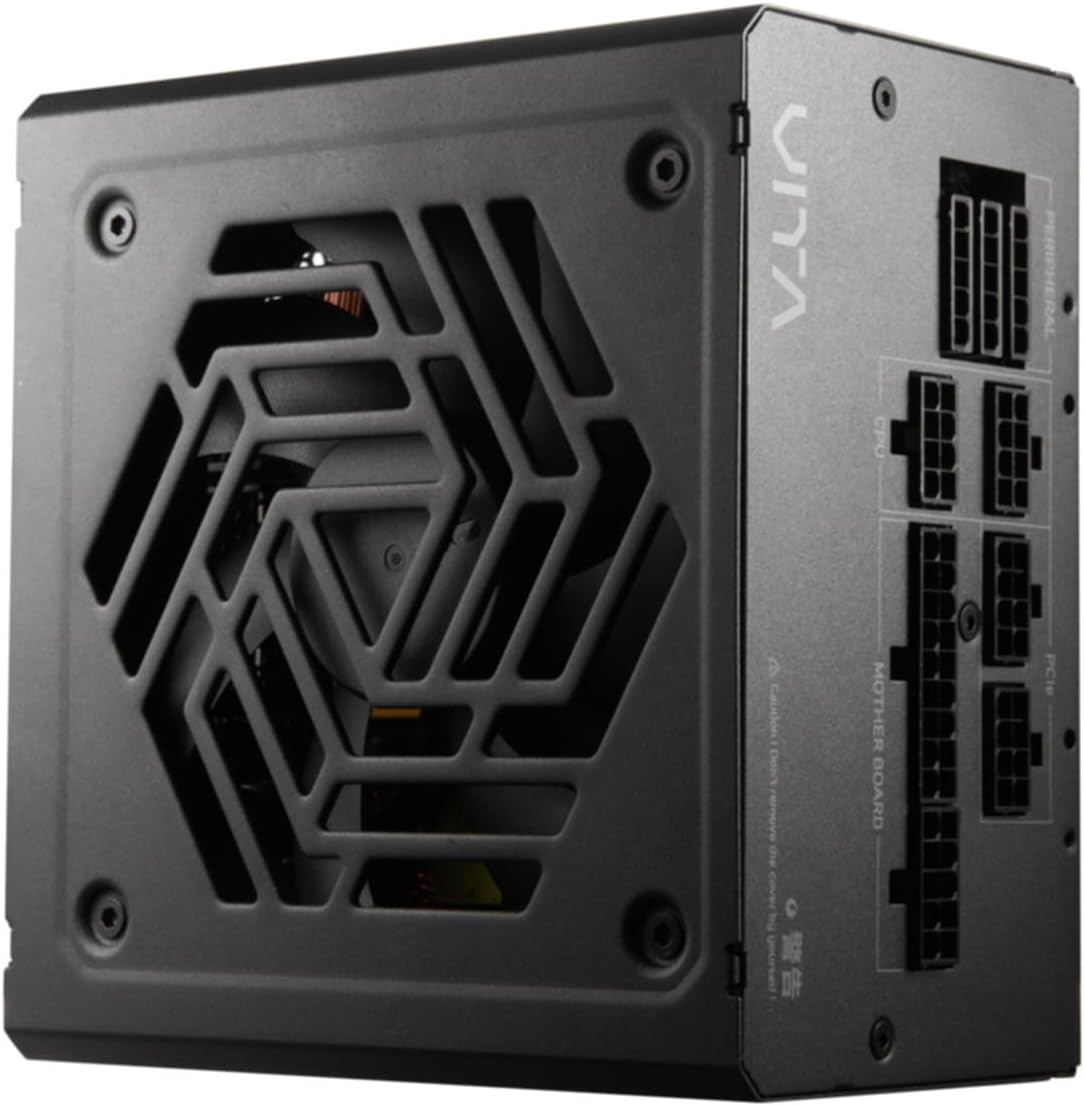
Figura 4.2: De arriba abaixo view of the FSP VITA GM 650W Power Supply, highlighting the fan and ventilation design.

Figura 4.3: Lateral view of the FSP VITA GM 650W Power Supply, showing the FSP branding and VITA model name.
5. Configuración e instalación
Follow these steps to install your FSP VITA GM 650W power supply:
- Preparación:
- Apague o ordenador e desconecte o cable de alimentación CA da toma de corrente.
- Abre a carcasa do teu ordenador.
- If replacing an existing power supply, disconnect all cables from the old PSU and remove it from the case.
- Montaxe da fonte de alimentación:
- Carefully place the FSP VITA GM 650W into the power supply bay of your PC case.
- Align the screw holes on the PSU with those on the case.
- Asegure a fonte de alimentación usando os parafusos de montaxe proporcionados.
- Conexión de cables modulares:
The FSP VITA GM 650W is a modular power supply. Connect only the cables required for your system components.

Figure 5.1: Modular cable connection panel. Ensure cables are firmly seated.
- Potencia da placa base: Conecte o cable ATX de 24 pinos á placa base.
- Potencia da CPU: Connect the 4+4-pin or 8-pin EPS/ATX12V cable(s) to the CPU power connector(s) on your motherboard.
- Alimentación PCIe: Connect the 6+2-pin PCIe cables to your graphics card(s).
- Potencia SATA: Conecta os cables de alimentación SATA a unidades SSD, HDD e unidades ópticas.
- Potencia periférica: Connect 4-pin Molex cables to other peripherals as needed.
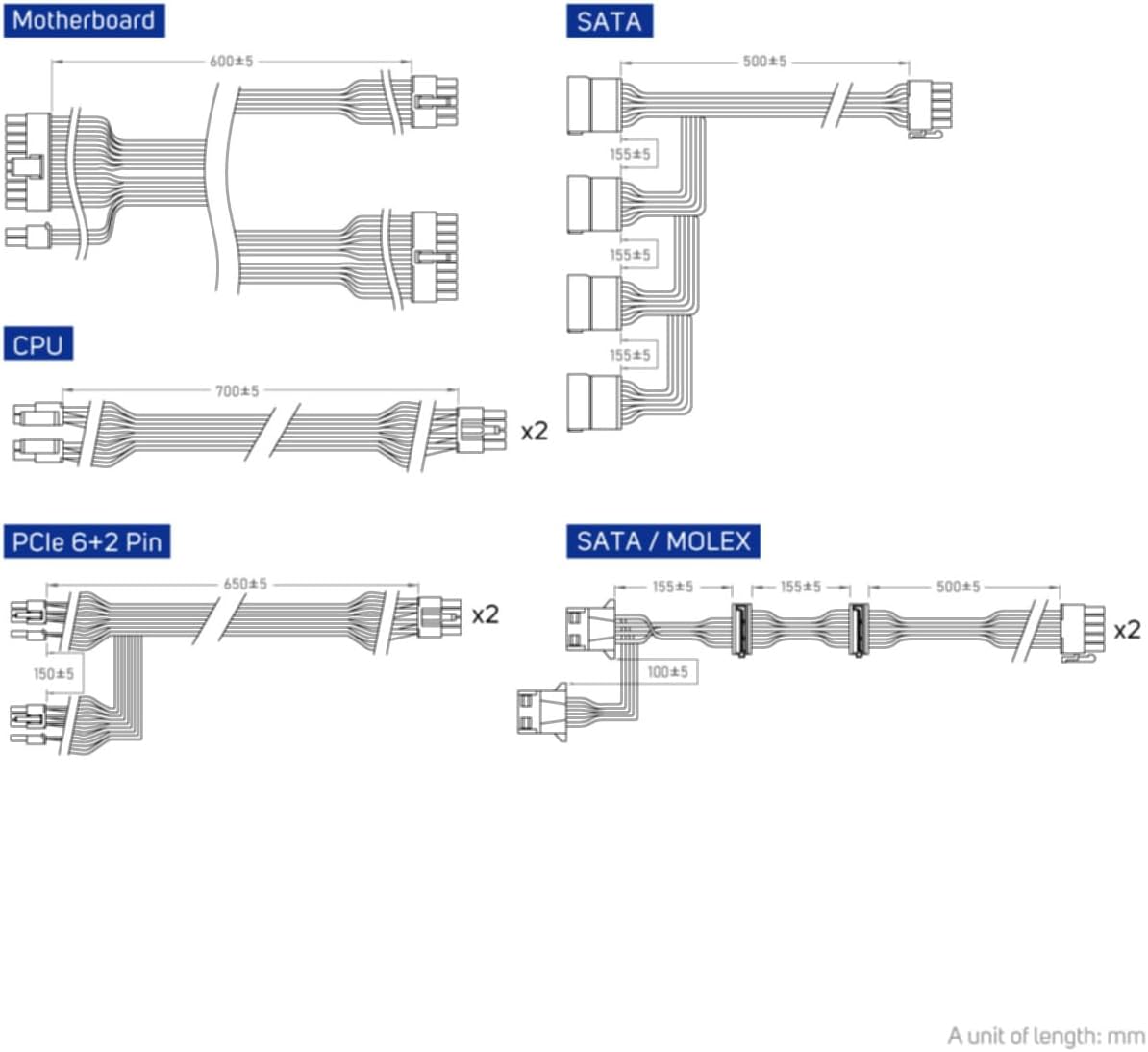
Figure 5.2: Diagram illustrating the various modular cables included and their approximate lengths (in mm).
- Comprobacións finais:
- Ensure all cables are securely connected and routed to avoid obstructing airflow.
- Pecha a caixa do ordenador.
- Conecte o cable de alimentación CA á fonte de alimentación e despois a unha toma de corrente con conexión a terra.
6. Instrucións de funcionamento
After installation, you can power on your system:
- Ensure the power switch on the back of the power supply is in the "ON" (I) position.
- Preme o botón de acendido da carcasa do teu ordenador.
- The power supply will provide stable power to your components.

Figura 6.1: Traseira view of the power supply, showing the AC power input and the main power switch.
Bridge Time Importance: The FSP VITA GM 650W adheres to the recommended ATX 3.1 bridge time values. This feature ensures the power supply can maintain a stable output voltage for a critical duration after a power interruption, preventing system instability or damage during sudden power fluctuations or outages.
7. Mantemento
Para garantir un rendemento óptimo e unha maior duración da súa fonte de alimentación:
- Limpeza do po: Limpa periodicamente o po da grella do ventilador e das saídas de aire da fonte de alimentación con aire comprimido. Asegúrate de que o sistema estea apagado e desconectado antes de limpalo.
- Xestión de cables Maintain good cable management inside your PC case to ensure proper airflow and prevent overheating.
- Condicións ambientais: Operate the power supply within recommended temperature and humidity ranges.
8 Solución de problemas
If you encounter issues with your FSP VITA GM 650W power supply, refer to the following common problems and solutions:
| Problema | Causa posible | Solución |
|---|---|---|
| O sistema non se acende. |
|
|
| O sistema acéndese pero apágase inmediatamente. |
|
|
| Unusual noises from PSU. |
|
|
If the problem persists after trying these solutions, please contact FSP customer support for further assistance.
9. Especificacións
| Característica | Detalle |
|---|---|
| Número de modelo | 790980 |
| Marca | FSP |
| Wattage | 650 W |
| Versión ATX | 3.1 |
| Certificación de eficiencia | 80 PLUS Ouro |
| Peso do elemento | 2.72 quilogramos (5.98 libras) |
| Fabricante | FSP |
| Data de primeira dispoñibilidade | 15 de agosto de 2024 |
10. Garantía e soporte
For warranty information, technical support, or service inquiries, please refer to the official FSP websitio web ou póñase en contacto co seu departamento de atención ao cliente. Garde o comprobante de compra para reclamacións de garantía.
FSP Official Websitio: www.fsp-group.com
11. Reciclaxe e eliminación
Please dispose of this product responsibly. Electronic waste should not be disposed of with household waste. Contact your local authorities or recycling center for information on proper disposal methods for electronic components.


