1. Introdución
Thank you for choosing the KAIDI KD-780 True Wireless Earbuds. These earbuds are designed to provide a high-quality audio experience with advanced features such as Bluetooth 5.3 connectivity, active noise cancellation, and intuitive touch controls. Please read this manual carefully to ensure proper use and maintenance of your device.
2. Contido do paquete
- KAIDI KD-780 True Wireless Earbuds (Left and Right)
- Estuche de carga
- USB to Lightning Charging Cable
- Manual de usuario
3. Produto rematadoview
Familiarize yourself with the components of your KAIDI KD-780 earbuds and charging case.

Image: The KAIDI KD-780 True Wireless Earbuds are shown in their open charging case, alongside a closed charging case. Both are white with the 'KAIDI' logo.
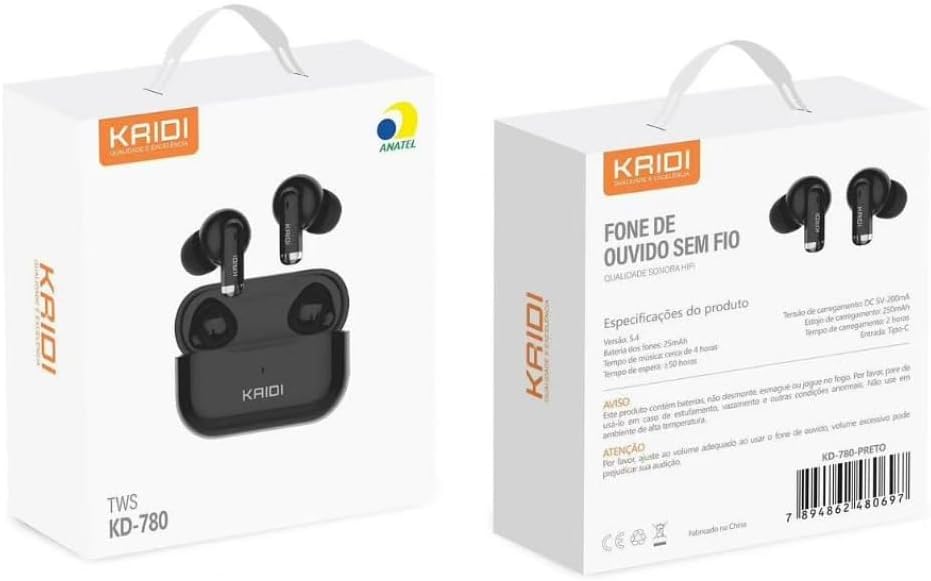
Image: The front and back of the KAIDI KD-780 product box, displaying the earbuds, charging case, and key features in Portuguese.
4. Configuración
4.1. Carga dos auriculares e da funda
- Coloca os auriculares na caixa de carga. Asegúrate de que estean correctamente asentados.
- Connect the USB to Lightning charging cable to the charging port on the case and a power source.
- The indicator light on the case will show charging status. A full charge takes approximately 2 hours for the case.
- The charging case provides multiple extra charges for the earbuds, extending total playback time up to 20 hours.
4.2. Emparellamento co teu dispositivo
Primeira parella:
- Abre a caixa de carga. Os auriculares entrarán automaticamente no modo de emparellamento.
- No teu teléfono intelixente ou dispositivo con Bluetooth, vai á configuración de Bluetooth.
- Busca available devices and select "KD-780" (or similar name).
- Once connected, you will hear a confirmation tone, and the indicator light on the case may change.

Image: A hand holding the open charging case, with a phone screen showing Bluetooth settings and a 'Connected' status, illustrating the one-step pairing process.
Emparejamento posterior:
- Unha vez emparellados, os auriculares conectaranse automaticamente co último dispositivo emparellado ao retiralos da caixa de carga.
5. Instrucións de funcionamento
5.1. Acendido/apagado
- Encendido: Open the charging case, or take the earbuds out of the case.
- Apagado: Coloque os auriculares de novo na caixa de carga e pecha a tapa.
5.2. Toca Controis
The KD-780 earbuds feature intuitive touch controls. Specific functions may vary slightly depending on your device and operating system.
- Reproducir/Pausa: Toca un só auricular en calquera dos auriculares.
- Próxima pista: Toca dúas veces no auricular dereito.
- Pista anterior: Toca dúas veces no auricular esquerdo.
- Responder/Finalizar chamada: Toca un só auricular en calquera dos auriculares.
- Rexeitar a chamada: Mantén premido calquera dos auriculares.
- Activar o asistente de voz: Toca tres veces en calquera dos auriculares.
- Control de volume: (Check device settings or app for specific volume control gestures if not default).
5.3. Cancelación activa de ruído (ANC)
The KD-780 earbuds feature Active Noise Cancellation to reduce ambient noise for a more immersive listening experience. The feature bullets mention 'Cancelamento de ruído ativo híbrido' indicate this functionality.
- Activar/desactivar ANC: Press and hold the touch area on either earbud for approximately 2 seconds to switch between ANC On, Transparency Mode, and ANC Off.

Image: A diagram illustrating superior audio, physical noise reduction, and powerful volume, highlighting the sound quality features of the earbuds.
6. Mantemento
6.1. Limpeza
- Usa un pano suave, seco e sen fiapos para limpar os auriculares e a caixa de carga.
- Non empregue produtos de limpeza abrasivos, solventes nin aerosois en aerosol.
- Keep the charging contacts on both the earbuds and the case clean and dry.
6.2. Almacenamento
- Garda os auriculares no seu estuche de carga cando non estes en uso para protexelos e mantelos cargados.
- Avoid storing the device in extreme temperatures or high humidity.
6.3. Resistencia á auga
The earbuds are resistant to splashes (IPX4 rating), making them suitable for workouts and light rain. However, they are not fully waterproof and should not be submerged in water.
7 Solución de problemas
- Auriculares sen emparellamento: Ensure both earbuds are in the charging case, open the lid, and check your device's Bluetooth settings. Try forgetting the device and re-pairing.
- Só funciona un auricular: Volva colocar os dous auriculares na funda, peche a tapa, agarde uns segundos e logo ábraa e inténteo de novo. Asegúrese de que os dous auriculares estean cargados.
- Sen son: Check the volume on your device and the earbuds. Ensure the earbuds are properly connected to your device.
- Problemas de carga: Ensure the charging cable is securely connected and the power source is working. Clean the charging contacts if necessary.
8. Especificacións
| Característica | Detalle |
|---|---|
| Versión Bluetooth | 5.3 |
| Capacidade do estuche de carga | 300 mAh |
| Capacidade da batería dos auriculares | 30 mAh (cada un) |
| Tempo de reprodución | Ata 5 horas (auriculares), ata 20 horas (con estuche de carga) |
| Tempo de carga | Aprox. 2 horas |
| Alcance Bluetooth | Ata 10 metros |
| Resposta en frecuencia | 20 Hz - 20 kHz |
| Resistencia á auga | IPX4 (resistente ás salpicaduras) |
| Tipo de control | Toca |
| Control de ruído | Cancelación activa de ruído |
| Tipo de conector | Lightning (for charging case) |

Image: A close-up of a microchip labeled '5.3', representing the advanced Bluetooth 5.3 technology for stable and continuous connection.

Image: A comparison graphic showing Bluetooth 5.0 vs. Bluetooth 5.3, highlighting 95% connection speed, stability, and sound quality for 5.3.
9. Vídeos oficiais de produtos
9.1. Produto rematadoview: The Best Option for Earbuds
Vídeo: Este vídeo ofrece unha visión xeralview of the KAIDI KD-780 True Wireless Earbuds, showcasing their design and features. It highlights why they are considered a top choice for wireless audio.
9.2. Product Details: Perfection in Every Detail
Video: This video focuses on the intricate details and craftsmanship of the KAIDI KD-780 Earbuds, emphasizing their premium build and aesthetic appeal.
9.3. Premium Bluetooth Earbuds
Vídeo: Un vídeo promocionalasing the KAIDI KD-780 as a premium Bluetooth earbud option, highlighting its features and user experience.
10. Garantía e soporte
Your KAIDI KD-780 True Wireless Earbuds come with a manufacturer's warranty. Please refer to the warranty card included in your package for specific terms and conditions. For technical support or customer service, please contact your retailer or visit the official KAIDI websitio.
Garantía do fabricante: 90 días


