1. Introdución
Thank you for choosing the ALLPOWERS R1500 LITE Portable Power Station and SF200 Flexible Solar Panel. This manual provides essential information for the safe and efficient operation, maintenance, and troubleshooting of your product. Please read it thoroughly before use and retain it for future reference.
The ALLPOWERS R1500 LITE is a high-capacity portable power station designed to provide reliable power for various devices, featuring a durable LiFePO4 battery and multiple output options. Paired with the SF200 Flexible Solar Panel, it offers an efficient and portable solar charging solution.
2. Produto rematadoview
2.1 Características principais
- Alta capacidade e potencia de saída: 1056Wh capacity with 1600W (peak 3200W) AC output, capable of powering up to 9 devices simultaneously.
- Batería LiFePO4: Long-lasting LiFePO4 battery offering 4000+ charge cycles to 80% capacity, ensuring over 10 years of daily use.
- UltraFast Charging: Charges to 80% in just 40 minutes via a wall outlet.
- Carga solar eficiente: Supports up to 650W solar input, allowing full charge in approximately 1.5 hours with a single cable.
- Fonte de alimentación ininterrompida (UPS): Features a 15ms seamless UPS function for continuous power during outages.
- Funcionamento silencioso: Operates at under 43 dB in whisper-quiet charging mode.
- Control intelixente da aplicación: Monitoriza e controla a central eléctrica a través dunha aplicación móbil dedicada.
- SF200 Flexible Solar Panel: Lightweight (9lb), bendable (within 260 degrees), and highly efficient (up to 25% conversion) monocrystalline solar panel.
- Duradeiro e resistente ás inclemencias meteorolóxicas: SF200 features IP68-rated ETFE material for resistance to extreme weather conditions.
2.2 Que hai na caixa
- 1 x ALLPOWERS Portable Power Station (R1500 LITE)
- 1 x cable de carga de CA
- 1 x Manual de usuario
- 1 x ALLPOWERS SF200 Flexible Solar Panel (Included with this specific variant)

Image: Package contents including the R1500 LITE power station, AC charging cable, and user manual.
3. Configuración
3.1 Carga inicial
Before first use, it is recommended to fully charge the R1500 LITE power station. This can be done via AC wall outlet, solar panel, or car charger.
- Carga de parede de CA: Connect the provided AC charging cable to the power station's AC input port and then to a standard wall outlet. The power station supports UltraFast Charging, reaching 80% in approximately 40 minutes.
- Carga solar: Connect the SF200 Flexible Solar Panel to the power station's solar input port. Ensure the solar panel is positioned in direct sunlight for optimal charging efficiency. The R1500 LITE supports up to 650W solar input.
- Carga do coche: Use a compatible car charger (not included) to connect the power station to your vehicle's 12V/24V cigarette lighter socket.
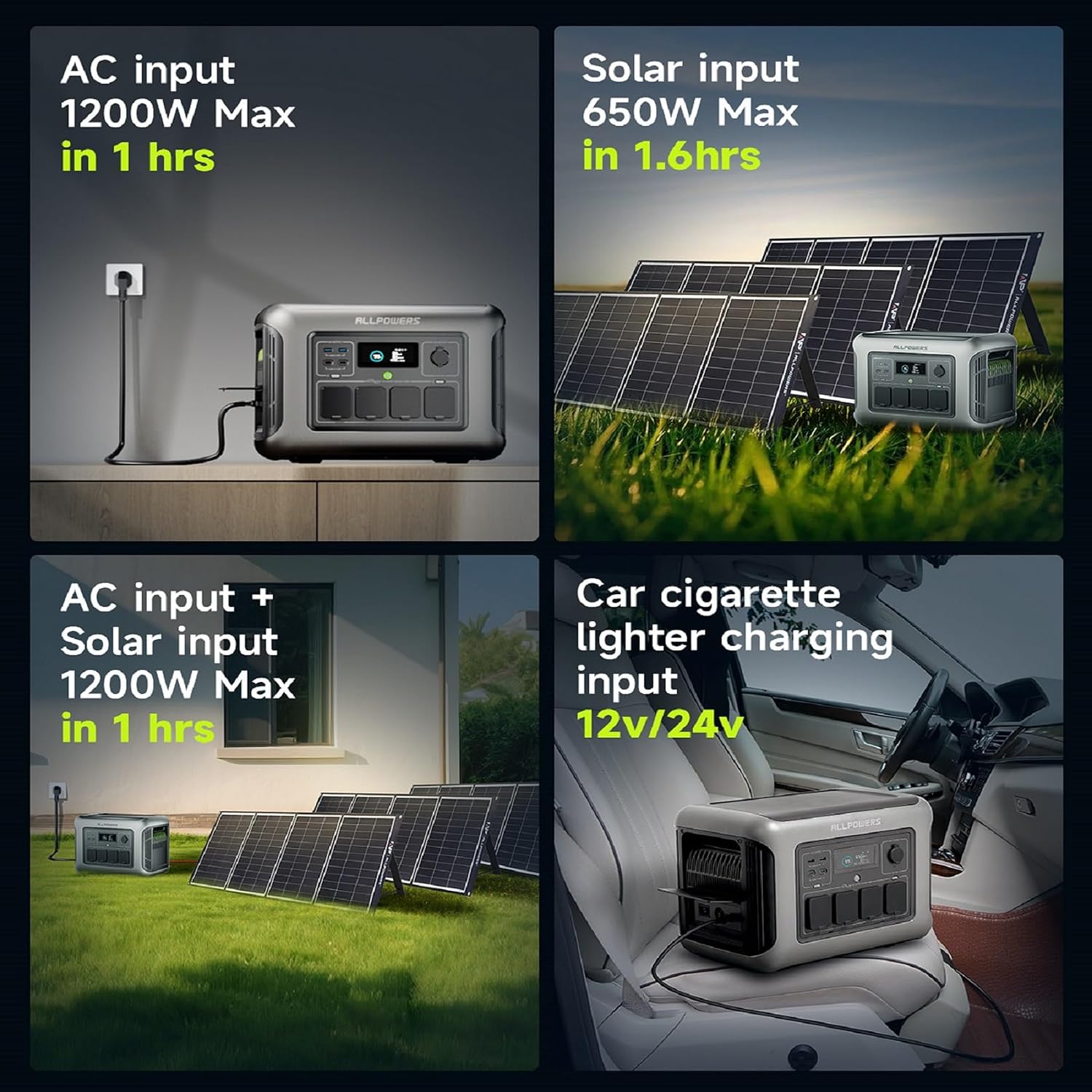
Image: Illustration of AC, solar, and car charging methods for the power station.
3.2 Connecting the SF200 Flexible Solar Panel
The SF200 Flexible Solar Panel is designed for easy installation and use. It can be bent within 260 degrees, making it suitable for various curved surfaces.
- Unroll or unfold the SF200 solar panel.
- Position the panel in an area with maximum direct sunlight.
- Connect the solar output connectors of the SF200 to the solar input port of the R1500 LITE power station.
- Monitor the charging indicator on the power station's display to confirm solar input.

Image: The R1500 LITE power station and SF200 flexible solar panel.
4. Instrucións de funcionamento
4.1 Acendido/Apagado
To power on the R1500 LITE, press and hold the main power button until the display illuminates. To power off, press and hold the main power button again until the display turns off.
4.2 Uso dos portos de saída
The R1500 LITE features various output ports:
- AC Outputs (120V, 1600W, peak 3200W): Press the AC power button to enable/disable the AC outlets. Connect your AC-powered devices.
- Portos USB-C (100 W): Connect USB-C compatible devices for fast charging.
- Portos USB-A (18 W): Connect standard USB-A devices for charging.
- Car Cigarette Lighter Socket (12V/10A): Connect 12V DC devices.

Image: The R1500 LITE powering various tools, demonstrating its high output capability.

Image: The R1500 LITE powering common household and campelectrodomésticos.
4.3 Función de sistema de alimentación ininterrompida (SAI)
The R1500 LITE features a 15ms seamless UPS function. When connected to an AC wall outlet and simultaneously powering devices, it can automatically switch to battery power in case of a power outage, ensuring continuous operation for sensitive electronics.
- Connect the R1500 LITE to an AC wall outlet using the AC charging cable.
- Connect your critical devices (e.g., desktop PC, CPAP machine) to the AC output ports of the R1500 LITE.
- In the event of a power failure, the R1500 LITE will automatically provide power from its internal battery.
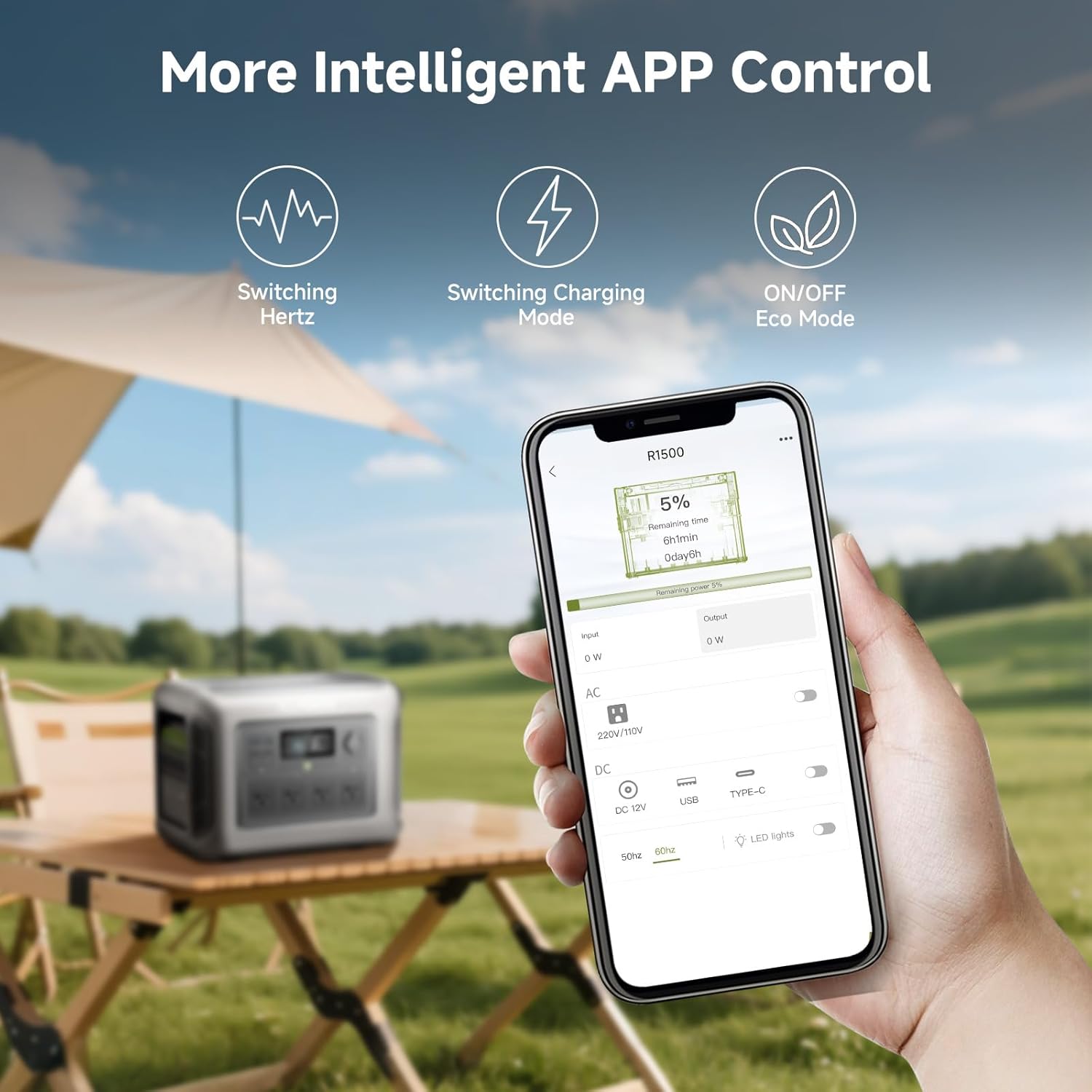
Image: The R1500 LITE providing uninterrupted power to an aquarium.
4.4 Control intelixente por aplicación
Control and monitor your R1500 LITE using the ALLPOWERS mobile application.
- Descarga a aplicación ALLPOWERS desde a tenda de aplicacións do teu dispositivo.
- Asegúrate de que o Bluetooth estea activado no teu smartphone.
- Open the app and follow the on-screen instructions to pair with your R1500 LITE.
- Through the app, you can switch Hertz, change charging modes, activate Eco Mode, and monitor power usage.

Image: The ALLPOWERS app interface for intelligent control of the power station.
5. Mantemento
5.1 Coidado coa batería
- For optimal battery life, avoid fully discharging the power station frequently.
- Garde a central eléctrica nun lugar fresco e seco, lonxe da luz solar directa e de temperaturas extremas.
- Se a gardas durante períodos prolongados, carga a batería aproximadamente entre o 50 e o 80 % cada 3 e 6 meses.
5.2 Limpeza
- Wipe the exterior of the power station and solar panel with a soft, dry cloth.
- Non use produtos de limpeza ou disolventes abrasivos.
- Asegúrate de que todos os portos estean libres de po e residuos.
5.3 SF200 Solar Panel Durability
The SF200 solar panel is designed with IP68 waterproof ETFE material, allowing it to withstand various weather conditions. However, for longevity, it is recommended to clean the panel surface periodically to remove dirt or dust that may reduce efficiency.
6 Solución de problemas
If you encounter issues with your ALLPOWERS R1500 LITE or SF200 Solar Panel, please refer to the following common problems and solutions:
| Problema | Causa posible | Solución |
|---|---|---|
| A central eléctrica non se acende | Batería baixa; o botón de acendido non se premeu correctamente | Charge the power station; Press and hold the power button for 3 seconds |
| Sen saída dos portos CA/CC/USB | Output port not activated; Overload protection; Device not compatible | Ensure respective output button is pressed; Reduce load; Check device power requirements |
| O panel solar non se carga | Insufficient sunlight; Panel not connected properly; Damaged cable/panel | Reposition panel in direct sunlight; Reconnect cables securely; Inspect cables and panel for damage |
| Problemas de conexión á aplicación | Bluetooth off; App not updated; Power station not discoverable | Ensure Bluetooth is on; Update app; Restart power station and app |
Se o problema persiste, póñase en contacto co servizo de atención ao cliente de ALLPOWERS.
7. Especificacións
7.1 ALLPOWERS R1500 LITE Portable Power Station
- Nome do modelo: AP-R1500+B1000-US
- Capacidade: 1056 Wh
- Saída CA: 1600 W (pico 3200 W)
- Saída USB-C: 2 x 100 W
- Saída USB-A: 2 x 18 W
- Car Cigarette Lighter Socket: 12 V/10 A
- Entrada AC: 1200 W máx
- Entrada solar: 650 W máx
- Tipo de batería: LiFePO4 (LFP)
- Ciclo de vida: Máis de 4000 ciclos a un 80 % de capacidade
- Función UPS: 15ms seamless
- Dimensións: 12.3 cm de longo x 16.3 cm de ancho x 10.4 cm de alto
- Peso: Aproximadamente 33.07 libras (15 kg)
7.2 ALLPOWERS SF200 Flexible Solar Panel
- Potencia: 200 W
- Tipo de cela: Monocristalino
- Eficiencia de conversión: Ata o 25%
- Material: ETFE (IP68 waterproof)
- Flexibilidade: Flexible dentro de 260 graos
- Dimensións: 54.1 cm de longo x 0.1 cm de ancho x 30.7 cm de alto
- Peso: 9 libras
8. Garantía
The ALLPOWERS R1500 LITE Portable Power Station and SF200 Flexible Solar Panel come with a 6 ano de garantía. This warranty covers defects in materials and workmanship under normal use. Please retain your proof of purchase for warranty claims. For detailed warranty terms and conditions, refer to the official ALLPOWERS websitio ou póñase en contacto co servizo de atención ao cliente.
9. Atención ao cliente
For any questions, technical assistance, or warranty inquiries, please contact ALLPOWERS customer support through the following channels:
- Oficial Websitio: Visita o Tenda ALLPOWERS en Amazon para obter información sobre o produto e recursos de asistencia.
- Correo electrónico: Consulte a embalaxe do produto ou a ficha oficial websitio para obter o enderezo de correo electrónico de atención ao cliente máis actualizado.
- Chat en liña: Available on the ALLPOWERS official websitio en horario comercial.
When contacting support, please have your product model number (AP-R1500+B1000-US) and purchase date ready.


