1. Introdución
This manual provides essential information for the safe and efficient operation of your DOOGEE Blade10 Energy rugged smartphone. Please read this manual thoroughly before using your device to ensure proper functionality and to prevent damage.
The DOOGEE Blade10 Energy is designed for durability and performance, featuring an Android 15 operating system, an octa-core processor, a 6.56-inch HD+ 90Hz display, a 16MP camera, and IP68/IP69K water and dust resistance.
2. Contido do paquete
Verifica que todos os elementos estean presentes no paquete:
- Teléfono resistente DOOGEE Blade 10 Energy
- Cable USB tipo C
- Cargador
- Película protectora de vidro temperado (preaplicada)
- Eslinga
- Manual de usuario
- Tarxeta de garantía
- Funda protectora

Image: Contents of the DOOGEE Blade10 Energy retail package, including the phone, charger, cable, and accessories.
3. Disposición do dispositivo
Familiarize yourself with the physical components of your smartphone.
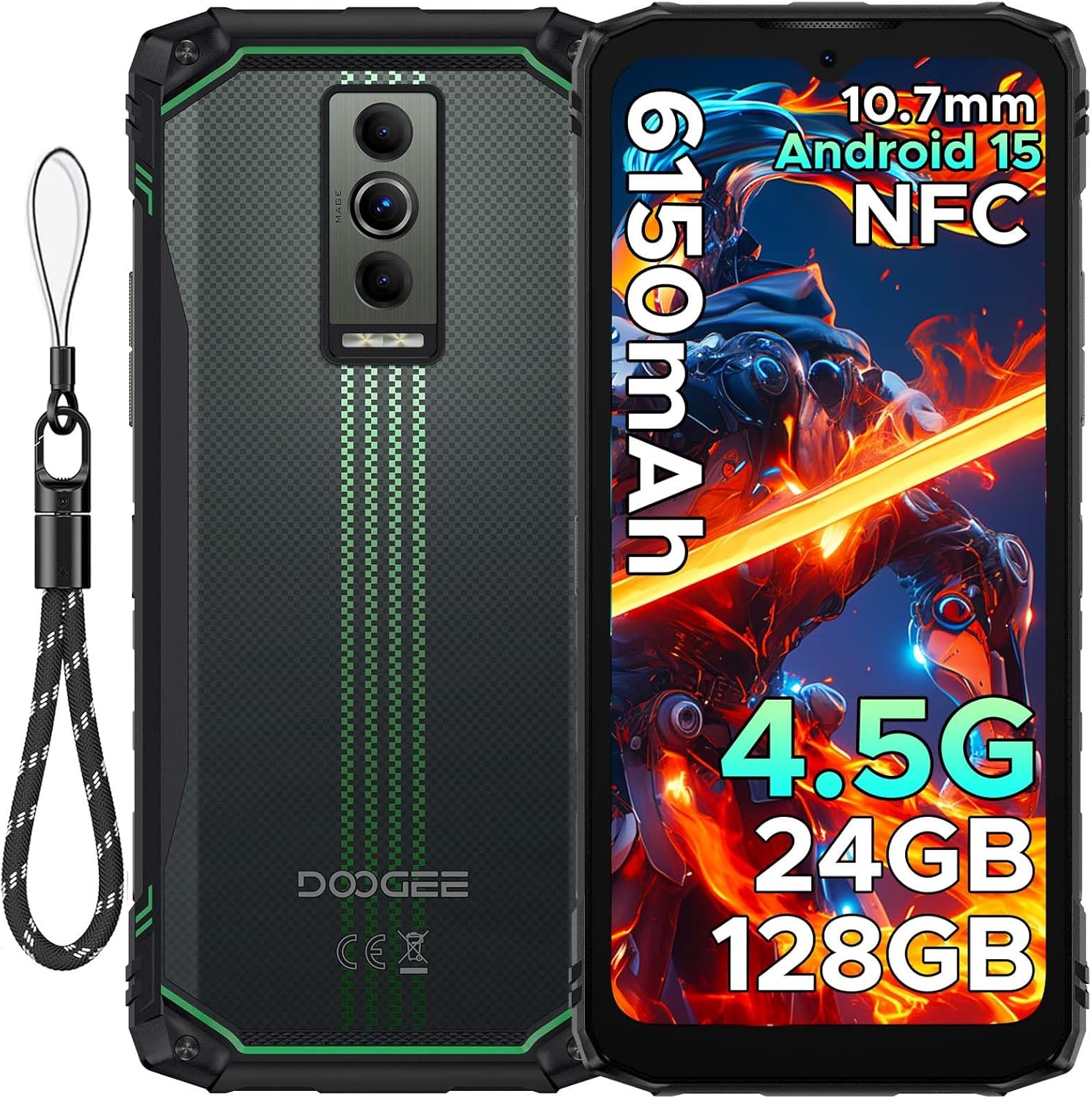
Imaxe: Fronte e parte traseira view of the DOOGEE Blade10 Energy smartphone, highlighting the display, cameras, and side buttons.
- Fronte: 6.56" HD+ Display, 8MP Front Camera
- Traseira: 16MP Main Camera, Flashlight
- Laterais: Power Button, Volume Buttons, SIM/MicroSD Card Slot, USB Type-C Port
4. Configuración
4.1. Instalación da tarxeta SIM e da tarxeta MicroSD
- Locate the SIM/MicroSD card slot on the side of the device.
- Usa a ferramenta de expulsión da tarxeta SIM fornecida para abrir a bandexa.
- Carefully place your Nano-SIM cards and/or MicroSD card into the designated slots. Ensure correct orientation.
- Empurre con coidado a bandexa cara atrás na ranura ata que quede ao mesmo nivel que a carrocería do teléfono.

Image: Close-up of the SIM/MicroSD card tray, illustrating the correct placement of cards.
4.2. Carga inicial
Before first use, fully charge your device using the provided Type-C USB cable and charger.
- Connect the Type-C cable to the phone's charging port.
- Conecta o outro extremo do cable ao cargador e, a seguir, conecta o cargador a unha toma de corrente.
- O indicador de carga aparecerá na pantalla.

Image: The DOOGEE Blade10 Energy connected to its charger via a Type-C cable.
5. Instrucións de funcionamento
5.1. Acender/Apagar e reiniciar
- Encendido: Manteña premido o botón de acendido ata que a pantalla se ilumine.
- Apagar/Reiniciar: Press and hold the Power button until the power options menu appears. Select "Power off" or "Restart".
5.2. Sistema operativo Android 15
Your DOOGEE Blade10 Energy runs on Android 15, offering enhanced performance, smarter interactions, and improved privacy features. Navigate through the interface using touch gestures.

Image: Screenshot of the Android 15 home screen and app icons on the DOOGEE Blade10 Energy.
5.3. Características da pantalla
The 6.56-inch HD+ display with a 90Hz refresh rate provides a smooth visual experience. Widevine L1 support ensures high-definition streaming content playback.

Image: The DOOGEE Blade10 Energy display showcasing vibrant colors and smooth motion.
5.4. Funcionamento da cámara
Capture photos and videos using the 16MP rear camera and 8MP front camera. The device also features an underwater shooting mode for aquatic environments.

Image: The DOOGEE Blade10 Energy camera interface, highlighting the underwater shooting mode.
5.5. Características de seguridade
Unlock your phone using Face ID for quick and secure access.

Image: An illustration of the Face ID recognition feature in use on the DOOGEE Blade10 Energy.
5.6. Funcionalidade NFC
The NFC (Near Field Communication) feature allows for contactless payments, data sharing, and card emulation. Enable NFC in your phone's settings to use these functions.

Image: The DOOGEE Blade10 Energy being used for a contactless payment via NFC.
6. Características de durabilidade
The DOOGEE Blade10 Energy is built to withstand harsh environments with its IP68/IP69K and MIL-STD-810H certifications.
- IP68/IP69K: Provides dustproof and waterproof protection. The phone can withstand immersion in water up to 1.5 meters deep for 30 minutes.
- Norma MIL-STD-810H: Certified for drop resistance up to 1.5 meters.

Image: The DOOGEE Blade10 Energy shown in various rugged scenarios, highlighting its dustproof, drop-proof, and waterproof design.
Video: This video demonstrates the IP68/IP69K waterproof capabilities of the DOOGEE Blade10 Energy.
7. Xestión da batería
The device is equipped with a 6150mAh silicon anode battery for extended usage. It also supports reverse charging.
Image: The DOOGEE Blade10 Energy showcasing its 6150mAh battery and the reverse charging capability with another device.
7.1. Carga inversa
To use your phone as a power bank, connect a compatible device to your Blade10 Energy using a USB-C to USB-C cable or a USB-C to the appropriate cable for the other device. Ensure reverse charging is enabled in the settings if it doesn't start automatically.
Video: This video highlights the ultra-thin design and long battery life of the DOOGEE Blade 10 series, including the Blade10 Energy.
8. Conectividade
- Dobre SIM 4.5G: Supports dual SIM cards for flexible network usage.
- GPS: Integrated with Beidou, Galileo, GLONASS, and GPS for accurate positioning.
- Wi-Fi: Supports standard Wi-Fi connectivity.
9. Mantemento
To ensure the longevity and optimal performance of your DOOGEE Blade10 Energy, follow these maintenance guidelines:
- Manteña limpo o dispositivo limpándoo cun suave, damp pano. Evite produtos químicos agresivos.
- Ensure all port covers are securely closed when the device is exposed to water or dust.
- Evite expoñer o dispositivo a temperaturas extremas ou á luz solar directa durante períodos prolongados.
- Fai copias de seguridade dos teus datos con regularidade para evitar perdas.
10 Solución de problemas
Se tes problemas co teu dispositivo, consulta as seguintes solucións habituais:
| Problema | Solución |
|---|---|
| O dispositivo non se acende | Asegúrate de que a batería estea cargada. Conéctaa ao cargador e agarda uns minutos antes de tentar acender de novo. |
| Sinal de rede deficiente | Check SIM card installation. Move to an area with better network coverage. Restart the device. |
| A pantalla táctil non responde | Restart the device. If the issue persists, perform a factory reset (note: this will erase all data). |
| A batería esgotarase rapidamente | Close unused applications. Reduce screen brightness. Disable unnecessary features like Wi-Fi, Bluetooth, or GPS when not in use. |
11. Especificacións
| Característica | Detalle |
|---|---|
| Nome do modelo | Blade10 Energy |
| Sistema Operativo | Android 15 |
| Modelo CPU | Mediatek Dimensity 9000 (Octa-Core, 1.8 GHz) |
| RAM | 24 GB (4 GB básico + 20 GB ampliado) |
| Almacenamento interno | 128 GB |
| Almacenamento ampliable | Up to 2 TB (MicroSD/TF card) |
| Tamaño da pantalla | 6.56 polgadas |
| Resolución | 720 x 1600 (HD+) |
| Taxa de actualización | 90 Hz |
| Cámara principal | 16 MP |
| Cámara frontal | 8 MP |
| Capacidade da batería | 6150 mAh |
| Conectividade | 4.5G Dual SIM, Wi-Fi, NFC |
| Navegación | Beidou, Galileo, GLONASS, GPS |
| Durabilidade | IP68/IP69K, MIL-STD-810H |
| Dimensións | 6.45 x 2.98 x 0.33 polgadas |
| Peso | 6.9 onzas (195 gramos) |
12. Garantía e soporte
Your DOOGEE Blade10 Energy comes with a two-year warranty. For technical support or warranty claims, please refer to the contact information provided on the warranty card included in your package or visit the official DOOGEE support websitio.
The package includes a Warranty Card and a Service Card for your reference.


