1. Introdución
The Marstek Venus-E is an advanced 5.12 kWh AC-coupled all-in-one energy storage system designed for balcony power plants. This system allows for efficient storage and utilization of solar energy, optimizing self-consumption and providing backup power. This manual provides essential information for the safe and effective installation, operation, and maintenance of your Venus-E unit.
2. Información de seguridade
Please read all safety instructions carefully before installation and operation. Failure to follow these instructions may result in electric shock, fire, serious injury, or property damage.
- Seguridade eléctrica: Ensure all connections are secure and correctly wired. Do not attempt to open or modify the unit. Only qualified personnel should perform electrical work.
- Colocación: Install the unit in a well-ventilated area, away from flammable materials, direct sunlight, and extreme temperatures. Ensure the unit is stable and cannot be easily knocked over.
- Exposición á auga: Although the unit is IP65 rated for water resistance, avoid submerging it or exposing it to high-pressure water jets. Ensure all covers and seals are properly closed.
- Nenos e animais: Keep the unit out of reach of children and pets to prevent accidental injury or damage.
- Emerxencia: In case of fire, use a CO2 or dry chemical extinguisher. Do not use water. In case of electric shock, immediately disconnect power if safe to do so and seek medical attention.
3. Produto rematadoview
3.1. Características clave
- 5.12 kWh Capacity: High-capacity energy storage for extended use.
- AC-Coupled System: Seamless integration with existing AC grids and balcony power plants.
- Plug and Play: Simplified installation for quick setup.
- Batería LiFePO4: Utilizes exceptionally safe and durable Lithium Iron Phosphate battery technology with 6000+ cycle life.
- Island Operation (Backup): Provides up to 2500W of power for essential loads during grid outages.
- Smart Meter Integration: Supports anti-feed-in protection and optimizes 100% self-consumption.
- Control da aplicación: Dual Bluetooth and WiFi modules for real-time data monitoring and remote control via the Marstek App.
- Deseño robusto: IP65 waterproof rating and operational in ultra-low temperatures down to -20°C.
- Universal PV Compatibility: Compatible with various photovoltaic (PV) systems.
3.2. Compoñentes (contido da caixa)
The Marstek Venus-E system typically includes the following:
- Marstek Venus-E Main Unit (referred to as Navi 2000 x 1)
- Cables de alimentación
- Manual de usuario (este documento)
- Additional accessories may vary by package.

Figure 3.2.1: Marstek Venus-E 5kW High-Performance Plug and Play Storage connected to a wall socket, illustrating its AC-coupled nature and ease of connection.
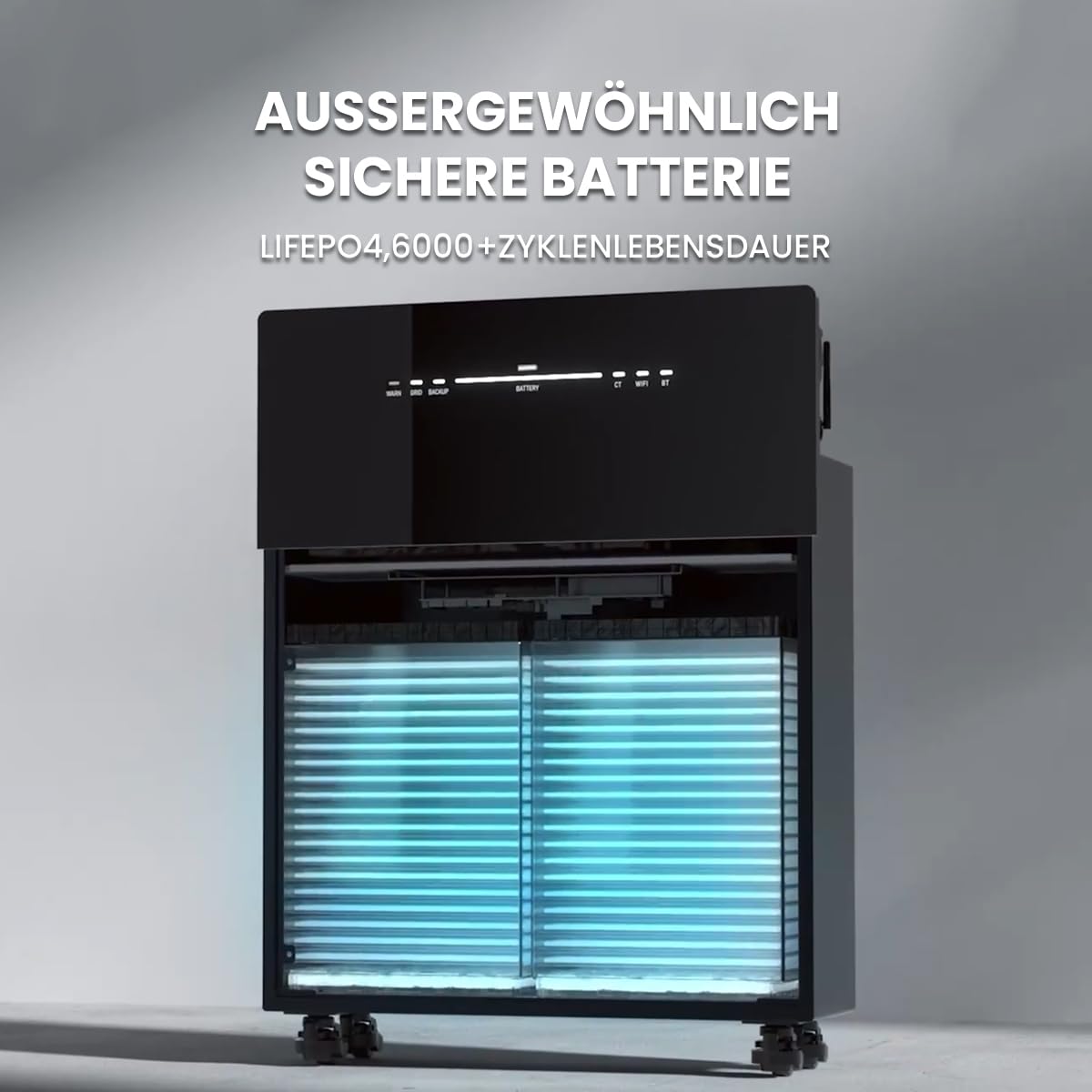
Figura 3.2.2: Interno view of the Marstek Venus-E, highlighting its LiFePO4 battery cells, designed for exceptional safety and a long cycle life of over 6000 cycles.
4. Configuración
4.1. Desembalaxe e inspección
- Carefully unpack the Marstek Venus-E unit and all accessories.
- Inspect the unit for any signs of damage during transit. If damage is found, contact your supplier immediately.
- Asegúrese de que estean presentes todos os compoñentes enumerados na Sección 3.2.
4.2 Colocación
- Choose a location that is dry, well-ventilated, and protected from direct sunlight.
- Ensure the ambient temperature is within the operating range specified in Section 7.
- The unit is IP65 waterproof, allowing for outdoor installation, but protection from extreme weather conditions is recommended for longevity.
- Place the unit on a flat, stable surface. The unit is equipped with wheels for easier positioning.

Figure 4.2.1: The Marstek Venus-E is designed for operation in ultra-low temperatures down to -20°C and features an IP65 waterproof rating, making it suitable for various environmental conditions.
4.3. Conexión eléctrica
- Connect the Marstek Venus-E to a standard AC wall outlet using the provided power cable. This establishes the AC-coupled connection to your home grid.
- For optimal energy management and anti-feed-in protection, integrate a compatible smart meter (e.g., Shelly) into your main electrical distribution panel. Follow the smart meter's installation instructions for proper wiring.
- Ensure your balcony PV system is connected according to its manufacturer's instructions. The Venus-E is compatible with various PV systems.

Figure 4.3.1: The Marstek Venus-E demonstrates compatibility with various photovoltaic (PV) systems, allowing flexible integration into existing solar setups.

Figure 4.3.2: Illustration of the Marstek Venus-E system with smart meter integration, enabling anti-feed-in protection and optimizing for 100% self-consumption within the household.
5. Instrucións de funcionamento
5.1. Acendido/apagado
- Encendido: Locate the power button on the unit and press it to turn on the system. Status indicators will illuminate.
- Apagado: Press and hold the power button until the unit powers down.
5.2. Marstek App Control
The Marstek App provides real-time monitoring and remote control capabilities for your Venus-E system. It connects via dual Bluetooth and WiFi modules.
- Download the Marstek App from your device's app store.
- Register an account and follow the in-app instructions to connect your Venus-E unit via Bluetooth or WiFi.
- Once connected, you can monitor battery status, power flow, and configure operating modes.

Figure 5.2.1: The Marstek App interface, offering easy control and real-time data monitoring for the Venus-E system via dual Bluetooth and WiFi modules. It includes modes like 'Electricity Trading Mode', 'Self-Adaptation Mode', and 'Manual Mode'.
5.3. Modos de funcionamento
The Marstek App allows you to select various operating modes to optimize energy usage:
- Electricity Trading Mode (Stromhandel Modus): Optimizes charging and discharging based on dynamic electricity tariffs to maximize savings.
- Self-Adaptation Mode (Selbstanpassung Modus): The system intelligently learns your energy consumption patterns and solar generation to automatically optimize self-consumption.
- Manual Mode (Manueller Modus): Allows you to manually set charging and discharging schedules and parameters.

Figure 5.3.1: This graph illustrates how the AC-coupled energy storage system can achieve greater savings by adapting to dynamic electricity tariffs, optimizing charge and discharge cycles based on price fluctuations.
5.4. Island Operation / Backup Mode
No caso dunha grella outage, the Venus-E can automatically switch to island operation, providing up to 2500W of backup power for essential household loads.
- Ensure critical appliances are connected to circuits supported by the backup function.
- The system will automatically detect a grid failure and provide power from the stored energy.
- Monitor the remaining battery capacity via the Marstek App during backup operation.
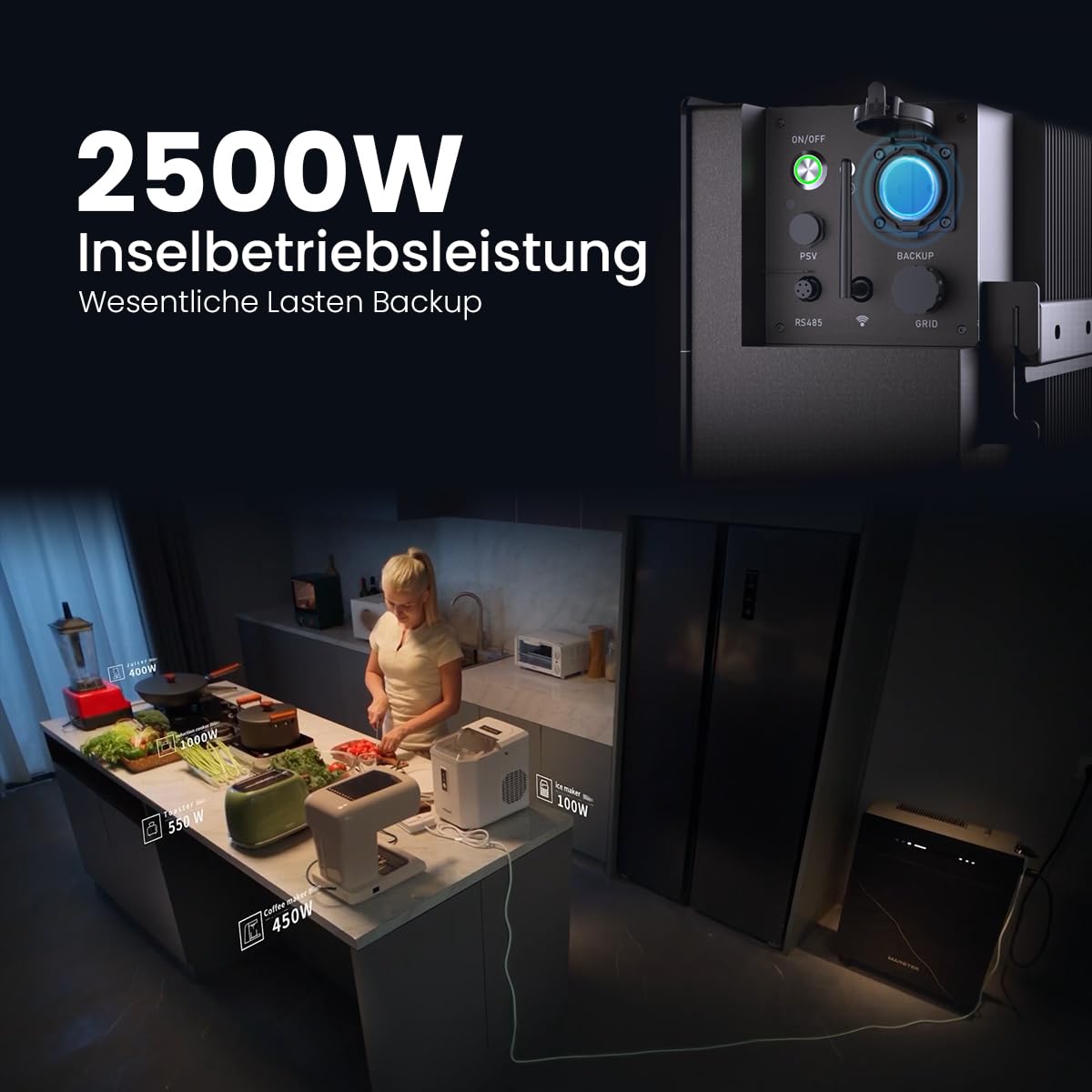
Figure 5.4.1: The Marstek Venus-E providing 2500W of power in island operation mode, demonstrating its capability to serve as a backup power source for essential household loads during grid interruptions.
6. Mantemento
Regular maintenance ensures the longevity and optimal performance of your Marstek Venus-E system.
- Limpeza: Limpa periodicamente o exterior da unidade cun pano suave e seco. Non empregues produtos de limpeza abrasivos nin solventes. Asegúrate de que as aberturas de ventilación estean libres de po e residuos.
- Actualizacións de firmware: Check the Marstek App regularly for available firmware updates. Install updates to ensure your system has the latest features and performance enhancements.
- Comprobacións de conexión: Inspeccione periodicamente todas as conexións eléctricas para comprobar se están ben axustadas e se presentan signos de desgaste ou corrosión.
- Condicións ambientais: Ensure the unit remains within its specified operating temperature range and is not exposed to excessive moisture or heat.
7 Solución de problemas
If you encounter issues with your Marstek Venus-E, refer to the following common troubleshooting steps:
| Problema | Causa posible | Solución |
|---|---|---|
| A unidade non se acende. | No power supply; Power button not pressed correctly. | Check AC power cable connection. Ensure the power button is pressed firmly. |
| No power output in backup mode. | Battery depleted; Overload; Incorrect wiring. | Check battery level via app. Reduce connected load. Verify backup circuit wiring. |
| App cannot connect to the unit. | Bluetooth/WiFi off; Unit too far; Network issues. | Ensure Bluetooth/WiFi is enabled on unit and phone. Move closer to the unit. Check home WiFi network. Restart unit and app. |
| Solar energy not being stored. | PV system not generating; Incorrect settings; Full battery. | Check PV system operation. Verify operating mode in the app. Battery may be at 100% charge. |
Se o problema persiste despois de intentar estas solucións, póñase en contacto co servizo de atención ao cliente.
8. Especificacións
| Característica | Detalle |
|---|---|
| Nome do modelo | Venus-E |
| Fabricante | Powerness |
| Reference / Model Number | 1 |
| Capacidade da batería | 5.12 kWh |
| Tipo de batería | LiFePO4 (fosfato de ferro de litio) |
| Ciclo de Vida | Máis de 6000 ciclos |
| Tipo de sistema | AC-Coupled, All-in-One |
| Island Operation Power | 2500 W |
| Conectividade | Dual Bluetooth, WiFi |
| Clasificación de protección de entrada (IP). | IP65 (Impermeable) |
| Temperatura de funcionamento | Down to -20°C (Ultra-low temperature operation) |
| Pezas incluídas | Navi 2000 x 1 (Main Unit) |
| Dispoñibilidade de Recambios | Información non dispoñible |
9. Garantía e soporte
9.1. Información da garantía
The Marstek Venus-E comes with a manufacturer's warranty. Please refer to the warranty card included with your product or visit the official Powerness websitio web para obter termos e condicións detallados. Garda o comprobante de compra para reclamacións de garantía.
9.2. Atención ao cliente
For technical assistance, troubleshooting beyond this manual, or warranty inquiries, please contact Powerness customer support:
- Websitio: Visita o Powerness Brand Store for contact information and FAQs.
- Correo electrónico: Consulte a embalaxe do produto ou a documentación oficial websitio para o enderezo de correo electrónico de asistencia.
- Teléfono: Consulte a embalaxe do produto ou a documentación oficial website for the support phone number.
When contacting support, please have your product model (Venus-E) and ASIN (B0F444MXGP) ready.


