1. Introdución
This manual provides comprehensive instructions for the WiMiUS K13 4K Google TV Projector. Designed for a superior visual experience, this projector integrates advanced features for both entertainment and professional use. Key functionalities include native 1080p resolution with 4K support, 1500 ANSI lumens brightness, automatic focus and keystone correction, and an integrated Google TV system for seamless access to a wide range of applications.
Lea este manual detidamente antes de operar o dispositivo para garantir un uso correcto e maximizar o seu rendemento e lonxevidade.
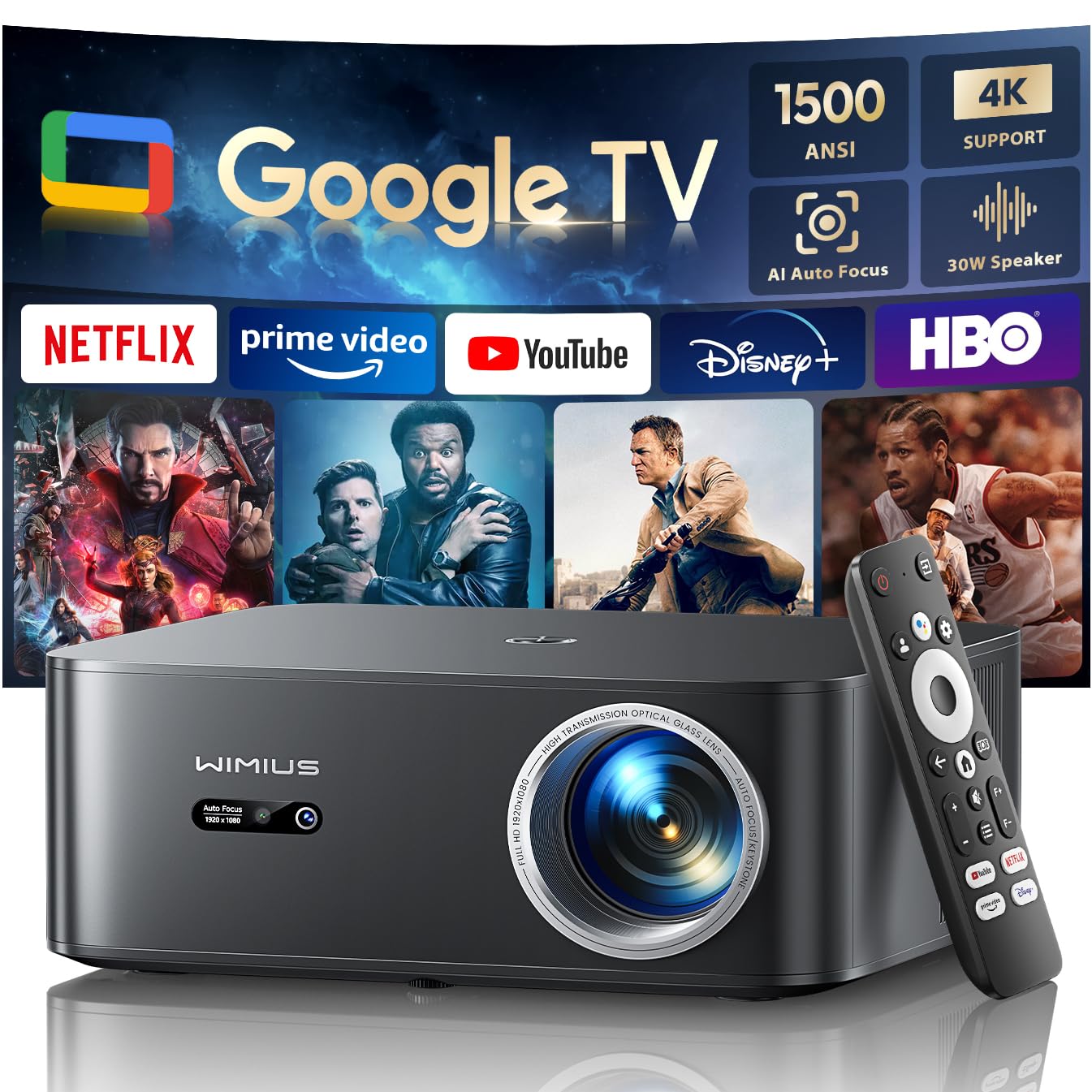
Figure 1: WiMiUS K13 4K Google TV Projector
2. Guía de configuración
2.1 Desembalaxe e contido da embalaxe
Retire con coidado todos os compoñentes da embalaxe. Comprobe que estean presentes todos os elementos:
- WiMiUS K13 Projector
- Mando a distancia (pilas AAA non incluídas)
- Cable de alimentación
- Cable HDMI
- Manual de usuario
2.2 Colocación
Position the projector on a stable, flat surface. For optimal image quality, ensure the projector lens is perpendicular to the projection surface. Recommended projection distance is 2.5 to 3 meters for a large screen size.
- Montaxe sobre mesa: Coloque o proxector sobre unha mesa ou un soporte.
- Montaxe no teito/pared: The projector features M5 screw holes for compatible ceiling or wall mounts. Ensure the mount is securely installed and can support the projector's weight.
- Montaxe de trípode: The K13 projector does not have dedicated tripod mounting holes. Use a tripod equipped with a tray to support the projector.
2.3 Conexión de alimentación
Connect the power cable to the projector's power input port, then plug the other end into a power outlet. The power indicator light will illuminate.
2.4 Acendido inicial e configuración básica
Press the power button on the projector or remote control to turn on the device. Upon first use, follow the on-screen prompts to:
- Seleccione o seu idioma preferido.
- Connect to a Wi-Fi network (2.4G or 5G) for internet access.
- Log in with your Google account to access Google TV features and applications.
2.5 Automatic Focus and Keystone Correction
The WiMiUS K13 projector is equipped with automatic focus and keystone correction. After powering on or moving the projector, it will automatically adjust the image to achieve a clear, rectangular display. Manual adjustments are also available in the settings menu if needed.
3. Instrucións de funcionamento
3.1 Remote Control and Google Voice Assistant
Use the provided remote control to navigate the Google TV interface. The remote includes dedicated buttons for popular streaming services like Netflix, Prime Video, YouTube, and Disney+. Utilize the integrated Google Voice Assistant by pressing the microphone button on the remote and speaking commands to search for content, adjust volume, or launch applications.
3.2 Google TV and Application Usage
The projector runs on an officially certified Android 11.0 Google TV system, providing access to over 10,000 applications from the Google Play Store. Navigate through the home screen to find installed apps or download new ones. Ensure a stable internet connection for optimal streaming performance.
3.3 Espello da pantalla
The projector supports wireless screen mirroring from various devices:
- AirPlay (iOS devices): Connect your iOS device and the projector to the same Wi-Fi network. Select the AirPlay option on your iOS device and choose the projector from the list of available devices.
- Miracast (Android/Windows devices): Enable Miracast or Screen Mirroring on your Android or Windows device. Select the projector from the detected devices.
3.4 Conexión de dispositivos externos
The WiMiUS K13 offers multiple connectivity options:
- Portos HDMI: Connect gaming consoles, laptops, Blu-ray players, or other HDMI-enabled devices. Select the corresponding HDMI input from the projector's source menu.
- Portos USB: Inserir unidades USB para reproducir contido multimedia files (videos, photos, documents like PPT, Excel, Word).
- Saída de audio de 3.5 mm: Connect external headphones or speakers via the audio jack.
3.5 Saída de audio
The projector features integrated 20W speakers for clear audio. For enhanced sound, you can connect external audio systems:
- Bluetooth 5.2: Pair with Bluetooth speakers or headphones for wireless audio.
- ARC HDMI: Connect to a soundbar or AV receiver that supports HDMI ARC for simplified audio setup and control.
3.6 Función de zoom
Adjust the screen size from 50% to 100% using the digital zoom function in the settings menu. This allows you to resize the image without physically moving the projector.

Figure 2: Outdoor movie experience with the WiMiUS K13 Projector

Figure 3: Outdoor sports viewing with the WiMiUS K13 Projector
4. Mantemento
4.1 Limpeza das lentes
Gently clean the projector lens with a soft, lint-free cloth or a lens cleaning brush. Avoid using abrasive materials or harsh chemicals, which can damage the lens coating.
4.2 Ventilation Care
Ensure the projector's ventilation openings are clear and unobstructed to prevent overheating. Regularly check for dust accumulation and clean as necessary using a soft brush or compressed air.
4.3 Almacenamento
Cando non o use durante períodos prolongados, garde o proxector nun ambiente fresco, seco e libre de po. Use a embalaxe orixinal ou unha funda protectora para evitar danos.
5 Solución de problemas
If you encounter issues with your WiMiUS K13 projector, refer to the following common problems and solutions:
| Problema | Causa posible | Solución |
|---|---|---|
| Non se mostra ningunha imaxe | Cable de alimentación desconectado, fonte de entrada incorrecta, dispositivo non acendido. | Check power connection, ensure projector is on, select correct HDMI/USB input. |
| A imaxe está borrosa | Out of focus, lens dirty, projector moved. | Allow auto-focus to adjust, clean the lens, manually adjust focus if needed. |
| A imaxe está distorsionada (forma trapezoidal) | Proxector non perpendicular á pantalla. | Allow auto-keystone correction to adjust, manually adjust keystone in settings. |
| Sen son | Volume too low, incorrect audio output selected, external device audio issue. | Increase volume, check audio output settings (internal, Bluetooth, HDMI ARC), verify external device audio. |
| Non se pode conectar a Wi-Fi/Bluetooth | Contrasinal incorrecto, fóra de rango, problema de rede. | Verify password, move closer to router/device, restart projector and router/device. |
| O control remoto non responde | Pilas baixas, obstrución, mando a distancia non emparellado. | Replace batteries, remove obstructions, re-pair remote if necessary. |
6. Especificacións
Detailed technical specifications for the WiMiUS K13 Projector:
| Característica | Detalle |
|---|---|
| Marca | WiMiUS |
| Número de modelo do artigo | K13 |
| Cor | Negro |
| Tipo de produto | Proxector portátil |
| Resolución de visualización | 1920 x 1080 (Native Full HD) |
| Resolución máxima de visualización | 4096 x 2160 Pixels (4K Support) |
| Tipo de visualización | LCD |
| Brillo | 1500 lúmenes ANSI |
| Tecnoloxía de conectividade | HDMI, USB, 3.5mm Audio, Wi-Fi (6), Bluetooth (5.2) |
| Características especiais | Digital Keystone Correction, Built-in Speaker, Auto Focus, Built-in Wi-Fi, Google TV |
| Dispositivos compatibles | Tablet, Laptop, Game Console, Speaker, Smartphone, Television |
| Usos recomendados do produto | Cine na casa, Videoxogos, Profesional, Educación |
| Dimensións do produto | 28 L x 24.2 W x 10.8 H centímetros |
| Factor de forma | Portátil |
| Tipo de montaxe | Table Mount (M5 screw holes for ceiling/wall mount) |
7. Garantía e soporte
WiMiUS is committed to providing excellent customer service and support for your K13 projector:
- Atención ao cliente: 24/7 support is available for any inquiries or assistance you may need.
- Política de reembolso: Enjoy a 1-year refund policy from the date of purchase.
- Repair Coverage: The projector is covered by a 3-year repair warranty.
- Soporte técnico: Lifetime technical support is provided for your product.
For any questions or support requests regarding your WiMiUS K13 projector, please contact our customer service team via email. We are dedicated to providing a prompt and satisfactory solution.