1. Introdución
The Lepro B1 AI Smart Light Bulb is an advanced RGBWW color-changing LED bulb designed for modern smart homes. It offers seamless integration with voice assistants like Amazon Alexa and Google Assistant, providing convenient control over your lighting. Featuring AI-powered lighting design (LightGPM 4), music synchronization (LightBeats), and extensive customization options, the B1 bulb enhances any living space. This manual provides detailed instructions for setup, operation, and troubleshooting to ensure optimal performance.
Important Tips Before Purchase:
- The bulb shape is A19, and the bulb base is E26. Please confirm compatibility with your lamp.
- The B1 AI Bulb is exclusively compatible with the Lepro app (not "Lepro Lampux" or "Smart Life" app).
- This product does not include a remote control; all advanced features are managed via the Lepro app.

2. Instrucións de configuración
2.1 Instalación inicial
- Carefully screw the Lepro B1 AI Smart Light Bulb into a compatible E26 socket.
- Asegúrese de que a alimentación da lámpada estea desconectada antes da instalación.
2.2 Descarga e conexión da aplicación
- Descarga o oficial Lepro app from your device's app store (App Store for iOS or Google Play for Android).
- Rexistra unha nova conta ou inicia sesión se xa tes unha.
- Ensure your phone's Bluetooth is enabled and connected to a Rede Wi-Fi a 2.4 GHz. The bulb does not support 5GHz Wi-Fi.
- Turn on the light bulb. It should begin flashing, indicating it's in pairing mode. If not, cycle the power switch ON/OFF 4 times until it flashes.
- Open the Lepro app, tap the '+' icon to add a device, and follow the on-screen instructions to pair your B1 bulb.
- Confirm the bulb is flashing blue during the pairing process.
Video 1: APP Setup Guide for Lepro AI Smart Bulbs. This video demonstrates the step-by-step process of downloading the Lepro app, registering an account, and pairing the smart bulbs with your 2.4GHz Wi-Fi network.
2.3 Connecting to Voice Assistants (Alexa/Google Assistant)
- Ensure your B1 bulb is successfully connected to the Lepro app via 2.4GHz Wi-Fi.
- Open the Lepro app, navigate to the 'Me' or 'Account' section, and select 'Smart Integration' (or similar).
- Choose 'Amazon Alexa' or 'Google Assistant' and follow the instructions to link your Lepro account with your voice assistant account.
- Once linked, you can use voice commands to control your bulbs.
Video 2: How to Connect Lepro AI Lights to Alexa. This video guides users through the process of linking their Lepro account with Amazon Alexa for voice control.
3. Instrucións de funcionamento
3.1 Control de aplicacións
The Lepro app provides comprehensive control over your smart light bulbs. After pairing, select your bulb from the device list to access its control panel.
- On/Off: Tap the power icon to toggle the bulb on or off.
- Brillo: Adjust the slider to set the desired brightness level (1%-100%).
- Selección de cor: Choose from 16 million colors using the color wheel or preset color options.
- Branco axustable: Select various white light shades from 2700K (warm white) to 6500K (cool white).
- AI Mode (LightGPM 4): Use voice prompts within the app to generate lighting effects based on moods, emotions, or specific instructions.
- Music Sync (LightBeats): Activate this mode to synchronize the bulb's dynamic lighting with music rhythms.
- Programación: Set timers and routines for automatic on/off, wake-up, and sleep modes.
- Control de grupo: Create groups of multiple bulbs to control them simultaneously.

3.2 Control por voz (Alexa/Asistente de Google)
After linking your Lepro account, you can use simple voice commands to control your B1 bulbs:
- "Alexa, turn on the [bulb name]."
- "Hey Google, set [bulb name] to blue."
- "Alexa, dim [bulb name] to 50%."
- "Hey Google, make the [bulb name] warmer."

4. Características clave
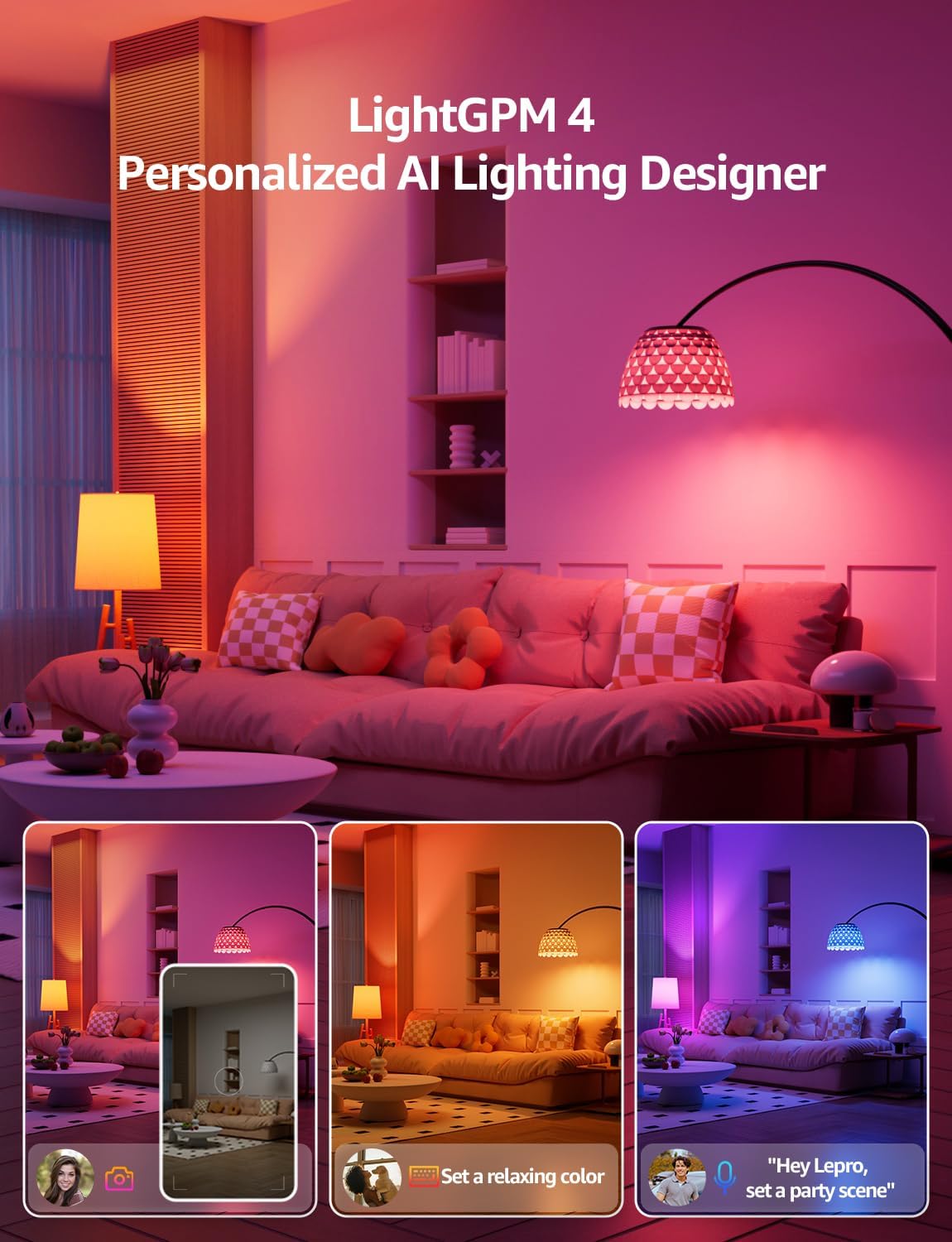
4.1 LightGPM 4 - Personalized AI Lighting Designer
LightGPM 4 is an innovative AI feature that learns your preferences and generates customized lighting effects. Simply tell the Lepro app what you desire, and it will adapt the lighting to suit your mood or activity. The more you use it, the more personalized your lighting experience becomes.
4.2 LightBeats Music Sync
Transform any space into an energetic environment with LightBeats. This feature uses advanced algorithms to intelligently synchronize the dynamic lighting of your B1 bulb with music rhythms, perfect for parties or creating an immersive audio-visual experience.

4.3 Personalized Scheduling
Automate your home lighting with personalized schedules. Set timers and routines for your bulbs to turn on/off, adjust brightness, or change colors at specific times. Dedicated wake-up and sleep modes simulate sunrise and sunset, gradually brightening or dimming the lights to promote natural sleep and wake cycles.

5. Especificacións
| Característica | Especificación |
|---|---|
| Marca | Leproso |
| Nome do modelo | B1 |
| Tipo de luz | LED |
| Características especiais | Color Changing, Dimmable, Energy Efficient, Instant On, Timer |
| Wattage | 8.5 vatios |
| Tamaño da forma do bulbo | A19 |
| Base de bulbo | E26 |
| Equivalente incandescente | 60 vatios |
| Cor clara | Multicolor (RGBWW) |
| Voltage | 120 voltios (CA) |
| Brillo | 800 lúmenes |
| Tecnoloxía de conectividade | Bluetooth, Wi-Fi (só 2.4 GHz) |
| Uso interior/exterior | Interior |
| Tipo de controlador | Amazon Alexa, Google Assistant, Lepro APP |
| Vida de funcionamento da fonte de luz | 15000 horas |
| Peso do elemento | 1.6 onzas |
| Tipo de material | Aluminio, Plástico |
6 Solución de problemas
Q: What should I do when the app crashes?
A: 1. Check the App Version: Ensure you're using the latest version of the Lepro APP by visiting the [App Store/Google Play]. Upgrades often resolve compatibility issues. 2. Restart Devices: A simple reboot of your phone/tablet and router can improve connectivity.
Additional Suggestions:
- Reset the bulb by switching ON/OFF 4 times.
- Try deleting and re-adding the bulb through the "Add Device" option.
- For immediate control, you may also use voice assistants like Alexa or Google Home (if set up).
If the issue persists, please share the following information to customer service:
- Your device ID and OS version
- Any error messages/screenshots (if applicable)
Q: Could I use these AI smart bulbs with dimmer switches?
A: No, the Lepro AI smart bulbs cannot work with dimmer switches or will flicker badly.
Q: Can I connect a voice assistant such as Alexa or Google Assistant to this Lepro AI light bulb?
A: Yes, you can. If you connect this Alexa light bulb to your home 2.4GHz Wi-Fi via the Lepro APP, you can easily connect this smart bulb to Alexa or Google Assistant.
Q: Can I control this smart light bulb without a Wi-Fi connection?
A: Sure, after connecting the bulb via Bluetooth, click "skip" to skip the Wi-Fi connection, and then you can control the bulb through the Lepro APP. But please enable mobile data or connect to Wi-Fi on your phone when using the AI functions.
Q: Why should I download the new correct APP - "Lepro", NOT the Lepro LampUX app? NOT Smart Life app?
A: To improve users' experience, we have launched a series of new products with AI Generated Lighting, then need a new app "Lepro" to control. While the previous Lepro lighting products used the Tuya Module & App. So please search for "Lepro" in the app store.
Q: Why can't I find the device on the APP when connecting?
A: You can try to reset the light by turning it off and on three times, then re-adding the device to connect.
Q: How to share the device control permission with other members?
A: Please enter the "Me" page on the Lepro APP and choose "Share", then enter your member's Lepro APP account, done.
Q: My router supports both 2.4GHz and 5GHz Wi-Fi. How to change the Wi-Fi to 2.4GHz to connect the bulbs?
A: Access the router's "Wireless Settings" page according to the back label of the router. Find the 2.4GHz settings page, change and save the Wi-Fi name (SSID) to "xxx-2.4G". Then you can find the "xxx-2.4G" network on your phone's Wi-Fi search page.
Q: The APP needs to obtain permissions for the camera, microphone, and GPS. Is there a risk of personal information leakage?
A: The relevant permissions are only required when using specific functions, such as APP voice input requiring a microphone and expression recognition requiring a camera. Any information you input is only used to generate matching lighting effects and will not be stored or used for other purposes, so there is no need to worry about personal information leakage.
7. Garantía e soporte
The Lepro B1 AI Smart Light Bulb comes with a 2 anos de garantía do fabricante. For technical support, warranty claims, or any inquiries, please contact Lepro customer service through the official Lepro website or the contact information provided in the Lepro app.


