1. Produto rematadoview
This GT POWER AC Adapter (Model 307) is designed to provide reliable power to compatible Binary HDMI Splitters. It features a threaded locking power supply connector for secure attachment and a 48-inch heavy-duty power cable. The adapter supports a wide input voltage range of 100-240VAC, 50/60Hz, making it suitable for international use.
Key protective features include:
- OVP (Over Voltage Protección): Safeguards connected devices from excessive voltage.
- OCP (protección contra sobrecorriente): Prevents damage from overcurrent conditions.
- SCP (Short Circuit Protection): Protects against short circuits, ensuring safe operation.

Image 1.1: The GT POWER AC Adapter, showing the main unit and the threaded locking DC output connector.
2. Información de seguridade
Lea e comprenda todas as instrucións de seguridade antes de usar este produto. O incumprimento destas instrucións pode provocar descargas eléctricas, incendios ou danos no produto ou nos dispositivos conectados.
- Use this adapter only with devices specified as compatible.
- Ensure the adapter's voltage and current ratings match the requirements of your device.
- Non expoñas o adaptador á auga, á humidade nin a temperaturas extremas.
- Non desmonte nin intente reparar o adaptador. Encargue o servizo técnico a persoal cualificado.
- Manteña o adaptador lonxe dos nenos.
- Desconecte o adaptador da toma de corrente cando non o use durante períodos prolongados.
- Asegure a ventilación adecuada ao redor do adaptador durante o funcionamento.
3. Contido do paquete
O paquete inclúe:
- 1 x GT POWER AC/DC Power Adapter (Model 307) with integrated 48-inch heavy-duty power cable and threaded locking DC connector.
4. Instrucións de configuración
- Verificar a compatibilidade: Ensure your Binary HDMI Splitter (e.g., B-240-HDSWTCH-5x1, B-260-444-HDR-SP12SA, B-260-444-HDR-SP14, B-260-444-HDR-SP18) requires a 12V DC power input and is compatible with a threaded locking connector.
- Connect DC Output: Locate the DC power input port on your Binary HDMI Splitter. Insert the threaded locking DC connector from the GT POWER adapter into this port. Gently twist the threaded collar clockwise until it is finger-tight to secure the connection.
- Conectar a entrada de CA: Plug the AC prongs of the GT POWER adapter into a standard wall power outlet (100-240VAC, 50/60Hz).
- Encendido: Once both connections are secure, your Binary HDMI Splitter should receive power. Refer to your splitter's manual for specific power-on procedures.

Imaxe 4.1: Primeiro plano view of the threaded locking DC connector, designed for a secure power connection.
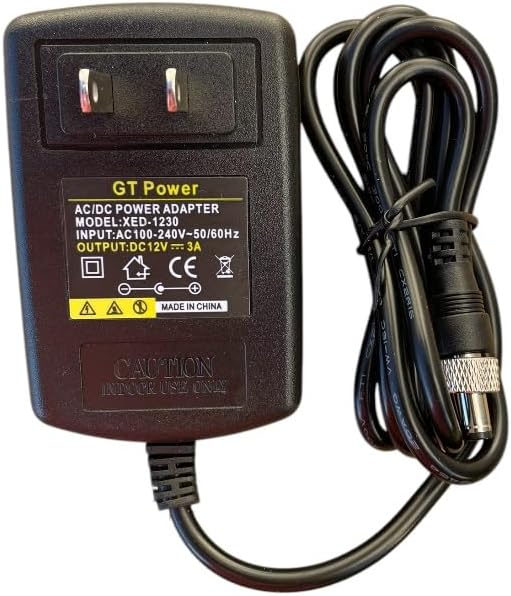
Image 4.2: The GT POWER AC Adapter with its AC prongs ready for connection to a wall outlet.
5. Instrucións de funcionamento
The GT POWER AC Adapter operates automatically once connected to a power source and a compatible device. It provides a stable 12V DC output. There are no user-adjustable settings on the adapter itself.
- Ensure the adapter is always connected to a properly grounded power outlet.
- Avoid placing the adapter in enclosed spaces where heat can build up.
- Do not pull the cable to disconnect the adapter from the wall outlet; always grasp the adapter body.
6. Mantemento
The GT POWER AC Adapter requires minimal maintenance.
- Limpeza: Disconnect the adapter from all power sources before cleaning. Use a soft, dry cloth to wipe the exterior. Do not use liquid cleaners or solvents.
- Almacenamento: When not in use, store the adapter in a cool, dry place, away from direct sunlight and moisture. Avoid tightly coiling the cable to prevent damage.
- Inspección: Periodically inspect the power cable and adapter housing for any signs of damage, such as cuts, fraying, or cracks. If damage is found, discontinue use and replace the adapter.
7 Solución de problemas
| Problema | Causa posible | Solución |
|---|---|---|
| No power to device. | Adaptador non conectado. Loose DC connector. Avaría na toma de corrente. Damaged adapter. | Ensure AC adapter is fully plugged into a live wall outlet. Securely tighten the threaded DC connector to the device. Proba a toma con outro dispositivo. Discontinue use and replace the adapter if damaged. |
| Device not functioning correctly after connecting adapter. | Incorrect adapter used. Mal funcionamento do dispositivo. | Verify the adapter's output voltage (12V DC) and connector type match your device's requirements. Consult your device's manual or manufacturer for further troubleshooting. |
| Adapter feels excessively hot. | Ventilación deficiente. Sobrecarga. Fallo interno. | Ensure the adapter is in a well-ventilated area. Verify the connected device's power requirements do not exceed the adapter's capacity. Deixar de usar inmediatamente e substituír o adaptador. |
8. Especificacións
| Marca | POTENCIA GT |
| Número de modelo | 307 |
| Vol. De entradatage | 100-240 VCA, 50/60 Hz |
| Vol. De saídatage | 12 voltios (DC) |
| Tipo de conector | Threaded Locking DC Connector |
| Lonxitude do cable | 48 polgadas (aprox. 1.2 metros) |
| Características especiais | OVP, OCP, SCP Protection |
| Dispositivos compatibles | Binary B-240-HDSWTCH-5x1, B-260-444-HDR-SP12SA, B-260-444-HDR-SP14, B-260-444-HDR-SP18 HDMI Splitters |
| UPC | 800185029601 |
9. Garantía e soporte
This GT POWER AC Adapter comes with a Un ano de garantía desde a data de compra. Ademais, un 30 días de garantía de devolución do diñeiro ofrécese.
For technical support, warranty claims, or further assistance, please contact GT POWER customer service through your retailer or the official GT POWER support channels.
Conserve o comprobante de compra para efectos da garantía.


