1. Introdución
This manual provides essential information for setting up, operating, and maintaining your DOOGEE Tab A9 Pro Android 15 Tablet. Please read it thoroughly to ensure proper usage and to maximize your device's capabilities.
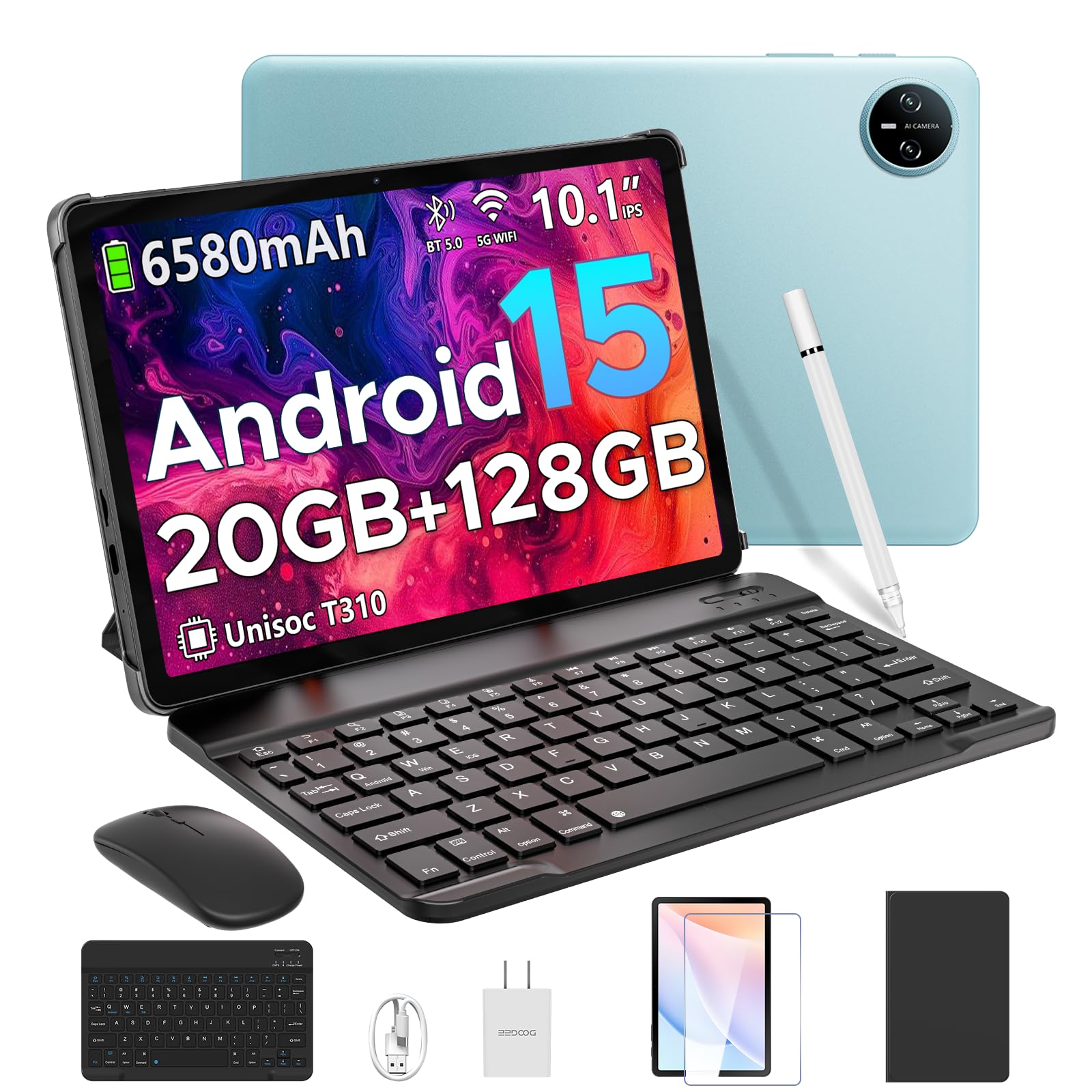
Image 1.1: The DOOGEE Tab A9 Pro Tablet.
2. Que hai na caixa
Your DOOGEE Tab A9 Pro package includes the following items:
- DOOGEE Tab A9 Pro Tablet (x1)
- Cable USB tipo C (x1)
- Cargador (x1)
- Manual (x1)
- Tarxeta de garantía (x1)
- Teclado Bluetooth (Edición VIP)
- Rato Bluetooth (Edición VIP)
- Stylus (Edición VIP)
- Leather Protective Cover (VIP Edition)
- Tempered Film (VIP Edition)

Image 2.1: All items included in the DOOGEE Tab A9 Pro package.
3. Produto rematadoview
The DOOGEE Tab A9 Pro features a sleek design with essential components for user interaction and connectivity.
3.1 Características físicas
- Visualización: 10.1-inch IPS HD Ultra-Clear Display.
- Cámaras: Cámara principal (traseira) de 8 MP e cámara frontal de 5 MP.
- Audio: High-Quality Dual Speakers and a 3.5mm Audio Jack.
- Portos: Type-C USB port for charging and data transfer.
- Botóns: Power button and volume controls located on the side.

Imaxe 3.1: Traseira view of the DOOGEE Tab A9 Pro, highlighting the camera module.

Imaxe 3.2: Lateral view of the tablet, illustrating the power button, volume controls, and ports.
Video 3.1: A short video showcasing the ultra-thin body and design of the DOOGEE Tab A9 Pro.
4. Configuración
4.1 Carga inicial
Before first use, fully charge your tablet using the provided Type-C USB cable and charger. The battery indicator on the screen will show charging progress.
4.2 Encendido/apagado
- Para acender: Press and hold the power button until the DOOGEE logo appears.
- Para apagar: Mantén premido o botón de acendido e, a seguir, selecciona "Apagar" entre as opcións que aparecen na pantalla.
4.3 Asistente de configuración inicial
Upon first power-on, follow the on-screen instructions to complete the initial setup, including language selection, Wi-Fi connection, and Google account login.
5. Operating System (Android 15)
The DOOGEE Tab A9 Pro runs on the Android 15 operating system, offering a smart, fluid, and secure user experience with enhanced privacy features.

Image 5.1: Visual representation of the Android 15 system interface.
Vídeo 5.1: Un overview of the DOOGEE Tab A9 Pro running Android 15.
6. Rendemento e almacenamento
The tablet is designed for smooth operation and ample capacidade de almacenamento.
6.1 Procesador
Powered by the energy-efficient Unisoc T310 octa-core processor, the tablet ensures seamless performance for various tasks.

Image 6.1: Diagram illustrating the Unisoc T310 Quad-Core Processor.
6.2 RAM and Storage
The tablet features 20GB of RAM (4GB physical + 16GB virtual) and 128GB of internal storage. Storage can be expanded up to 2TB using a microSD card (sold separately).

Image 6.2: Visual representation of the tablet's RAM and ROM configuration.
7. Display & Audio
Experience vibrant visuals and clear sound with your tablet.
7.1 Visualización
The 10.1-inch IPS HD display offers wide viewing angles and a resolution of 1280x800 for an immersive visual experience.

Image 7.1: The 10.1-inch IPS HD display with key specifications.
Audio 7.2
Built-in dual speakers deliver clear and dynamic sound for movies, music, and video calls.

Image 7.2: Illustration of the tablet's dual speaker system.
8. Cámaras
Capture moments and conduct video calls with the integrated cameras.
8.1 Cámara principal
The 8MP main camera allows you to take sharp photos.

Image 8.1: Close-up of the 8MP main camera on the tablet's rear.
Cámara frontal 8.2
The 5MP front camera is suitable for selfies and video calls.

Image 8.2: The 5MP front camera in use for a video call.
9. Conectividade
Stay connected with various wireless options.
9.1 wifi
Supports 2.4G/5G dual-band Wi-Fi for smooth, high-speed internet access.

Image 9.1: Features of WiFi 5 connectivity on the tablet.
Bluetooth 9.2
Equipped with Bluetooth 5.0 for connecting wireless accessories.
9.3 GPS
Built-in GPS provides accurate navigation for travel and outdoor activities.
10. Accesorios
The DOOGEE Tab A9 Pro comes with a suite of accessories to enhance its functionality.
10.1 Teclado Bluetooth
Connect the Bluetooth keyboard for a desktop-like typing experience, ideal for productivity tasks.

Image 10.1: The tablet connected to its Bluetooth keyboard for efficient typing.
10.2 Mouse and Stylus
The included mouse and stylus further enhance navigation and interaction, especially for note-taking and creative tasks.

Image 10.2: The tablet shown with its accompanying keyboard and mouse.

Image 10.3: The tablet being used with the stylus for precise input.
10.3 Funda protectora
The protective case shields your tablet from drops and scratches and can also function as a stand.

Image 10.4: The tablet securely placed within its protective case.
11. Xestión da batería
The tablet is equipped with a high-capacity battery for extended use.
11.1 Capacidade da batería
Features a long-lasting 6580mAh battery, providing hours of power for various activities without frequent recharging.

Image 11.1: Diagram showing the 6580mAh battery inside the tablet.
Video 11.1: A video highlighting the large battery capacity of the DOOGEE Tab A9 Pro.
12. Características de seguridade
Protect your device and data with built-in security options.
12.1 Desbloqueo facial
Effortlessly unlock your tablet using facial recognition technology.

Image 12.1: Illustration of the facial recognition unlock feature.
12.2 Fortified Privacy Shield
Android 15 provides enhanced privacy controls, robust data encryption, timely security patches, and proactive app screening for unbreakable security.

Imaxe 12.2: Acabadoview of Android 15's privacy features.
13. Multitasking & Productivity
Optimize your workflow and entertainment with these features.
13.1 Multitarefa en pantalla dividida
Run two applications simultaneously side-by-side for enhanced productivity.

Image 13.1: The tablet displaying two apps in split-screen mode.
13.2 WPS Office integrado
The tablet comes with WPS Office pre-installed, providing PC-level productivity for documents, spreadsheets, and presentations (Note: WPS Office feature may be unavailable in certain regions).

Imaxe 13.2: A tableta que se mostraasing WPS Office applications.
Video 13.1: A video demonstrating the DOOGEE Tab A9 Pro's capabilities for learning and work.
14. Mantemento
14.1 Limpeza
Usa un pano suave e sen pelusa para limpar a pantalla e o corpo da tableta. Evita o uso de produtos químicos agresivos ou materiais abrasivos.
14.2 Actualizacións de software
Comprobe e instale regularmente actualizacións do sistema para garantir un rendemento, unha seguridade e un acceso óptimos a novas funcións. Vaia a Configuración > Sistema > Actualización do sistema para comprobar as actualizacións.
15 Solución de problemas
Esta sección aborda problemas comúns que podes atopar coa túa tableta.
A tableta 15.1 non se acende
- Asegúrate de que a tableta estea suficientemente cargada. Conéctaa ao cargador durante polo menos 30 minutos.
- Manteña premido o botón de acendido durante 10-15 segundos para realizar un reinicio forzado.
15.2 Rendemento lento
- Pecha as aplicacións en segundo plano innecesarias.
- Borrar os datos da caché das aplicacións que se usan con frecuencia.
- Ensure sufficient storage space is available. Delete old files or transfer them to external storage.
- Reinicie a tableta.
15.3 Problemas de conectividade Wi-Fi
- Reinicia o teu enrutador Wi-Fi e a tableta.
- Esquécete da rede wifi e volve conectar.
- Asegúrate de estar dentro do alcance do sinal Wi-Fi.
15.4 Accessories Not Connecting
- Ensure Bluetooth is enabled on the tablet and the accessory.
- Check if the accessory is charged and in pairing mode.
- Refer to the accessory's individual manual for specific pairing instructions.
16. Especificacións
| Característica | Especificación |
|---|---|
| Marca | DOOGEE |
| Nome do modelo | TABA9PRO |
| Número de modelo do artigo | Pestana A9 Pro |
| Sistema Operativo | Android 15 |
| Tamaño de visualización da pantalla de pé | 10.1 polgadas |
| Resolución de pantalla | 1280*800 HD |
| Resolución máxima de pantalla | 1280*800 píxeles |
| Marca de procesador | Unisoc |
| Coprocesador gráfico | Mali-G52 1-Core-2EE |
| Capacidade de almacenamento da memoria | 128 GB (ampliable ata 2 TB mediante microSD) |
| RAM | 20 GB (4 GB físico + 16 GB virtual) |
| Tipo sen fíos | 802.11ac, 802.11n (2.4G/5G Dual-band WiFi) |
| Bluetooth | 5.0 |
| Capacidade da batería | Polímero de litio de 6580 mAh (incluída) |
| Duración media da batería | Up to 2 years (estimated lifespan) |
| Peso do elemento | 1.05 libras |
| Dimensións do produto | 9.55 x 6.33 x 0.31 polgadas |
| Cor | Blue (other colors available) |
| Data de primeira dispoñibilidade | 23 de abril de 2025 |
17. Garantía e soporte
17.1 Información da garantía
Your DOOGEE Tab A9 Pro comes with a 2-Year Limited Warranty. Please refer to the included Warranty Card for detailed terms and conditions.
17.2 Atención ao cliente
For any questions or technical assistance, please contact our support team. We aim to respond within 24 hours.
- Soporte en liña: Dispoñible 24 horas ao día, 7 días á semana.
- Devolucións: 30-day money-back guarantee and free returns.