1. Introdución
This manual provides essential instructions for the safe and effective use of your Hello Kitty Kuromi Wireless Bluetooth Earbuds. Please read this manual thoroughly before using the product and retain it for future reference.
2. Contido do paquete
Verifica que todos os elementos estean presentes no paquete:
- Hello Kitty Kuromi Wireless Bluetooth Earbuds (2)
- Caixa de carga xiratoria
- Cable USB
- Manual de usuario (este documento)
3. Produto rematadoview
3.1 Compoñentes
The Hello Kitty Kuromi Wireless Bluetooth Earbuds system consists of two earbuds and a rotating charging case. The charging case features a unique flip-face design, allowing you to change Kuromi's expression.
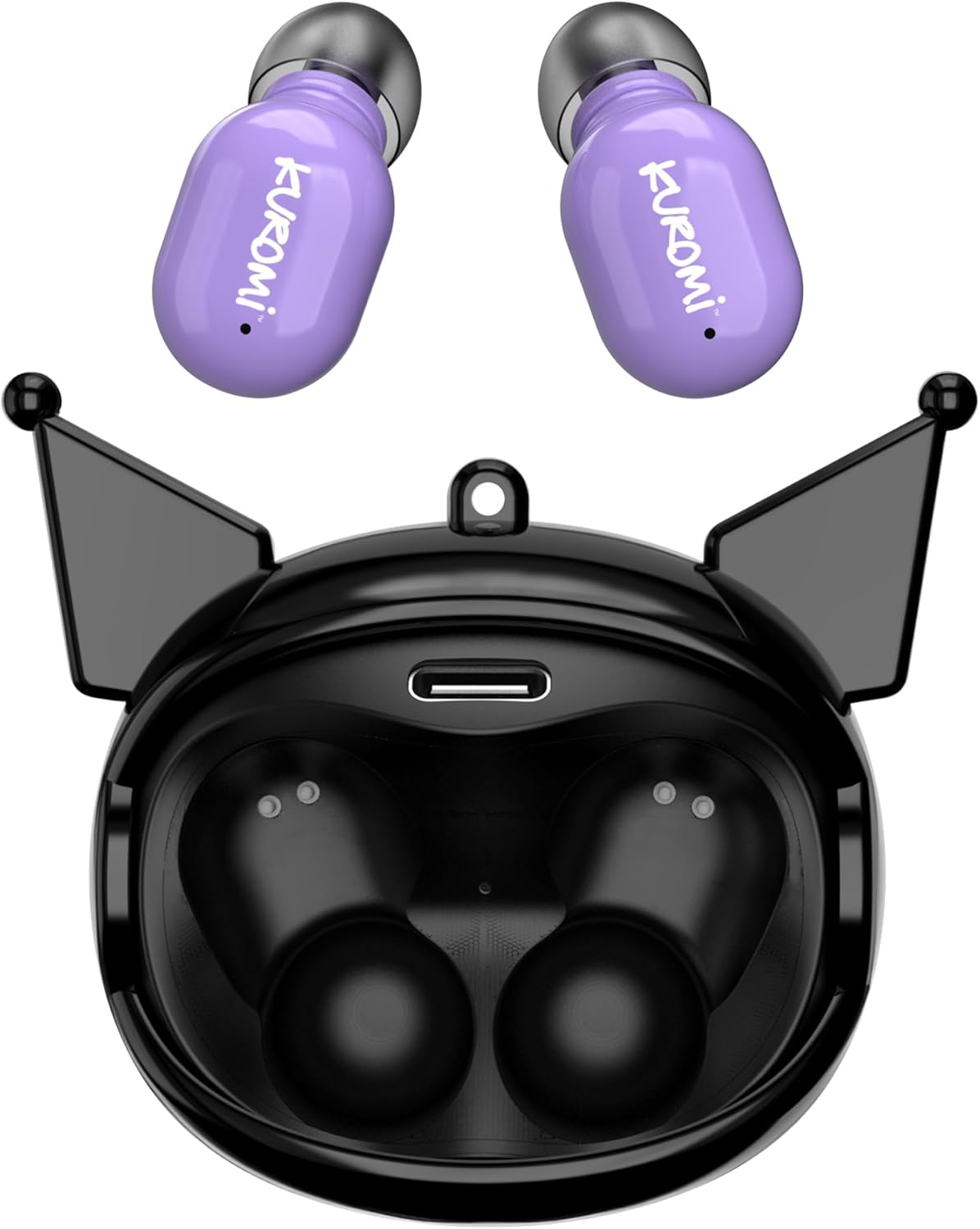
This image displays the two purple Kuromi wireless earbuds positioned above their open black charging case. The charging case features the Kuromi character design with pointed ears and an open compartment for the earbuds, revealing the charging contacts and a USB-C port.

The closed black charging case is shown, featuring Kuromi's default facial expression with a pink skull on her forehead and a neutral mouth.

The closed black charging case displays Kuromi's winking facial expression, with one eye closed and a small pink heart near her mouth.

The closed black charging case features Kuromi's heart-eyes facial expression, with two pink hearts replacing her eyes and an open-mouthed smile.
3.2 Controis
The earbuds feature touch controls for various functions. Specific touch gestures may vary; refer to the 'Operating Instructions' section for details.
4. Configuración
4.1 Carga inicial
Antes do primeiro uso, carga completamente os auriculares e a caixa de carga.
- Connect the provided USB cable to the charging port on the case and to a compatible USB power source.
- Coloca os dous auriculares na caixa de carga. Asegúrate de que estean ben asentados.
- The charging indicator lights (if present) will illuminate to show charging status. A full charge typically takes approximately 1 hour.
4.2 Emparejamento Bluetooth
Para conectar os auriculares a un dispositivo:
- Asegúrate de que os auriculares estean cargados e retirados da caixa de carga. Deberían entrar automaticamente no modo de emparellamento.
- No teu dispositivo (teléfono intelixente, tableta, etc.), activa o Bluetooth.
- Busca dispositivos Bluetooth dispoñibles.
- Select "HKTWSRKU" or a similar name from the list of devices.
- Unha vez conectados, os auriculares indicarán que o emparellamento se realizou correctamente (por exemplo, unha indicación de voz ou un cambio de LED).
- Os auriculares volverán conectarse automaticamente ao último dispositivo emparellado ao retiralos da funda, se o Bluetooth está activado no dispositivo.
5. Instrucións de funcionamento
5.1 Encendido/apagado
- Encendido: Retira os auriculares da caixa de carga. Acenderanse automaticamente.
- Apagado: Place the earbuds back into the charging case. They will power off and begin charging automatically.
5.2 Reprodución de música
Use the touch controls on the earbuds:
- Reproducir/Pausa: Toca unha vez en calquera dos auriculares.
- Próxima pista: Toca dúas veces o auricular dereito.
- Pista anterior: Toca dúas veces o auricular esquerdo.
- Control de volume: O volume normalmente contrólase a través do dispositivo conectado.
5.3 Xestión de chamadas
O micrófono incorporado permite facer chamadas mans libres:
- Responder chamada: Tap once on either earbud when a call comes in.
- Finalizar a chamada: Tap once on either earbud during a call.
- Rexeitar a chamada: Press and hold either earbud for approximately 2 seconds.
5.4 Flip-Face Feature
The charging case features a rotating mechanism to change Kuromi's facial expression. Gently rotate the front panel of the case to cycle through the available expressions.
6. Cargando
6.1 Carga dos auriculares
Place the earbuds into the charging case. They will automatically begin to charge from the case's internal battery.
6.2 Carga da caixa
When the charging case battery is low, connect it to a power source using the provided USB cable. The case's indicator lights will show charging status. A full charge for the case typically takes about 1 hour.
7. Mantemento e coidados
- Limpeza: Usa un pano suave e seco para limpar os auriculares e a funda de carga. Non empregues produtos químicos agresivos nin materiais abrasivos.
- Almacenamento: Garda os auriculares no seu estoxo de carga cando non os uses para protexelos e mantelos cargados. Evita temperaturas extremas.
- Exposición á auga: Estes auriculares non son impermeables. Evita a exposición á auga ou á humidade excesiva.
- Impacto: Handle the earbuds and case with care to prevent damage from drops or impacts.
8 Solución de problemas
Se tes algún problema, consulta a seguinte táboa:
| Problema | Posible Solución |
|---|---|
| Os auriculares non se emparejan | Asegúrate de que os auriculares estean cargados. Desactiva e activa o Bluetooth no teu dispositivo. Esquece o dispositivo na configuración de Bluetooth e volve emparellalo. |
| Non hai son dos auriculares | Comproba o volume do dispositivo. Asegúrate de que os auriculares estean conectados. Tenta reproducir sons diferentes. |
| Os auriculares non se cargan | Ensure earbuds are correctly seated in the case. Check if the charging cable is securely connected to the case and power source. |
| O micrófono non funciona | Ensure earbuds are properly connected. Check microphone permissions on your device. |
9. Especificacións
Key technical details for the Hello Kitty Kuromi Wireless Bluetooth Earbuds:
| Característica | Detalle |
|---|---|
| Nome do modelo | Wireless Earbuds (HKTWSRKU) |
| Tecnoloxía de conectividade | Bluetooth 5.3 |
| Duración da batería (tempo de reprodución) | Ata 4 horas por carga |
| Tempo de carga | Aproximadamente 1 Hora |
| Método de control | Toca |
| Colocación do oído | En Orella |
| Característica especial | Rotating Charging Case with Flip-Face Feature |
| Compoñentes incluídos | Rotating Charging Case, USB Cable, User Manual |
| Fabricante | Southern Telecom |
| Peso do elemento | 3.52 onzas |
10. Información da garantía
For warranty details, please refer to the documentation included with your purchase or contact the retailer where the product was acquired. Warranty terms and conditions may vary by region and retailer.
11. Apoio
If you require further assistance or have questions not covered in this manual, please contact the manufacturer or your retailer's customer support. Keep your purchase receipt and product model number (HKTWSRKU) available when seeking support.


