Introdución
Welcome to the HONOR 400 Lite 5G Smartphone user manual. This guide provides essential information for setting up, operating, maintaining, and troubleshooting your new device. Please read this manual thoroughly to ensure optimal performance and longevity of your smartphone.
O que hai na caixa
Upon unboxing your HONOR 400 Lite, you should find the following items:
- Teléfono intelixente HONOR 400 Lite 5G
- Cable USB
- Ferramenta de expulsión de SIM
- Guía de inicio rápido
- Tarxeta de garantía
Note: The specific contents may vary by region.
Dispositivo rematadoview
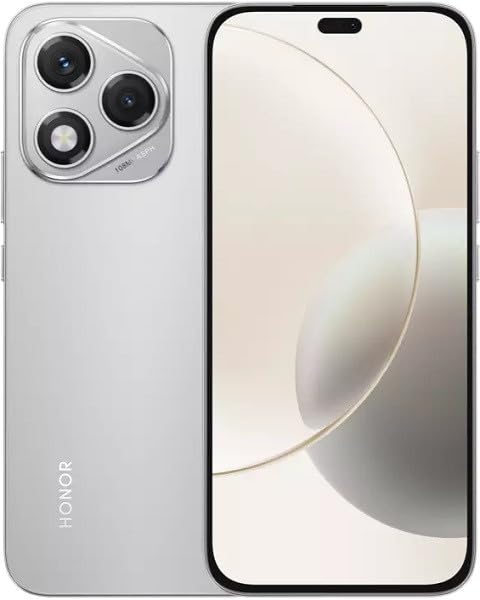
Image: The HONOR 400 Lite 5G Smartphone in Velvet Grey, showcasing its sleek design and camera module on the rear.
The HONOR 400 Lite features a 6.7-inch AMOLED display with a resolution of 1080 x 2412 pixels. The device is equipped with a powerful camera system, including a 108 MP main sensor. Its ergonomic design ensures a comfortable grip and easy access to all physical buttons and ports.
Configuración
1. Instalación da tarxeta SIM
- Localiza a bandexa da tarxeta SIM no lateral do teu dispositivo.
- Insira a ferramenta de expulsión da tarxeta SIM no pequeno orificio que hai xunto á bandexa e prema firmemente ata que a bandexa saia.
- Place your Nano-SIM card(s) and/or eSIM (if applicable) into the tray with the gold contacts facing down, ensuring they are correctly aligned.
- Empuxa coidadosamente a bandexa de novo no dispositivo ata que faga clic.
Importante: This smartphone is designed for GSM networks only and is not compatible with CDMA networks (e.g., Verizon, Sprint, US Cellular in the USA). Please verify network compatibility with your service provider before use.
2. Acendido inicial
- Press and hold the Power button (usually on the right side) until the HONOR logo appears.
- Siga as instrucións na pantalla para completar a configuración inicial, incluíndo a selección do idioma, a conexión wifi e a configuración da conta de Google.
Operando o seu dispositivo
Mostrar características
The 6.7-inch AMOLED display offers vibrant colors and deep blacks. Utilize gestures for navigation, access quick settings by swiping down from the top, and customize your home screen layout and widgets to personalize your experience.
Uso da cámara
Your HONOR 400 Lite is equipped with a high-resolution 108 MP main camera. Open the Camera app to access various modes such as Photo, Video, Portrait, and more. Tap on the screen to focus and use the on-screen shutter button to capture images or start recording videos. Explore settings for advanced options like HDR and AI enhancements.
Batería e carga
The device is powered by a 5230mAh non-removable battery. Use the provided USB cable to charge your device. Connect the USB-C end to your phone and the USB-A end to a compatible power adapter (not always included, check box contents) or computer USB port. For optimal charging speed, use a compatible fast charger.
Mantemento
- Actualizacións de software: Regularly check for and install system updates to ensure your device has the latest features, security patches, and performance improvements. Go to Settings > System & updates > Software update.
- Limpeza: Usa un pano suave e sen fiapos para limpar a pantalla e a carcasa do teléfono. Evita produtos químicos agresivos ou materiais abrasivos.
- Xestión de almacenamento: Limpar periodicamente o innecesario fileaplicacións para liberar espazo de almacenamento e manter un rendemento óptimo.
Resolución de problemas
If you encounter issues with your HONOR 400 Lite, try the following common troubleshooting steps:
- O dispositivo non responde: Mantén premido o botón de acendido/apagado durante uns 10 segundos para forzar un reinicio.
- Fallo da aplicación: Clear the app's cache and data (Settings > Apps > [App Name] > Storage > Clear cache/Clear data) or reinstall the app.
- Descarga de batería: Check battery usage in Settings to identify power-hungry apps. Reduce screen brightness and disable unnecessary features like GPS or Wi-Fi when not in use.
- Problemas de rede: Ensure your SIM card is correctly inserted. Try toggling Airplane Mode on and off. If issues persist, contact your network provider.
Especificacións
| Nome do modelo | Honor 400 Lite |
| Mostrar | AMOLED de 6.7 polgadas, 1080 x 2412 píxeles |
| Procesador | Mediatek Dimensity 7025 Ultra (6 nm), oito núcleos (2x2.5 GHz Cortex-A78 e 6x2.0 GHz Cortex-A55) |
| RAM | 12 GB |
| Almacenamento interno | 256 GB (non ampliable) |
| Cámara traseira | 108 MP, f/1.8, (wide), 1/1.67", PDAF; 16 MP, f/2.5, (wide) |
| Sistema Operativo | Android 15 |
| Batería | 5230mAh, non-removable |
| Compatibilidade coa rede | 2G, 3G, 4G, 5G (GSM Only) |
| Cor | Gris veludo |
| Características especiais | SIM dual |
Garantía e Soporte
Your HONOR 400 Lite smartphone comes with a standard manufacturer's warranty. Please refer to the included Warranty Card for detailed terms and conditions, including coverage period and service procedures. For technical support or further assistance, please visit the official HONOR support websitio ou póñase en contacto co seu servizo de atención ao cliente.
Conserve o seu comprobante de compra para reclamacións de garantía.


