Introdución
Thank you for choosing the AOSU Solar Wall Light Camera System. This system integrates a security camera with a solar-powered wall light, offering comprehensive surveillance and illumination for your property. This manual provides detailed instructions for installation, operation, maintenance, and troubleshooting to ensure optimal performance of your device.
Contido do paquete
Please check the package for the following items. If any items are missing or damaged, please contact AOSU customer support.
- AOSU Solar Wall Light Camera Unit
- Detachable Solar Panel
- Soporte de montaxe
- Mounting Screw Kit (screws, wall anchors)
- Cable de carga USB
- Guía de inicio rápido
- Modelo de perforación
Produto rematadoview
Familiarize yourself with the components of your AOSU Solar Wall Light Camera System.
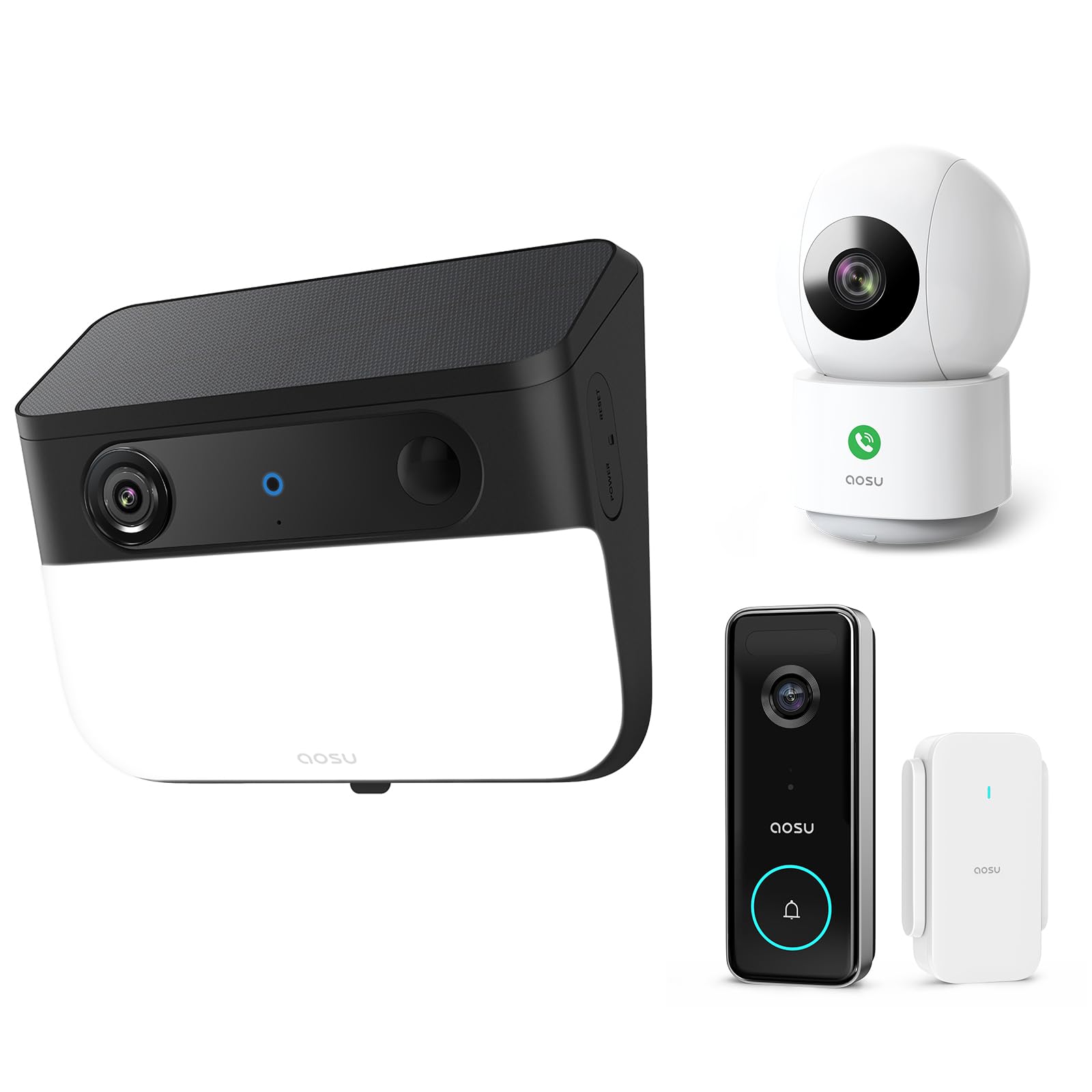
Image 1: AOSU Solar Wall Light Camera System. This image displays the main camera unit integrated with a wall light, alongside its detachable solar panel.
- Lente da cámara: Captura vídeo footage.
- Panel de luz LED: Provides 400-lumen illumination.
- Sensor PIR: Detects passive infrared motion.
- Sensor de radar: Enhances motion detection accuracy.
- Micrófono: Grava audio.
- Relator: Enables two-way audio communication and siren.
- Solar Panel Port: Connects the detachable solar panel for charging.
- Botón de reinicio: Used for factory reset (typically located under a cover).
- Luz indicadora de estado: Shows device status (e.g., charging, connected, recording).
Configuración
1. Carga inicial
Before installation, fully charge the camera unit using the provided USB cable. Connect the USB cable to the charging port on the camera and a standard 5V/2A USB power adapter (not included). The status indicator light will show charging progress.
2. Instalación da aplicación e creación de conta
- Download the "AOSU Security" app from the Apple App Store or Google Play Store.
- Abre a aplicación e crea unha nova conta ou inicia sesión se xa tes unha.
3. Emparejamento de dispositivos
- In the AOSU Security app, tap the "+" icon to add a new device.
- Select "Solar Wall Light Camera" from the list of devices.
- Follow the on-screen instructions to power on the camera and scan the QR code displayed in the app using the camera's lens.
- Connect the camera to your 2.4GHz Wi-Fi network. Ensure your Wi-Fi signal is strong at the installation location.
- Once connected, name your device and complete the pairing process.
4. Montaxe da cámara e do panel solar
Choose a mounting location that provides a clear view of the area you wish to monitor and receives ampluz solar directa para o panel solar.
- Marcación: Use the drill template to mark the screw positions on the wall.
- Perforación: Drill holes at the marked positions. Insert wall anchors if mounting on masonry or stucco.
- Soporte de montaxe: Fixe o soporte de montaxe á parede cos parafusos proporcionados.
- Conectar cámara: Slide the camera unit onto the mounting bracket until it clicks into place. Adjust the camera angle as needed.
- Instalación de paneles solares:
- Mount the detachable solar panel in a location that receives maximum direct sunlight throughout the day.
- Connect the solar panel cable to the solar panel port on the camera unit. Ensure a secure connection.
Instrucións de funcionamento
En directo View e Gravación
- Open the AOSU Security app and select your camera to access the live view.
- Do directo view, you can manually record video, take screenshots, and use two-way audio.
- Recorded events are stored in the cloud or on a local storage card (if installed).
Detección de movemento e alertas
- The camera utilizes advanced radar and PIR motion sensors for accurate detection.
- Configure motion detection sensitivity and activity zones within the app settings.
- Activa as notificacións push para recibir alertas no teu teléfono intelixente cando se detecte movemento.
- Smart Motion Tracking: Activate this feature in the app to allow the camera to automatically follow detected objects within its field of view.
Wall Light Operation
- The 400-lumen wall light automatically activates at night when motion is detected.
- Adjust light duration and brightness settings via the AOSU Security app.
Visión nocturna en cor
The camera provides vivid, full-color images even in low-light conditions or complete darkness, thanks to its advanced color night vision technology. This feature activates automatically.
Doorbell Camera Functionality (if applicable)
If your model includes doorbell functionality, visitors can press the doorbell button. This will trigger a notification on your phone, allowing you to see and speak to the visitor via the app.
Mantemento
- Limpeza: Regularly wipe the camera lens, light panel, and solar panel with a soft, damp un pano para eliminar o po e a sucidade. Non empregues produtos químicos agresivos.
- Eficiencia do panel solar: Ensure the solar panel remains free from obstructions (e.g., leaves, snow) to maximize charging efficiency.
- Actualizacións de firmware: Periodically check the AOSU Security app for available firmware updates. Keeping your device's firmware up-to-date ensures optimal performance and security. Follow the in-app instructions for updates.
- Coidado da batería: While solar-powered, extreme cold or prolonged periods without sunlight may reduce battery performance. Ensure the solar panel receives adequate sunlight.
Resolución de problemas
A cámara non se conecta á wifi
- Asegúrate de que a túa rede wifi sexa de 2.4 GHz. A cámara non admite wifi de 5 GHz.
- Check Wi-Fi signal strength at the camera's location. Move the router closer or use a Wi-Fi extender if necessary.
- Verifica que o contrasinal wifi introducido na aplicación sexa correcto.
- Try resetting the camera by pressing the reset button for 5 seconds until you hear a prompt.
Mala calidade da imaxe
- Limpa a lente da cámara para eliminar calquera mancha ou sucidade.
- Ensure there is adequate lighting in the monitored area, especially for color night vision.
- Comproba a velocidade da túa conexión a internet. Unha conexión lenta pode afectar á vida view calidade.
Motion Detection Not Working or Too Many False Alerts
- Adjust motion detection sensitivity settings in the app.
- Define specific activity zones to focus detection on critical areas and ignore irrelevant movements.
- Asegúrate de que a cámara view is not obstructed by moving objects like tree branches.
O panel solar non se carga
- Verify the solar panel cable is securely connected to the camera.
- Ensure the solar panel is positioned to receive direct sunlight for several hours daily, free from shade.
- Limpa a superficie do panel solar para eliminar calquera sucidade ou residuos.
Especificacións
| Resolución | 5MP Ultra HD (3K) |
| Visión Nocturna | Advanced Color Night Vision |
| Saída de luz | 400 lúmenes |
| Detección de movemento | Triple Motion Detection (Radar + PIR + Human Detection) |
| Seguimento | Seguimento de movemento intelixente |
| Conectividade | Wi-Fi de 2.4 GHz |
| Fonte de enerxía | Rechargeable Battery, Solar Panel |
| Lente óptica | 7-piece ultra-clear optical glass lens |
| ASIN | B0F7Y1PRVT |
| Primeiro dispoñible | 25 de marzo de 2025 |
Garantía e Soporte
AOSU provides a limited warranty for this product. For detailed warranty information, please refer to the warranty card included in your package or visit the official AOSU website. For technical support, product inquiries, or warranty claims, please contact AOSU customer service through the contact information provided on the official website or within the AOSU Security app.
Oficial Websitio: www.aosu.com (Nota: Este é un marcador de posición URL, consulte a documentación do produto para obter a información correcta websitio.)


